

Mike Lehman
How to Generate Images in Claude: A Step-by-Step Guide for Consumer Brands
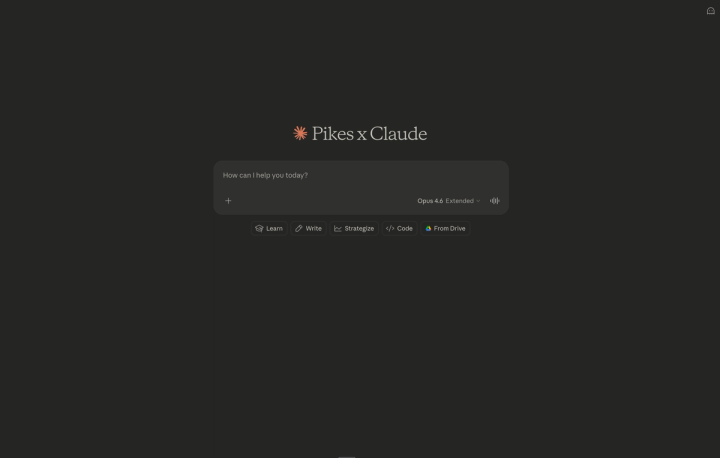
Claude has officially blown up. Millions of people now use it daily for writing, analysis, and strategy.
However, if you're a consumer brand, you've probably noticed the one thing Claude couldn't do: create images.
That just changed.
With Pikes MCP, you can now generate product shots, edit lifestyle imagery, remix assets into new scenes, resize for any ad placement, and even turn stills into video — all directly inside your Claude chat.
Under the hood, Pikes is powered by a suite of the best image and video AI models available today, including Nano Banana Pro (1K, 2K, and 4K), Ideogram, Kling, Seedance, Veo 3.1, and more. You don't need to know which model to pick. Pikes automatically selects the right one based on what you're asking it to do.
Let's walk through how to set it up and what you can do with it.
What's MCP?
Quick explainer if you're not familiar: MCP stands for Model Context Protocol. It's basically a plugin system for Claude. It lets external tools — like Pikes — plug directly into your chat so you can use them through regular conversation.
Why does that matter? Because instead of learning a new interface, uploading files to a separate platform, and downloading results to bring back into your workflow, you just... talk to Claude. You say "put my product on a model in a kitchen setting" and it happens right there.
For brand teams juggling five different creative tools, this is a big deal.
How to Set Up Pikes MCP in Claude
Before we get into the fun stuff, let's get you connected. This takes about two minutes.
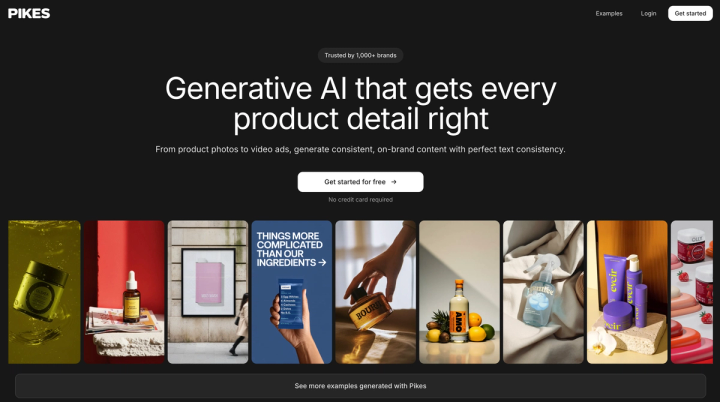
Step 1: Create an account at pikes.ai. This is where your image generation credits and assets live.
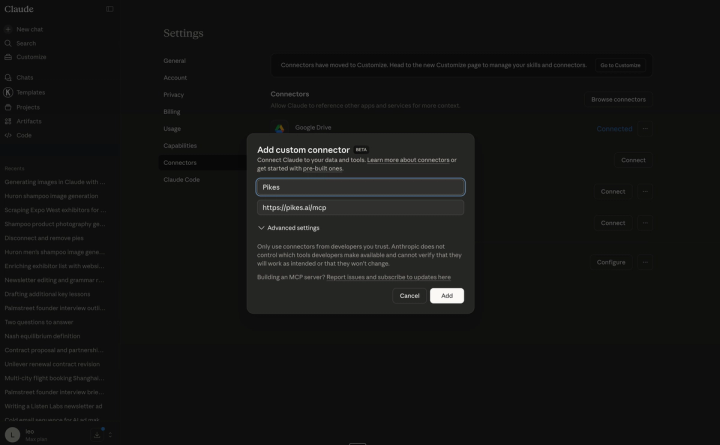
Step 2: In Claude, go to Settings → Add Custom Integration. You're looking for the option to add an MCP server. Paste this URL as the MCP server address: https://pikes.ai/mcp
Step 3: Start creating after authentication. Open a new conversation and ask Claude to generate an image. That's it — you're live.
Wait, What's MCP?
Quick explainer if you're not familiar: MCP stands for Model Context Protocol. It's basically a plugin system for Claude. It lets external tools — like Pikes — plug directly into your chat so you can use them through regular conversation.
Why does that matter? Because instead of learning a new interface, uploading files to a separate platform, and downloading results to bring back into your workflow, you just... talk to Claude. You say "put my product on a model in a kitchen setting" and it happens right there.
For brand teams juggling five different creative tools, this is a big deal.
What You Can Do: The 6 Image Capabilities
Pikes gives you six distinct capabilities inside Claude. Here's what each one does, how to use it, and when it's most useful for consumer brands.
1. Generate Image — Create Something New From a Text Prompt
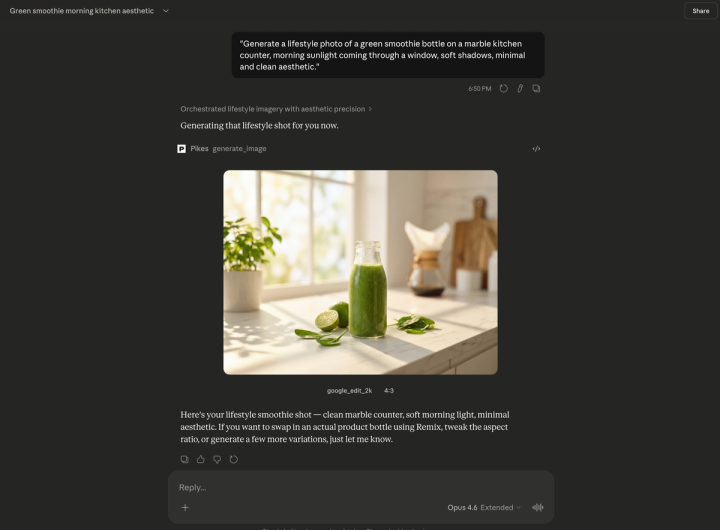
What it does: You describe an image in words, and Pikes creates it from scratch. No input image needed.
How to use it: Just tell Claude what you want. Be specific about the setting, lighting, style, and mood. For example:
"Generate a lifestyle photo of a green smoothie bottle on a marble kitchen counter, morning sunlight coming through a window, soft shadows, minimal and clean aesthetic."
Claude can also help you refine your prompt before generating. If your first result isn't quite right, just describe what to change and try again.
When to use it: Campaign concepting, social media content, mood boards, A/B testing different creative directions, and placeholder visuals for internal reviews.
2. Edit Image — Change Any Existing Image With Words
What it does: Upload a photo you already have and tell Claude what to change. Pikes can swap backgrounds, place products on models, adjust styling, remove objects, change the scene — all from a plain English description.
How to use it: Upload your image to the conversation, then describe the edit:
"Put this protein bar on a wooden table in a gym locker room setting. Warm lighting, slightly blurred background."
When to use it: Background swaps, product-on-model compositing, seasonal refreshes of evergreen imagery, and repurposing existing assets for new campaigns.
3. Remix Images — Combine Your Product With Any Scene
What it does: Give Pikes two images — your product and a lifestyle scene — and it intelligently combines them. Pikes figures out which image is the product (isolated item, simple background) and which is the scene (rich environment, person, hands), then composites them together.
The output automatically matches the scene's dimensions, so the result is ready to use without manual cropping.
How to use it: Upload both images and ask Claude to remix them:
"Place this honey jar onto the table in the other image. Maintain the same lighting."
When to use it: This is the big one for ecommerce and CPG brands. Take one product photo on white and remix it into dozens of lifestyle contexts — kitchen countertop, gym bag, bathroom shelf, influencer-style flat lay, outdoor picnic. One SKU photo becomes a whole library of lifestyle content.
4. Expand Image — Make Any Image Fit Any Placement
What it does: Takes your existing image and extends the canvas. Pikes generates new content that seamlessly continues the scene, so you get a wider or taller image that looks like it was shot that way.
How to use it:
"Expand this image to a 16:9 landscape ratio."
When to use it: You have one great product shot but need it in five different sizes — square for Instagram feed, 9:16 for Stories, 16:9 for a website banner, wide for email headers, leaderboard for display ads. Instead of awkward crops or re-shoots, just expand.
5. Animate Image — Turn Any Still Into Video
What it does: Upload a still image and Pikes transforms it into a short, smooth video with cinematic motion. This isn't a cheap zoom-and-pan — models like Kling, Seedance, and Veo 3.1 generate natural, high-quality movement.
How to use it:
"Animate this product image. Slow, cinematic camera push with a slight parallax effect."
When to use it: Short-form video dominates every platform right now, but producing video is expensive and slow. Animate turns every still image in your asset library into video content for Reels, TikTok, Stories, and video ads. One product photo becomes a looping product reveal. One lifestyle shot becomes a three-second story ad.
The Bonus You Didn't Expect: Meta Ads Built In
Here's where Pikes goes beyond being "just" an image tool. It also bundles full Meta (Facebook and Instagram) ads management directly into Claude.
From the same conversation where you're creating visuals, you can:
- Pull your ad account data and campaign performance
- See how your current creatives are performing (impressions, clicks, CTR, CPC, conversions)
- Preview how ads look before they go live
- Review all your uploaded ad images and videos
- Drill into specific campaigns, ad sets, and individual ads
Why this matters: The creative-to-performance feedback loop gets really tight. You can check which ads are underperforming, generate new creative variants, edit them for different audiences, and have deployment-ready assets — all in one sitting. You're not making images in a vacuum. You're making images informed by what's actually working.
Putting It All Together: 3 Workflows for Consumer Brands
The individual tools are useful on their own, but the real unlock is chaining them together. Here's what that looks like in practice.
The Product-to-Lifestyle Pipeline
Start with a clean product photo on white. Remix it into five different lifestyle scenes. Expand the best two into banner and story formats. Animate one for a Reels ad. What used to require a photographer, a retoucher, and a motion designer now happens in minutes.
The Ad Creative Sprint
Pull your Meta ad performance to see which creatives are fatiguing. Generate five new concepts based on what's been working. Edit the top two to match your brand guidelines. Expand into the sizes you need. Data-informed creative, done in a single session.
The Seasonal Refresh
Upload your evergreen hero images. Edit them with seasonal elements — summer colors, holiday styling, back-to-school settings. Expand each into every format you need for web, email, and paid social. Animate the hero for your homepage. Your whole seasonal creative package, built from assets you already had.
Why This Changes the Math for Brand Teams
This isn't just about convenience. It's about what's actually practical for lean teams.
Consumer brands usually juggle separate subscriptions for photo editing, design, AI image generation, animation, and ad analytics. Each one has its own interface, its own file management, and its own monthly cost.
Pikes MCP puts all of that inside Claude — a tool your team is probably already using. Because Claude keeps the conversational context, you iterate by describing changes instead of starting from scratch. Because Meta ads data is right there, creative decisions are backed by real numbers. Because all six image tools share the same conversation, you can chain them without exporting or importing anything.
For DTC and CPG brands where every dollar of content spend needs to drive revenue, that's a real shift in what a small team can produce.
Start Here
If you want to try this out, here's a good first project:
- Create an account at pikes.ai.
- In Claude, go to Settings → Add Custom Integration and paste https://pikes.ai/mcp as the MCP server URL.
- Authenticate when prompted.
- Upload a product photo and a reference image from Pinterest
- Ask Claude to swap your product into the reference image.
- Expand the result into a 16:9 banner.
- Animate it for a story ad.
You'll see the full pipeline working in under five minutes. From there, you can start building it into your actual creative workflow.
The creative stack for consumer brands is collapsing into conversation. Pikes MCP powered by models like Nano Banana Pro, Ideogram, Kling, Seedance, and Veo 3.1 is what that looks like in practice, and the brands that adopt it early are going to out-iterate everyone else.
Frequently Asked Questions
Can Claude generate images on its own?
Not natively. But with Pikes MCP connected, you get full image generation, editing, remixing, expansion, and animation directly inside Claude's chat.
What AI models does Pikes use?
Pikes uses multiple best-in-class models and picks the right one automatically. The current suite includes Nano Banana Pro (1K, 2K, 4K), Ideogram, Kling, Seedance, Veo 3.1, and more.
Do I need to be technical to use this?
Not at all. Everything works through natural language. You describe what you want in plain English and Pikes handles the rest.
Can I use my existing product photos?
Yes. Upload your existing images and use them across all capabilities — edit, remix, expand, or animate them.
Does the Meta ads integration cost extra?
It's bundled into Pikes MCP. Check pikes.ai for current pricing details.
What image formats and resolutions are supported?
Pikes supports standard formats like JPEG and PNG. With Nano Banana Pro, you can generate at 1K, 2K, or 4K resolution depending on your needs.

Written by
Mike Lehman
Mike Lehman is a senior content strategist at Pikes. Before joining Pikes, Mike spent nearly a decade working with Glossier, Haus, and Athletic Brewing, leading campaigns that blended storytelling and data.