

Mike Lehman
AI Product Photography: The Complete Guide for E-commerce Brands in 2026

In e-commerce, visuals do the heavy lifting. Shoppers can’t touch, test, or try your product, so your images have to do that job for you. And if your images feel outdated or generic, you lose trust before you even get a click.
Additionally, with the growing competition and shrinking attention span among shoppers, brands are starting to realize the importance of great product images in selling and staying competitive.
That’s why more e-commerce brands are turning to AI product photography. Instead of slow photoshoots and expensive revisions, AI makes it possible to create high-quality, consistent product images faster and at scale.
In this guide, we’ll break down how AI product photography works, why it matters in 2026, and how tools like Pikes help brands upgrade their visuals without the usual friction.
So, How Does AI Product Photography Work?

Most e-commerce brands rely on traditional photoshoots for their product images. AI product photography turns that in the head by allowing you to use artificial intelligence to create or enhance your product images. Instead of setting up lights, cameras, and studios for every shot, you use AI to generate clean, realistic product photos from existing images.
While it might sound complex, the idea behind it is surprisingly simple. You start with a real product image, usually a clean photo of your product, and AI takes care of the heavy lifting that would normally require a full studio setup and hours of editing.
The first thing the AI does is to isolate the product from its background. It identifies the edges, shape, and details of the item, and then separates it cleanly. From there, it can adjust the lighting, refine shadows, and replace or entirely remove backgrounds. All these used to take a designer several hours to complete. But now, you can do it in a matter of minutes.
So, it has come as a great help for many e-commerce brands, who are grateful they can now create their visuals faster and with more control. With the right AI photography tools, you too can create studio-style photos, lifestyle images, and campaign visuals on demand without sacrificing quality or trust.
Benefits of AI Product Photography for E-commerce Brands
AI product photography is not just offering brands a new way to create images; it’s actually changing how they work, launch, and scale. For e-commerce teams trying to balance speed, budgets, and consistency, the benefits you get are not limited to convenience.
Let’s discuss other reasons you should use AI product photography.
1. Fast and Saves Time
Traditional photoshoots take time if you consider the planning, shooting, editing, and revisions that can stretch into weeks. However, AI product photography compresses that entire timeline into minutes. This means brands can launch new products faster, update visuals instantly, and react to campaigns or trends without waiting on a studio schedule.
2. Lower Costs, Fewer Trade-offs
The cost of a traditional photoshoot is a great concern for many brands. From getting a studio to hiring traditional photographers, getting props, and handling post-production, costs can add up quickly. AI removes most of those fixed costs. Instead of paying per shoot, brands get predictable pricing and the freedom to generate as many visuals as they need. That’s especially valuable when testing new products or refreshing existing listings.
3. Creative Freedom Without Risk
With AI, experimentation is easy and low-risk if you want to test different backgrounds, lighting styles, or compositions. You can try ten visual directions instead of committing to one. Then, you can keep only what performs best. This makes creative testing practical, not expensive.
4. Consistency Across Every Channel
E-commerce brands sell everywhere: websites, marketplaces, ads, and social media. AI product photography makes it easier to keep a consistent look across all of them. You can keep your lighting, angles, and styling uniform, helping your brand feel polished and recognizable wherever customers find you.
5. Scales with Your Catalogue
As product lines grow, managing visuals becomes harder. But with AI, you can scale effortlessly. That means you can generate high-quality images at volume without multiplying your workload, no matter what you’re doing: adding new SKUs, variants, or seasonal campaigns.
Use Cases & Examples of AI Product Photography

AI product photography fits naturally into almost every part of an e-commerce brand’s visual workflow. Let’s consider some ways brands can use it to create better images faster.
E-commerce Product Pages
Product pages need clear and trustworthy visuals. Brands use AI to generate clean studio-style images, multiple angles, and close-up detail shots that highlight textures, materials, and packaging. This makes listings feel more professional and helps shoppers make confident decisions.
Lifestyle & Context Images
Lifestyle images show products in real-world use, which is often what convinces a shopper to buy. With AI, you can easily place products into realistic settings like kitchens, bathrooms, bedrooms, or outdoor scenes, without organizing locations, props, or models.
Marketplaces Like Amazon and Walmart
Marketplaces have strict image rules. Thankfully, AI product photography helps brands generate white-background images, compliant dimensions, and consistent angles for every SKU. When packaging changes or new variants launch, you can instantly update the images instead of reshooting everything.
Paid Ads and Social Media
Brands need volume to keep up with visuals for social media. And you can create multiple ad creatives quickly, test different visual styles, and refresh content regularly with AI tools. This keeps your ads from going stale and makes creative testing an easy aspect of your daily workflow.
Product Launches and Campaigns
Launching a new product or seasonal campaign often means having tight deadlines. But what if you can create launch visuals, banners, and promotional images fast, without compromising quality? That’s what many brands are currently achieving with AI product photography.
Getting Started with AI Product Photography (Using Pikes)
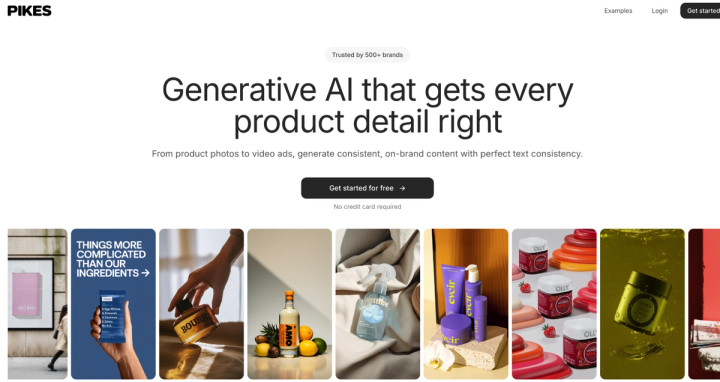
Now, let’s show you how you can leverage these tools for your store too. Interestingly, getting started with AI product photography doesn’t require a big learning curve or a complete overhaul of your workflow.
In fact, most brands see results within their first session. The key is using a tool that’s built specifically for e-commerce, not a generic image generator.
Why Pikes Works So Well for E-commerce Brands
Pikes was designed with real product visuals in mind. It’s trusted by 1,000+ e-commerce and consumer brands to upgrade their product photos, ads, and listings without the usual friction of photoshoots. Instead of “AI-looking” outputs, you can trust Pikes with accuracy, consistency, and conversion-ready visuals.
With Pikes, your product details remain intact, the labels stay readable, the packaging isn’t ruined, and the colors don’t change. And that is why the tool is trusted by so many brands.
With it, brands can:
- Generate clean studio-style product images with perfect lighting
- Create lifestyle visuals that feel realistic and on-brand
- Edit images easily (remove objects, change colors, adjust backgrounds)
- Train custom style models using reference images for brand consistency
- Animate product images to create short, engaging product videos
- Export images in multiple dimensions for Amazon, Shopify, Meta, TikTok, and more
The platform also includes templates and a Discover page, which helps teams find inspiration and move faster when testing new visual directions.
Step-by-Step: Creating Your First AI Product Photos with Pikes
Step 1: Start in the Products Tab
Pikes begins with your product assets. Head to the Products tab and upload your product images. If you run a Shopify store, you can paste your store URL, and Pikes can pull your catalogue automatically. If you’re on another platform, you can upload manually.
Step 2: Open Product Studio
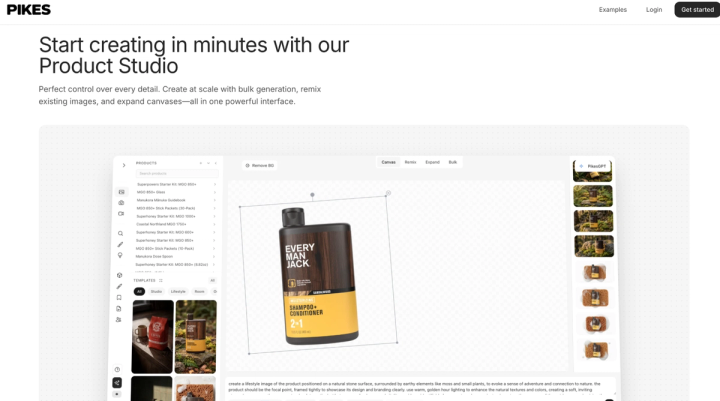
Once your products are in, go to Product Studio. Think of this as your main workspace for creating visuals. Here, you can see the uploaded products that you can use to generate images quickly. You would also see templates (preset prompts) that you can start with and tweak if you’re not sure what to type.
Step 3: Pick the Right Model
Here, you can choose between two models: Consistency and Creativity Pro models. The one you choose will affect the “type” of image you get.
1/ Consistency Model: Use this for clean, studio-style product shots where accuracy is everything. It’s ideal when your packaging has text (supplements, skincare, labels) because it protects readability and prevents distortion.

2/ Creativity Pro Model: Use this for lifestyle scenes, ad creatives, and more dynamic, photorealistic images. It’s the one you pick when you want the product to feel “alive” in a real setting. You can generate photorealistic images in 4K resolution with this Pro model.
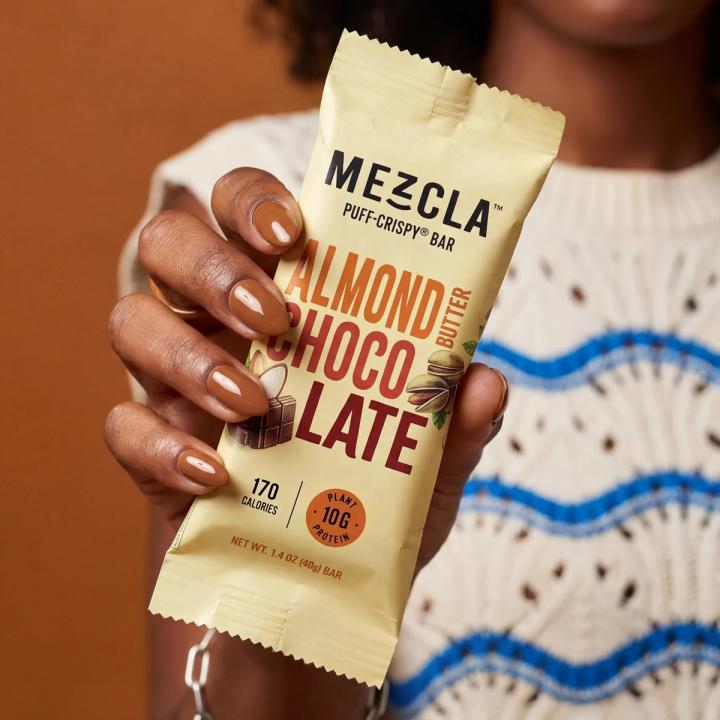
Step 4: Generate Your First Set of Studio-Style Images
Now, you can generate your studio-quality images. This can be through a template or your own prompt. Inside Pikes, you can control:
- Dimensions (square, 4:5, 9:16, etc.)
- Number of outputs (generate multiple options at once)
- Where it’s saved (helpful for teams or multiple brands)
Step 5: Create Lifestyle Images That Actually Sell
Once you have clean studio shots, move into lifestyle. This is what helps shoppers imagine the product in their lives.
For example:
- A skincare bottle on a bathroom counter with soft daylight
- A supplement jar beside a smoothie in a kitchen scene
- A hair product on a vanity with clean and premium styling
With Creativity Pro, you can quickly generate multiple lifestyle directions, then select the best-performing look for your brand.
Step 6: Add Simple Motion with Video
If you want to go beyond static images, Pikes also lets you create short animations.
You can add subtle motion like:
- Moving background elements
- Gentle product spotlight effects
- Light environmental movement (clouds, steam, water, etc.)
These videos are perfect for ads and product pages because motion naturally catches attention, especially in crowded social feeds.
Step 7: Export and Use Immediately
Once you’ve generated what you need, export them in the right formats for your channels.
Best Practices & Tips for AI Product Photography

This kind of product photography gives e-commerce brands speed and flexibility, but the best results still come from using it thoughtfully. So, before we wrap up this guide, let’s take a quick look at some practical tips that will help you get the best from AI product photography.
#1: Start with the Best Base Image You Can
AI works best when it has a clear product to work with. A simple, well-lit photo – even from a smartphone – goes a long way. Make sure the product is fully visible, in focus, and not heavily distorted by shadows or reflections. The cleaner the starting image, the better the final result.
#2: Use AI to Enhance, Not Misrepresent
AI product photography should make your product clearer, not different. Avoid adding elements that change how the product actually looks or functions. Keep colors accurate, proportions realistic, and details true to life. This protects trust and helps avoid returns or ad rejections.
#3: Be Intentional with Lighting and Backgrounds
Don’t generate visuals just because you can. Choose lighting styles and backgrounds that match your brand and product category. Clean, neutral lighting works best for product pages, while softer or more dynamic lighting is ideal for lifestyle and ad creatives.
#4: Keep Branding Consistent Across Images
Your images should feel like they belong together. Stick to a defined look, especially across your product catalogue. This could mean similar angles, lighting, and spacing. Using Pikes’ style features and templates makes it easier to maintain a cohesive brand identity as you scale.
#5: Test Multiple Creatives, Then Let Data Decide
One of the biggest advantages of AI photography for products is how easy it is to experiment. Generate several variations of the same image and test them in ads or on product pages. Then keep what performs best and move on quickly from what doesn’t.
Pikes vs Traditional Product Photography
For most e-commerce brands, the real question isn’t “Is AI good enough?” anymore; it’s “Does traditional photography still make sense for everything?”
Here’s a clear, side-by-side look at how Pikes AI compares to traditional product photography in 2026.

Traditional photography still has its place, especially for flagship campaigns or highly artistic brand moments. But for everyday e-commerce needs like product pages, marketplaces, ads, and ongoing creative testing, it’s often too slow and costly.
FAQs
Is AI product photography ethical?
Yes, as long as it represents the real product accurately. Ethical AI product photography enhances clarity and presentation without changing what customers receive.
Does AI product photography replace photographers completely?
Not entirely. Traditional photography still works well for high-end editorial shoots or hero campaigns. But for everyday e-commerce needs, such as product pages, ads, A/B testing, and catalogue updates, AI is faster, more flexible, and more cost-effective.
How realistic are AI product photos?
Very realistic when created with e-commerce-focused tools. The key is using AI that’s trained to protect product details. Poorly trained models can distort text or shapes; use specialized platforms to avoid this.
Is AI product photography suitable for small brands and startups?
Absolutely. In fact, smaller brands benefit the most. It removes the cost and complexity of photoshoots, making professional visuals accessible to you from day one.
What’s the best AI product photography tool in 2026?
The best tool is one designed specifically for products, not generic image generation. Platforms like Pikes stand out because they focus on accuracy, consistency, and real e-commerce workflows, and are trusted by over 1,000 brands to create their product visuals.

Written by
Mike Lehman
Mike Lehman is a senior content strategist at Pikes. Before joining Pikes, Mike spent nearly a decade working with Glossier, Haus, and Athletic Brewing, leading campaigns that blended storytelling and data.