

Mike Lehman
Canva Product Photos: Limitations & When You Need a Dedicated AI Tool
Canva is usually the first place many founders turn to when looking to add simple mockups or polish images for social posts. Small teams, especially, appreciate how easy it is to jump in and get something done. For basic design tasks, Canva does a solid job.
But as your brand grows, you need more than basic designs. Canva product photos stop being enough when you’re running ads, selling on marketplaces, or scaling multiple SKUs. This is because it can’t prevent edges from looking rough or products from losing realism.
To help, this guide takes a close look at what Canva actually offers for product photography. It reveals where it breaks down for ecommerce, and when switching to a dedicated AI tool like Pikes becomes the smarter move.
What Canva Offers for Product Photos
Although Canva isn’t built specifically for product photography, it does offer a handful of tools that many ecommerce brands use to create simple product visuals. For early-stage sellers or quick design tasks, these features can be helpful, as long as expectations are clear.
Here are some of the features Canva offers for ecommerce:
Basic Photo Editing Tools
Canva allows you to upload product images and make light edits such as cropping, adjusting brightness or contrast, and resizing images for different channels. These tools are easy to use and require no design experience, and that’s part of what makes Canva so appealing.
Canva Background Remover
One of Canva’s most popular features for ecommerce is its background remover. With a single click, users can isolate a product from its background and place it on a plain color or stock backdrop. This works reasonably well for simple shapes and solid products, especially when images are already clean.
Templates and Mockups
The tool offers a large library of templates that can be used for different purposes, such as product announcements, social posts, banners, and basic lifestyle-style visuals. These templates are design-focused and help users move quickly without starting from scratch.
AI-Assisted Design Features
Canva has introduced AI tools like text-to-image and Magic Background, designed to speed up creative work. But even though they are useful for design concepts, these features are not product-aware and are limited when it comes to preserving accurate product details.
What Makes Canva Great for Many Brands
To be fair, Canva does a few things really well, which explains why so many ecommerce teams rely on it early on. The problems only show up when brands try to use it beyond what it was designed for.
Canva shines when the task is more about design rather than product. It’s great for:
- Social media posts and announcements
- Promotional banners and sales graphics
- Simple lifestyle mockups for campaigns
- Email headers and landing page visuals
It’s Easy for Non-Designers
When you think of one thing that makes Canva so popular, it will be its accessibility. That is its biggest strength. Founders, marketers, and operators can jump in without design training and still create decent-looking assets. With the templates, drag-and-drop editing, and preset layouts, Canva is made to reduce friction and save time.
Good for Early-Stage or Low-Volume Brands
For small stores with a limited product range, Canva can be good enough. If you’re testing a handful of products, posting occasionally on social, or running lightweight campaigns, it covers basic needs without adding complexity.
Strong Collaboration Features
Canva’s shared workspaces and brand kits make it easy for teams to collaborate on visuals, especially for marketing content that doesn’t require photorealism or strict accuracy.
Limitations of Using Canva for Ecommerce Product Photos

Canva works well for design, but product photography has very different demands. Here, accuracy, realism, and scale matter. So, it just becomes pretty hard to ignore Canva’s limitations.
Let’s look at some of these limitations.
Product Accuracy and Consistency Issues
Canva doesn’t truly understand products. When you remove backgrounds or place products into mockups, it’s easy for the edges to look rough or product proportions to feel slightly off. Also, your labels can lose sharpness, and shadows often don’t match the product.
Across multiple SKUs or variants, maintaining a consistent look becomes manual and time-consuming. For brands selling supplements, skincare, or packaged goods, even small inconsistencies can reduce trust.
Background Remover Isn’t Ecommerce-Grade
The Canva background remover is pretty good, but it struggles with:
- Transparent or reflective packaging
- Soft edges (glass, plastic, liquids)
- Fine details like pumps, droppers, or thin labels
Many users end up manually cleaning edges or layering shapes to hide imperfections, which defeats the “fast and easy” promise.
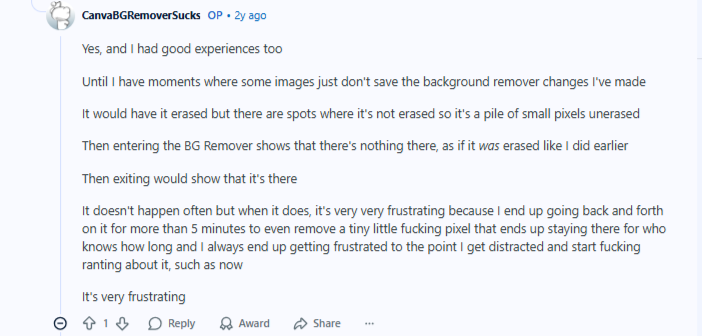
In a Reddit thread, a user once complained about how glitchy and inconsistent things can be sometimes on Canva, stating: “Some images just don't save the background remover changes I've made”. “There are spots where it's not erased… a pile of small pixels”.
Design-First, Not Product-First AI
Canva’s AI features are built for creative design, not product realism. Both the Magic Background and text-to-image tools are great for concepts, but they don’t preserve product geometry or details reliably.
For ecommerce, that can lead to images that look polished but don’t accurately represent what customers will receive.
Poor Scalability for Growing Catalogues
As soon as you manage more than a few products, Canva’s workflow hits a wall. While it offers basic bulk tools for swapping images into templates, it lacks generative product awareness. There is no way to automatically generate multiple angles or fresh lifestyle scenes from a single product image. You still have to manually photograph or source every specific angle first, making true scalability impossible
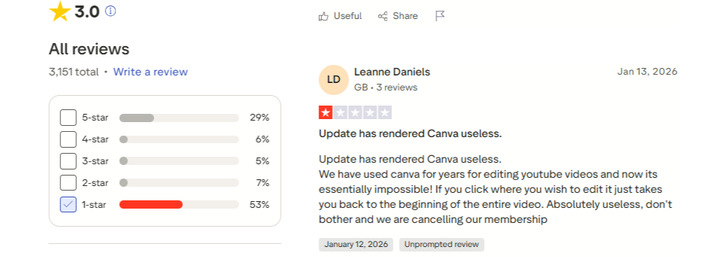
While users hope things will get better with the tool, things seem to be getting worse after every Canva update.
Not Built for Marketplaces or Ads
Canva doesn’t guide you toward marketplace compliance or ad-ready outputs. Creating Amazon-ready images, consistent lifestyle visuals, or ad variations requires extra steps – and often multiple tools outside of Canva.
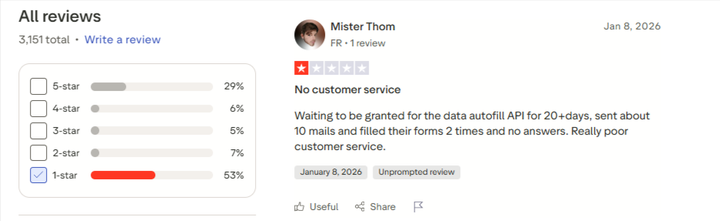
It’s almost normal to see many complaints online about Canva. The tool is designed for basic designs. People start having issues when they try to push Canva into jobs it wasn’t built for. To make things even worse, many users complained that Canva’s support team is near zero!
When to Upgrade from Canva: Better Alternatives in the Market
When Canva product photos start to feel like a quick fix, the next step for most people is usually to try tools that go deeper into editing or faster on design production.
Important point though: most Canva alternatives are still design tools or photo editors. They can be better than Canva in specific ways, but they’re not always built for ecommerce product photography at scale. That means, they will likely still fall short when you need consistent angles, clean cutouts, SKU variants, marketplace-ready outputs, and bulk generation.
Here are some Canva alternatives you will usually come across. But if you want something beyond just designs, a tool that can help you scale as your catalogue grows, keep reading, as we have just the perfect tool for you.
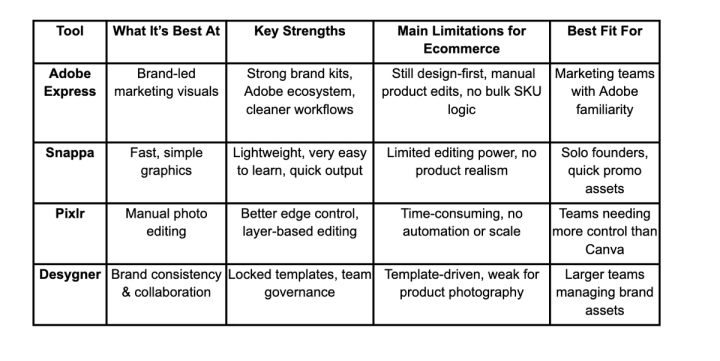
Canva Alternatives: A Quick Look
Adobe Express
Adobe Express is Adobe’s quick-creation tool for social graphics, ads, flyers, and simple image edits.
If your team already lives in the Adobe world, Express is a smooth step up from Canva. It has a more “professional marketing team” feel than Canva. So, it’s especially great for brand kits and content production.
Pros
- Strong brand-kit setup (logos, colors, fonts stay consistent)
- Good for marketing creatives without heavy design work
- Plays nicely with Adobe assets/workflows – helpful if you already use Photoshop/Illustrator
- Often feels more controlled/less messy than Canva for teams
Cons
- Still not a dedicated product photography tool (it won’t “understand” your product)
- You’ll still do plenty of manual work for clean product cutouts and realistic scenes.
- Not ideal for bulk SKU workflows (many products, many variations)
Best for:
Marketing teams that want a cleaner Canva-like tool with stronger brand consistency and an Adobe-friendly workflow.
Snappa
Snappa is a lightweight graphic design tool focused on speed. It’s commonly used for quick social posts and ad creatives. What makes it great is its simplicity. If Canva feels overwhelming, Snappa can feel calmer and faster for basic designs.
Pros
- Very easy to learn (good for non-designers)
- Fast for simple marketing graphics
- Clean interface for quick output
Cons
- Limited advanced photo editing (not great for finicky cutouts)
- Not built for photorealistic product scenes
- If you need studio-quality product images, you’ll hit a ceiling quickly
Best for:
Solo founders or small teams who just want to crank out clean promo graphics fast.
Pixlr
Pixlr is a browser-based photo editor. It leans more toward “Photoshop-lite” than “template design tool.” The tool is useful when your pain is less about templates and more about hands-on editing. If Canva’s background remover frustrates you, Pixlr gives you more control to fix edges properly.
Pros
- More manual editing power than Canva (layers, adjustments, retouching tools)
- Better for detailed fixes (edges, artefacts, small corrections)
- Good middle ground if you don’t want full Photoshop
Cons
- More time-consuming (manual work comes with manual tools)
- Steeper learning curve than Canva
Best for:
Ecommerce teams that need better photo-editing control but aren’t ready for Photoshop, or don’t want Adobe complexity.
Desygner

Desygner (Now Fluer) is a design platform focused on templates, brand consistency, and team collaboration. It’s often used by teams that want stricter control over brand assets.
Desygner can be a good option if your issue with Canva is brand mess (different people making different-looking creatives). It’s built to keep teams aligned.
Pros
- Strong brand controls – useful if you have multiple people creating assets
- Template-based workflow for consistent output
- Collaboration features that suit structured teams
Cons
- Still template-driven (design-first, not product-photo-first)
- Not built for realistic product photography generation
- You may still need separate tools for product cutouts, lifestyle scenes, and scaling
Best for:
Brands that want tighter brand consistency and team control across marketing assets.
Canva vs Pikes: When a Design Tool Isn’t Enough
At a certain point, the question stops being “What’s the best Canva alternative?” and becomes “Do we need a completely different kind of tool?” This is where Pikes AI comes into the picture.
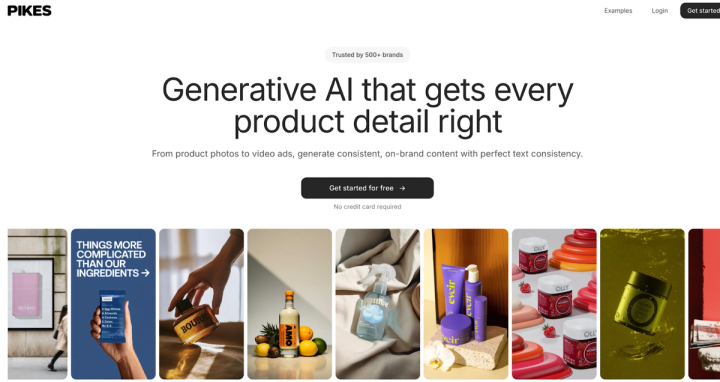
Canva and its alternatives are built to help you design around images. Pikes is built to generate product images themselves – accurately, consistently, and at scale. That difference matters a lot for ecommerce brands.
How Pikes Thinks Differently About Product Photos
Pikes is product-aware. Instead of treating your product like a flat design element, it understands it as the center of the image. That means:
- Labels stay sharp and readable
- Packaging doesn’t warp or change shape
- Colors remain true across every image
- Variants look like they belong together
This is especially important for categories such as supplements, skincare, beverages, and CPG, where small visual inconsistencies can undermine trust or trigger ad rejections.
From Editing Images to Generating Them
With Canva, you usually start by fixing or decorating an existing image. With Pikes, you start by creating what you actually need:
- Clean studio-style product photos
- Photorealistic lifestyle scenes
- Ad-ready visuals for Meta and TikTok
- Marketplace-ready images for Amazon and Walmart
You’re no longer limited by what a supplier, photographer, or template gives you.
Built for Scale, Not One-Off Designs
One of the biggest differences shows up as brands grow. Canva workflows stay manual. Every new SKU, variant, or campaign means repeating the same steps again and again.
Pikes is built for scale:
- Generate multiple images per product in one go
- Keep styles consistent across an entire catalogue
- Refresh creatives instantly when packaging or campaigns change
- Export the right dimensions for every channel
This is why over 1,000+ ecommerce and consumer brands use Pikes to upgrade their product visuals – not just for one campaign, but as an ongoing creative engine.
Canva can still play a role for banners, presentations, and simple marketing graphics. But when it comes to core product photos – the images that drive conversions on product pages, ads, and marketplaces – brands eventually need something more specialized.
That’s the gap Pikes fills. It is a dedicated AI product photography platform designed for modern ecommerce realities, not general-purpose designs.
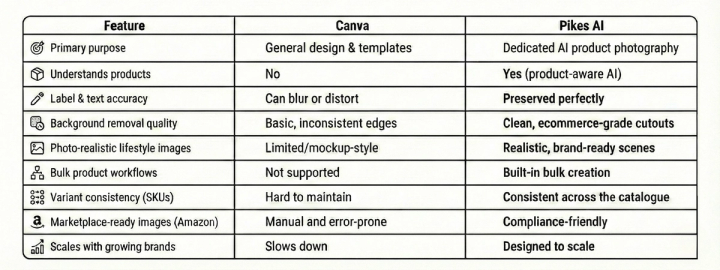
Canva vs Pikes Feature Comparison For Product Photos
Recommendation by Use Case: Which Tool Should You Use?
Not every brand needs the same setup. The right choice depends on where you are today and what your product visuals need to do.
Use Canva if…
- Your business is at an early stage, and just needs simple graphics
- You’re creating social posts, banners, or presentations
- Product photos are occasional and low volume
- “Good enough” visuals are acceptable for now
Use Pikes if…
- Product images directly affect conversions and Ad performance
- You sell supplements, skincare, beverages, or CPG products
- You manage multiple SKUs, variants, or frequent launches
- You need consistent, realistic visuals across channels
- You want to move faster without hiring photographers
Final Note
Canva is a great starting point for product visuals, but it wasn’t built for the realities of modern ecommerce. As soon as accuracy, consistency, and scale start to matter, its limits start to show.
Dedicated tools fill that gap. For brands that want clean, realistic, and conversion-ready product photos without the cost or friction of traditional shoots, Pikes AI offers a faster, more scalable way forward. It practically turns product visuals from a recurring headache into a growth advantage.
FAQs
Is Canva good enough for product photos?
Canva works for basic design tasks and simple visuals. For ecommerce product photos, it often falls short. That’s because Canva is a general design tool, not a product photography solution.
Can Canva replace professional product photography?
For simple social graphics or mockups, it can help. But for marketplace listings, ads, or high-conversion product pages, Canva usually can’t replace either professional photography or a dedicated AI product photography tool.
What’s the main difference between Canva and Pikes?
Canva helps you design around images. Pikes AI helps you create accurate, realistic product images from scratch. Pikes is built for product detail consistency, bulk generation, and ecommerce-ready outputs.
Can I still use Canva if I switch to Pikes?
Yes. Many teams use Pikes to generate clean, production-ready product images, then bring those images into Canva for banners, text overlays, or promotional designs. The tools complement each other well.

Written by
Mike Lehman
Mike Lehman is a senior content strategist at Pikes. Before joining Pikes, Mike spent nearly a decade working with Glossier, Haus, and Athletic Brewing, leading campaigns that blended storytelling and data.