

Mike Lehman
Claid AI Review (2026): Best AI Tool for Product Photos or Overrated?

AI product photography tools are everywhere right now, and Claid is one of the names that keeps coming up. It’s positioned as a simple way to turn average product images into professional-looking visuals in seconds.
That sounds great on paper. But e-commerce brands need more than just “better-looking” images. They need accuracy, consistency, and visuals that actually convert. So, in this guide, we’ll take a closer look at Claid AI to see if it lives up to the hype – or if it’s a bit overrated.
What Is Claid AI?
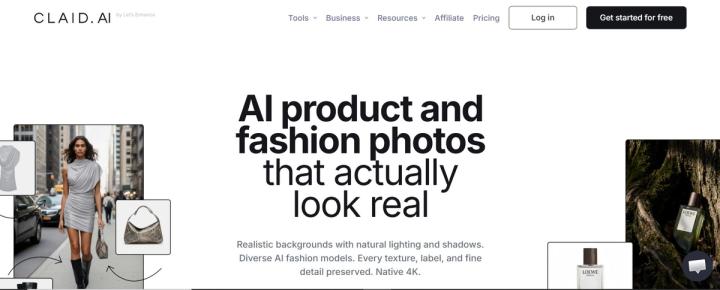
Claid AI is an AI-powered tool that helps you enhance, edit, and generate product images. Instead of starting from scratch, it focuses on improving existing photos, making them clearer, sharper, and more visually appealing.
At its core, Claid helps with tasks like:
- background removal
- image upscaling
- lighting and color correction
- placing products into new scenes
This makes it especially useful for e-commerce brands that already have product photos but want to upgrade their quality without hiring a photographer.
Key Features of Claid AI
Claid AI comes with a solid set of features focused on improving and generating product visuals quickly. With them, you can easily take a basic product image and turn it into something more polished without heavy manual editing. Let’s take a quick look at some of these features.
AI Image Enhancement and Upscaling
Claid’s core strength is improving image quality. It can automatically sharpen details, correct colors, adjust lighting, and remove noise. So, even if you took your product photos with a phone or in less-than-perfect conditions, you can easily enhance them with Claid.
Background Removal and Replacement
Claid offers one-click background removal that works well even with tricky edges like transparent objects or reflections.
Once the background is removed, you can:
- Replace it with a clean studio-style background
- Generate a new scene using AI
- Place the product in a lifestyle setting
Ready-to-Use Templates
Claid includes 100+ templates that let you place your product into pre-designed scenes instantly.
AI Fashion Models
For clothing and fashion brands, Claid can generate AI models wearing your products. You don’t need to hire models and run a full shoot. You can use the tool to turn a flat-lay into a style visual easily.
AI Edit (Text-Based Editing)
Claid allows you to edit images using simple text instructions. For example, you can ask it to change the background, adjust colors, add props, or modify lighting, making it much easier to edit your photos.
Image-to-Video Generation
Claid also offers basic video capabilities that allow you to turn static product images into short animated clips.
Claid AI Pricing (2026 Breakdown)
Claid AI uses a credit-based pricing model, which means every action, such as enhancing an image, removing a background, or generating a scene, consumes credits. This makes it easy to get started, but the cost can add up depending on how often you use it.
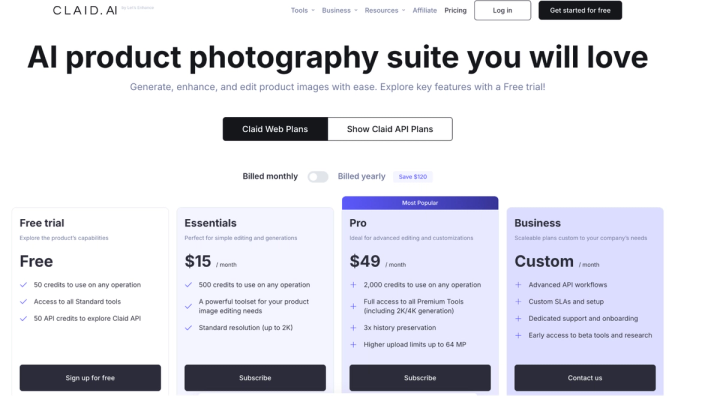
Here’s how the plans are structured.
Free Plan
Claid offers a free tier so you can test the platform before committing. With it, you get:
- Limited uploads (around 5 images)
- 50 API credits
- Basic enhancement features
- Very limited access to AI editing tools
This plan is mainly for testing quality rather than real use.
Essential Plan – $15 per Month
This is the entry-level paid plan, and it offers:
- 500 monthly credits
- Background removal and image enhancement
- Basic editing features
- Limited access to advanced tools
Pro Plan – $49 per Month
The Pro plan unlocks the full feature set, offering:
- 2,000 monthly credits
- Full access to AI photoshoots and scene generation
- Video generation features
- Higher-quality outputs
- Custom AI model support
This is the plan most businesses would need if they want to use Claid seriously.
How the Credit System Works
Claid charges credits for each action, which means:
- Simple edits use fewer credits
- Advanced features like scene generation or video use more
- Frequent use can quickly consume your monthly credits
In practice, this means you need to monitor usage closely, especially if you’re working with multiple products. While this might work fine for solo users, who just need the tool for a couple of image enhancements here and there, for brands with large volumes of product images or ongoing campaigns, costs can rise quickly. And that is something worth considering before committing to the tool.
Pros and Cons of Claid AI
Claid AI does a lot of things well, especially when it comes to improving product images quickly. But like most tools, it also has its downsides, especially for e-commerce brands that need consistency and scale.
Pros
- Fast image enhancement – quickly improve sharpness, lighting, or color balance
- The background removal feature is reliable, even with tricky edges
- Come with more than 100 ready-to-use templates
- Reduces the need for traditional photoshoots with its AI photoshoot capabilities
- For teams and developers, Claid offers an API that can be integrated into workflows.
Cons
- Claid uses a credit-based pricing model, and credits can run out quickly, especially if you’re generating or editing a lot of images.
- Not suitable for smaller businesses because of its credit-based pricing
- Performance can be inconsistent – Some users report slow processing times, especially during peak usage.
- Occasional downtime issues
- Requires a little bit of a learning curve
- Limited customization in some cases
Major Limitations of Claid for Product Photography
Claid AI delivers solid image enhancement and helps improve product images – there is no doubt about that. But for brands considering the tool for a serious e-commerce workflow, there are a few limitations they need to be aware of. Let’s quickly look at some of them.
1. Credit-Based Model Limits Scalability
Claid’s biggest limitation is its credit system. While it works fine for small batches, it becomes restrictive when you need to process large product catalogs, multiple variations per product, and frequent campaign updates.
According to user feedback, credits can run out quickly, especially when using advanced features like scene generation or video. This makes it harder to scale without increasing costs.
2. Performance and Speed Issues
Some users report that Claid can be slow during peak usage times. For example, a user stated on AI-tools that processing can lag, which can slow down workflows when you’re handling multiple images. There are also mentions of occasional downtime, which can interrupt work when you need quick turnaround times.
3. Limited Customization for Advanced Use
While Claid automates a lot of editing, it doesn’t always give full control over the final output.
According to user feedback, some enhancements:
- Don’t fully match the desired look
- Require additional tweaking
- Lacks deeper customization options
This can be frustrating for brands that want precise control over their product visuals.
4. Not Fully Built for Performance Marketing
Claid is great for improving images, but it doesn’t focus heavily on performance-driven creatives. For ecommerce brands running ads, this means no built-in tools for ad-specific visuals, no insights into high-performing creatives, and limited support for creating variations tailored for ads. This creates a gap between generating images and actually using them for marketing.
5. Workflow Still Requires Manual Input
Even though Claid automates many tasks, it still requires users to choose templates, adjust outputs, manage credits, and refine images manually. For teams managing multiple products, this can slow things down compared to more automated systems.
Pikes AI: Best Alternative to Claid AI for Product Photography
Again, Claid AI does a good job when it comes to enhancing and editing product images. But as e-commerce brands grow, their needs change. It’s no longer just about improving images but about creating high-performing visuals at scale.
This is where dedicated platforms stand out.
One strong alternative is Pikes AI, a tool built specifically for e-commerce brands that want to generate studio-quality product images and ad creatives without traditional photoshoots.
Many e-commerce brands choose Pikes because, while Claid focuses on improving images, the former focuses on creating and scaling product visuals that actually drive results.
Here’s what makes the difference.
No Prompting Needed
With Claid, you still need to choose templates or guide the output manually. Pikes makes things easier with ready-to-use templates and a chat-based workflow.
You only need to describe what you want, and the system will generate visuals quickly – without the need for constant tweaking.
Built for Performance Marketing
Most tools stop at generating images. Pikes goes further by helping you create visuals that are designed to perform in ads. It includes:
- an ad search feature to discover top-performing competitor creatives
- the ability to recreate similar visuals
- support for Meta and other ad platforms
This helps brands move from “nice-looking images” to conversion-focused creatives.
Scales Easily with Your Catalog
Claid’s credit system can slow things down when you need high-volume output. But for Pikes, the tool is built for scale. You can generate multiple variations per product as well as visuals for different platforms. You can have the quality visuals you need for your products without worrying about running out of credits mid-project.
Consistent Product Accuracy
While Claid improves existing images, maintaining consistency across large catalogs can still require manual checks. Pikes is designed to keep product details accurate, lighting consistent, and visuals aligned across all outputs. This makes it easier to maintain a professional and trustworthy brand image.
Combines Image and Video Creation
Pikes brings together best-in-class image and video models in one platform. That way, you can easily create product images, lifestyle visuals, and short video creatives for your brand without switching between multiple tools.
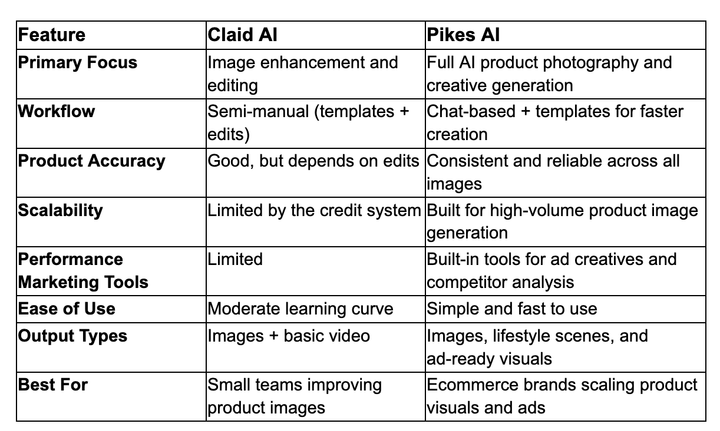
Claid vs Pikes: Quick Comparison
Final Verdict
Claid AI is a strong tool for enhancing and upgrading product images. It saves time, improves quality, and makes it easier to create polished visuals without deep design skills. For small teams or brands working with existing images, it can be a helpful addition to the workflow.
But as your needs grow, its limitations become more noticeable. The credit-based system, manual steps, and lack of performance-focused features can slow things down. For e-commerce brands looking to scale quickly and create conversion-ready product visuals, a more dedicated solution like Pikes is often the better long-term choice.
FAQs
Is Claid AI free to use?
Claid AI offers a free plan, but it comes with limited uploads and credits. It’s mainly useful for testing the platform rather than handling real e-commerce workloads. To access more features and higher usage limits, you’ll need a paid plan.
How much does Claid AI cost?
Claid uses a credit-based pricing model. Paid plans start at around $15 per month (Essential plan) and go up to $49 per month (Pro plan), depending on how many credits and features you need. Costs can increase as your usage grows.
Can Claid AI generate models wearing clothing?
Yes, Claid includes an AI Fashion Models feature that allows you to place clothing on AI-generated models. This can help fashion brands create styled visuals without running a full photoshoot.
Which AI tool is best for product photography?
Tools like Claid are great for enhancing images, but for full product photography workflows, dedicated platforms such as Pikes AI are often a better fit. They are built specifically to create accurate, scalable, and conversion-ready product visuals.

Written by
Mike Lehman
Mike Lehman is a senior content strategist at Pikes. Before joining Pikes, Mike spent nearly a decade working with Glossier, Haus, and Athletic Brewing, leading campaigns that blended storytelling and data.