

Mike Lehman
Higgsfield AI Review (2026): Features, Pricing, Pros & Best Alternatives
AI photography and video tools are everywhere right now. Some generate decent clips, and some promise Hollywood-level results. Higgsfield AI positions itself somewhere in between as a cinematic AI studio that gives creators real camera control, access to multiple cutting-edge AI models, and high-impact visuals.
On paper, it sounds powerful. But how does it perform in real use? Does the pricing match the value it offers? And more importantly, who is it actually built for?
In this honest Higgsfield AI review, we’ll take a closer look at the tool to help you understand its features, pricing, pros and cons, and where it fits for modern brands and content teams.
What Is Higgsfield AI?
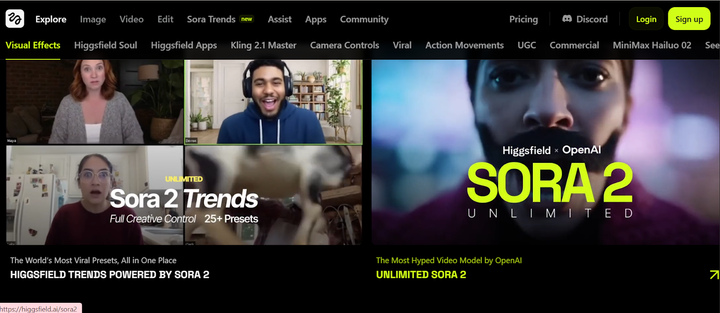
Perhaps you’re getting to hear about Higgsfield AI for the first time. It is an all-in-one AI platform focused primarily on video generation with cinematic control. Unlike basic text-to-video tools that produce generic motion clips, Higgsfield tries to mimic the language of real filmmaking, including camera moves, shot composition, and continuity across scenes.
Basically, Higgsfield combines multiple AI video models into a single workspace. Instead of locking you into one generation engine, it lets you switch between different models, depending on what you want most – whether it’s realism, speed, lip-sync accuracy, or motion control.
The platform includes:
- Text-to-video generation
- Image-to-video conversion
- Sketch-to-video for pre-visualization
- Advanced camera controls (Cinema Studio)
- Lip-sync tools for dialogue scenes
- Character consistency through Soul ID
There’s also a mobile layer through the Diffuse app, making it accessible for short-form creators.
Key Features of Higgsfield AI
Higgsfield’s feature set is broad. Some tools feel genuinely advanced while others are more experimental. Here are some of its features you should know about.
1. Text-to-Video Generation
This is the foundation of the tool. You enter a prompt, choose a model, and generate a video clip. What makes Higgsfield different is its emphasis on cinematic framing. Prompts that describe camera language (“slow dolly in,” “crash zoom,” “overhead crane shot”) often translate into more intentional compositions compared to generic AI generators.
2. Cinema Studio & Camera Controls
Instead of relying entirely on prompt wording, Cinema Studio allows you to control things like camera movement types, speed and intensity, shot paths, and scene composition. For creators who think in terms of storyboards and coverage, this level of control reduces guesswork.
However, there is a huge learning curve required here, but once you master it, it significantly improves the consistency of your shots.
3. Image-to-Video
You can upload a static image and animate it. The system attempts to infer depth and introduce camera motion or environmental effects. This works well for product highlight animations or mood-driven social clips.
4. Lipsync Studio
Lip-syncing is notoriously difficult in AI video. Higgsfield offers a dedicated workflow where you upload audio and generate synced speech animation. It’s not flawless, especially with micro-expressions, but it performs better than tools where lip-sync is just a secondary add-on.
5. Soul ID (Character Consistency)
Maintaining the same character across multiple shots is one of the biggest challenges in AI generation. Soul ID anchors facial and identity features so a character can persist across scenes. For narrative projects or brand mascots, this is genuinely useful.
6. Multi-Model Switching
Higgsfield allows you to switch between AI models such as WAN 2.6, Minimax Hailuo 02, and Kling 2.6. Each model has different strengths and what they bring to the table.
7. Click to Ad
This allows you to paste a product link and generate a quick video ad. It’s useful for marketers and small businesses. It automates cropping, formatting, and scene generation into a short promotional clip. It’s convenient for quick ads, but it’s more about speed than deep product control.
8. Sora 2 Enhancer & Upscaling
Higgsfield includes post-processing tools that allow you to reduce visual artifacts, increase perceived fidelity, or upscale resolution. These tools help polish outputs, especially when initial renders contain small distortions.
Pros of Higgsfield AI
- Director-level camera control: Cinema Studio and Camera Controls are genuinely impressive. Instead of relying purely on prompt wording, you can specify camera movement types. This reduces random results and improves shot composition.
- Multi-model flexibility: Being able to switch between models is powerful. Different models perform better for realism, speed, or lip-sync accuracy.
- Strong character consistency (Soul ID): Maintaining the same character across scenes is not always easy, but Higgsfield’s Soul ID helps anchor facial identity and improve continuity.
- Dedicated lip-sync workflow: Lip-syncing is treated as a core feature rather than an afterthought. While not perfect, it performs better than many general video generators.
- Broad creative toolkit: Text-to-video, image-to-video, sketch-to-video, VFX, upscaling, relighting, and editing tools make Higgsfield feel like an all-in-one creative lab.
Cons of Higgsfield AI
This is where things become more complex, especially based on real user feedback.
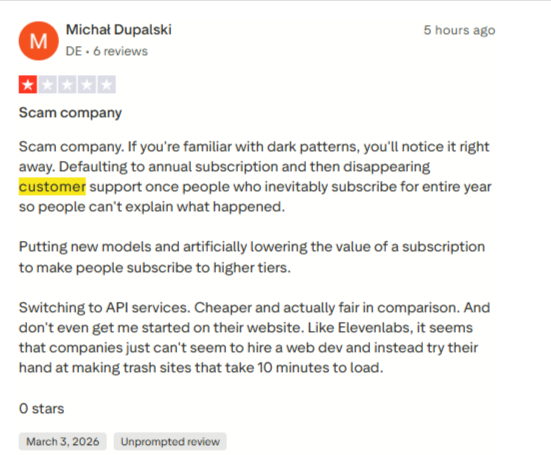
The credit system can feel restrictive
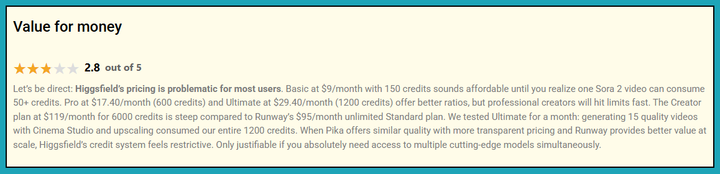
Higgsfield runs on a credit-based pricing model. While the entry plans look affordable, credit burn can escalate quickly. Users have reported that certain high-quality models consume credits fast, and you can burn through a monthly allowance with just a handful of polished videos.
Motion & consistency issues in complex scenes
Several users note that while simple scenes work well, complex motion can become unstable. It can sometimes be ridiculously slow or misleading in its outputs.
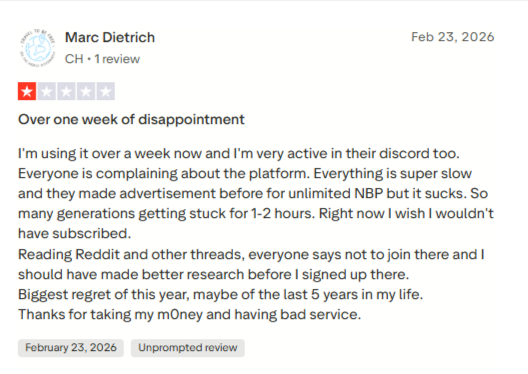
Learning curve for advanced controls
Cinema Studio is powerful, but mastering camera controls takes experimentation. If you’re expecting instant “Hollywood results” without learning basic shot language, you may feel overwhelmed.
Limited integrations
Compared to competitors, Higgsfield lacks strong native integrations with:
- Premiere or DaVinci
- YouTube or TikTok direct publishing
- Marketing automation stacks
Exports must often be downloaded and uploaded manually. For agencies or ecommerce teams with established pipelines, this creates friction.
Customer support & documentation depth
Some user feedback highlights that support response times can be slow (often over 24-36 hours). Documentation exists, but deeper guidance on optimizing credit usage or on advanced workflows is limited. For mission-critical projects, that may be frustrating.
Not optimized for e-commerce product precision
This isn’t a flaw in its design; it’s just not its focus. Higgsfield excels at cinematic video generation. It’s not built specifically for:
- High-accuracy product photography
- Label-perfect packaging visuals
- Batch SKU creative production
- Marketplace-optimized product imagery
If your primary need is scalable e-commerce product visuals rather than cinematic short videos, this limitation can be a great concern.
Higgsfield AI Pricing (2026 Breakdown)
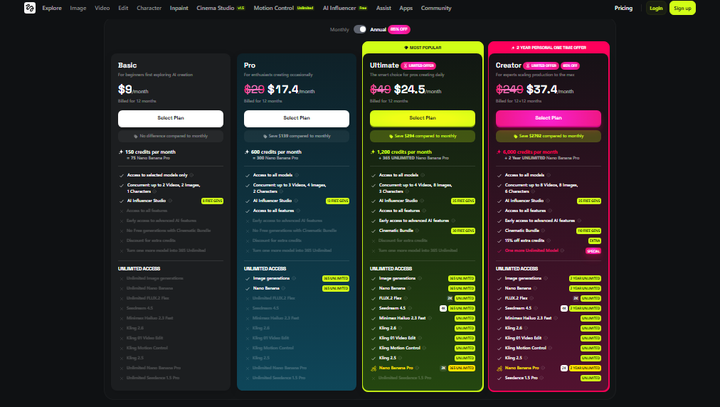
Higgsfield AI runs on a credit-based system. That means every generation, whether video or image, consumes credits depending on the model, duration, and resolution you choose.
On paper, the plans look straightforward. In practice, how fast you burn credits depends heavily on how you use the platform.
Let’s break it down.
Starter - $19/mo billed monthly or yearly
- 270 credits per month
- 135 Nano Banana Pro image generations, or about 15 Seedance 2.0 Fast videos
- Parallel generations: up to 2 videos, 4 images
- No access to Seedance 2.5
Starter is the only tier with no annual discount. Its card states "No difference compared to monthly", and toggling both billing cycles confirms $19 either way.
Plus - $59/mo billed monthly, or $47/mo billed yearly
- 1,200 credits per month
- 600 Nano Banana Pro generations, or about 53 Seedance 2.0 videos
- Parallel generations: up to 6 videos, 8 images
- Access to all models and features, plus the 7-day unlimited Seedance 2.5 window
This is where most active users land, and it is the first tier with full model access. Annual billing saves $144 a year.
Ultra - $129/mo billed monthly, or $99/mo billed yearly
- 3,000 credits per month
- 1,500 Nano Banana Pro generations, or about 133 Seedance 2.0 videos
- Parallel generations: up to 8 videos, 8 images
- Credit slider: 6,000 credits costs $250/mo billed monthly or $194/mo billed yearly; 9,000 credits costs $375/mo billed monthly or $270/mo billed yearly
Watch the monthly price on the higher steps. The 6,000-credit step displays $220 with the note "Billed monthly, renews at $250", and the 9,000-credit step displays $310 renewing at $375. The first month is discounted and the price then rises.
Scale - $169/seat/mo billed monthly, or $150/seat/mo billed yearly
- Five-seat minimum, 5 to 15 members in one shared workspace
- 2,500 credits per seat per month, or 12,500 credits across the workspace
- SSO, admin spend control, shared credit pool, delegated top-ups, indemnification, priority support
Scale is not a volume discount. At 1,250 generations per seat it works out to $0.120 per image billed yearly, against $0.060 per image on Ultra at the 9,000-credit step. The business plan costs exactly double per image, so buy it for the governance features rather than the economics.
Is there a free Higgsfield plan?
The plan cards show only Starter, Plus and Ultra, but Higgsfield's feature comparison table lists a Free tier described as "Limited use", with no credit figure attached. Separately, the pricing page offers five free Seedance 2.0 4K generations in exchange for adding a card to verify the account.
One restriction to know before buying: Higgsfield states that unlimited models and free generations on plans "are accessible only via higgsfield.ai and are not accessible on MCP/CLI, Canvas or Supercomputer."
All prices in this section were verified on higgsfield.ai/pricing on 6 August 2026 by toggling both billing cycles. Higgsfield changes its plan structure often, so check the live page before committing.
Limitations of Higgsfield AI (Especially for E-commerce & Product Brands)
Higgsfield AI is impressive in the right context. But every tool is built with a core audience in mind, and Higgsfield’s DNA is clearly video-first.
If you’re a creator making short cinematic clips, many of its limitations are manageable. If you’re an e-commerce brand scaling product creatives, they become more noticeable.
#1: Built for Cinematic Video, Not Product Precision
Higgsfield is optimized for motion, storytelling, and camera language. It’s not optimized for hyper-accurate product rendering. And for e-commerce brands, that matters.
Product imagery requires:
- Exact label clarity
- True-to-life packaging geometry
- Color consistency across SKUs
- Clean white-background compliance
Higgsfield’s image tools are capable, but they’re not purpose-built for product-detail preservation. If packaging text or micro-details matter for conversion, you may hit limitations.
#2: Credit-Based Iteration Can Slow Experimentation
Ecommerce growth often depends on testing multiple creative variations. You may need to test different hooks, different backgrounds, different lighting styles, or multiple aspect ratios.
With Higgsfield’s credit system, experimentation has a visible cost attached to every iteration. That can discourage rapid testing compared to subscription-based AI product platforms, where generation feels less constrained.
#3: Motion Instability in Complex Scenes
User feedback consistently points out that while simple scenes perform well, complex motion can introduce artifacts, chaotic action, and inconsistent subject details.
For short-form social clips, this may be acceptable. For polished brand ads or product-centric storytelling, it will require extra refinement.
#4: Limited E-commerce Workflow Integrations
Higgsfield offers API access, but it lacks deep native integrations with ecommerce systems.
There’s no direct:
- Shopify sync
- Amazon image optimization workflow
- Marketplace compliance presets
- Bulk SKU creative automation
For brands managing dozens of products, this creates extra manual work.
#5: Short-Format Bias
Higgsfield performs best within the 10-15 second range. Longer sequences or highly complex visual narratives require heavier iteration. Most of the time, e-commerce brands need scalable static creatives, multi-angle product imagery, or quick catalog updates. In that case, video-centric workflows like Higgsfield's can feel overengineered.
This means in some instances, a product-first AI tool is often a better fit than a cinematic video lab. Really, a dedicated product AI tool makes more sense if your priority is:
- Studio-grade product imagery
- Batch SKU generation
- Marketplace-ready dimensions
- Label-perfect detail consistency
- Scalable ad creative production
That’s where tools like Pikes AI naturally enter the conversation – not as a competitor in video storytelling, but as a purpose-built solution for e-commerce product creatives at scale.
Let’s take a moment to look at that alternative more directly and compare it side by side.
Pikes AI: Best Alternative to Higgsfield AI for E-commerce Brands
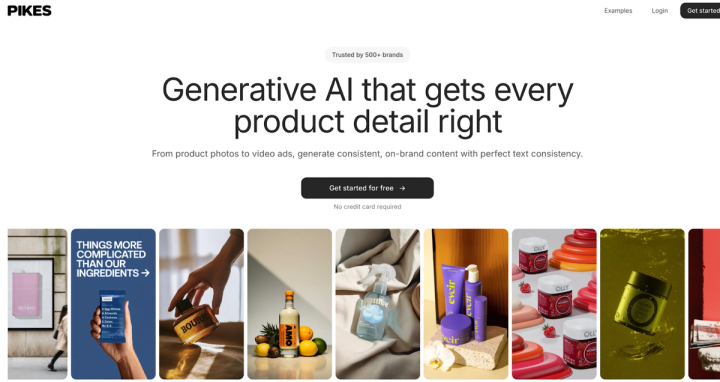
Higgsfield AI is powerful if your goal is cinematic video creation. But if you’re a product-driven e-commerce brand, the problem you’re solving is different.
You don’t just need motion; you need clean, conversion-ready product images and accurate packaging details. Of course, you also need batch generation across SKUs and marketplace-compliant formats. In that case, what you need is a dedicated AI product studio.
While Higgsfield focuses on video storytelling and camera control, Pikes is built specifically for fast-growing consumer brands that rely on high-quality product visuals.
Here’s how the positioning differs.
Product Detail Consistency
Pikes is trained to preserve label text accuracy, packaging geometry, color precision, and even logo integrity. For supplements, skincare, beverages, and CPG products, this level of detail isn’t optional. It directly affects trust and conversion. While Higgsfield’s image tools are broad, Pikes is more product-focused.
Built for Scalable SKU Workflows
Pikes allows brands to:
- Generate multiple product variations
- Create different aspect ratios instantly
- Expand one image into multiple dimensions
- Run bulk creative generation
Instead of consuming credits per cinematic experiment, the workflow is designed for ecommerce production at scale.
Studio-Grade AI Product Photography
With Pikes, brands can generate:
- White-background marketplace images
- Lifestyle product scenes
- Ad-ready creatives
- Product animations
- Multi-platform outputs (Amazon, Meta, TikTok, Shopify)
The lighting and shadow logic is tuned specifically for e-commerce performance.
Custom Style Model Training
Instead of scanning a website for brand DNA, Pikes allows you to upload reference images and train a custom visual style model. That way, you have more control over product aesthetic without jeopardizing consistency across launches.
Used by 1,000+ E-commerce Brands
Pikes is not an experimental beta. It’s already used by over 1,000 consumer and ecommerce brands to upgrade their product creatives and replace expensive photoshoots. It’s purpose-built for product teams, not just content creators.
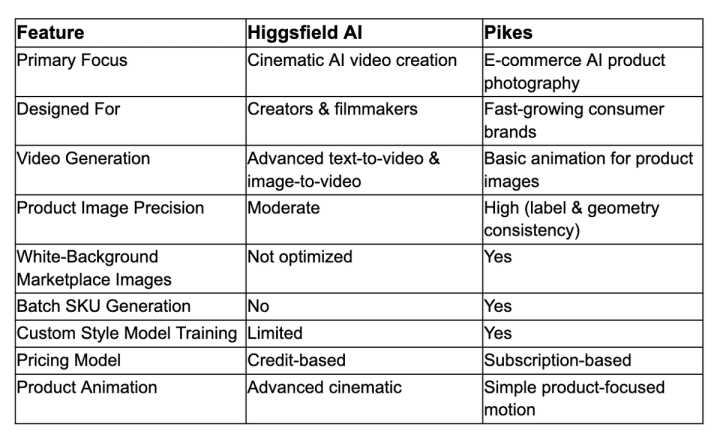
Higgsfield AI vs Pikes AI: Feature Comparison
Final Verdict: Is Higgsfield AI Worth It in 2026?
Higgsfield AI is a serious contender in the AI video space. Its camera controls, multi-model flexibility, and cinematic toolkit make it one of the more advanced creative labs available right now. If you’re a content creator, indie filmmaker, or marketing team focused on short-form video storytelling, it’s absolutely worth considering.
But if you’re an e-commerce brand where product visuals directly impact conversions, Higgsfield may not be the perfect fit as your primary creative engine. It’s video-first, credit-based, and not optimized for high-accuracy, scalable product photography workflows.
For product-driven brands, a dedicated platform like Pikes AI offers a more practical long-term solution, especially when precision and marketplace compliance matter.
FAQs
Is Higgsfield AI worth the investment for video creators?
Yes, especially if you prioritize cinematic control and model flexibility. It has more solid tools and features compared to simpler AI video generators.
What’s the difference between Higgsfield and Pikes?
Higgsfield AI focuses on cinematic video generation with advanced camera controls. It’s built for creators and storytellers. Pikes AI, on the other hand, is designed specifically for e-commerce product creatives. So, while Higgsfield is video-first, Pikes is product-first.
What output formats and resolutions can I export?
Higgsfield allows exports in common video formats suitable for social platforms and ads. Resolution and credit cost depend on the selected model and plan tier.
Who owns the rights to content produced with Higgsfield AI?
Generally, users retain rights to the content they generate, subject to the platform’s terms of service. However, as with any AI tool, it’s important to review Higgsfield’s licensing policies carefully, especially if you’re creating commercial work.

Written by
Mike Lehman
Mike Lehman is a senior content strategist at Pikes. Before joining Pikes, Mike spent nearly a decade working with Glossier, Haus, and Athletic Brewing, leading campaigns that blended storytelling and data.