
Mike Lehman
How To Generate Professional Product Images With AI In 5 Simple Steps
Traditional e-commerce photography gives you creative control and material realism. But it can be financially draining, time-consuming, and unscalable, especially for large catalogs. This is where cost-effective approaches like AI product photography become a better option.
If you have ever thought of saving cost and scaling your product shoots using AI tools, this guide shows you exactly how to create AI product photos that are mistaken for traditional shoots.
Step 1: Prepare Your Product Photos
The quality of your original product images largely affects the outputs. Think of them as raw materials—a good raw material will produce a good end product and vice versa. While you don’t need 4K quality product photos, you need high-resolution images to generate realistic outputs.
Here are some basic tips to help you take great product images:
- Use a 64MP camera or a resolution of at least 72 ppi and 1080p.
- Use a tripod to keep the angles and distance consistent.
- Use natural lighting as much as possible. Set your table (or surface) adjacent to the light source. If there is no natural light source, use an artificial one with bright lighting to prevent heavy shadows.
- Products with heavy details, such as texts and logos, should be shot from a distance of 30-60cm. Products with fewer details should be captured in 80-90% of the frame.
- For background removal, use a chroma green or blue background for easy cutout by background remover tools. Images that require no background removal can use a white, grey, or any plain background.
- Save your product image using this format: productname_number_date for easy access.
Pro Tip: Remove the background of your product images when editing with AI, as they work better with isolated products.
Step 2: Choose An AI Tool
After crafting your prompt, the next step is deciding which platform can bring your ideas to life. With hundreds of Gen-AI tools around, it can be a difficult task surfing through and selecting which platform delivers professional product photos.
However, here are some quick guidelines and examples you can use to select the best tool for your e-commerce brand:
- What platform are you uploading to?
- Marketplaces like Amazon and Walmart that require pure white backgrounds can use Photoroom for easy background removal and editing.
- For social media platforms that require more lifestyle content, tools like Pikes that ensure visual consistency are a great option.
- E-commerce stores requiring close-up, professional studio shoots can use AI product photography tools like Pikes and Kive to generate photorealistic images and keep details intact.
- What features do you need?
- If you have a large catalog, a tool that can process hundreds of images at once is necessary to save time.
- For workflow automation, check if the platform’s API is integrable with your e-commerce store.
- If you want more use cases and social media assets, choose a tool that can accurately place product images on AI-generated human models.
- How frequently do you require content?
- For consistent outputs, go for platforms that offer a pay-per-use or credit-based pricing model to ensure you only pay for the images you create.
- Choose tools that have pre-sets, templates, and brand management features to scale generation while retaining consistency.
Step 3: Craft Detailed and Clear Prompts
Professional product images are the result of good prompts. And good prompts begin with knowing exactly what you want and being able to describe it in detail. This means specifying qualities like background, lighting, camera settings, etc.
When describing a subject or model, go beyond mentioning only the sex to describing the age, color, height, personality, hair, mood, etc., to help the AI tool understand your idea.
For example, for a minimalist product image, instead of using “Product on a plain grey surface with minimal lighting”, be more descriptive like this:
“Sleek surface, cinematic lighting, editorial photography style. The mood should capture elegance, confidence, and transformation — the quiet power of getting ready. The scene should feel sophisticated, modern, and evoke understated glamour. Ultra-high definition, soft shadows. NO TEXT”.
The result will look like this:

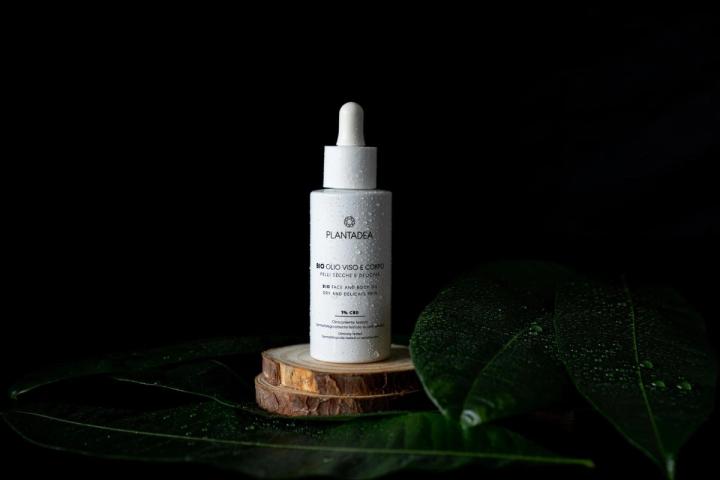
AI-generated image of an exotic perfume using Pikes.ai
Note the quality of the product, lighting, and realism. This again proves that clear and detailed prompts are the secret to generating hyper-realistic AI product photos.
Another replicable example for a lifestyle image is this:
“A natural lifestyle photo featuring [product] placed on a reflective glass tabletop beside a softly draped linen curtain. The scene is bathed in warm, diffused daylight that filters through the fabric, creating a cozy, nostalgic atmosphere. The background includes subtle vintage details. The overall composition feels intimate and tactile, with gentle highlights on the bottle’s surface and soft shadows grounding it naturally in the space. The tone is warm and organic, evoking comfort, authenticity, and quiet sophistication.”
Pro Tip: Some AI tools have chatbots to help you craft better prompts. A good example is PikesGPT that takes your idea and produces studio-quality prompts for your use.
Step 4: Edit and Refine
Sometimes, even the best AI tools fail at generating your desired outputs. It doesn’t mean it’s bad; it only reveals the tool's insufficiency at generating product images that match pure human creativity. This is why it is important to check and edit your AI-generated product images where necessary.
Gen-AI platforms can fail at scaling, matching lighting, or softening shadows, but these can be solved by simple tweaks. For example, this AI-generated product image for a rum beer shows misalignment in the product and background lighting. The result is a product image that looks “cut-and-pasted”. Note that this is generated by a generic Gen AI tool.
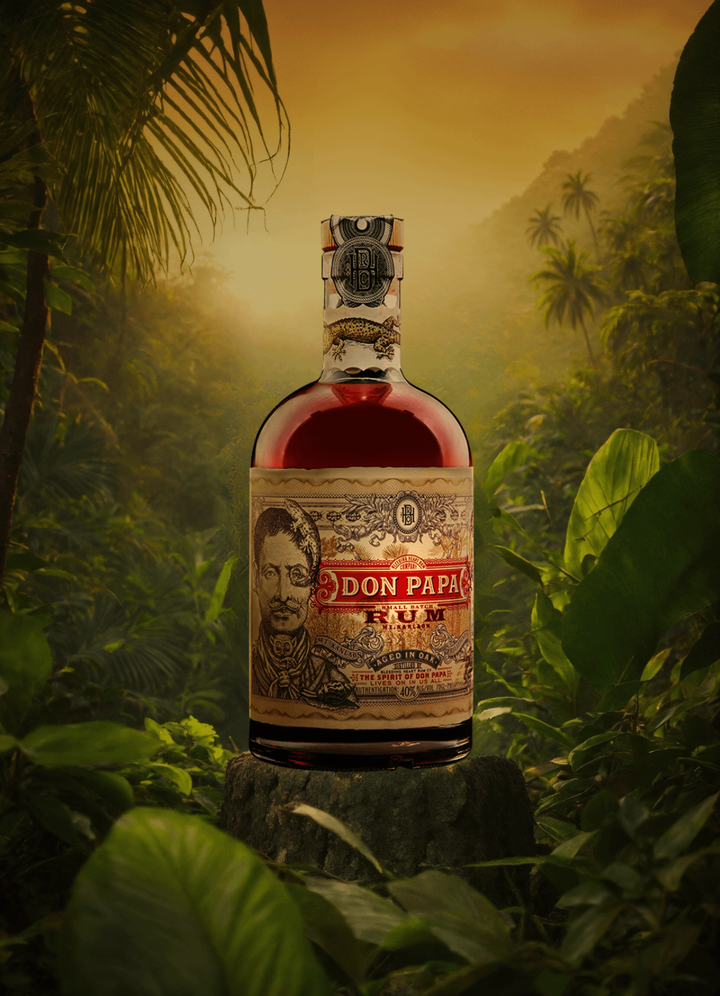
A simple tweak in the lighting and a few edits with Pikes AI produced a better result, shown below:

AI-generated image edited using Pikes.ai
To edit your generated product photos and refine them for better realism, check for the following:
- Ensure shadows look natural and “on-ground”. Use words like “right–side” when describing the direction of the lighting.
- For products with heavy details, check for inconsistencies and correct any, if found, to prevent misleading customers.
Step 5: Optimize and Export
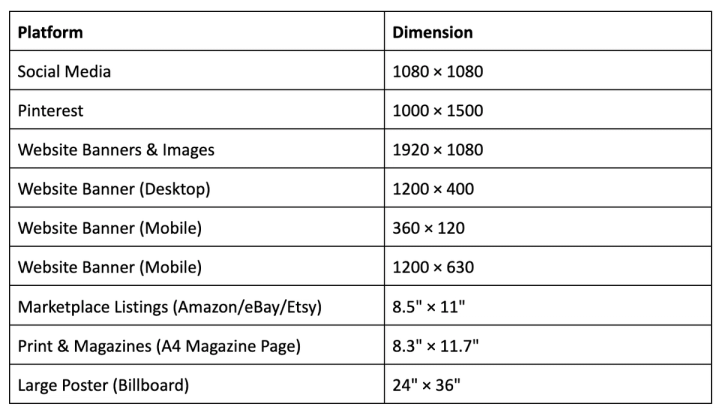
Optimizing your product photos to fit the platform ensures the quality stays the same. This is what differentiates product images with stretched sides from those with the perfect height and width.
To resize your image for different use cases, use the table below as a guide:
Export the images in JPEG for websites or PNG for transparency needs. Compress images while retaining quality to optimize for mobile speed.
Best AI Tool For Professional Product Image Generation: Pikes
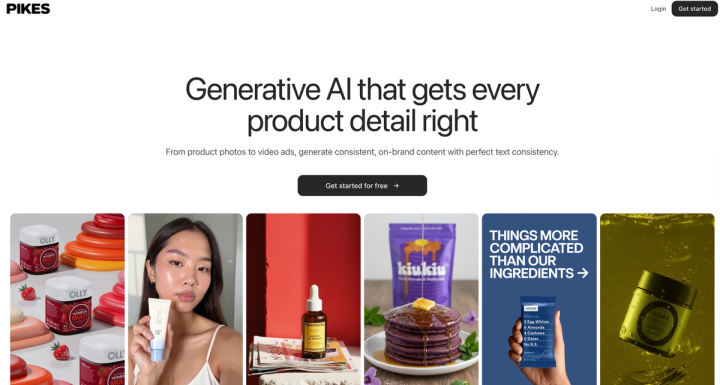
Many AI tools promise high-quality product image generation with artistic flair. While this is good, an AI product image generator must be capable of retaining product details and generating realistic photos.
This is where Pikes shine. With a powerful model that ensures text and logo consistency across all content assets, Pikes helps consumer brands generate professional product images without extra tools. The platform allows you to generate lifestyle photos and creative product shots that feel like they were taken by a pro. The tool also has a comprehensive preset and templates library to keep you inspired and creative.
Try Pikes today for free to start generating professional product images for your e-commerce brand and scale your revenue.
FAQs
What is AI Image Generation?
AI image generation is the use of artificial intelligence to edit and generate images by following instructions from texts known as prompts. These models are trained on vast datasets to recognize patterns and create original images using advanced technology software.
How do I maintain brand consistency while using AI?
You can maintain brand consistency with AI by training your chosen tool with your preferred style.
For example, some platforms have features that can generate multiple variations of your traditional product photos. You simply upload the original image, and the tool generates similar images. This not only allows you to create multiple product shoots without paying more, but the outputs stay consistent in style and branding.
Some platforms also have a brand management and teams feature for easy organization and asset management. Generated images can also be stored as templates and replicated.
What AI tool is best for generating product images?
Product images require more realism than artistic flare and this should be your major factor for selecting an AI tool for your e-commerce brand. Tools like Pikes combine hyper-realism with product consistency to generate on-brand product images for e-commerce brands.
Can I use AI to generate product images for Ads?
Yes, you can! Many AI-generated product images now match up to and even offer better advantages than traditional product photos. Some AI tools offer marketing insights to help you create content that appeals more to your target audience.
Are AI-generated Images licensed or copyrighted?
AI-generated images are not owned by humans and, therefore, are not copyrighted. However, some platforms place licenses on generated content, and this informs how they should be used. It becomes important to read the platform's copyright rules to understand the usage rights for your generated images, especially for commercial use.

Written by
Mike Lehman
Mike Lehman is a senior content strategist at Pikes. Before joining Pikes, Mike spent nearly a decade working with Glossier, Haus, and Athletic Brewing, leading campaigns that blended storytelling and data.