

Mike Lehman
Kive AI Vs. Flair AI Vs Pikes AI: Which AI Tool Is Better For Product Visuals?

AI product photography tools are rapidly replacing traditional studio shoots for many e-commerce brands. But while these tools promise professional product visuals at a fraction of the cost, their capabilities differ significantly.
In this comparison, we evaluated Kive AI, Flair AI, and Pikes AI across four important criteria:
- Brand Consistency
- High-end creativity
- Cost-to-credit efficiency
- Video generation
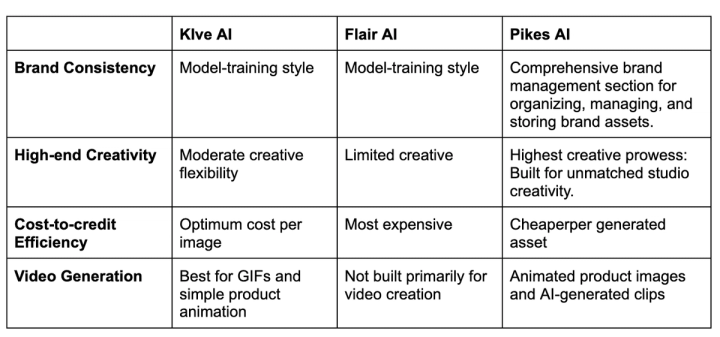
Kive AI Vs. Flair Vs. Pikes AI Quick Comparison
Brand Consistency: Kive Vs. Flair Vs. Pikes AI
Your brand style is what sets you apart in a crowded marketplace. While logos, colors, and messaging form an important part of a brand identity, visual consistency across product creatives is equally important.
When we evaluated brand consistency across the three platforms, Pikes appeared more tailored and optimized for maintaining brand identity across generated assets.
Below is a closer evaluation of each tool’s branding capacity:
Kive: Custom model training platform
Kive includes an “AI Model” training section that allows you to upload professional product images that you may want to replicate. These images are saved in your “Custom Models,” enabling you to generate new images in a similar style.
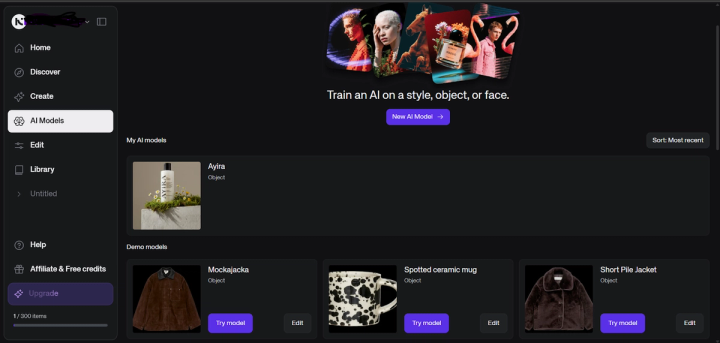
While this feature maintains a level of consistency, it mostly focuses on style replication rather than broader brand identity. It does not manage brand voice or variations across elements like background, lighting, angles, and overall brand storytelling.
If you simply want to replicate a specific creative style, Kive works well. But if your goal is maintaining brand identity across multiple campaigns, the tool is less robust than Pikes.
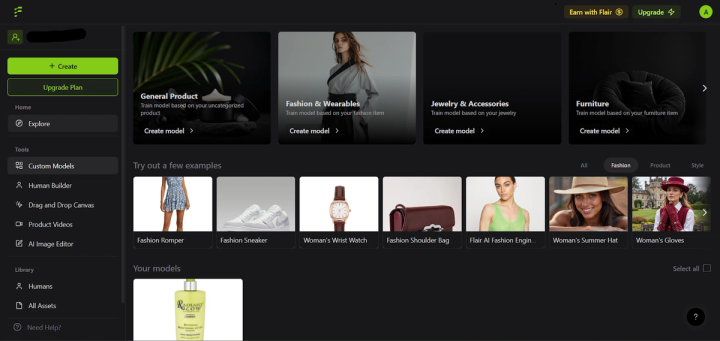
Flair: Simple variations generator from reference images
Flair AI works similarly to Kive AI. You upload a reference image in the AI Model section to “train an AI on a style, object, or face”. The system then generates variations by combining specified elements in your reference images. This process helps produce consistent visual outputs, especially for marketing assets.
Pikes: Comprehensive brand management toolkit
Pikes has a “Brand Management“ section that comprises several features:
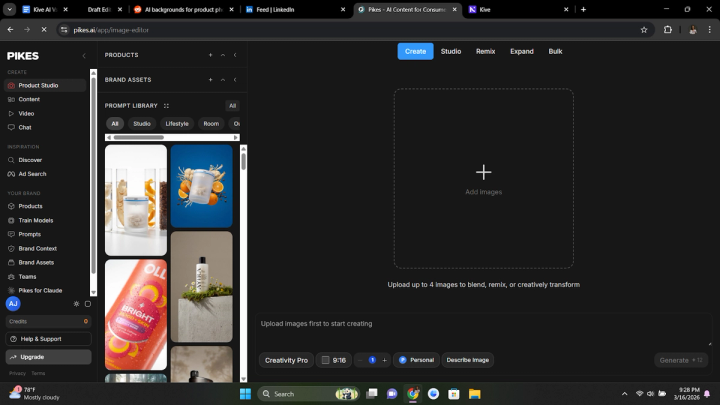
- Products to scrap all your unedited/raw product files from your store.
- Model Training to upload reference images and train AI to generate product photos that match the style.
- Prompts Library to store prompts that you like and want to replicate for your product's photoshoot.
- Brand Context to define your detailed brand voice and visual guidelines.
- Brand Assets to manage all your generated visuals in one place.
- Teams for easy collaboration and shared edits.
Together, these features ensure that your brand’s style, tone, and identity remain consistent across all generated assets. Because of this structured system, Pikes is better suited for teams that need consistent branding and messaging across marketing visuals.
Verdict: Judging by in-built brand management features, Pikes has a more comprehensive toolkit for maintaining brand consistency. Kive and Flair operate the same way by offering a custom model training feature, but they are primarily focused on replicating visual styles rather than managing brand identity at scale.
High-End Creativity
One of the flexes of traditional product photoshoot vs AI is creative conceptualization. While AI tools are evolving quickly to match up to human-level creativity, only a few platforms can match the creative depth of a professional studio shoot.
We tested the creativity output of Kive, Flair, and Pikes. Although the tools performed closely in some areas, Pikes demonstrated a stronger creative ability.
Kive: General-purpose image generator
Kive is built for general e-commerce brands with products such as fashion pieces, sports products, accessories, and consumer goods. This makes it somewhat like a general-purpose creative tool for e-commerce products.
While this flexibility may be helpful and economical, it also means the AI must handle many different product categories. As a result, the creative output can sometimes feel less specialized compared to tools built for specific product niches, e.g., Pikes for consumer goods or Pebblely for fashion.
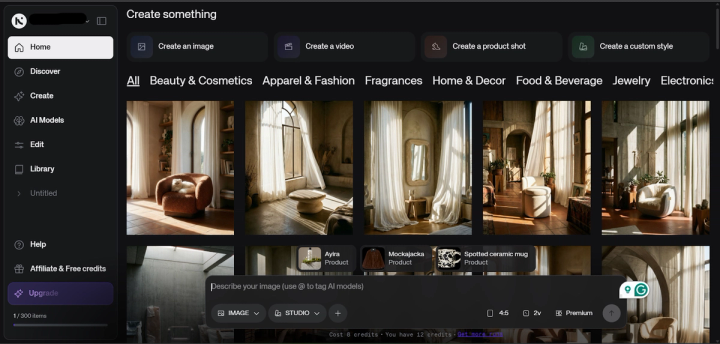
Although the platform showcases many impressive visuals on its discovery page, real user feedback often reports difficulty generating market-ready creatives consistently.
As this user reacts, “I didn’t think it was easy to use or to get the results we wanted.”
Flair: Compositing tool for easy photo generation
Flair functions more as a compositing tool than a full AI image generator. The platform's photoshoot feature allows you to drag-and-drop your product images into AI-generated backgrounds and describe the scene you want.
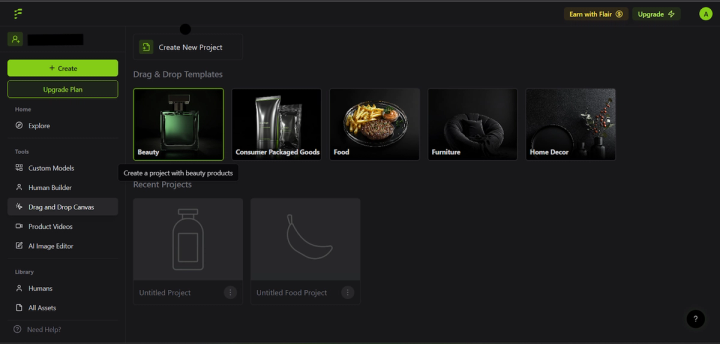
This approach gives you full control and flexibility over your product photoshoot background, but it also limits your creativity as you can only assemble scenes using existing product images.
While Flair AI solves the problem of plain product images, it is less suitable for studio-level creative visuals.
Pikes: High-end creative tool for e-commerce brands
Pikes includes a Product Studio section with two creative tools:
- Creativity
- Creativity Pro
Creativity Pro is powered by Gemini 3 Pro, which is optimized to generate high-quality visuals at up to 4K resolution. These tools allow you to create and remix product images with creative variations, producing visuals that often go beyond basic prompt instructions.
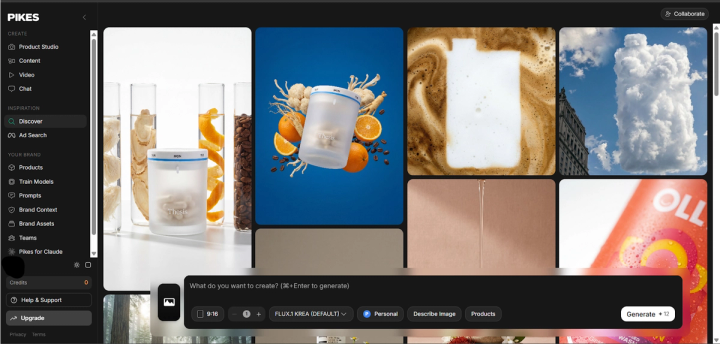
Pikes also includes a Video section powered by advanced models such as:
- Seedance
- Veo 3.1
- Kling 2.5 Pro
These models are capable of generating high-quality cinematic clips from text prompts or product images.
Verdict: Pikes offers more realism, smoother transitions, and better quality outputs compared to the other two tools.
Cost-To-Credit Efficiency
Most brands switch to AI product photography because of the steep cost of traditional photoshoots. However, these tools vary significantly in their pricing models and credit costs per generated image.
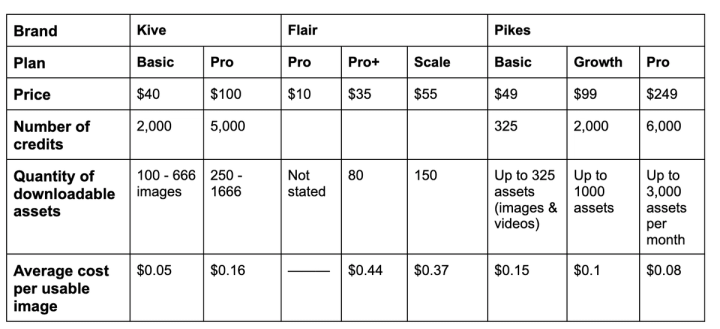
We compared the pricing structure of Kive, Flair, and Pikes to determine which tool provides the best cost-to-credit efficiency.
Across all three platforms:
- They operate on a credit-based model
- They offer a free trial without requiring a credit card
- They allow up to 5 generations on the free plan
However, the average cost per usable image varies widely.
- Flair: Up to $0.44 per image (highest cost)
- Kive: Around $0.16 per image
- Pikes: As low as $0.08–$0.15 per generated asset
Verdict: Although Pikes can appear expensive at first glance, the cost per generated asset is actually lower when scaled across higher plans.
Video Generation
Some AI product photography tools now include built-in video generation features that allow users to transform still product images into short animated clips. However, the depth and quality of these capabilities vary across platforms.
While some tools focus on simple motion effects, others integrate more advanced AI video models capable of generating cinematic product clips.
Here’s how Kive, Flair, and Pikes compare in terms of video generation.
Kive: Simple animator for product images
Kive AI includes a built-in AI video generator that allows you to create short product clips from prompts or existing images. Instead of producing long-form videos, the tool focuses on short cinematic product animations designed for ads and social media.
You can generate a video from scratch using a prompt or convert a still product image into a short animated clip. The platform allows basic camera movements such as zoom-in, pan, or static shots, helping highlight product details and create a more dynamic presentation.

Typical outputs are short clips (around 6–8 seconds) optimized for formats like 16:9 or 9:16. The AI also attempts to maintain product consistency across frames so logos, packaging, and fine details remain stable throughout the clip.
Flair: Basic product video capability
Flair AI is primarily built for product photography and visual ad creation, not full video production. It focuses on staging product images, generating backgrounds, and designing marketing visuals.
Flair also offers a basic product video capability where you can upload a product image, select camera motion or a style preset, and generate a short animated clip suitable for ads or social media.
Because the platform is designed around visual ad composition rather than video generation, its video capabilities are relatively lightweight. It works best when you simply need to turn product photos into short motion ads, rather than produce complex AI-generated videos.
Pikes: Multi-modal AI video generator
Pikes AI integrates multiple AI video generation models, such as Kling and Veo, allowing you to generate product videos from text prompts or images. These models are capable of producing high-quality cinematic clips, sometimes in 4K, with realistic motion and lighting.
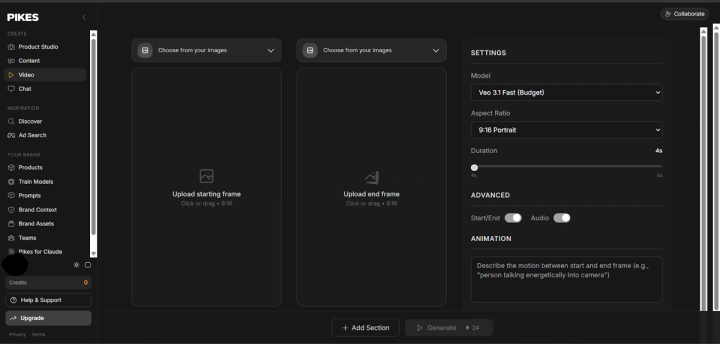
Instead of relying on a single model, Pikes functions more like a multi-model AI studio, where you can select different video generation engines depending on the style or realism you want.
However, like the other tools in this comparison, Pikes is not a full video editing platform. It focuses on short AI-generated clips (often a few seconds long) rather than long-form video production or detailed timeline editing.
Verdict: Kive is best for turning product images into short cinematic animations. Flair is primarily a product photo tool with simple motion video capabilities, while Pikes offers a powerful AI product video generation feature thanks to access to multiple video models.
Final Verdict
Each tool performs well in different areas.
- Brand consistency: Pikes wins.
- High-end creativity: Pikes offers stronger creative capabilities.
- Video generation: Kive is the better option for simple product animations.
- Cost-to-credit efficiency: Pikes provides the best value per generated asset.
FAQs
What is the best AI for lifestyle photography?
Pikes offers stronger realism, better brand consistency, and greater creative variations in lifestyle shoots. Kive comes close with its robust model library for style replication, while Flair produces more limited lifestyle outputs compared to the other tools.
What is Kive used for?
Kive is a creative AI product photography tool that generates professional visuals for e-commerce brands. The platform's key features include:
- Image Creation for bringing your product idea to life
- Product Shoot for transforming simple product images into professional photos.
- Video Generation for creating simple videos from still product images.
- Custom Style Model for training the AI models to generate visuals that align with your brand style.
What is the alternative to Flair AI?
Pikes and Kive serve as alternatives to Flair AI in terms of cost efficiency, output realism, and visual creativity.
Does Pikes work for fashion brands?
While Pikes is built primarily for e-commerce brands, it is optimized more for CPG brands than fashion brands.

Written by
Mike Lehman
Mike Lehman is a senior content strategist at Pikes. Before joining Pikes, Mike spent nearly a decade working with Glossier, Haus, and Athletic Brewing, leading campaigns that blended storytelling and data.