

Mike Lehman
Soona Vs. AI Product Photography Tools: What’s The Better Choice For Brands?
If you’re trying to scale product visuals for your brand, you’re faced with a difficult choice: stick with human-led studio photography like Soona, or switch to faster, cheaper AI tools.
On one hand, Soona gives you real-time collaboration, professional creatives, and highly realistic outputs. On the other hand, AI product photography tools offer speed, flexibility, and the ability to generate hundreds of visuals in minutes.
But which option actually makes more sense for your brand?
In this guide, you’ll see how Soona compares with AI product photography tools across workflow, realism, cost, and scalability, so you can decide what works best for you.
What Does Soona Do?
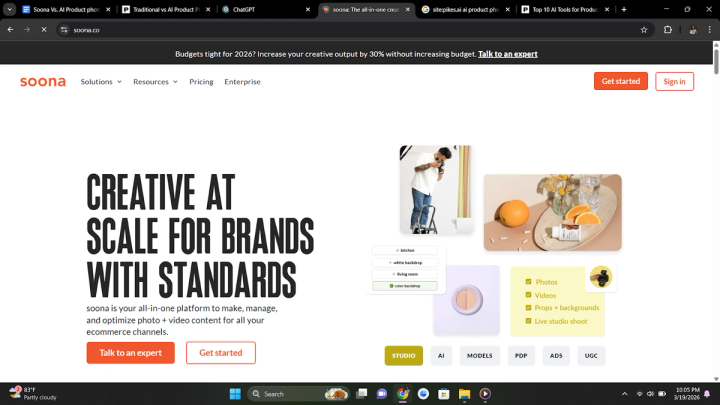
Soona is an e-commerce product shoot studio that combines human creativity with AI-powered features. The platform stands out for its virtual, real-time collaboration between brand owners and artisans, giving them the flexibility to monitor shoot sessions and provide suggestions.
While Soona operates as a traditional product photography service, it removes many of the usual frictions. Users can book models, props, and stylists, and receive their assets within a 24-72 hour window. Soona also functions as a service-based marketplace, connecting artisans with brand owners.
Pros
● Real-time collaboration
● Faster delivery (24-72 hours)
● Seamless booking process
● Cheaper than traditional methods
● Professional quality outputs
Cons
● Occasionally misleading pricing
● Physically cumbersome
● Time-consuming
● Limited creative control
● Limited studio locations
● Expensive to scale
● Inconsistent outputs
How Soona Compares With AI Product Photography Tools
Although Soona offers human creativity, high-end professionalism, and collaborative control that is hard to replicate, many of its capabilities can now be replaced, or even improved, by AI product photography tools.
While AI tools do not offer the experience of working directly with photographers or stylists, they provide greater creative control, speed, and flexibility when generating product visuals.
Here’s how Soona compares with AI product photography tools across key areas.
Studio Photography Workflow
Soona’s workflow follows a structured studio process.
● Select between photos or videos and choose the number of assets.
● Pick your preferred scenes (white or colored backdrop, textured surface, or lifestyle scene).
● Select a model (hand, full-body, leg, or pet model).
● Add extras such as groceries, mannequins, wrinkle steaming, or behind-the-scenes content.

Once your booking is complete, you’ll be invited to a live-streamed shoot session where you can watch the shoot in real time, provide corrections and suggestions, and direct the shoot to your preference.
After the shoot, you receive a catalog of photos and videos, select the assets you want, and pay only for selected outputs. Photos start at $39 and videos at $93.
Once payment is made, editing begins, and your final assets are delivered within 24-72 hours, depending on your plan.
It is important to note that post-delivery edits require extra payments.
Meanwhile, a typical studio photography session with an AI product photography tool follows this workflow:
● Choose a tool.
● Purchase credits or a subscription plan.
● Navigate the platform to the photo/video shoot page.
● Select the model you want (optional).
● Write a detailed prompt describing scene, lighting, textures, props, quality, style, etc.
● Generate image/video.
This entire process typically takes less than one hour.
Compared to Soona, AI tools give you full control over background, lighting, and creative direction. You can also generate multiple variations instantly with unlimited edits and faster turnaround without physical logistics.
This level of flexibility is something Soona’s structure and pricing model do not fully support.
Realism
AI product photography tools do not provide as much realism as Soona, especially for lifestyle photography. Some struggle with inconsistent lighting and shadows, and occasional lack of product realism.
Soona, on the other hand, delivers more natural lighting, realistic textures, and unique angles. This makes it a stronger option when true-to-life visuals are critical.
Matching Inspiration & Ideas
Even though Soona works with human models, photographers, and stylists, most users still complain of inconsistent outputs and below-par results. Like this Reddit user reports,
“The white background shots were really good, and the edits are fast (24hrs). I got some good styled shots, but I don’t think they did a great job in matching my inspiration photos.”
Another commented, “My first shoot was fine, and I actually scheduled two more shoots with them, and they got progressively worse. Seems I got lucky the first time.”
In contrast, AI tools produce more predictable outputs when given clear prompts and consistent inputs. With the right setup, you can replicate styles and results repeatedly without variation.
Delivery
Using Soona requires physically sending your products to a studio and having them returned after the shoot. In this process, products can get damaged or altered during shipping. For fashion brands, clothes can get wrinkled and require extra preparation. Perishable goods also require extra delicateness while being handled to prevent destruction. Now, imagine doing this for multiple campaigns all year round. All of these back-and-forths make the process stressful and ambiguous.
However, with AI product photography tools, the process is much simpler. Take a clear image of your product against a white background using a phone or camera with good resolution. Afterwards, the AI tool does the heavy-lifting for you. This saves time, eliminates the physical involvement, and improves workflow.
Pricing
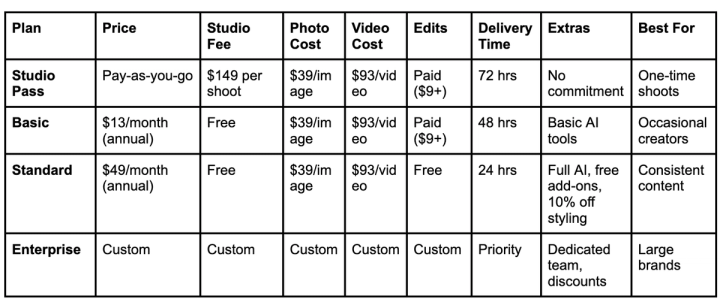
Soona offers both one-off payments and a subscription plan with more benefits.
1. Studio Pass: This operates like a “pay-as-you-go” plan. You only pay per shoot and for every asset you use.
2. Basic Membership: You also pay the same per-asset pricing, but the booking fee is replaced with a monthly subscription fee. This works best if you need multiple shoots per year in low volume.
3. Standard Membership: This works the same way as the basic membership plan, but with more benefits. It is best for brands that are creating content consistently, as costs are reduced heavily and delivery is faster.
Here is the breakdown of the pricing model of each plan:
Other extra costs which are not included in the subscriptions include:
Models & Talent
● Hand model: from $79/hour
● Full-body model: from $159/hour
● Pet/foot model: from $99/hour
Styling & Production
● Styling: from $149/hour
● Hair & makeup: ~$299/model
● Grocery/props sourcing: $79 + cost
UGC (User Generated Content)
● Starts from $110 per project
● Package bundles can go as high as $500+
In contrast, AI tools typically charge from $5 (for basic plans) to up to $250 dollars (for premium packages). This usually includes multiple generations, unlimited edits, access to a comprehensive template library, and additional creative tools.
While Soona is cheaper than traditional photography, it is still significantly more expensive than AI tools, especially at scale.
Scalability
Soona charges for each asset it produces. You pay for every photo, video, model, prop, and extra feature you use. With more assets, cost increases. This is less efficient for brands with a large catalogue and fast growth.
AI product photography tools do the opposite: higher plans reduce cost per generated asset, and you can generate large volumes of content quickly. You can also scale your content workflow, streamline production, and stay on-brand without spending thousands of dollars. This is a flexibility you cannot get with Soona.
Best AI Product Photography Alternatives to Soona
Pikes
Pikes is an all-in-one AI product photography platform that generates professional, publish-ready creatives, including product images and videos, for consumer brands. Like most Gen-AI platforms, Pikes AI uses prompts, raw product photos, and reference images to generate high-quality outputs for marketing campaigns, social media, and ads.
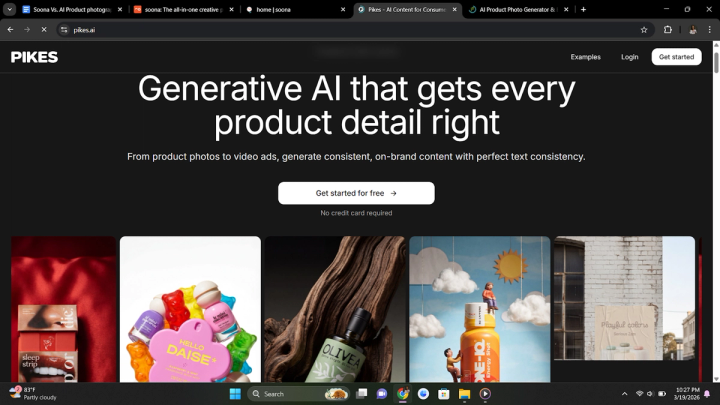
Some of its key features include: Studio photography, product video generation, custom modeling, template and discover page, Ad insights, bulk generator, and style presets.
Pikes offers a free trial with up to 50 credits, allowing users to test the platform before committing to a Starter, Growth, or Pro Plan.
Pebblely
Pebblely is a platform with powerful editing capabilities for correcting original and generated product images. Pebble positions itself more as a background remover and generator, allowing you to replace your product’s background with AI-generated, enhanced scenes.
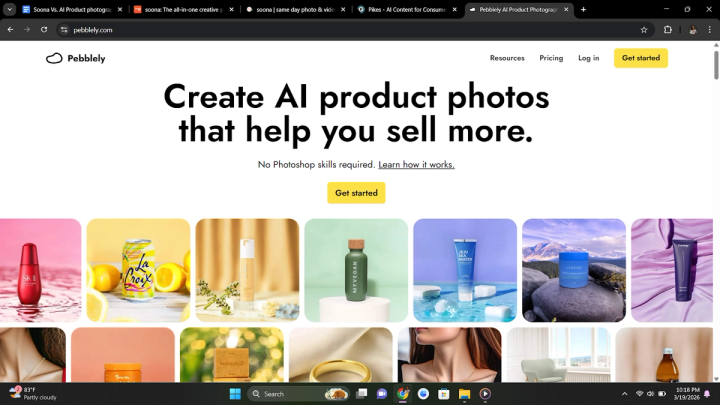
Some of the features include: background remover and generator, image resizer, AI image editing, and bulk generator. Pricing starts at $19/month with a Pro plan at $39/month.
Pebblely allows users to edit generated images without having to modify the prompts or use more credits.
Claid
Claid AI offers a simple AI product photography toolkit to generate and improve product images. Offering everyday editing tools like image resizer, enhancer, and background remover, it is the ideal choice for entrepreneurs who need a basic platform for simple edits and small fixes.
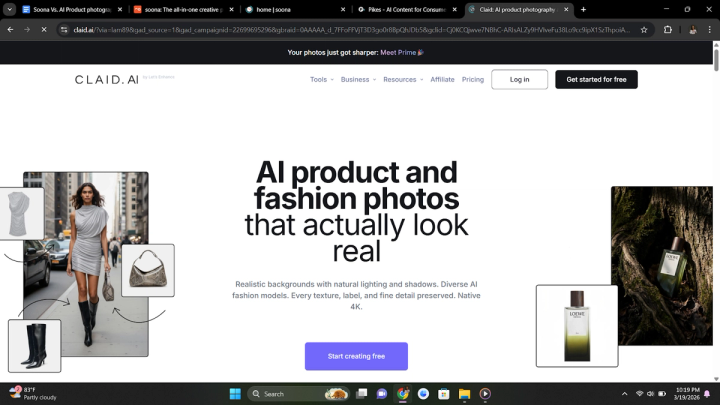
Some of its features include: AI background remover, image enhancer and upscaler, AI videos, image expander, AI fashion model, and face swap.
Claid offers a free plan that allows you to generate or edit between 5 and 25 product images, after which you would need to upgrade to a paid plan to access the features. It’s an excellent way to test all of the platform’s features in real time.
Flair
Flair AI is another AI tool for creating and editing product photos and visual content. It turns raw product photos into polished images with backgrounds, props, models, text, or other design elements, all without needing a camera, studio, or advanced design skills.

Some of the features include: custom model image generation, instant image generation, background image regeneration, video generation, and Ad generation.
Flair also offers a free plan and 4 paid plans starting from as low as $8 and scaling up to $199/month.
Final Thoughts
Soona and AI product photography tools can be used to create high-quality product visuals, but they approach it differently. Soona offers human creativity, realism, and real-time collaboration, while AI tools offer speed, flexibility, scalability, and cost efficiency.
● If you prioritize realism and hands-on creative direction, Soona is a strong option.
● For brands focused on scaling content production efficiently, AI product photography tools provide a more flexible and cost-effective solution.

Written by
Mike Lehman
Mike Lehman is a senior content strategist at Pikes. Before joining Pikes, Mike spent nearly a decade working with Glossier, Haus, and Athletic Brewing, leading campaigns that blended storytelling and data.