

Mike Lehman
The 5 Best Kive Alternatives For E-commerce Brands in 2026
Kive is a creative AI platform that e-commerce brands use for product visuals, including 360-degree spin videos of models. It has real strengths and a real following, and it also draws consistent criticism in a few specific areas. If the trade-offs below matter to how you work, these are the alternatives worth knowing about.
Disclosure: we make Pikes AI, which appears in the list below, so treat this as a comparison written by an interested party. Every review we cite links to the review itself, and Kive's overall rating is 2.8 out of 5 across 27 Trustpilot reviews.
For example, some recurring complaints in Kive's public reviews center on the following:
- Collaboration: Kive lags at syncing changes across team members' dashboards, thereby affecting real-time collaboration and slowing progress. Like a marketing manager on G2 commented, "The real-time collaboration is a little laggy, and occasionally, we have to log out and in again to see changes."
- Quality: Several users complain of occasional low-quality outputs from the platform, as noted by this Trustpilot user, "The quality of the delivered assets is simply too poor and waaaaay from the advertised images created."
- Consistency: Kive struggles with retaining the text, size, and style of the original images in the generated outputs.
Those are the recurring criticisms, not the whole picture. Kive's Trustpilot page also carries substantive praise: one small fashion brand owner calls it "an absolute game changer" for turning social visuals into ecommerce images at a fraction of studio cost, and another reviewer reports the Kive team stepping in directly to resolve a problem. Which trade-offs actually matter depends on your workflow.
With all of these complaints, finding better alternatives among the sea of virtual product photography platforms available becomes the next headache to deal with.
Fortunately, based on hundreds of feedback from real-time users, we have listed the 5 Best Kive alternatives for your e-commerce brand in 2026 below.
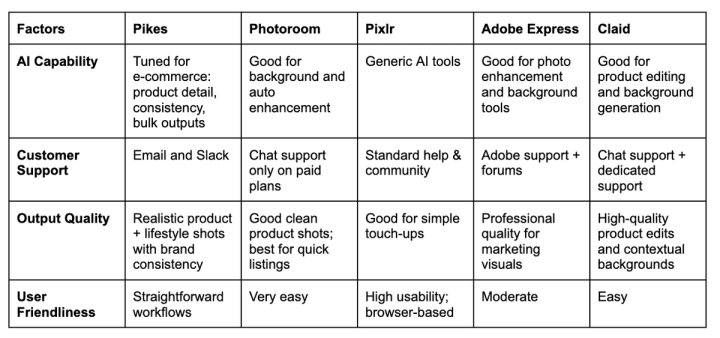
Summary of The 5 Best Kive Alternatives For E-commerce Brands in 2026
The Best Kive Alternative For E-commerce Brands: Pikes AI
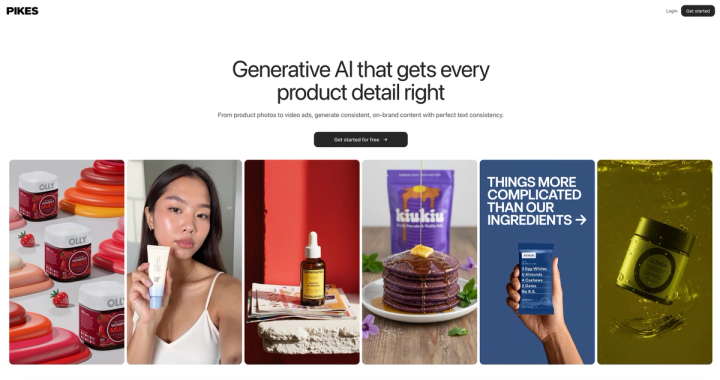
Pikes is an all-in-one AI content creation toolkit for e-commerce brand owners who value creativity and product consistency. It excels at generating product images and videos with uniform text and style details.
Pikes is perfect for you if you want to generate professional-level product content without technical knowledge or a huge budget.
Core Features
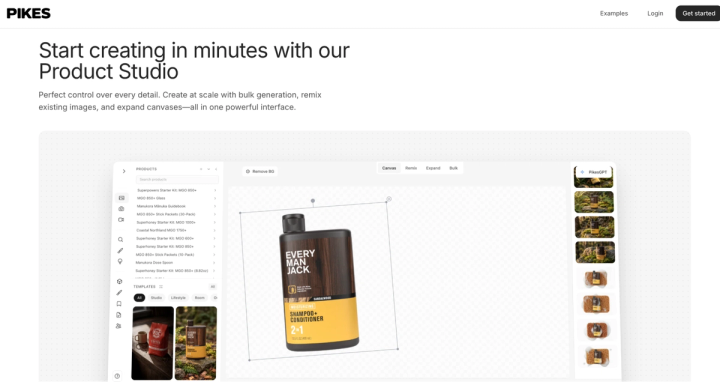
- Product photography tools to create studio-quality shots with perfect detail consistency, at scale.
- Video creation tools to generate ready-to-publish Ads.
- PikesGPT to help you generate the assets you need by talking to it. No prompts required.
- Ad Insights to find out what's working for your competitors.
- Template and discover page to get inspiration.
- Brand management section to organize and scale content production.
Pricing
Pikes offers a free trial for new users without the need for credit cards. The free version provides 25 credits, which can generate up to 12 downloadable assets. That way, you can test the software's features before committing resources and generate usable content without paying a dime.
After your free plan expires, you can upgrade to any of the three monthly packages below:
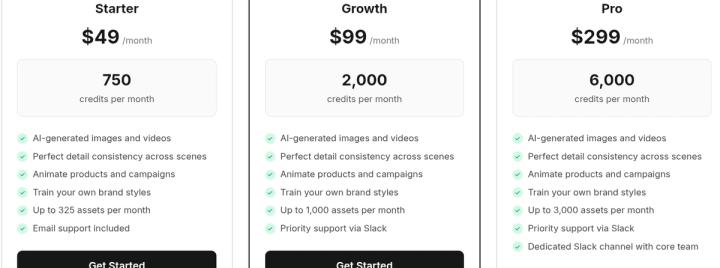
Annual plans run at lower costs with up to 50% discounts. Credits automatically roll over monthly or annually (depending on your plan).
Pikes also offers custom pricing and API plans for enterprises and agencies.
Pros
From several use cases, Pikes is found to have:
- Hyper-realistic outputs
- Consistent product labels
- Collaboration-friendly features
- Easy and intuitive interface
- Easy subscription cancellation model
- Dedicated human customer support team
Cons
- Sometimes you might need to adjust/tweak the prompt to get a perfect output in the product studio.
The Best Photo Editing Alternative: Photoroom
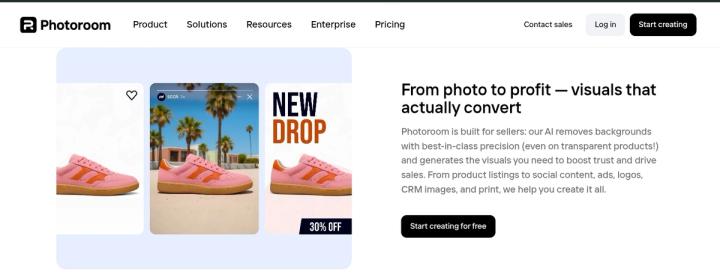
Popular for its batch image background removal feature, Photoroom stands out as a popular AI photo editing software for entrepreneurs and product marketers. It is perfect for business owners who need to edit and upload a large number of their products on e-commerce platforms, making it one of the best Kive alternatives for Shopify and Amazon.
Core Features
- Background remover to enhance or replace backdrops
- Video generator to animate product photos
- AI fashion model generator for creating lifelike virtual models
- Text-to-image tool to generate images from scratch
- Recolor Photos to scale product photography without reshoots
- Blur background to highlight product photos
Pricing
Photoroom offers new users a free trial to test their platform before upgrading to the Pro, Max, Ultra, or Enterprise plan. One standout characteristic of Photoroom is the ability to use all of the platform’s features in the free version, although with limited access. Below is the cost of each package:
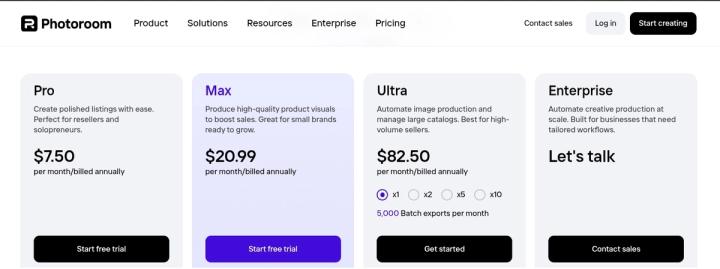
Annual plans cut costs by up to 47%, and the enterprise plan can be fully customized to fit your team’s size and needs.
Pros
- Batch image editing up to 250 images at once
- Fast and easy to use
- Intuitive interface
- Large template library
Cons
- Poor customer support
- Occasional low-quality outputs
- Learning curve required
- Mobile only
- Frequent crashes, lags, and bugs.
The All-In-One Content Creation Kit: Adobe Express
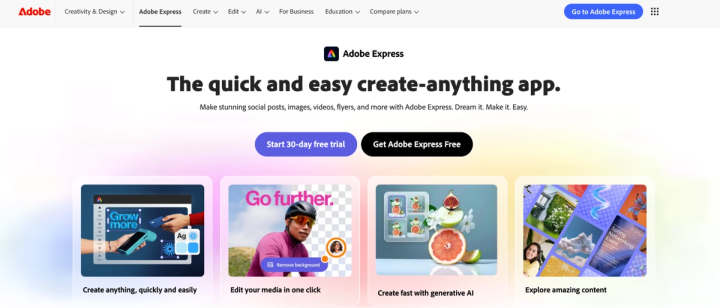
Adobe is no small player in the design community, and when one of its tools comes to compete at the table, you know it has a lot to bring. Offering a comprehensive toolkit for all kinds of content creation, Adobe Express allows product marketers and e-commerce founders to create on-brand marketing visuals for their products.
The platform offers templates, stock assets, and a powerful AI model to generate content ranging from simple edits to complex projects.
Features
- Photo Editing Tools to replace background and add effects
- Adobe Firefly to generate images from text prompts.
- AI Video Tools to create short clips, animate still images, and enhance speech.
- Templates and Design Assets to choose and draw inspiration from.
- Brand Kits and Management Tools to organize brand assets and ensure consistency.
Pricing
Adobe Express offers a freemium plan at $0/month with access to:
- Basic editing
- Limited number of templates and assets
- 5GB cloud storage
- Limited Generative AI credits (25 per month)
The paid plan costs $20/month and offers all of the benefits in the free plan, including:
- Up to 4,000 Gen-AI credits
- Full access to all of Adobe’s library
- Advanced editing tools
- Brand management features
Pros
- Beginner-friendly
- Fast outputs
- Allows for seamless collaboration
- Large template library to select from
Cons
Some common complaints by multiple users on Capterra and G2 include:
- Occasionally slow, especially with larger projects or advanced edits, like this User on Capterra commented, “It is more limited than other online design programs and it runs slow.”
- Less intuitive interface as reported on G2, “The interface is a little messy, and I take a bit of time to find what I'm looking for.”
- Not beginner friendly
- Low customization options
- Bulky due to the need to install other Adobe suites.
AI Image Generation and Photo Editing Tool: Pixlr

Pixlr is an AI photo editing software popular for its cheap pricing and simple dashboard. Available on web, mobile, and desktop, it is perfect for those moments when you need to make a quick, simple edit on your product photos without the need to pay much or download a software.
Features
- Batch photo editor for applying filters and effects
- AI product studio to create professional product shots
- AI generative fill to add extra objects and details naturally
- AI text-to-image generator for bringing your imagination to life
- AI face swap to change faces between photos and streamline model photography
Pricing
Pixlr offers one of the most affordable payment plans for e-commerce brand owners. With a starting price of $2.49 for basic editing features to up to $17 for teams, it is accessible for both solopreneurs with a lean budget and CPG brands doing millions monthly.

Each pricing package comes with:
- An Ad-free dashboard
- Unlimited saves, and
- Monthly AI credits
Pixlr also allows new users to test their platform for free for 7 days, after which you're automatically deducted the monthly cost of a premium package, unless you cancel beforehand.
Pros
Most Pixlr users found it to be:
- Super-affordable for all budget sizes
- Intuitive to navigate
- Easy to use
Cons
Several unsatisfied Pixlr's users on Trustpilot complain that the platform:
- Automatically renews payments without sending reminders
- Has a poor customer support service
- Contains intrusive ads in free version
- Offers no cancellation support
- Has limited editing options
- Is occasionally buggy
- Slows down during uptimes
The AI Product Photography Platform: Claid AI

Claid AI offers a simple AI product photography suite to generate and improve product images. Offering everyday editing tools like image resizer, enhancer, and background remover, it is the ideal choice for entrepreneurs who need a basic platform for simple edits and small fixes.
Features
- AI background remover
- Image enhancer and upscaler
- AI videos to transform static images into motion.
- Image expander to increase the sizes without the weird stretches
- AI fashion model to depict traditional model shoots
- Face swap
- Other basic editing tools like object/people eraser, background remover, etc.
Pricing
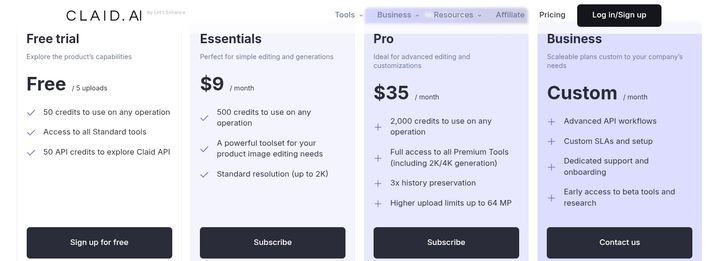
Like every tool in this list, Claid offers a free trial that includes 50 credits to access all of the platform’s features. This free plan allows you to generate or edit between 5 to 25 product images, after which you would need to upgrade to a paid plan to access the features. It’s an excellent way to test all of the platform’s features in real time.
The paid plans are in two tiers as shown below:
Pros
- User-friendly interface
- Easy to use
- High-quality AI backgrounds
- Access to all features in free trial
- Mobile version available
Cons
- Change in products’ fidelity — text, size and proportions can shift in the generated output.
- Learning curve required in API version
- Cloud-based, therefore, saves no offline edits
- Heavy dependency on input image quality
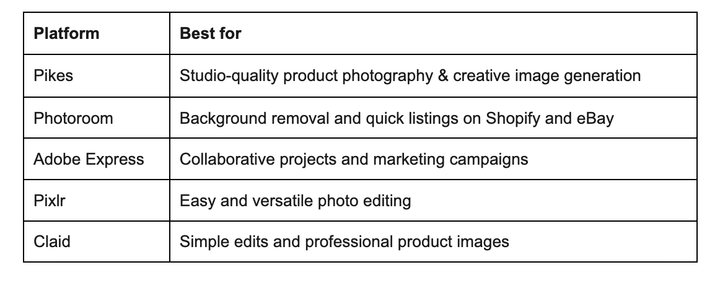
If you want a quick run-through on the ideal platform for different use cases, the table below offers a simple guide to help you choose the right platform.
Final Thoughts
The best e-commerce product photography tools combine robust editing features, speedy generation times, and a studio-level output quality.
Pikes deliver beyond these base requirements by ensuring that generated images retain their text and style. In addition, the comprehensive content creation suite makes it a complete toolkit for e-commerce brand owners and marketers.
If you're ready to upgrade your brand’s content quality and increase revenue through visually-appealing product images, try Pikes today.
FAQ
Is there a cheap alternative to Kive?
Yes. There are many cheaper alternatives to Kive that provide e-commerce product photography tools. A popular, cheaper alternative is Canva, which is free forever and starts at $13/month in the paid plan. Other examples include Adobe Express ($10/month), Photoroom (starting at $7.5/month), and Pixlr (starting at $2.49/month).
Does Kive have competitors for product photography?
Yes. There are faster and cheaper alternatives to Kive for product photography that specifically serve e-commerce brand owners. A good example is Pikes, a comprehensive e-commerce product photography suite for creating professional shoots with perfect text and style consistency. Other examples include: Photoroom, Pixlr, and Picsart.
Which AI tools are better than Kive for product photos?
Kive is an AI platform with genuinely strong image generation. The weakness raised most often in its public reviews is fidelity: holding the original product's lighting, text and proportions in the generated output. For marketplaces like Amazon and eBay, where shoppers judge almost entirely from the photo, that is the thing to test before you commit.
Moreover, some AI platforms like Pikes excels in this area. They process your raw photos to generate hyper-realistic product images that can serve any use case.
What tools are similar to Kive?
Several tools integrate similar features of Kive into their platform, making them the perfect substitutes for Kive anytime. They include Pikes, Claid, and Adobe Express, etc.

Written by
Mike Lehman
Mike Lehman is a senior content strategist at Pikes. Before joining Pikes, Mike spent nearly a decade working with Glossier, Haus, and Athletic Brewing, leading campaigns that blended storytelling and data.