

Mike Lehman
The Dropshipper Guide To Creating Highly Converting Product Visuals with AI
Dropshipping has never been more competitive. Customers can now spot generic AliExpress images instantly, and ad platforms are quicker than ever to reject low-quality or misleading creatives. Therefore, if your store still relies on supplier photos, you’re already at a disadvantage, no matter how good the product is.
In this dropshipper GenAI guide, we will break down how GenAI for dropshippers is changing the game. You’ll see how Pikes AI can help turn basic AliExpress product images into clean, branded, production-ready creatives that are built for ads, product pages, and scale.
We will show you that you don’t need any designers or photoshoots before you can have compelling visuals that help you stand out and sell.
Why Dropshippers Struggle with Product Creatives

For many dropshippers, getting the right visuals to help them sell products is one of the biggest obstacles they face. The product might be great, the price competitive, and the offer solid. If the visuals don’t inspire trust, everything else falls apart.
Before discussing the core of the guide, let’s quickly examine the major challenges dropshippers face when it comes to dropshipping product images.
Low Quality Supplier’s Product Images
Most supplier images, like those on Aliexpress, are designed to list products quickly, not to sell a brand. They’re often low-resolution, badly lit, and cluttered with distracting backgrounds.
Worse still, the exact same images are reused by hundreds, sometimes thousands, of other stores. When shoppers see these images, they can recognize them almost instantly, which makes your store feel generic and untrustworthy.
Ad Rejections and Poor Performance
Platforms like Facebook and TikTok are strict about image quality and realism. Blurry visuals, exaggerated claims, or misleading edits often trigger ad rejections.
In those few times ads get approved, generic supplier images usually lead to low click-through rates and high costs because they don’t stand out in busy feeds. Not just that, you could get banned on some of these social media platforms if your visauls is the same as someone else, as it will be termed “unoriginal.”
Branding Is Hard to Do at Scale
Creating custom product photos for every new item is expensive and slow. When you’re still testing products, it doesn’t make too much sense to hire photographers or designers. Because of this, many dropshippers stay stuck using supplier images, even though they know it’s holding them back.
How GenAI Is Helping to Save the Day for Dropshippers
GenAI has quietly become one of the most powerful tools in modern dropshipping. Instead of relying on raw supplier assets, dropshippers now use AI to upgrade their visuals before a product ever goes live. They are not trying to fake a product; they are simply presenting it clearly, professionally, and in a way that builds trust.
How does GenAI come into the picture?
Gen AI (Generative AI) is a tool for creating original content, and in this context, it allows dropshippers to create new, high-quality visuals from existing suppliers’ (E.g AliExpress) product images. That means taking a basic AliExpress photo and transforming it into clean studio shots or ad-ready creatives.
Unlike generic AI tools, eCommerce-focused GenAI keeps product details accurate. This means the labels stay readable, the product shapes don’t warp, and the textures look real.
To bring it a little closer, dropshippers can use GenAI to:
- Clean up messy supplier images
- Create consistent branding across product pages
- Generate lifestyle visuals without models or props
- Test products faster without upfront photography costs
How GenAI Compares with Traditional Product Photography
For dropshippers, the goal isn’t to create one perfect image. Rather, it’s to test fast, iterate often, and scale what works. This is where traditional product photography struggles to keep up.
With traditional photography, you’re dealing with photographers, studio bookings, lighting setups, editing costs, and long turnaround times. That model makes sense for established brands with fixed product lines, but for dropshippers testing multiple products, it’s slow and expensive. One shoot can cost more than the product itself, and if the creative doesn’t convert, that money is gone.
GenAI changes the story completely. With tools like Pikes, dropshippers can generate studio-quality product images and ad creative visuals in minutes. And they do this without upfront shoot cost, rescheduling, or waiting. Plus, you can test multiple visual styles, angles, and formats before spending a dollar on ads.
More importantly, GenAI gives dropshippers control. You’re no longer stuck with whatever images a supplier provides or whatever a photographer delivers. You can adjust, regenerate, and scale creatives as your store grows, which is exactly what dropshipping demands.
Step-by-Step Guide: Turning AliExpress Images into High-Quality Creatives with Pikes
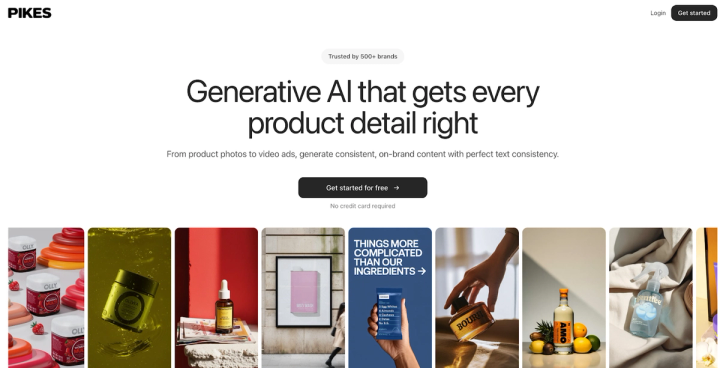
Most dropshippers don’t start with perfect assets; they start with whatever the supplier provides. And it could be cluttered backgrounds, inconsistent lighting, or images that look nothing like a real brand.
With AI photography tools like Pikes available to them now, that narrative has changed. With Pikes, even a basic AliExpress image can become a production-ready visual.
How do dropshippers create production-ready creatives with Pikes?
Here’s the process:
Step 1: Upload Your Supplier Image
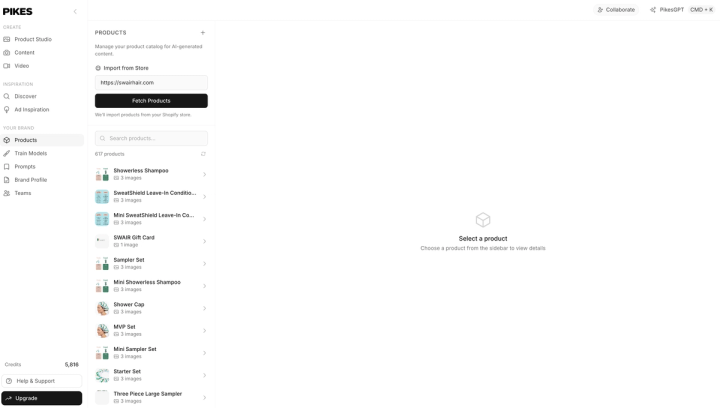
The first step is getting your product into Pikes. Inside the platform, you’ll start in the Products tab. This is where all your assets live.
If you’re running a Shopify store, you can simply paste your store URL, and Pikes will automatically pull in your full product catalogue. For most dropshippers, though, it’s just as easy to manually upload the images you downloaded from AliExpress.
At this stage, it doesn’t matter if the image looks boring or generic. Pikes is designed to work with imperfect inputs.
Step 2: Open the Product Studio
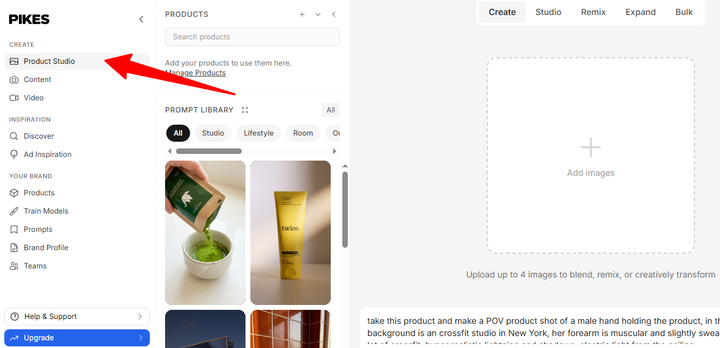
Once your product is uploaded, you move into the Product Studio. This is the core workspace where images are generated, edited, and transformed.
On the left, you’ll see your product assets. Below that, you’ll find ready-made templates – think of these as pre-built prompts for common use cases like studio shots, lifestyle scenes, or ad visuals. This makes it easy to get started even if you’re not sure what to generate yet.
Step 3: Choose the Right AI Model
Pikes gives you control over how your product is generated. You can choose between two models here:
- Consistency model
This is ideal when accuracy is at the top of your priority list. It keeps labels, text, and packaging details perfectly intact. Dropshippers use this model when they are looking for clean, studio-style product images. We’re talking about the kind you’d put on a product page or Amazon listing.
- Creativity Pro model
This model is more dynamic. It’s designed for lifestyle images, ad creatives, and eye-catching visuals. It introduces movement, depth, and realism that would normally take a lot of Photoshop work.
Step 4: Generate Clean, Branded Product Images
With a model selected, you can generate your first upgraded image. What Pikes does here is crucial for dropshipping. It:
- Fixes lighting and shadows
- Removes cluttered supplier backgrounds
- Keeps the product shape, text, and details accurate
- Produces a clean and professional look
This helps you come up with a studio-quality product image that looks like it came from a real brand, and not from just any marketplace supplier.
What More Can You Do with Pikes?
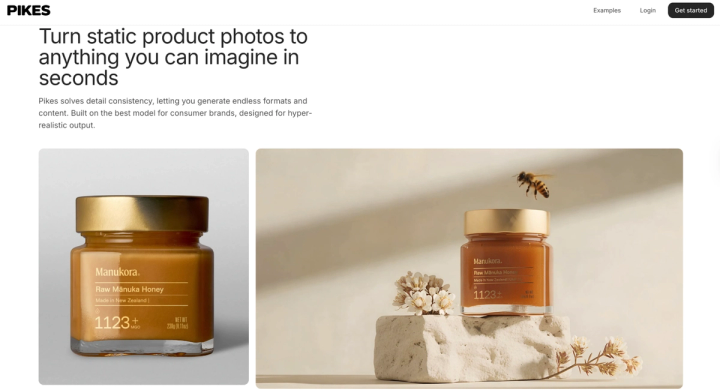
Create Lifestyle and Creative Visuals
Once you have clean product shots, you can move to creating lifestyle and creative visuals for your brand.
Using the Creativity Pro model, you can place your product into realistic scenes, whether it’s a kitchen, bedroom, fitness space, beauty routine, or outdoor setting. These images help customers understand how the product fits into their lives, which is especially important for ads.
Instead of copying competitor creatives, you’re now generating your own unique visuals that still feel natural and trustworthy.
Use “Describe Image” to Match a Style You Like
If you’ve seen a competitor ad or a product image style you like, you don’t need to guess how it was made. With Describe Image, you can upload a reference image and let Pikes analyze the style for you.
It breaks down elements like lighting, mood, angle, and composition, then helps you generate something similar using your own product. This is especially useful for dropshippers who want to stay on trend without copying visuals directly.
Remix Existing Images to Extend Their Life
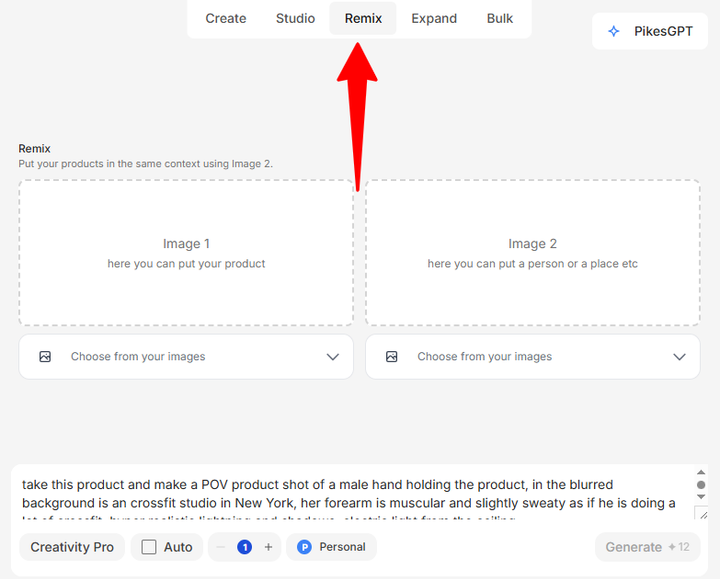
One of the biggest advantages of Pikes is Remix.
Instead of creating everything from scratch, you can take an existing image (e.g. Pinterest, Unsplash, etc) and swap the product inside it. For example, replacing one supplement bottle with another flavor or variant. This allows dropshippers to:
- Refresh product pages
- Create visuals for new variants
- Reuse successful ad styles
- Avoid new photoshoots altogether
It’s a massive time-saver when you’re testing or scaling multiple products.
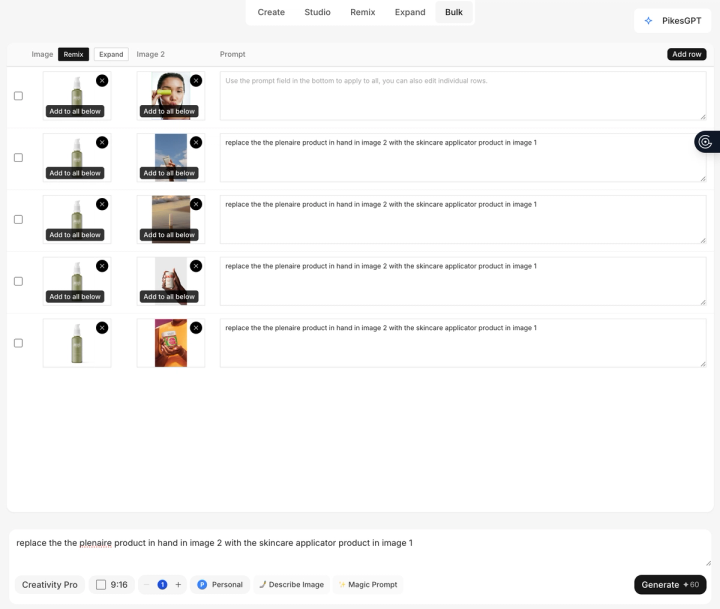
Scale with Bulk Creation
When you’re testing products, one creative is never enough. Bulk Creation lets you generate multiple images at once by running several prompts simultaneously. This is perfect for creating ad variations, testing different backgrounds or styles, or launching multiple products quickly. For dropshippers managing large catalogues, this can turn hours of manual work into minutes.
Add Motion with Simple Product Animations
Finally, Pikes lets you add subtle animations to static images. Things like moving background elements or gentle motion effects help creatives stand out in feeds, especially on TikTok and Instagram.
You don’t need video editing skills. Just describe the motion, click generate, and the animation is created.

Why Pikes AI Is Built for Dropshippers
The truth is that most AI image tools weren’t designed with dropshippers in mind. They’re great for creating abstract visuals or artistic scenes, but when it comes to real products, they often fall short. With most of them, your labels can get distorted, your text can turn into gibberish, and packaging may change shape. For dropshippers, those mistakes aren’t just annoying; they can also cost you the trust of customers and result in ad rejection.
Pikes is different because it’s built specifically for consumer brands and eCommerce workflows. There is a reason the tool has become the favorite of over 1,000 dropshippers worldwide. Let’s see some things that make it stand out when it comes to AI product photography for dropshipping.
1. Perfect Product Consistency (No AI Weirdness)
Pikes uses models designed to preserve product details exactly as they should appear. That means Pikes makes sure your logos remain readable, packaging stays the same shape, and text doesn’t turn into random characters. This is critical if you need your product to look real, accurate, and ad-compliant across every image.
2. Made for Real E-commerce Use Cases
Pikes supports the exact formats dropshippers need, from clean store images to lifestyle visuals. When you use Pikes, you’re not forcing a generic AI tool to “sort of” work; you’re using a platform built for product pages, Facebook ads, TikTok creatives, and marketplace listings.
3. Built-In Creative Inspiration
Pikes goes beyond just AI image generation for e-commerce. It includes templates, a Discover page for inspiration, and ad insights that show what competitors are running. This helps speed up your creative decisions when launching or scaling products.
4. Scale Without Designers or Photoshoots
Testing products is the core of dropshipping, and Pikes makes that happen fast. You can generate multiple creatives per product, experiment with styles, and iterate daily – all without hiring designers or waiting several days to get a shoot schedule. That speed is what helps dropshippers move from testing to scaling faster than their competition.
Final Note
In a largely competitive and selective market, visuals separate serious stores from forgettable ones. Moreover, generic AliExpress photos no longer build trust, and they certainly don’t help ads stand out.
To compete, dropshippers need creatives that look intentional, branded, and professional from day one.
That’s where Pikes AI for dropshipping changes the game. It gives dropshippers a practical GenAI workflow, turning basic supplier images into production-ready product photos and ad creatives at scale. Without photoshoots or designers, you get fast, high-quality creatives that help you test faster and stand out in a crowded dropshipping market.
FAQs
How can dropshippers use GenAI?
Dropshippers can use GenAI to turn basic supplier images into clean, branded, production-ready visuals. Instead of relying on raw AliExpress photos, GenAI helps generate studio-style visuals that build trust and improve conversion rates across stores and ads.
Can AI replace product photography for dropshipping?
For most dropshippers, yes. Traditional photography is slow and expensive, especially when testing products. Tools like Pikes AI allow dropshippers to create realistic, accurate product images without photoshoots, while keeping labels, packaging, and details consistent and ad-compliant.
How do I improve AliExpress product images?
Start by removing cluttered backgrounds, fixing lighting, and creating consistent angles. With Pikes, you can upload AliExpress images and instantly generate clean studio shots, lifestyle scenes, and branded creatives that look far more professional than the original supplier photos.
What is the best AI tool for dropshippers?
The best AI tool for dropshippers is one built specifically for eCommerce visuals. Pikes AI stands out because it preserves product accuracy, avoids “AI-looking” distortions, and supports real dropshipping needs.

Written by
Mike Lehman
Mike Lehman is a senior content strategist at Pikes. Before joining Pikes, Mike spent nearly a decade working with Glossier, Haus, and Athletic Brewing, leading campaigns that blended storytelling and data.