

Mike Lehman
7 Ways to Use Claude for E-Commerce Content Generation

For marketers and creative teams, Claude is no longer just any AI tool. It’s quickly becoming their go-to for writing product descriptions, brainstorming ideas, and planning campaigns. It also saves the day for many looking for a way to organize their messy workflows.
Virtually everyone is talking about the tool now, except e-commerce brands. And that’s because Claude hasn’t been very helpful when it comes to creating visuals they need to sell their products online.
But the story seems to be changing now – thanks to Pikes MCP. Brands can now do more than just generate product images; they can also edit existing photos, create lifestyle scenes, and much more, right inside Claude. This means e-commerce brands no longer need to jump from one tool to another. They only need to describe what they want in plain English, and they can have it.
In this guide, we will take a closer look at how all of these work and show you common ways e-commerce brands are using Claude today.
What Is Pikes MCP and Why Does It Matter?
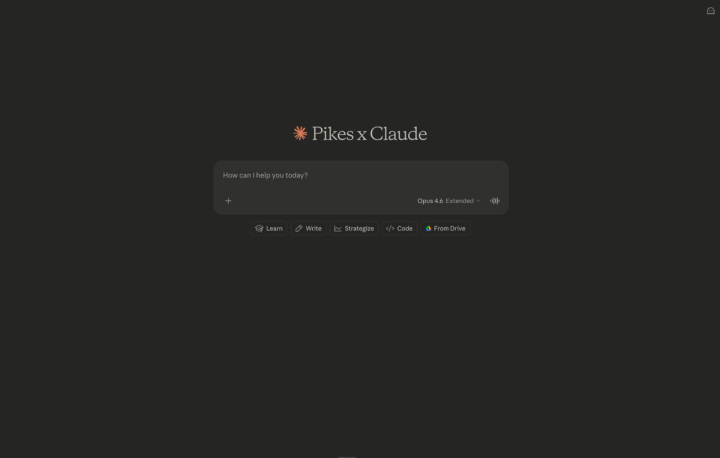
Before we get into the practical ways to use Claude for e-commerce content generation, it helps to understand what Pikes MCP actually is and why so many consumer brands are paying attention to it right now.
MCP stands for Model Context Protocol. In simple terms, it’s a system that allows external tools to connect directly to AI systems, like Claude. It’s like giving Claude new abilities beyond writing and analysis. With Pikes MCP connected, Claude can now generate images, edit product photos, create videos, remix scenes, and resize creatives for different platforms – all inside the same chat.
That’s the big shift here.
Before now, e-commerce brands often needed many tools to create content for their products. They write prompts in one platform, use another platform for editing images, and then look for another to resize creatives just to create product pages or ads. This workflow is not only slow; it can also be very messy and expensive, especially for growing brands.
Pikes changes that workflow completely. Instead of learning complicated software, you simply talk to Claude naturally. For instance, you can say:
“Put my product on a kitchen counter with soft morning lighting.” Or “Turn this skincare image into a short cinematic video for TikTok.”
And it happens directly in the conversation.
Pikes uses several top AI image and video models to make sure you have the best outputs, including Nano Banana Pro, Ideogram, Kling, Seedance, and Veo 3.1. The good part is you don’t have to choose which model to use yourself. Pikes automatically picks the best one for the task based on what you ask Claude to create.
So, why does this matter? Well, for e-commerce teams, this is a big deal because content production has become nonstop. Brands constantly need new ad creatives, social media visuals, and many more to push their brands. Pikes MCP helps speed that process up dramatically without making the workflow more technical or complicated.
And that’s exactly what this guide is about. We’re going to look at practical, real-world ways e-commerce brands are using Claude and Pikes together to create faster, better, and more scalable content.
How to Set Up Pikes in Claude
Getting started with Pikes inside Claude is surprisingly simple. You don’t need any technical setup or coding knowledge. The whole process takes just a few minutes.
Step 1: Create Your Pikes Account
First, head over to Pikes AI and create an account.
This is where your generated assets, credits, and product images will live. Once your account is ready, you can connect it directly to Claude.
Step 2: Add the Pikes MCP Integration in Claude
Inside Claude, go to ‘Settings,’ and then to ‘Add Custom Integration. You’ll see an option to add an MCP server. Paste this server address: https://pikes.ai/mcp
After that, Claude will guide you through the authentication process to verify the connection.

Step 3: Start Creating Inside Your Chat
Once connected, open a new conversation in Claude and start prompting naturally.
You can say things like:
- “Generate a luxury product shot of this candle on a marble countertop.”
- “Turn this product image into a short cinematic video.”
- “Place this protein powder beside gym equipment with moody lighting.”
That’s it. You’re now using Claude as both a creative assistant and an AI-powered content studio.
The best part is that the workflow feels natural. You’re not learning a complicated design tool or switching between multiple apps. You simply describe what you want, refine the results through conversation, and keep creating inside the same chat thread.
7 Ways to Use Claude for E-Commerce
1. Create Lifestyle Product Images for Social Media
One major challenge that plagues e-commerce brands is keeping their social media content fresh. They always need new visuals to ensure their brand stays top of mind. But achieving this traditionally does not only take time; it also requires a lot of planning and money.
With Claude, you no longer have to go through all that. You just need to describe the kind of image you want, and you can have it in a split second. Claude, through Pikes, allows you to create lifestyle scenes, seasonal content, and branded visuals without spending months organizing a traditional photoshoot.
A skincare brand, for example, could prompt Claude with:
“Generate a luxury skincare serum on a bathroom shelf with soft natural morning lighting, clean white tiles, and minimal aesthetic.”
A snack brand could create:
“A protein bar beside gym equipment with moody lighting and a fitness-focused atmosphere.”
They will not only get these images immediately, but they also get the chance to test multiple creative directions, hence ensuring their brand stays consistent with fresh content.
2. Turn Basic Product Photos into Premium Ad Creatives
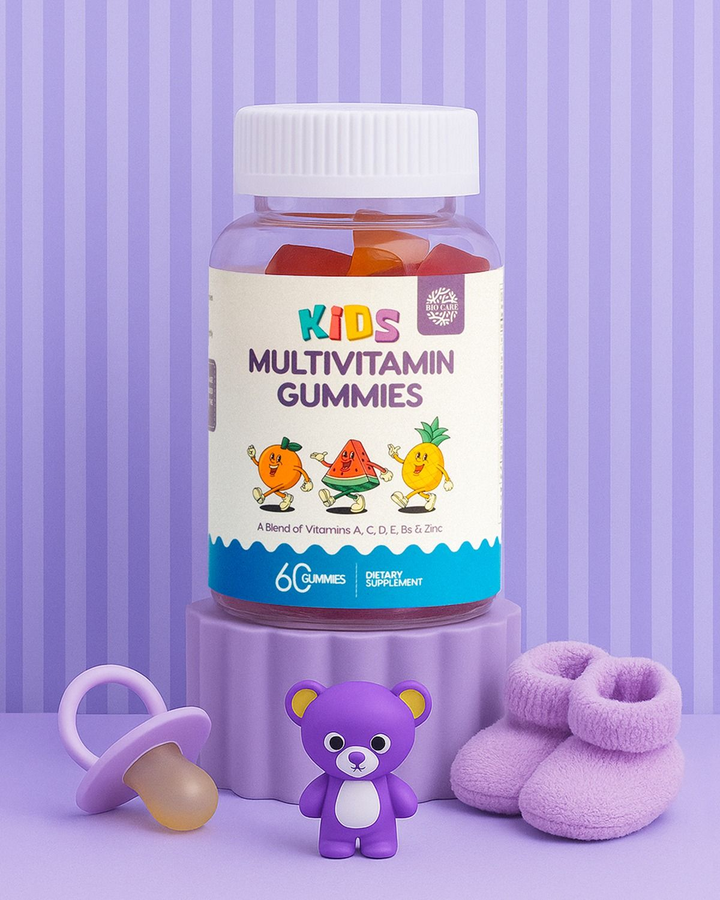
Most brands already have product images sitting somewhere in their asset library. Usually, they’re simple white-background shots taken for marketplaces like Amazon or Shopify.
Are they useful? Yes. But are they exciting? Not always.
With Pikes connected to Claude, those ordinary product photos can become polished ad creatives without needing a full redesign or reshoot. You simply upload your existing image into the chat and tell Claude what to change.
For example:
“Place this candle on a cozy bedside table with warm evening lighting and a luxury hotel feel.”
Or:
“Turn this supplement bottle into a premium gym lifestyle ad with dark, moody lighting.”
Pikes can intelligently edit backgrounds, add environments, adjust styling, change lighting, remove distractions, and create entirely new scenes around your product while keeping the product itself consistent.
3. Generate Multiple Creative Variations for A/B Testing
Running ads today is rarely about finding one perfect creative. Most successful e-commerce brands test multiple variations constantly. Different backgrounds, lighting, headlines, moods, and visual styles can completely change how an ad performs.
The problem is that creating enough variations manually takes a huge amount of time. But Claude and Pikes make this process much faster.
Instead of creating one image at a time, you can quickly generate several creative directions from the same product. You can test minimalist visuals against bold, colorful scenes. You can compare luxury aesthetics with casual lifestyle setups. You can even experiment with seasonal moods or different target audiences.
4. Create Marketplace-Ready Images for Amazon, Shopify, and Ads
Modern e-commerce brands don’t create content for just one platform anymore. The same product image might need to work as:
- an Amazon listing image
- a Shopify banner
- an Instagram post
- a TikTok Shop cover
- an email header
- a display ad
And every platform uses different dimensions.
Normally, resizing creatives creates problems. Important parts of the image get cropped and layouts stop looking balanced. So, designers end up manually adjusting every format one by one.
Pikes solves this with its Expand Image capability directly inside Claude. Instead of awkward cropping, Pikes intelligently extends the image canvas and generates new visual content around the original image so it fits the required placement naturally.
For example, you can simply tell Claude: “Expand this image into a 16:9 website banner.”
Or: “Convert this product image into a vertical 9:16 format for TikTok Stories.”
The result looks like the image was originally shot in that format.
5. Turn Still Product Images into Short Videos
Short-form video has completely changed e-commerce marketing. Instagram Reels, TikTok, YouTube Shorts, and video ads have reshaped how people find products online. However, one fact about this is that creating videos takes a lot of money for brands. To shoot high-quality videos, you will need adequate planning, equipment, editing, and production resources.
But the good news is that all these are now made easier and faster with Claude and Pikes.
With the Animate Image feature, you can upload a still product image and turn it into a short cinematic video directly inside your conversation.
Pikes uses advanced video generation models like Kling, Seedance, and Veo 3.1 to create natural movement and depth. And the results look much more polished than simple zoom effects or slideshow-style animations.
This means brands can now produce more motion content without constantly filming new footage.
6. Remix Product Images into Endless Lifestyle Scenes
This might be one of the most powerful features for e-commerce brands when using Claude and Pikes together.
Most brands already have standard product photos on white backgrounds. The problem is that modern marketing needs much more than that. Customers want to see products in real-life settings that feel natural, relatable, and visually engaging.
That’s where Remix Images comes in.
Pikes allows you to combine your product image with an entirely different lifestyle scene. You upload both images into Claude – your product and the environment you want it placed in – and Pikes intelligently blends them together while matching lighting, composition, and perspective.
For example, a honey brand could upload:
- a clean product shot of the honey jar
- a cozy breakfast table scene
Then prompt Claude with: “Place the honey jar naturally on the breakfast table and match the warm morning lighting.”
This means instead of organizing separate photoshoots for every creative idea, one single SKU image can be transformed into dozens of different lifestyle visuals for:
- paid ads
- product pages
- social media
- seasonal campaigns
- email marketing
- marketplace listings
7. Speed Up Creative Brainstorming and Campaign Ideation
Claude is already great at helping marketers brainstorm ideas, campaign angles, product messaging, and creative concepts. But when paired with Pikes, those ideas can instantly become visuals instead of staying as text in a document.
Instead of spending hours explaining concepts to designers or waiting days for mockups, teams can quickly generate visual directions directly during brainstorming sessions.
Claude also acts like a collaborative creative partner during the process. You can continue refining ideas naturally:
“Make this feel more premium.”
“Add stronger luxury fashion energy.”
“Create a version that feels more playful and colorful.”
That conversational workflow removes a lot of friction from the early creative stage.
Final Thoughts
Claude is already becoming a go-to tool for marketers, founders, and creative teams. But with Pikes MCP connected, it becomes much more than a writing assistant. It becomes a complete creative workspace for modern e-commerce brands.
Instead of juggling multiple design tools, editing platforms, and production workflows, brands can now generate images, edit creatives, remix product scenes, and more directly inside a simple conversation.
FAQs
Can Claude generate images on its own?
Not natively. Claude mainly focuses on writing, reasoning, and analysis. But once connected to Pikes through MCP, it can generate images, edit visuals, remix scenes, expand creatives, and create videos directly inside the chat.
Do I need design experience to use Pikes with Claude?
No. Everything works through natural conversation. You simply describe what you want in plain English, and Pikes handles the technical side of the image and video generation process.
Can I use my existing product photos to generate brand images with Pikes?
Yes. In fact, many e-commerce brands will probably get the best results this way. You can upload your existing product images and use them for edits, remixes, expansions, and animations.
What types of brands benefit most from this workflow?
Almost any consumer brand can benefit, especially:
- skincare and beauty brands
- food and beverage companies
- supplement brands
- fashion labels
- home and lifestyle products
- DTC e-commerce stores
Brands producing large amounts of social content and paid ads will likely see the biggest impact.
Do I need to choose AI models manually?
No. Pikes automatically selects the best AI models for the task you’re trying to complete. That includes image generation, editing, remixing, expansion, and video animation.
Is this useful for small e-commerce teams?
Very much. Small teams often struggle with content production because of limited budgets and resources. Claude and Pikes help reduce the need for large production workflows while still allowing brands to create professional-looking creatives quickly.

Written by
Mike Lehman
Mike Lehman is a senior content strategist at Pikes. Before joining Pikes, Mike spent nearly a decade working with Glossier, Haus, and Athletic Brewing, leading campaigns that blended storytelling and data.