

Mike Lehman
Best Soona Alternatives for E-commerce Brands in 2026

For many years now, Soona has been the go-to for brands that want to outsource their product photography. Its on-demand model for product photos and video shoots significantly reduced friction for many businesses. But it has its challenges too. Having to first book online, ship your products to a Soona studio, then attend the shoot virtually to approve is a long process.
Things are no longer what they used to be, and the world is changing fast. There’s now a lot more competition, and e-commerce brands have to push new product pictures as often as possible. That’s why these brands have started to use better alternatives that save time, money, and stress. For instance, instead of having to send your products all the way to a Soona studio, you can take basic product pictures with your phone and use them to generate studio-quality images with just a few clicks. This is one area that a traditional studio workflow, like Soona, lacks.
In this article, we’re taking a look at seven alternatives to Soona that e-commerce brands can use. But before we go into that, let’s look at the challenges people face with Soona for product photography.
Challenges with Using Soona for Product Photography
Even though Soona is a good option for e-commerce product photography, it has some limitations like unclear pricing, cost, logistics, and delays, limited creative flexibility, scalability issues, inconsistent content renewal, and bad image quality.
Unclear Pricing
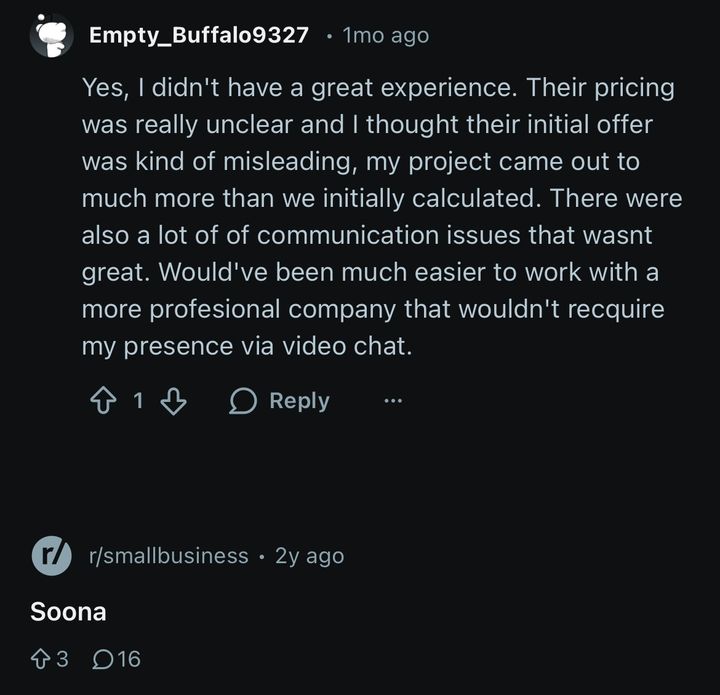
When the price of a service isn’t clear or it’s misleading, it stresses the client out. You think you’re working within budget, only to be told something else when the service is delivered.
This is the case with some people who have used Soona. They complain about being charged more money than was initially calculated or agreed upon.
Cost
If you’re a Presson Nails brand, for instance, or a gadget brand that frequently takes product pictures, using Soona becomes very expensive. You need to book a studio session for each shoot. Imagine how quickly that adds up and drains your pocket.
Logistics and Delays
With Soona, you have to ship your products to the studio, schedule shoot sessions, join virtually to approve images, and also wait for edits. The stress of having to ship these products is one thing. The delay from the entire workflow is another. Worse still, your product could get damaged in the process of shipping.
Limited Creative Flexibility
With a traditional studio like Soona, the background, props, and lighting may be restricted to only a few options. So let’s say you want to recreate unique scenes like stylized lifestyle shots or international scenery, it becomes a problem. It’s either almost impossible or very expensive.
Scalability Issues for Large SKUs
This mainly applies if you’re a brand that manages hundreds or thousands of SKUs. It’ll become too stressful to keep product photography consistent across different colors and variants. They are created by humans, and mistakes are bound to happen.
Bad Image Quality
Some Soona clients have complained about how bad the images turn out. Sometimes they don’t look like professionally shot product photos, and that is a problem because sales start from the images people see.

If what they see doesn’t look good enough, there’s a problem. This is also why you need alternatives that help you create high-quality product images. Now let’s look at those alternatives.
7 Soona Alternatives for E-Commerce Brands in 2026 (with Pros & Cons)
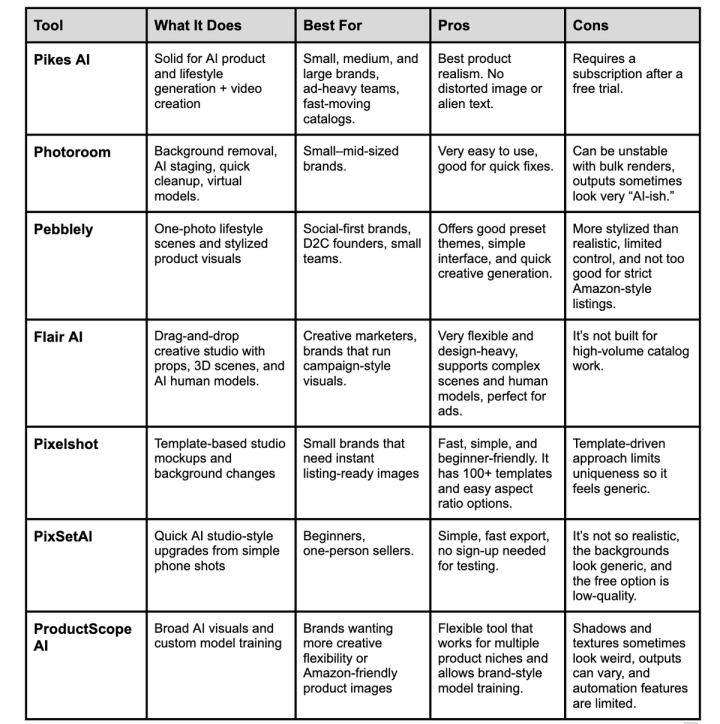
Now that we know the challenges with using Soona for e-commerce product photography, let’s look at seven alternatives. They are Pikes AI, Photoroom, Pebblely, Flair AI, Pixelshot, PixSetAI, and ProductScope AI.
⭐️ Pikes AI (Best Overall)
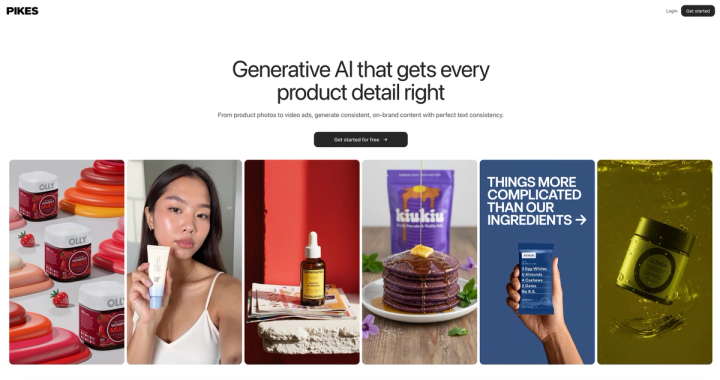
Pikes AI is an all-round AI alternative for e-commerce brands. It creates realistic pictures that don’t scream, “I was made with AI,” because this can make potential customers run away. You can generate the product images right from your room and with your mobile phone or laptop. No need to ship to a studio or wait long hours and days.
It doesn’t matter whether you’re a big or small brand; Pikes AI helps you with quality product pictures and even videos. If you frequently run campaigns, you can generate as many images as you want, the way you want them.
Pros
- The most important advantage of using Pikes AI is the image quality. They look like studio-taken pictures because of their top-notch quality. Even the lifestyle images come out really well.
- Pikes AI contains a complete suite for your e-commerce brand. You don’t need an external editing tool after your images have been generated.
- It handles bulk generation and batch processing. This helps with consistent visuals across many SKUs without repeated shoots.
- It supports custom style models. You just need to upload a few sample images and generate many consistent ones that go with your brand’s aesthetic.
- You can create videos and animations with Pikes AI. They’re useful for ads or just social media content.
- Pike's AI looks very real. People generally have reservations about using AI tools for image generation, but Pikes AI stands out for how real and consistent the images it creates look.
- Pikes AI creates product images without distorting texts or labels.
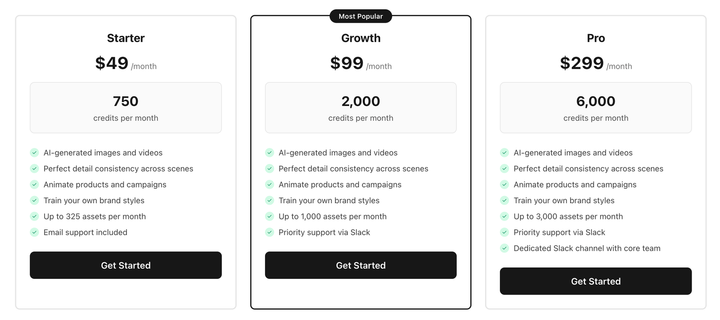
- It is affordable. With only $49 every month, you get to enjoy 325 brand assets.
- You also enjoy 24/7 customer support whenever you need assistance.
Cons
- After your free trial, you need to subscribe to continue using it. This is normal with all AI tools anyway.
Photoroom
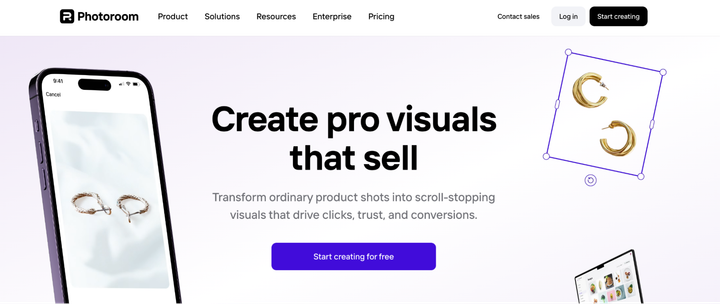
Photoroom requires you to take basic product photos and then use them to create studio-standard ones on the platform. If you’re a growing e-commerce brand, this is a good one for you.
Pros
- It has a clear background removal tool, plus AI-powered background replacement, lighting, and staging.
- It recently introduced some new AI tools like “Product Beautifier”, “Product Staging”, and “Virtual Model”, AI Fill, etc. This helps with the quality of images.
- It generates realistic images.
- Works well for quick adjustments. If you already have basic product shots (e.g., raw photos), Photoroom helps clean and stylize them quickly.
Cons
- You could experience crashes, low-quality renders, or inconsistent outputs, especially when you’re generating many images.
- It’s not as realistic as tools like Pikes AI. Lighting, shadows, and proportions look rough sometimes.
- The different tiers for the paid plan are confusing, and this can be misleading.
- The customer support is unresponsive, and this stresses users out.
Pebblely
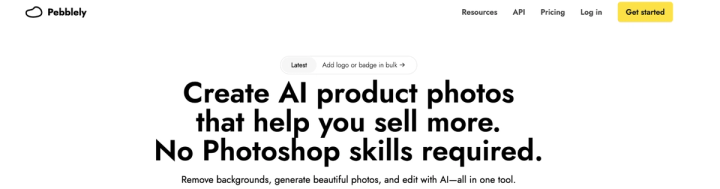
Next on our list is Pebblely, which boasts of creating images that “help you sell more.” With Pebblely, you can generate beautiful product images and edit without Photoshop skills.
Pros
- It generates clean images
- There are more than 40 preset themes. There’s also bulk generation via API.
- It has a simple interface that makes it easy to navigate.
- You can generate 40 free images every month. If that’s not enough, you switch to the paid plan.
Cons
- The images it generates look more “stylized” than realistic.
- You have limited control over details like exact lighting, consistent shadows, or precise product proportions.
- Even though you can start with a free plan, it has tight generation limits. If you want something serious, you need a paid plan.
- If you sell on Amazon, you have challenges because things like white background restrictions may not be so accurate. That’s how it’s designed.
Flair AI

Flair AI is fourth on our list because it is another good Soona alternative for your e-commerce brand. Let’s check out some of the pros and cons.
Pros
- It has a drag-and-drop studio interface where you can arrange props, backgrounds, and models, then export images or short videos.
- Flair AI supports 3D elements, lighting adjustments, and customizable scenes. This gives creative flexibility.
- It has AI human models that you can use for lifestyle shoots.
Cons
- Because of its manual-like interface and “studio builder” model, production speed may be slower than fully automated tools.
- To achieve high-quality or realistic results (especially lighting, textures, shadows), you may need manual tuning or repeated attempts. Again, this delays the process.
- It’s not really optimized for bulk or catalogue-level use. It’s better for small campaigns and ads.
Pixelshot
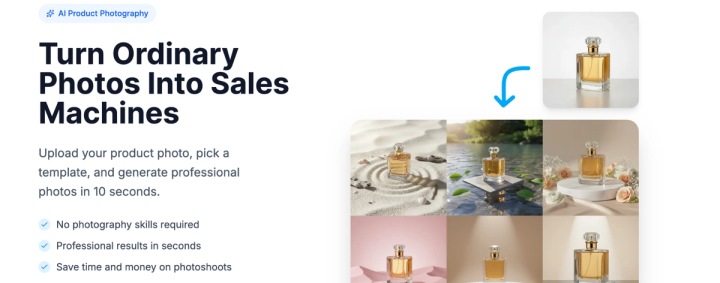
Pixelshot lets you turn ordinary images into images that bring you money. You don’t need photography skills, and you can start creating as soon as you get on the platform.
Pros
- It lets you upload a basic product photo and generate studio-quality product visuals in a few seconds.
- Pixelshot contains 100+ professional templates across skincare, fashion, kitchenware, etc.
- You can remove backgrounds with just one click. This makes it a flexible tool for your e-commerce product photography.
- You’re able to choose different aspect ratios like 1:1, 16:9, and 9:16, depending on the channel you’re using.
- Lastly, it’s a good entry-level tool if you want clean, consistent product images quickly.
Cons
- It is sometimes inaccurate and lacks specific details.
- Because of its template rather than custom image generation, there may be limits in creative flexibility.
- When you rely too much on templates, the images start to look similar or generic.
PixSetAI

This tool is perfect for social media, Amazon, and e-commerce generally. You take real pictures and turn them into professional shots with a few clicks. You can even turn them into lifestyle product images all on the platform.
Pros
- It allows you to transform simple or plain product shots into studio-quality images.
- The export time is fast, it has a simple interface, and you don’t need to sign up before you test it out.
- It’s a good option for small brands, side-hustles, or one-person shops that need clean images quickly.
Cons
- It may not look so real because of its generalist design, especially for complex products.
- It’s not as good as some advanced AI tools when it comes to custom backgrounds, creative marketing visuals, etc.
- The free trial doesn’t generate high-quality product images.
ProductScope AI

ProductScope AI turns boring, basic product images into stunning ones. It’s also good for Amazon listings as it’s flexible enough to follow Amazon’s image guidelines.
Pros
- You can replace image backgrounds without stress.
- It allows you to train their own AI model by uploading a few reference images. This feature helps with style consistency.
- It can be used for fashion, pets, and custom visuals. This gives you more creative options to choose from, even for your product shoots.
- It is generally easy to use.
Cons
- Because it aims to be broad and not niche-specialized, you may need to always check how realistic and consistent the output is.
- Weird shadows and textures are a problem with this tool.
- The output may not align with what you want, so check and tweak where necessary.
- It has limited automation features.
Conclusion
While Soona has its good sides, it comes with its challenges, and as a brand in this fast-paced business Industry, you cannot afford to waste time and money. That’s what makes alternatives like Pikes AI relevant.
Pikes AI stands out because it delivers high-quality product images that look real without you having to ship your product to a Soona studio. It’s also very flexible so that you can play around with backgrounds, colours, angles, etc., to fit your brand’s aesthetics.
The best part is that you don’t need a lot of money for it. You get 325 brand assists for $49 per month when you use Pikes AI. So, you get everything: great product images, an affordable tool, and no stress.
Frequently Asked Questions
Does Soona Still Have Competitors for Product Photography?
Yes, it still does. Beyond traditional studios, many AI image-generation tools like Pikes AI get the job done well. Brands no longer have to rely on physical product shoots because they can now generate clean product images, lifestyle shoots, and ad-ready visuals from a single sample photo.
This shift means Soona is competing on two fronts: physical studios offering hands-on photography, and AI platforms offering speed, scalability, and lower production costs. For businesses that release new products frequently or manage large SKU volumes, AI tools have become a perfect alternative.
What is the Best Soona Alternative for E-commerce in 2026?
The best option depends on your workflow and what you want, but for most e-commerce brands, Pikes AI stands out as the strongest all-rounder in 2026. It’s great at realistic lighting, accurate proportions, and batch-friendly features. The images that Pikes AI generates look more “real” and consistent compared to many other tools.
Other good tools include Pebblely, Photoroom, and Flair AI, especially for lifestyle images. Overall, if your priority is reliable, scalable, clean product photography, then Pikes AI is your buddy.
Are AI tools Now Better than Soona for Product Images?
For many e-commerce needs, the simple answer is yes. AI tools are faster, more affordable, and much easier to scale than traditional photography. Brands can use multiple backgrounds, styles, and angles in minutes without scheduling shoots or shipping products. This efficiency is what every business wants.
However, traditional photography still has its own use, and that’s why some brands take the hybrid approach. They take good, real photos with their phones/cameras and use AI to get different variations of it.
What is the Best Soona Alternative for Amazon Sellers?
For Amazon and other e-commerce stores, you need to comply with the given guidelines. In this case, Pikes AI is a very good choice because it is compliant with Amazon’s image guidelines, e.g., white background. The shadows and product proportions are also important so that your listing isn’t rejected, and Pikes AI delivers on this.
Some other tools, like Photoroom, are helpful for smaller catalogs or simpler products, especially when you just need clean cutouts or quickly fix the background.
How Can E-commerce Brands Create Product Photos Without Soona?
They can use AI tools like Pikes AI. You need a clear sample image taken with a smartphone or basic camera on a simple background. Then the AI tool takes this sample image and turns it into what you want.
For more creative uses like lifestyle shoots, social media posts, or ad visuals, tools like Pebblely, Flair AI, and Pikes AI can produce styled environments in just a few minutes. Then you review the output, make tweaks where necessary, export, and use.

Written by
Mike Lehman
Mike Lehman is a senior content strategist at Pikes. Before joining Pikes, Mike spent nearly a decade working with Glossier, Haus, and Athletic Brewing, leading campaigns that blended storytelling and data.