

Mike Lehman
Midjourney for Product Photography: Limitations & Better Alternatives
Midjourney is no small player in the GenAI world. Competing with tech giants like Google's Gemini and OpenAI's DALL-E, it stands as one of the most popular image generation platforms for individuals and businesses. It also positions itself as a research lab that is passionate about expanding the ability to imagine creatively.
While it is cheaper than most alternatives, Midjourney product photography ability is subpar compared to the industry standard. Several business owners complain of issues like non-adherence to prompts, wide artistic flair, and reduced image quality. This has birthed the rise of platforms that meet the need for consistency and high-quality image generation.
This article pulls reviews, use cases, and smarter alternatives from real-world experience to help you make better choices for your e-commerce business.
Can Midjourney Do Product Photography?
Although Midjourney is excellent at generating animated images and creative artworks, it lags at creating marketable, on-brand product photos.
Many e-commerce business owners mention that they generate backgrounds using Midjourney and use an external tool like Photoshop to place their products in the generated scenes. However, the result, most times, is a product image that looks cut-and-pasted rather than professional, like this user reports:
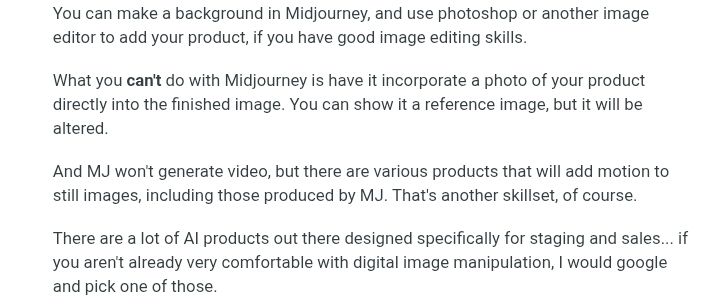
As this method still requires photo editing skills to align the lighting, apply shadows, and adjust resonance, this proves to be an unscalable and inefficient method for generating large-volume product images.
Midjourney's Limitations for Product Photography
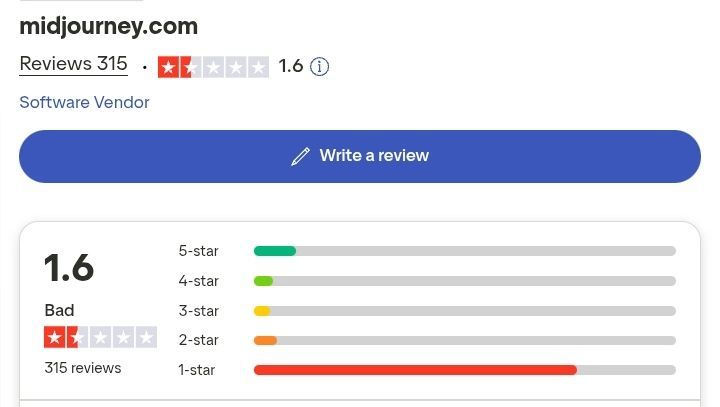
According to multiple sources from G2 and Trustpilot, the most highlighted limitations of Midjourney in product image generation are:
Artistic outputs
Midjourney is an excellent artwork generator often used by small business owners for professional and personal use. However, this feature affects e-commerce owners, as it generates images that look perfect and artistic. In lifestyle product shoots that require human models, body parts appear polished and shiny—the kind of AI images that most consumers find irritating.
Non-adherence to prompts
Multiple users complain of Midjourney’s inability to adhere strictly to text prompts, with some reporting that it generates something entirely different. Users have to tweak the generated images multiple times to get their desired results. As this photographer on G2 puts it, “...the prompt control is somewhat limited, so achieving specific details or iterations can be challenging without trial and error.”
Another Reddit user commented, “I find each new MJ version disregards my prompts more and more.”
Distorted details
In product photography, closing up on details like logos and texts helps consumers find important information like product names and ingredients to make buying decisions. Unfortunately, Midjourney struggles with retaining fine product details, as it often generates images with distorted logos and style, as this G2 user mentions, “It is unable to replicate and generate exact logos or technical details.”
Inconsistency across generated assets
Midjourney struggles with keeping style consistent across generated assets, and a user on Product Hunt asserts using other tools to ensure consistency, which can be exhausting.
No API access
Midjourney provides no API access to the public for integration into websites. This poses a problem for brands that have a large inventory and need to improve workflow. Also, running on Discord sometimes leads to lost outputs, and users complain that it can feel clunky and overwhelming to generate images on the external platform.
Better Midjourney Alternatives for Product Photography
Pikes AI
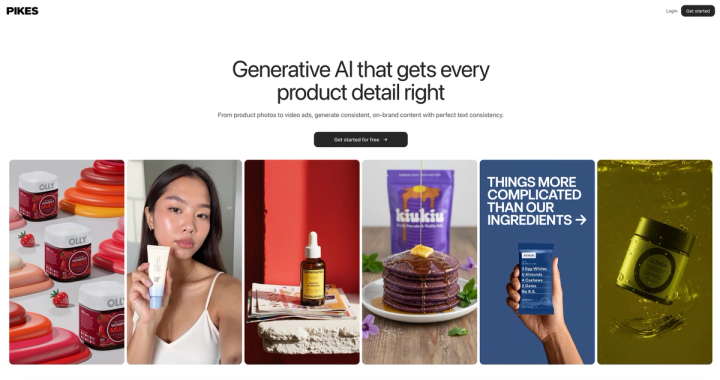
Pikes is an all-in-one product photography suite specifically made for e-commerce brands. It uses a suite of best in class GenAI models to generate product images that match traditional quality and feel natural. Pikes has an unmatched consistency feature that retains product logos, texts, and shape. It is perfect for consumer packaged goods that need to preserve products' details that buyers may need.
Features
- Product image generation: The tool takes your product image and places it in different contexts without altering the form or adding alien text to your product label.
- Collaboration: Pikes is designed for leading brands. It has best in class collaboration features like teams, workspace sharing, and prompt saving so that different people can collaborate on one campaign together.
- Template page: This section sources inspiration from high-performing content across social media and the web within the platform.
- AI photoshop: This allows you to easily add, resize, and remove images without altering the quality. The color change feature also enables you to create multiple forms of your product without taking more shots.
- Product image animation: Turn static product images into attention-grabbing social media content and engaging visuals.
- Multiple use cases: to align your content to fit into different platforms (TikTok, Walmart, Amazon, etc.).
Pros
- Perfect product detail consistency
- Free trial available without a credit card required
- Brand management and organization
- Full human customer support
- Easy subscription cancellation
Cons
- Minimal learning curve required
Pricing
Pikes allows new users to try out all the platform's features without the need for credit cards. This free version allows you to generate up to 5 downloadable product images.
After your free plan expires, you can upgrade to any of the three monthly packages below:
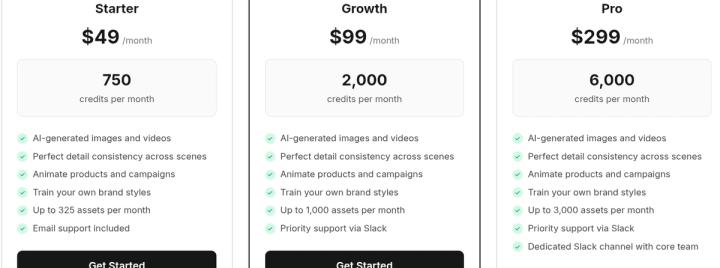
Annual plans run at lower costs with up to 50% discounts.
Pikes also offers custom pricing and API plans for enterprises and agencies.
Caspa AI
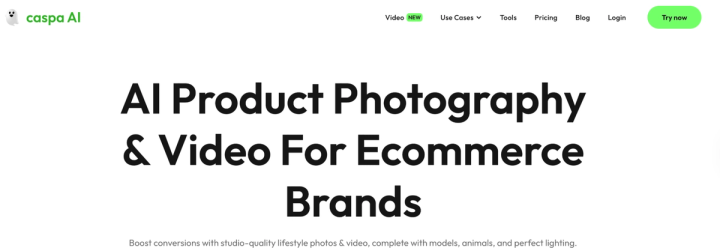
Caspa AI is another AI product photography platform that serves e-commerce brands. Their messaging is clear—"studio-quality lifestyle photos & video, complete with models, animals, and perfect lighting”. The simple interface and beginner-friendly tools make it a preferred choice by several e-commerce brand owners. Simply upload your product photos, describe your idea, and the tool places your product on a human or animal model.
Features
- Images generator to edit and create realistic lifestyle images of your product.
- Video generator to animate product images into highly converting marketable assets.
- Custom AI stock photos and art as templates for easy edits, inspiration, and fast generation.
- Infographic maker to generate marketing content for social media ads.
- Upscaler to resize images for different platforms and use cases.
Pros
- Easy to use.
- Intuitive interface.
- Tailored to e-commerce.
Cons
- Unrealistic human outputs that look too perfect for customers to connect with. Like the ones posted on their website homepage.
- Pricey plans starting from $59/month.
- No free trial plan is available, so users have to disregard a plan to try out the product.
Pricing
Caspa offers three paid plans, namely Starter, Growth, and Scale.
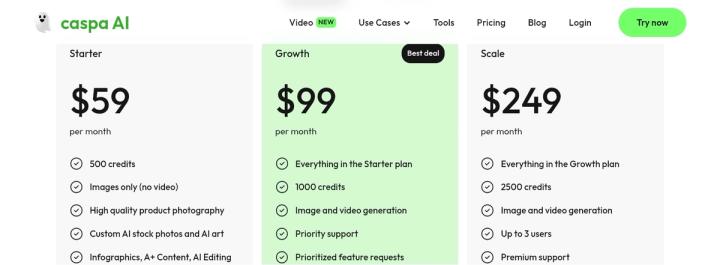
No free trials are offered on Caspa AI.
Pebbly
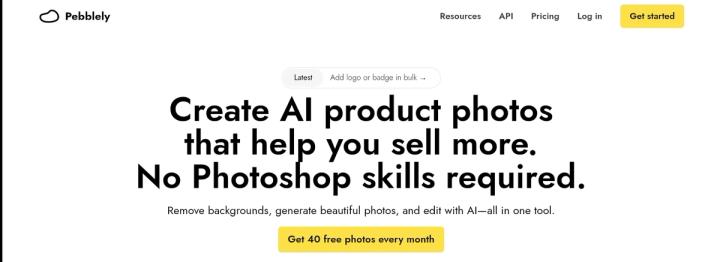
Another product photography tool dominating the e-commerce industry is Pebblely. The platform has powerful editing capabilities to correct original and generated product images. Pebblely competes heavily with alternatives by allowing users to edit generated images without having to modify the prompts or use more credits.
Features
- Background remover and generator to completely erase product backgrounds and replace them with AI-generated scenes.
- Image resizer to edit photo sizes to fit any platform.
- AI image editing to correct or remove unwanted details in generated images without using up more credits.
- Bulk generator to upload up to 25 product images and create professional versions in one click.
- API access for enterprise and agency owners to improve workflow.
Pros
- Intuitive interface with a minimal learning curve.
- User-friendly for beginners and business owners.
- Cost-effective for limited budgets.
- Customization and brand consistency.
- API access for high-volume image generation.
Cons
- Incomplete product feature set, requiring users to combine other tools to produce usable assets.
- Uneven image quality and detail inconsistency.
- Constant bugs and technical limitations.
- Limited creative ability.
Pricing
Pebblely offers two pricing tiers, namely:
- The basic plan starts at $19/month in the monthly plan and $15/month in the yearly plan.
- The Pro plan starts at $39/month in the monthly plan and $32/month in the yearly plan.
The platform also allows new users to generate up to 40 free photos to test out their product before they commit.
Flair AI
Flair AI is a web-based AI tool for creating and editing product photos and visual content. It is useful for e-commerce and marketing, as it allows you to turn raw product photos into polished images with backgrounds, props, models, text, or other design elements, all without needing a camera, studio, or advanced design skill.
Features
- Instant image generation: Generate professional product images with text-to-image prompts.
- Background image regeneration: Remove, generate, and modify image backgrounds.
- Video generation: Animate product images into engaging videos with AI.
- Ad generation: Generate advertising creatives automatically.
- AI editing tools: Edit and refine images with AI assistance.
- Brand asset management: Manage your brand assets in one place.
Pros
- User-friendly editor.
- Budget-friendly.
- High-quality outputs of up to 4k.
- Brand management features to enable consistency.
Cons
- Inconsistent image quality.
- Limited editing features.
- Subscription cancellation difficulty.
Pricing
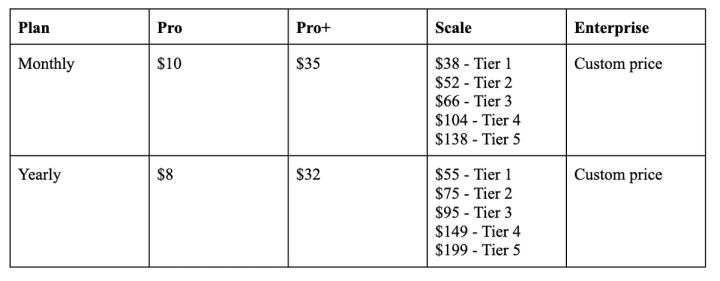
Flair offers a free trial plan that allows new users to generate 5 professional images and 1 video. Upgraded plans include Pro, Pro+, Scale, and a custom package for enterprise owners. The different prices are displayed below:
Claid AI
Claid AI is a simple product photography platform that allows users to perform a wide variety of image generation and photo editing tasks, such as background removal, lifestyle shoots, image enhancement, and resizing. It is perfect for business owners who need a powerful AI tool for everyday edits.
Features
- AI backgrounds remover and maker: Allows you to easily remove, replace, or enhance your product backgrounds.
- Video generator: Create engaging videos with ordinary product photos.
- Image editor: Improve, add elements, expand, and upscale product photos in seconds.
- AI fashion studio: Wear your product on real human models.
- Object and people eraser: Remove unwanted details and people in photos.
Pros
- Comprehensive content creation suite.
- Batch processing feature for scalable image generation.
- High-quality outputs.
- Free plan available.
Cons
- Occasional change in the product's fidelity.
- Learning curve for prompt generation.
- Less manual control.
- Heavily dependent on input image quality.
- Saves no edits in the offline model.
Pricing
Claid allows new users to try all of their platform’s features with 50 credits and 5 uploads. The upgraded plans have three pricing tiers, which are
- Essentials package at $15 and $9 per month on monthly and yearly plans, respectively.
- The Pro package is $49 and $35 per month on monthly and yearly plans, respectively.
- Custom for enterprise and agency owners.
All plans allow you to have full access to the platform's comprehensive features.
Pikes vs Midjourney Comparison for Product Photography
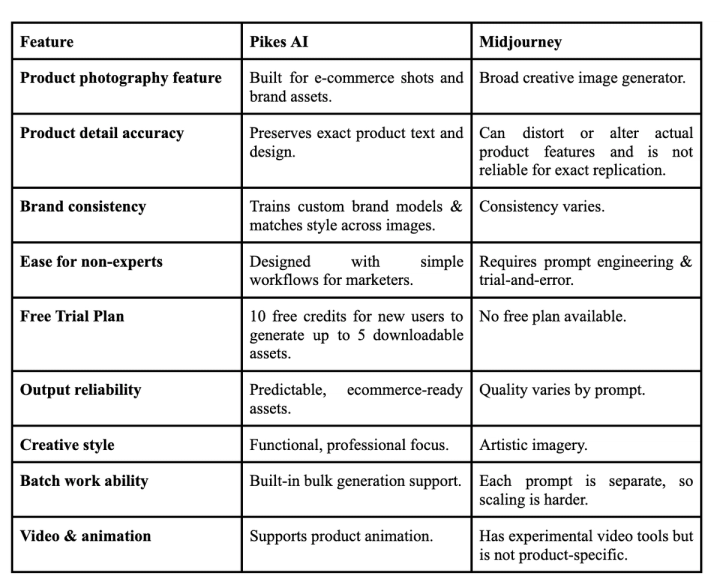
Pikes is a purpose-built GenAI platform for product visuals and e-commerce brands. It generates studio-quality images with accurate product details to ensure consistency across generated assets.
Midjourney, on the other hand, is a general-purpose GenAI platform that generates images following instructions from text prompts. It is a creative, artistic flair, but it is not built for exact replication or image consistency.
Here’s a quick overview of how the two compare when it comes to product image generation for e-commerce brands.
Final Thoughts: Making the Right Choice
Midjourney's creative generation ability has been explored by many individuals and business owners. Yet, the practical use case shows the platform's insufficiency in product photography that converts to revenue. Navigating through this guide will help you make better choices that will positively impact your brand.
To help you select the right platform for your use case, use the checklist below:
- For comprehensive product photography features tailored to e-commerce and consumer packaged goods, choose Pikes AI.
- To enable easy API software for large-scale generation, choose Caspa AI.
- For access to a large templates library for quick edits and branding, choose Pebblely.
- For creative staging and realistic environments, choose Flair AI.
- For everyday edits and quick product shoots, choose Claid AI.
FAQs
Which AI to use for product photography?
Pikes is the best GenAI platform for product photography. It takes raw product images and generates professional studio-quality versions without needing any technical skill. It also retains your product’s detail perfectly in generated images.
Can I use Midjourney product photos commercially?
Yes, Midjourney allows users to use generated images commercially. Although, as stated in their terms of use, larger companies making over $1,000,000 yearly would require a pro or mega plan to use generated images commercially.
Is Midjourney better than DALL-E?
While both tools are excellent depending on the use case, DALL-E is more adherent to prompts and generates better realistic images than Midjourney.
Midjourney’s generation style is artistic, creative and texture-rich. DALL-E, on the other hand, is easier to use, accurately adds texts to images and can handle complex prompts.
Can I use AI-generated Images commercially?
Most AI-generated images can be used both commercially and publicly as they are not owned by the AI platform, except otherwise stated by the tool’s copyright statement or terms of use.

Written by
Mike Lehman
Mike Lehman is a senior content strategist at Pikes. Before joining Pikes, Mike spent nearly a decade working with Glossier, Haus, and Athletic Brewing, leading campaigns that blended storytelling and data.