

Mike Lehman
Pomelli vs Kive vs Pikes: Best AI Product Photography Tool Compared (2026)

TL;DR
- If you want automated brand marketing assets, choose Pomelli.
- If you need a collaborative, creative workflow, choose Kive.
- If you want realistic, scalable product photos and short ad videos, choose Pikes.
Since Pomelli launched in October 2025, most entrepreneurs in the U.S. and Canada have explored the tool to create publish-ready campaigns for their businesses. Although still in beta, Pomelli lets you generate on-brand visuals in minutes for free. However, it still shows some inconsistencies in terms of generation speed, creativity, and realism.
To help you make the most of your AI content generation workflow, we’ve explored top Pomelli alternatives for product photography, like Kive and Pikes. Based on real-world testing and user feedback, we’ve also laid out a detailed comparison to help you make the right choice for your e-commerce brand.
Best AI Product Photography Tool At A Glance
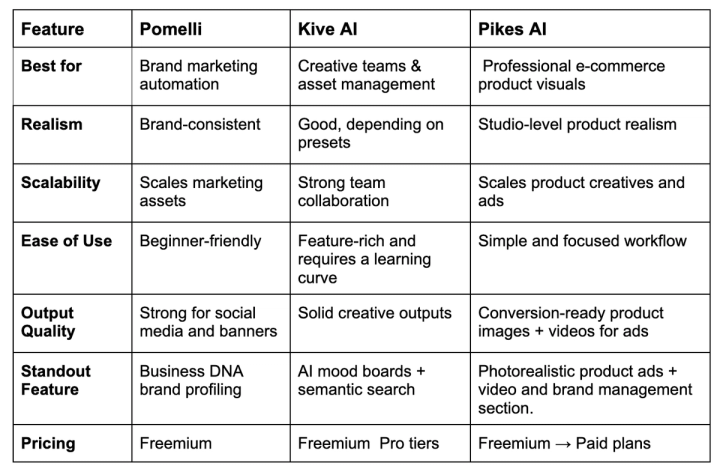
Detailed Comparison: Pomelli by Google Labs vs Kive vs Pikes
Now, let’s compare Pomelli, Kive, and Pikes' product photography features based on these six core factors:
- Branding consistency
- Product detail consistency
- Scalability
- Realism
- Cost-efficiency
- Ease of use
Best For Consistent On-brand Visuals: Pomelli
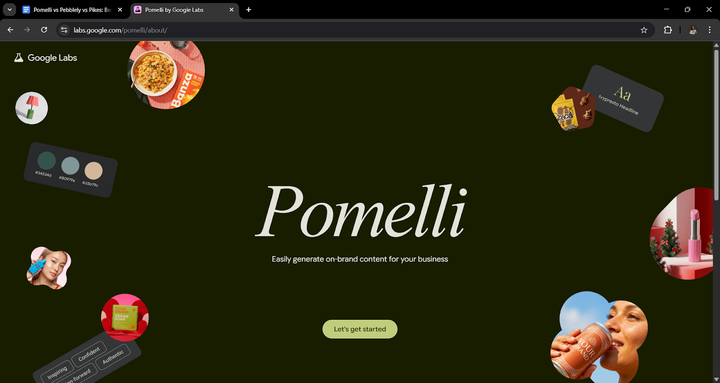
If you’ve played around with Canva’s brand kit, Pomelli’s terrain will be a familiar place. The only difference is that Pomelli takes your website’s URL and pulls out your brand logo, font, colors, images, tone of voice, tagline, etc., to form your “Business DNA”.
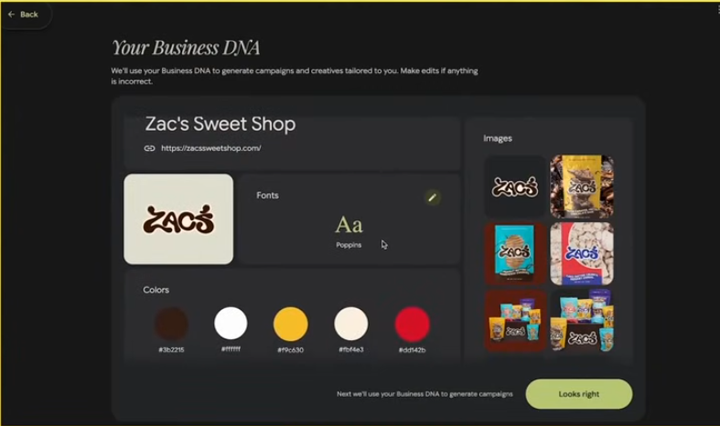
With this information, the tool generates publish-ready campaigns aligned with your brand style and voice. These generated assets can be edited or used straightaway for Ads, social media, and email headers.
Overall, Pomelli is exceptional at generating branded visuals for e-commerce brands.
Pikes comes close to Pomelli in generating consistent on-brand images for e-commerce campaigns. Like Pomelli, you input your website’s URL, and it scrapes your brand’s colors, style, tone of voice, and target audience and summarizes them into a “Brand Profile”.
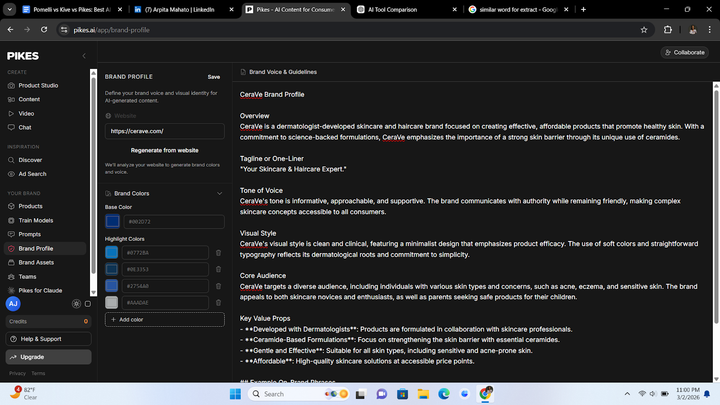
Under the “Brand Assets” section, you can also upload your raw product images, and the tool uses them to generate product photos that align with your business branding.
Kive, on the other hand, lacks a dedicated brand management section. However, it allows you to add logos to images, upload your images as style references, and reuse a photo background.
Best In Product Detail Consistency: Pikes AI
One of the greatest offshoots of AI product photography tools is hallucinations in the outputs. Texts, images, and logos are non-negotiable branding elements for marketing teams, and most AI product photography tools cannot maintain these details across outputs.
Pikes AI, however, stands out for its consistent attention to product detail. The tool retains your logo, product images, and body texts in their exact form, font, and color.

Professional image generated with Pikes AI
Pikes uses an AI model that is ultra-trained to avoid hallucinations in generated images, allowing you to publish them without additional edits.
While Pomelli has a powerful AI Photoshoot ability, it is not built for products with heavy details. Here is an example result with Pomelli:

AI-generated product images with Pomelli by Google Labs
The generated photo looks professional, but zooming in reveals alien texts and a logo on the product label, making it unsuitable for marketing campaigns.
Kive also excels at generating product images with studio-quality, but lacks consistency in detail. See an example below:
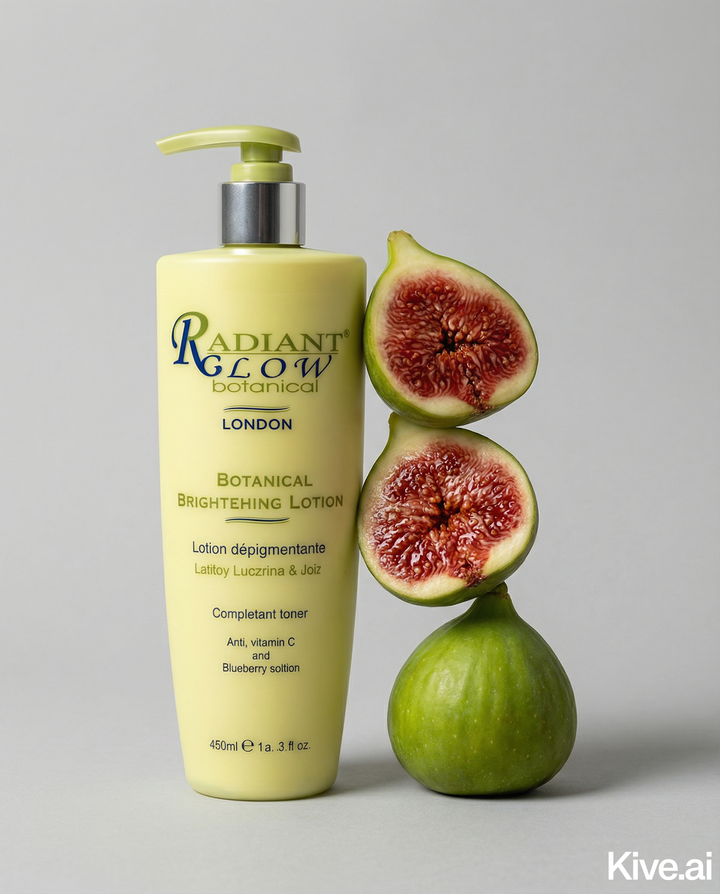
Overall, Pikes shows a better way to generate professional product images with exact texts and logos.
Highest Scalability Capacity: Pikes
If you own multiple products, being able to generate hundreds of creatives for seasonal and evergreen campaigns is a huge flex. Automating backgrounds, style, and lighting across images not only saves you time and money but also increases memorability. And Pikes does it best.
Pikes allows you to generate dozens of brand assets simultaneously, from one reference image. Instead of spending time and extra credits producing multiple creatives from a single product image, you can save up to 300% in time using “Bulk Mode”, without compromising quality.
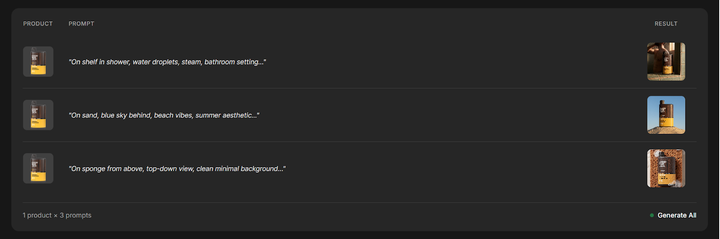
This feature is especially useful for brands with multiple SKUs that need different product variations. You can also save prompts, reference images, and generated photos for easy access and replication.
Pomelli also does well at scaling professional image generation. However, there's much variation in the generated visuals. Unlike Pikes, which uses a single reference image to produce variations, Pomelli generates entirely different campaigns with images it extracts from your website.
Kive, on the other hand, lets you use reference styles from the platform and apply them to your product images. This reduces the time spent on crafting detailed prompts and also ensures consistency across a number of your assets.
Most Realistic AI Photoshoot Software: Pikes
Most AI-generated images are characterized by polished, plastic skin with a gaze that is obviously fake. While this is ethically acceptable, it can raise customers’ objections and hurt your brand perception and conversion rate.
Amidst these considerations, Pikes daunts this main problem by generating realistic images that match traditional studio-quality versions. The flaws, pores, and scars are obvious to give the human feel and eliminate speculation in shoppers' minds. Even still images convey realism by portraying cinematic scenes and a high-quality feel, exuding the energy only a professional photography shoot can deliver.
Next, on the realism scale is Kive.
Most Cost-Efficient: Pomelli
One of the highest advantages of AI product photos for e-commerce is its cost efficiency. A typical traditional photography session costs between $1,500 - $5,000. Meanwhile, most AI photo-shoot software ranges from $10 to $100 for usable product images.
Pomelli, at its beta stage, costs way less for product photos. Easily accessible to any user, it is free to use and offers unlimited daily usage. This allows e-commerce owners to execute full marketing campaigns without spending a dime on creatives. It works well for e-commerce founders and product managers who need simple, on-brand visuals for social media marketing. However, it may not work well for premium or high-end consumer goods.
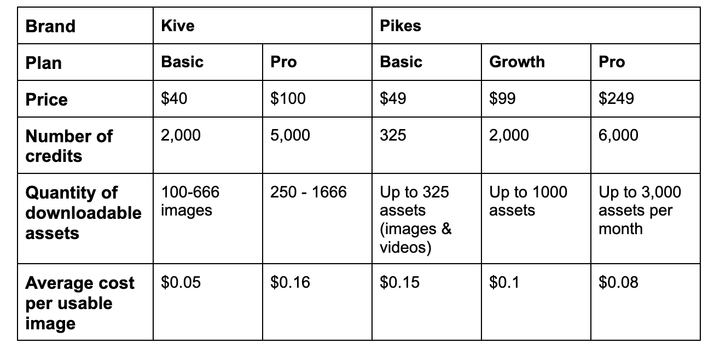
Pikes and Kive also have affordable pricing plans for users with varying use cases. With basic plans allowing one to generate over 300 assets, it works well for founders who need multiple high-quality creatives quickly but lack the budget for pricey shoots.
Here is a comparison of Kive and Pikes' pricing plans:
Simplest AI Product Photography Tool: Pomelli
Outsourcing your product photography to a photographer requires no technical input from your end. But with AI photo shoot software, it may require varying levels of technical know-how, depending on the tool's complexity.
For Pomelli, the interface is easy enough for a 10-year-old to navigate through. With only four subsections, the platform uses a prompt-style guide to help users navigate the website.
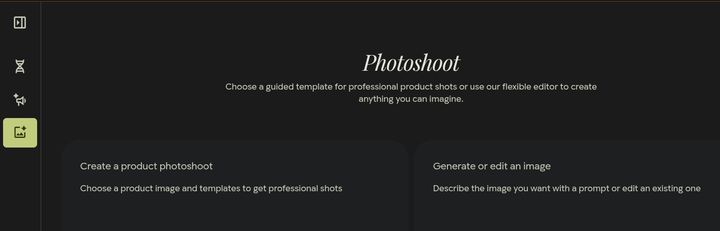
You almost know the next step to take based on the suggestion it provides. This makes Pomelli our top choice for the most intuitive and easy-to-use AI photoshoot software among the three.
Pikes comes close with its simple interface and sectionalized layout. The platform has no overwhelming features or webpages, making it easily accessible by both technical and non-technical staff.
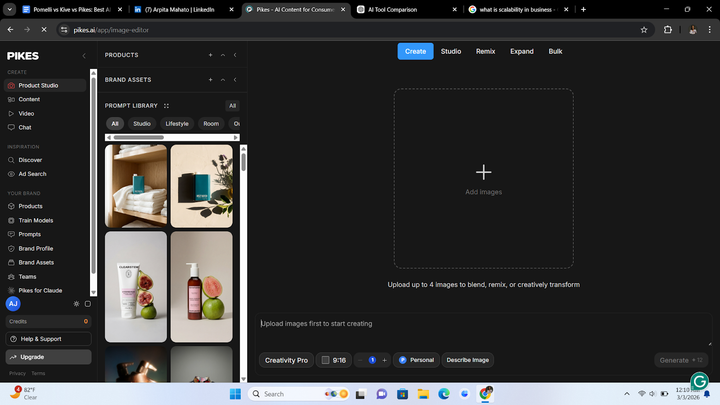
Kive also has a non-complex interface. However, it has many features, layouts, and webpages that can make it overwhelming to use. For first-time users, you may need to spend a lot of time on the platform to get a hang of all the features. There’s also a learning curve to using the platform effectively.
In Summary
- If you need a tool that can retain your product’s details with perfect consistency, choose Pikes.
- If you want something simple and cheap, Pomelli is your best option.
- If you run a high-end product or sell consumer goods that showcase class, Pikes can give you that premium edge.
- If you want to retain consistency in brand style, tone, and message, Pomelli is most capable.
- If your brand constantly needs creatives for seasonal campaigns and high-value positioning, Pikes can best help you manage that.
FAQs
Which region is Pomell AI available in?
For now, Pomelli is only available in English in Australia, Canada, the United States, and New Zealand.
Is Pomelli free to use?
Yes, Pomeeli is currently free to use. You can gain full access to the tool without any payment or credit card details.
What are some of the best Pomelli Alternatives?
When comparing Pomelli vs AI product photography tools, several alternatives work better in speed, realism, quality, and collaboration. An example is Pikes, which can perform the same function as Pomelli at a greater quality and efficiency. Another example is Kive, which generates realistic outputs faster and enables seamless team collaboration.

Written by
Mike Lehman
Mike Lehman is a senior content strategist at Pikes. Before joining Pikes, Mike spent nearly a decade working with Glossier, Haus, and Athletic Brewing, leading campaigns that blended storytelling and data.