

Mike Lehman
Best Pomelli AI Alternatives for Product Photography (2026 Guide)
When you scroll on social media or any other internet platform nowadays, you’ll find many AI-generated brand photos. Businesses now use AI to their advantage to save cost and stress, and that is what Google's Pomelli AI tool is about.
Google says that the reason for this tool is to help businesses grow by making it easier to generate on-brand photos and marketing campaigns that feel professional and authentic. All they need to do is get a basic picture, put it in the tool, and generate studio-standard ones for their businesses. But while this has been helping businesses, there are limitations like scalability issues, how realistic the images look, etc. This is why businesses now look for alternatives.
So if you’re a business owner, especially of an e-commerce brand, this article will show you different alternatives you can use. But before we get into that, let’s look at some limitations of Google Pomelli.
Why Brands Consider Pomelli AI Alternatives
There Are Regional Limitations
One of the first issues of Pomelli AI for global e-commerce brands is access. Currently, it’s only available in a few regions: the US, Canada, Australia, and New Zealand. So what happens to businesses in other regions? They cannot use it, and that’s a problem.
For example, a Shopify store selling globally or an Amazon brand managing listings across different marketplaces needs tools that operate consistently regardless of location. When there’s an access problem, these brands start to look for tools that work in their region.
For businesses outside major Western markets, it’s more than an inconvenience. It becomes a scalability issue, and it’s enough reason to look for an alternative.
They Want Creative Variety
At first, when you use Pomelli to generate a few images, it produces clean and visually appealing ones. The lighting and compositions are also good. But once you begin generating dozens or hundreds of images, it can become a problem. Background depth, shadow treatment, and environmental styling start to feel the same across images.
If you’re a brand that runs continuous paid ads, this is a big problem. When images begin to look template-driven, it reduces how well the images look and how much people trust your brand.
When Pomelli’s outputs begin to feel predictable at scale, brands naturally start to look for tools better than Pomelli AI that offer deeper creative diversity.
They Want a More Versatile Tool
Pomelli is mostly perfect within the Google ecosystem. This is helpful for brands heavily invested in Google Ads. However, modern e-commerce does not operate within a single advertising channel. Brands use Shopify, Amazon Seller Central, Meta Ads, TikTok Shop, email campaigns, landing pages, etc.
A product photography tool should support exports, resizing, and workflow coordination across all these different channels. When brands discover they need additional tools to manage bulk editing, versioning, or marketplace-specific requirements, Pomelli starts to feel limited. This, again, makes them look for alternatives.
Limitations of Using Pomelli for Product Photography
It Doesn’t Support Video/Animation
As much as the main focus here is images, e-commerce marketing/advertising has become quite video-driven. You’ll find short-form videos on platforms like Instagram, TikTok, and YouTube Shorts. Static images are still essential for listings, but conversion-driven advertising most times relies on motion.
Pomelli focuses primarily on still AI-generated photos. For brands that do video ads, this creates a workflow gap. Their teams have to use separate platforms to create animated creatives, which increases production time and tool costs.
Outputs Feel the Same
Yes, consistency is a positive feature when building brand recognition. However, excessive stylistic similarity can create a sense of repetition in the minds of the audience. When generating multiple assets with Pomelli, some brands have noticed that lighting direction, perspective, and environmental composition feel repeated.

For small batches, this is not an issue. But when you progress to generating hundreds of creatives every month, the repetition then becomes noticeable. This can affect trust and engagement.
That is one of the reasons scaling brands move to exploring other alternatives to Pomelli that allow deeper control over scene diversity and image variations.
Photos Don’t Look So Real
AI image generation has advanced, but how realistic images look still depends on how complex the product is and how good the tool is. Some users have complained about how they could tell that images generated with Pomelli didn’t look real.
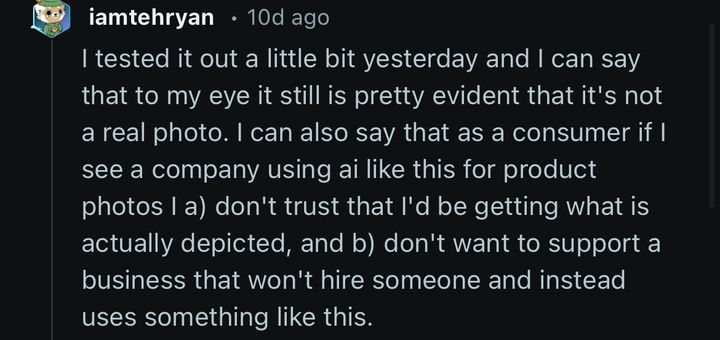
If you’re an e-commerce brand positioning yourself as a premium one, this limitation is enough reason to find a better alternative.
It Struggles with Accuracy
Again, this is especially for complex products. Detailed typography, small packaging text, and precise design elements can occasionally distort during generation. Accuracy is very important; a lack of it will make people distrust your brand.
Even minor inaccuracies can affect conversion rates. When brands scale into regulated categories or technical products, precision is a non-negotiable. This is another reason why brands need better Pomelli alternatives in 2026.
Top 5 Pomelli Alternatives in 2026
Pikes AI: Best All-Round Tool for E-Commerce
Pikes AI is the first tool on this list because it’s an all-round tool for studio-standard product photography. As a brand looking for a good Pomelli alternative, you’re no longer testing. Instead, you’re scaling, and Pikes AI was built to help you scale as a brand.

You can batch-create and edit your generated images the way you want. And no matter how many images you want to generate, it doesn’t give you template-looking results.
You’re also able to create lifestyle product images and still maintain your brand consistency. Also, while many AI tools don’t look real, Pikes AI does, and that’s part of what makes it a strong alternative to Pomelli.
You’re able to change backgrounds without altering the product. You can add props, change colors, and adjust as you want. It also has video and animation features that allow you to turn static images into videos. As we noted earlier, this is critical to your conversion rate.
In addition to all these, Pikes AI is really fast and efficient. The speed is needed especially if you’re a fast-paced brand that wants to do things fast and smoothly. The customer service is great, so you get help whenever you need it. You only have to pay $49 to get more than 200 brand assets monthly; this shows how cost-effective Pikes AI is.
Claid.ai: Best for Automation
One good thing about Claid.ai is that it does very well with automation and integration. So if you’re a brand that wants AI photography embedded into your backend systems, this is a good option.

Claid.ai also does well in generating realistic and high-quality images. It can remove backgrounds, although sometimes these backgrounds look unreal. It also helps you keep a consistent visual identity for your e-commerce brand. As for volume, this tool can possess so many SKUs in a short time. So, yes, it’s a good alternative to Pomelli.
PhotoRoom: Best for Mobile Brands
PhotoRoom is one of the most widely used AI product photography tools among smaller e-commerce businesses. Its major strength is speed and simplicity. You can remove backgrounds, clean up edges, adjust lighting, and export marketplace-ready images directly from your mobile device (desktop, too).

You can change backgrounds as you want, batch create and edit for consistency, and use advanced features like “Magic Retouch”. The lighting and framing are also good, and this helps with your click-through-rates.
However, you should take note of some downsides, like unexpected charges that some users have complained about. There’s also the complaint of poor customer support and the fact that sometimes, the images don’t look very realistic. But overall, PhotoRoom is a good alternative to Pomelli.
Flair.ai: Best for Scene Creativity
With Flair.ai, you can generate high-quality images in minutes. Just like some of the options listed above, it is quite realistic. A major upside to using this tool is how good it is for scene creativity and how versatile it is. For example, you can create short-form videos and ad creatives right in the tool. You can build stylized scenes using virtual surfaces, props, and adjustable lighting directions. This makes it appealing to brands that want more artistic control over the final aesthetic.

Flair is also really hands-on. You can experiment with background colors, add contextual elements, and customize as you want.
The tradeoff, however, is that it sometimes distorts product shapes and texts. The output quality may also be inconsistent, and this affects brand trust. One other thing that some users have complained about is unexpected charges and difficulty canceling subscriptions.
Pebblely: Best Budget Entry Option
Pebblely is a budget-friendly tool when it comes to AI product photography. But even with an affordable price point, it is fast, realistic, and generates high-quality product images.

It’s also a user-friendly tool with more than 100 themes you can choose from. You’re able to easily edit with any prior design knowledge. For early-stage Shopify stores or small Amazon sellers testing AI-generated visuals, this makes it accessible. You can even create lifestyle images as well.
However, there are also downsides, one of which is that the tool can experience hallucinations, which cause inconsistent results. You may also face limitations with editing. This automatically limits the control you have over the assets. Users have also reported bugs and slow performance.
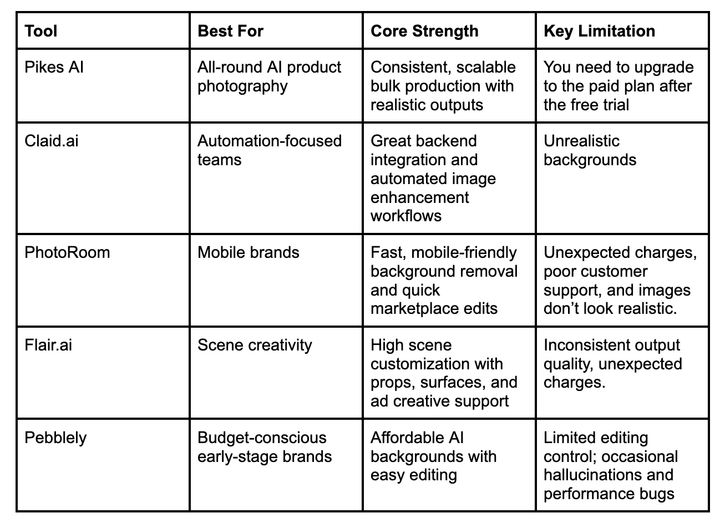
Best Pomelli AI Alternatives For E-commerce Brands in 2026
Use-case Based Recommendations
The right AI product photography tool depends on what your e-commerce business looks like and where it’s going.
If you’re running a growing Shopify store or managing multiple Amazon variations, structure and consistency are non-negotiable. You need bulk generation, realistic outputs, and visuals that stay consistent across your catalog. That’s where Pikes AI stands out. It’s built for scaling brands that want campaign coordination and consistency, not just single-image edits.
If you’re a solo seller or testing a small catalog, tools like PhotoRoom or Pebblely may be okay. They’re faster to start with and easier for quick edits, though they offer less control as your inventory grows.
For brands that prioritize highly stylized lifestyle scenes, Flair.ai gives more creative flexibility, while Claid.ai is better suited if you want backend automation integrated into larger workflows.
The long and short of it is that if you’re experimenting, several tools will work. If you’re scaling and want fewer compromises, Pikes AI is the safer long-term choice.
Final Thoughts
Google Photoshoot (Pomelli) is a good starting point for your AI-generated product visuals, especially if you're already using Google. But as your e-commerce brand grows, you need a tool with more flexibility and bulk production capabilities.
Pikes AI is the top Pomelli alternative in 2026 as it handles high-volume SKUs and big campaigns with ease. Other options like Claid.ai, PhotoRoom, Flair.ai, and Pebblely also work, even though they have certain limitations as we’ve seen in this article.
The main thing is that you choose a platform that fits your business goals and growth. Pikes AI works best if you want to see a boost in your conversion rates, customer trust, and campaign efficiency. Sign up on Pikes AI today to begin.
Frequently Asked Questions
Is AI Product Photography Free?
Most AI product photography tools offer limited free tiers or trials, but serious e-commerce scaling would most often require a paid subscription.
Free versions are good for testing or editing a small number of products. However, when it’s time for bulk generation, real consistency, and multi-channel exports, you’d need to upgrade to a paid plan.
How Good is Pikes AI for Product Photography?
Pikes AI is widely regarded as one of the strongest AI product photography tools for e-commerce brands. It’s really good at maintaining consistent lighting, angles, and brand aesthetics across large product catalogs.
Teams using Pikes experience faster campaign-level production, higher visual consistency, and reduced AI-related problems compared to other AI platforms.
What Are the Best AI Alternatives to Pomelli for Product Photography?
The top alternatives in 2026 include Pikes AI, Claid.ai, PhotoRoom, Flair.ai, and Pebblely. Each tool serves a specific purpose: Pikes for bulk generation and consistency, Claid.ai for automation, PhotoRoom for quick mobile edits, Flair.ai for creative scene control, and Pebblely for budget-conscious early-stage sellers.
Still, Pikes stands out as the best all-round tool.
Is Pebblely a Good Pomelli Alternative?
Yes, for early-stage or small-scale brands, Pebblely is an accessible and affordable option. It allows simple AI-generated enhancements and background edits. But it lacks advanced bulk capabilities and structured campaign management. This makes it a not-so-great option for larger e-commerce operations.
Which AI Product Photography Tool is Best for Amazon E-Commerce Businesses?
For Amazon sellers, precision, consistency, and realistic images are critical. Tools like Pikes AI are best suited because they maintain visual consistency across multiple product variations, handle complex reflections or packaging details accurately, and support bulk generation for large catalogs.
Automated tools like Claid.ai can also help with backend workflows, but may require technical setup.

Written by
Mike Lehman
Mike Lehman is a senior content strategist at Pikes. Before joining Pikes, Mike spent nearly a decade working with Glossier, Haus, and Athletic Brewing, leading campaigns that blended storytelling and data.