

Mike Lehman
Kive AI Review (2026): A Complete Review for E-commerce Product Photography
AI tools have brought a lot of changes to how e-commerce brands create product visuals. What used to require expensive photoshoots, long editing cycles, and multiple design tools can now be done with AI platforms in minutes.
One of the tools that has gained good attention in this space is Kive AI. It is a platform that promises to act as a complete creative hub for generating, organizing, and managing product visuals.
Disclosure: we make Pikes AI, a competing product. Every claim about Kive below is sourced to Kive's own pricing page or to its public reviews, and linked so you can check it.
But is it actually worth using for e-commerce product photography? In this detailed Kive AI review, we’ll take a closer look at the platform, considering its features, pricing, strengths, and real limitations.
So, if you’re considering Kive for your brand, this guide will help you decide whether it’s the right fit – and how it compares with newer AI product photography tools built specifically for e-commerce.
What Is Kive AI?
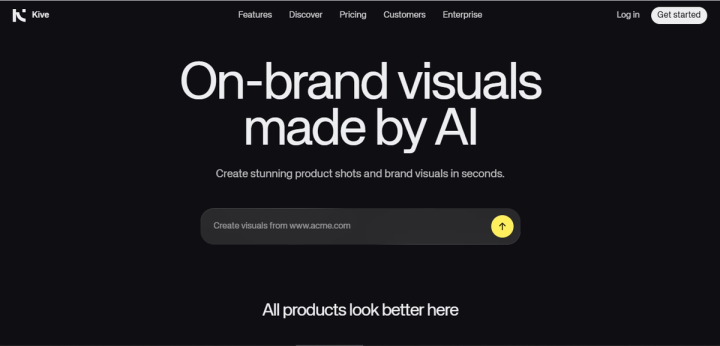
Kive AI is an AI-powered creative platform designed to make generating, managing, and organizing visual content a lot easier for brands. Instead of just focusing on image generation, the tool aims to function as a complete creative workspace where teams can produce product visuals, store assets, build moodboards, and collaborate on campaigns.
By combining several AI capabilities into one dashboard, users are able to do many things at the same time with the tool. They can generate images and videos, train models to recognize their products, and much more. The goal is to simplify the entire creative process – from ideation to final asset delivery.
Key Features of Kive AI
Product Shots
Product Shots is Kive’s most relevant feature for e-commerce brands. Instead of simply placing a product cutout into a background, the platform allows you to train a model using photos of your actual product.
Once trained, the AI can generate new scenes that include your product in different environments, lighting styles, and creative contexts. This allows brands to produce lifestyle-style product visuals without organizing a full photoshoot.
Studios
For users who don’t want to write long prompts, Kive offers Studios, a visual composition tool. With it, users don’t need to type prompts to generate their visuals – they can use presets for elements like lighting, props, camera angles, and backgrounds.
This makes image generation more accessible, especially for teams that prefer a visual workflow rather than prompt engineering.
AI Image and Video Generation
Kive includes built-in tools for generating both images and short videos using AI.
The platform integrates multiple AI models, including well-known video and image generation systems such as Veo and Kling. This model-agnostic approach allows users to experiment with different engines without leaving the platform.
With these tools, brands can create product visuals, concept imagery, promotional visuals, and short marketing videos – all from the same interface.
AI Library (Smart Asset Organization)
One of Kive’s standout features is its AI-powered asset library. Every asset you upload to the platform or the ones you generate inside it is automatically tagged based on its visual content.
This means users can search for images using natural language rather than file names or folders.
For example, you could search for terms like:
- “blue skincare bottle”
- “outdoor product scene”
- “studio lighting shot”
This kind of semantic search makes managing large asset libraries much easier for teams handling high volumes of visual content.
Moodboards and Stories
Kive not only brings visual generation and organization to the table. It also allows creative teams to collaborate easily within the platform. With Moodboards, Kive makes it easy for creatives to align and collaborate on visual direction before production begins. And with the Stories feature, users can turn visual assets into layouts in presentation styles.
Pros and Cons of Kive AI
Kive AI brings a lot of functionality into one platform. But like most AI creative tools, it has some downsides. So, let’s consider some of its strengths and trade-offs.
Pros of Kive AI
- Unified creative workflow: Kive combines multiple tools into a single platform. This can be a huge plus for agencies and marketing teams as it helps simplify the workflow from idea to finished asset.
- AI-powered asset organization: Every image, whether uploaded or generated, is tagged. This makes it easy to find your visuals even when you can’t remember the file names.
- On-brand visual generation: Features like Product Shots and Studios help maintain brand consistency. You just need to train the AI on your product and style, and it will generate new scenes that match your brand aesthetic.
- Built-in collaboration tools: The Moodboards and Stories features help teams easily organize inspiration and present creative ideas directly on the platform.
Cons of Kive AI
Despite its strengths, Kive has received a number of criticisms from users, particularly around reliability, product accuracy, and customer support.
Inconsistent image quality
For context on what follows, Kive averages 2.8 out of 5 across 27 Trustpilot reviews. That average holds both sustained criticism and genuine praise. The recurring critical themes are below; the positive side follows them.
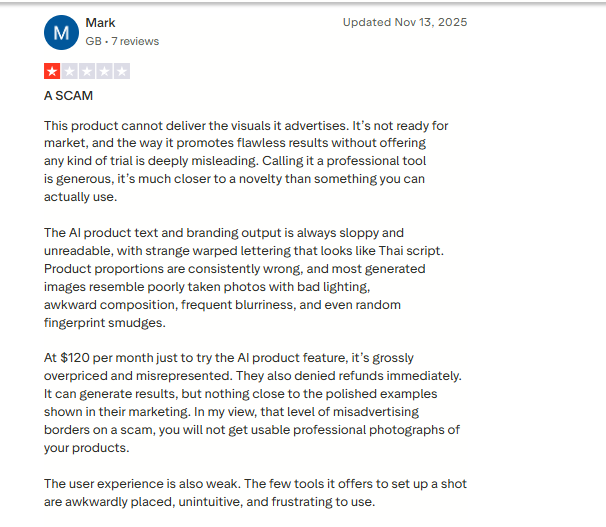
Several users report that the quality of generated assets doesn’t always match the platform’s promotional examples. In a Trustpilot review, a user stated that: “The quality of the delivered assets are simply too poor and waaaaay from the advertised images created.”
This inconsistency can be frustrating for ecommerce brands that need reliable visuals for product pages or advertising.
Product distortion issues
Generated visuals can alter the product’s appearance. Users have reportedly complained about the tool changing their product so much that it looks nothing like the original. This is not a minor issue for e-commerce brands, because product photos need to accurately represent the real item.
Performance and collaboration glitches
While Kive promotes collaboration features, some users report performance issues during team workflows. A user mentioned in a G2 review how real-time collaboration can sometimes feel laggy, requiring users to log out and back in most of the time before they can see updates made by teammates. These kinds of issues can seriously affect speed and efficiency when multiple people are working on the same project.
Customer Support Concerns
Customer service appears to be another area of frustration for some users. One Trustpilot reviewer wrote: “Appalling customer service. Mostly AI, rude, and almost impossible to get real human help.”
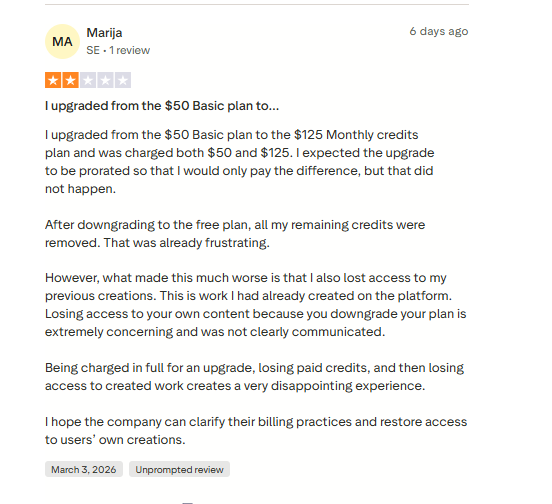
Another complaint described difficulties resolving billing concerns and subscription cancellations. While not every user reports these issues, when it’s repeatedly mentioned in public reviews, it’s a thing to consider if you have your eyes on Kive AI.
The same review page carries consistent praise that belongs alongside the above. A small fashion brand owner describes Kive as "an absolute game changer" for producing ecommerce imagery cheaply. Another reviewer, after hitting platform errors, reports that the team "jumped in, helped get through the roadblock and made it right." A third notes output quality is excellent once you prompt with the product's real-world dimensions — a practical tip that may also explain some of the proportion complaints.
Learning Curve for New Users
Because the platform combines generation, asset management, and collaboration tools, it often requires extra time and effort to fully understand how things work on it. This can initially be a challenge for beginners expecting a simple AI generator.
Credit-based generation limits experimentation
Because Kive uses a credit system for AI generation, experimentation can be limited by how many credits remain in your plan.
Kive AI Pricing (2026 Breakdown)
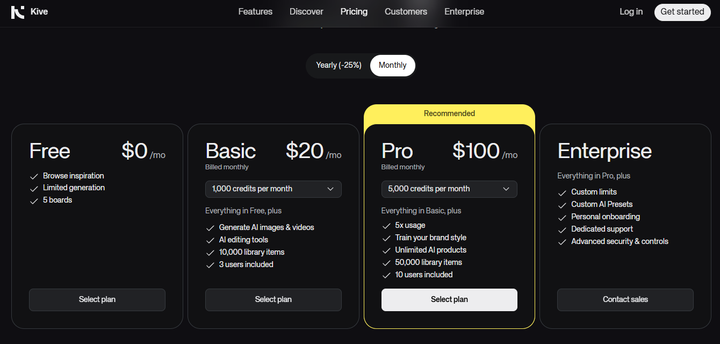
Kive AI has three pricing plans, designed for different categories of users – individuals, small teams, and larger creative departments. The platform operates on a credit-based system, which means AI generation, such as images or videos, consumes credits based on how complex your requests are.
Here’s how the main plans are structured.
Free Plan
Kive provides a free plan that allows users to explore the platform before committing to a paid subscription. The plan includes:
- 300 library items
- 5 boards for organizing projects
- Access to the AI library and asset management tools
However, the free plan is mainly for testing the platform. It does not include full access to AI generation capabilities.
Basic Plan – $20 per Month
The Basic plan unlocks the core AI generation tools. Here, you can get:
- AI image and video generation
- AI editing tools
- AI-organized library
- 1,000 generation credits
- Up to 10,000 library items
- 3 users included
For small teams or early-stage ecommerce brands, this plan provides enough credits to experiment with visual creation and asset organization.
Pro Plan – $100 per Month
The Pro plan is where Kive’s more advanced features become available, particularly for e-commerce brands. Features include:
- Everything in the Basic plan
- AI Product Shots
- Item versions for product variations
- Video uploads
- 5,000 credits per month
- Up to 50,000 library items
- 10 users included
Best Alternative to Kive AI for E-commerce Product Photography
Kive AI is an interesting platform for managing creative assets and generating visuals. However, many e-commerce brands eventually realize that they need something more specialized.
For brands whose goal is to create high-quality product images that actually drive sales, a general creative hub may not always cut it; you’ll need dedicated AI product photography platforms.
These tools tend to perform better when it comes to product accuracy, speed, and scalable creative production. That’s simply because they’re designed specifically for e-commerce workflows.
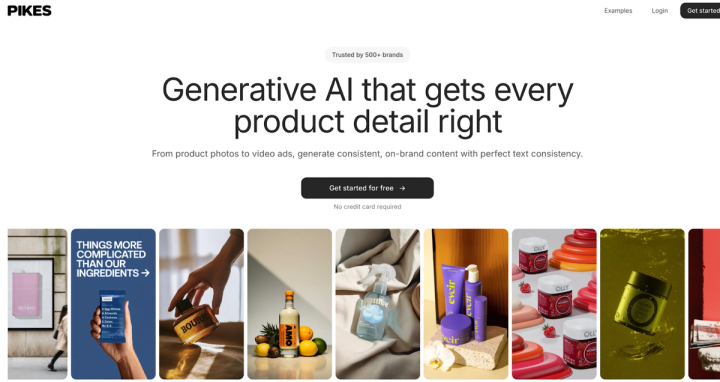
One strong alternative is Pikes AI. Unlike Kive, Pikes doesn’t just focus on creative ideation and asset organization. The tool is built specifically to help e-commerce brands produce conversion-ready product visuals quickly and consistently.
Here are a few reasons why many e-commerce teams prefer it:
Product accuracy is top-notch
One common concern brands have with AI product tools is accuracy. They can sometimes distort packaging, change labels, or alter product proportions. This can render the final image unusable for marketplaces like Amazon.
But many people love Pikes because it removes that hurdle; it’s designed to preserve the original details of your product. Everything, including colors, labels, or packaging, remains accurate across generated images. This, of course, is a huge plus for brands selling online.
Faster creative workflows
AI tools have removed the need to wait for days before visuals are ready through traditional product photography. However, many AI tools still often require heavy manual tweaking, which can also eat up some time.
Pikes simplifies the process. You only need to upload your product once, and you can generate studio shots, lifestyle images, and ad creatives in minutes. If you’re a dropshipper or run a fast-moving e-commerce brand, you will understand how valuable this kind of speed can be.
Built for high-volume creative production
E-commerce brands rarely need just one product photo. They need multiple variations for:
- Amazon product listings
- Meta and TikTok ads
- Shopify stores
- Email campaigns
- Landing pages
With Pikes, brands can easily and quickly generate dozens of visual variations, helping them experiment with backgrounds, different scenes, and styles without organizing expensive photoshoots.
Designed for the marketplace and ad creatives
Another advantage is that Pikes focuses on real e-commerce use cases. Images can be generated for different placements, including:
- Amazon listing images
- Social media ads
- Website product pages
- Vertical creatives for TikTok and Instagram Reels
Instead of brands having to design visuals from scratch, they can quickly create platform-ready creatives that fit different marketing channels.
Why Many E-commerce Brands Choose Pikes Over Kive AI
Most e-commerce brands have migrated from tools like Kive to Pikes AI. Presently, Pikes is used and trusted by more than 1,000 consumer brands.
Yes, Kive does a good job when it comes to brainstorming visuals and managing creative libraries. But it cannot produce the same output you would get from specialized tools when you’re looking for high-quality product images that support e-commerce growth.
Because Pikes AI is designed specifically for product visuals and ad creatives, it often comes as the chosen favorite for brands that need fast, accurate, and scalable product photography, without having to bother about traditional photoshoots.
FAQs
How much does Kive cost? Is there a free plan?
Yes. Kive AI does offer a free plan that allows people to test the platform. The plan comes with 300 library items and 5 boards, which are obviously not enough to produce any tangible visuals. The paid plans start from $20 per month and come with more advanced features.
Which AI tools are better than Kive for product photos?
It all depends on your goal. If it’s for e-commerce product photography, dedicated tools like Pikes AI will perform much better. These tools are designed specifically for generating high-quality product images and marketplace-ready creatives. And if you’ll need the visuals for Amazon, Shopify, or Meta ads, you will understand how important this can be.
Is Kive good for e-commerce product photography?
Kive can generate product visuals, and its Product Shots feature can help with e-commerce use. However, many users have reported issues concerning low-quality output and product distortion, among others. All these make the tool less reliable for brands that need to consistently produce product images for marketplaces and ads.

Written by
Mike Lehman
Mike Lehman is a senior content strategist at Pikes. Before joining Pikes, Mike spent nearly a decade working with Glossier, Haus, and Athletic Brewing, leading campaigns that blended storytelling and data.