

Mike Lehman
Magnific Pricing in 2026: What Freepik's Rebrand Actually Costs
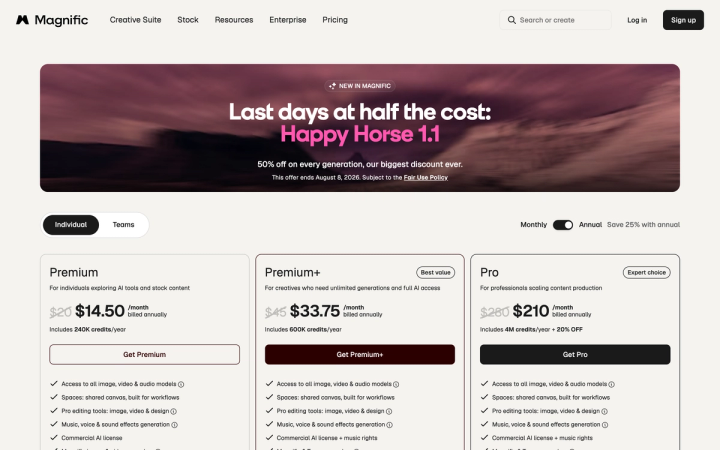
Magnific costs $20, $45 or $280 per month if you pay month to month, or $14.50, $33.75 or $210 per month if you commit to a year up front. The pricing page loads with the annual toggle already selected, so the first numbers you see are the discounted ones. Team plans start at $69 per seat per month. All figures verified on magnific.com on 1 August 2026.
If you searched for Freepik pricing and landed here, that is not a mistake. Freepik rebranded as Magnific on 28 April 2026, and freepik.com/pricing now returns a 301 redirect to magnific.com/pricing. Same company, same subscription, different name on the invoice.
What does Magnific cost in 2026?
There are three individual plans and one team plan. The credit allowances change depending on which billing cycle you pick.
| Plan | Billed monthly | Credits on monthly | Billed annually | Credits on annual |
|---|---|---|---|---|
| Premium | $20/mo | 20,000 per month | $14.50/mo ($174/yr) | 240,000 per year |
| Premium+ | $45/mo | 45,000 per month | $33.75/mo ($405/yr) | 600,000 per year |
| Pro | $280/mo | 300,000 per month | $210/mo ($2,520/yr) | 4,000,000 per year |
| Business | $69/seat/mo | 90,000 per month, shared | 20% off with annual | Not checked |
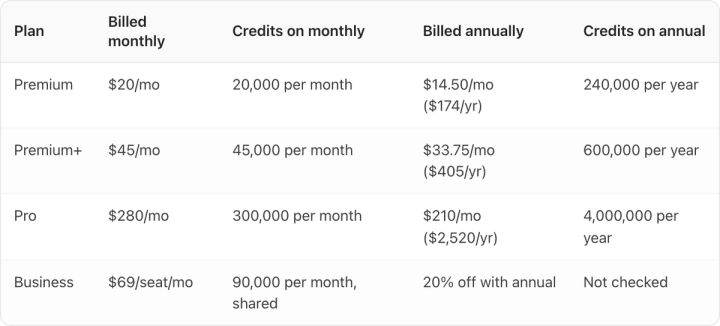
Prices exclude VAT and local taxes. The Business plan includes two users and pools credits across the team.
Why is the price on the page not the price you pay?
Magnific's toggle sits on Annual when the page loads, with the monthly figure struck through beside it. You see $20 crossed out and $14.50 in large type. The $14.50 is real, but only if you pay $174 today for twelve months.
This is not unique to Magnific. Every major AI product photography tool I checked on the same day does the same thing.

Claid opens on "Billed yearly" and shows $9 and $35. Switch the toggle and those become $15 and $49. Kive opens on "Yearly (-25%)" showing $15 and $75; monthly is $20 and $100. Photoroom opens on yearly at $7.50 and $20.99; monthly is $12.99 and $34.99.
So when you compare two tools by glancing at their pricing pages, you are usually comparing two annual rates and calling them monthly. Budget from the monthly column unless you are certain you will still be using the tool in month eleven.
What do Magnific's credits actually buy?
Credits are the number that matters, because a plan's price tells you nothing without knowing what a generation costs. Magnific publishes per-model credit costs on the same page. At the Premium+ tier, the site's own calculator shows:
- Google Nano Banana 2 (2K): 75 credits per image, listed as unlimited on paid plans
- Nano Banana 2 (4K): 150 credits per image, 300 images
- Seedream 5.0 Pro (2K): 100 credits per image, listed as unlimited
- Magnific Precision: 90 credits per 2K image, 500 images
- GPT Image 2.0 Mid (2K): 400 credits per image, 112 images
- Google Veo 3.1 4K with audio: 2,080 credits per 4 seconds, 21 videos
- Kling 3.0 Turbo 1080p: 780 credits per 3 seconds, 57 videos
- Training an AI character: 3,000 credits, 15 characters
Two things follow. First, the model you pick swings the cost by more than 5x: an image from GPT Image 2.0 costs over five times one from Nano Banana 2 at the same resolution. Second, several models carry an "unlimited" label on paid plans, which genuinely changes the maths if you standardise on one of them.
There is also a promotion running at the time of writing: 50% off every generation on selected models, ending 8 August 2026. Do not build a budget on it.
How does Magnific compare to Claid, Kive and Photoroom?
All prices below are the monthly-billed rate, checked on each vendor's own pricing page on 1 August 2026.
| Tool | Entry plan, billed monthly | What the entry plan includes | Rough cost per image |
|---|---|---|---|
| Magnific | $20 | 20,000 credits/month | ~$0.08 at 75 credits/image |
| Claid | $15 | 500 credits/month | ~$0.12 at 4 credits/generation |
| Kive | $20 | 1,000 credits/month, ~100 image generations | ~$0.20 per generation |
| Photoroom | $12.99 | Up to 8,000 credits, 1,000 exports | Capped by exports, not credits |
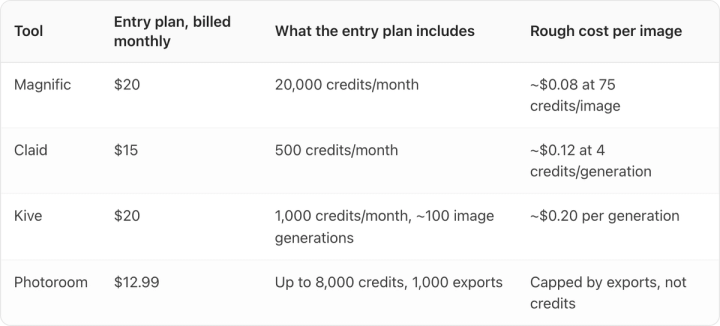

A credit is not a standard unit. Claid spends 4 credits on an AI Photoshoot generation and 35 credits on five seconds of video. Kive quotes roughly 100 image generations per 1,000 credits. Magnific charges 75 credits for a 2K image on one model and 400 on another. The per-image column is an estimate on each tool's own most common settings, not a like-for-like exchange rate, and anyone who tells you tool A is "three times cheaper per credit" is comparing units that do not convert.
The more useful comparison is what the entry tier lets you finish in a month. On that measure Magnific's 20,000 credits is generous, and the bundled 250 million stock assets are worth real money if you also license photography and video.
We have verified breakdowns of the same kind for Claid's plans, Kive's credit system and Pomelli's free tier if you are pricing several tools at once.
Which plan makes sense for a consumer brand?
Premium at $20/month billed monthly is enough to evaluate the platform properly. 20,000 credits is roughly 266 images on Nano Banana 2 at 2K, which is more than most brands generate in a trial month.
Premium+ at $45/month billed monthly is the one most small teams land on, largely because of the unlimited-model list rather than the credit bump.
Pro at $280/month billed monthly only pays off at genuine catalogue scale. On annual billing it is $2,520 a year, which is a real line item and around the cost of two mid-range product shoots.
Business at $69/seat/month billed monthly is the only tier that adds the things a procurement team asks about: ISO/IEC 27001 and SOC 2 certification, GDPR compliance, a stated no-training-on-your-data policy, basic legal indemnification for AI content, and a three-month credit rollover. If you have a legal review to clear, the individual plans will not get you through it.
On annual billing your credits are valid for the full year with no monthly reset, so a heavy catalogue month can borrow from a quiet one. On monthly billing they reset every month and unused credits are gone. For brands whose creative demand arrives in bursts around launches, that pooling is often worth more than the 25% discount.
Where Magnific is the wrong tool
Magnific is a broad creative platform. It generates images, video, audio and 3D, and it bundles a very large stock library. If your job is "make a lot of visual work of many kinds," that breadth is the product and it is genuinely good at it.
It is a weaker fit when the job is narrower and stricter: keeping one physical SKU looking exactly like itself across hundreds of outputs. General-purpose models drift on label text, packaging finish and brand colour, and the drift is worst on small type, which is where a shopper checks whether a listing looks legitimate.

That gap is why we built Pikes AI around a brand's real product library rather than around prompts alone. It is also why the test we would give any tool on this list is the same one: generate ten images of your worst-case SKU, the one with small type or a reflective finish, and look at the label at 100% zoom. Whichever tool survives that is the right answer, and it will not always be ours. You can try Pikes free without a card and run that test in an afternoon.
Frequently asked questions
Is Magnific the same company as Freepik? Yes. Freepik rebranded as Magnific on 28 April 2026, and freepik.com now redirects to magnific.com. Existing subscriptions carried over.
How much is Magnific per month? $20 for Premium, $45 for Premium+ and $280 for Pro on monthly billing. On annual billing those become $14.50, $33.75 and $210 per month, paid twelve months in advance.
Does Magnific have a free plan? The pricing page lists no free tier for individuals. The three individual plans all require payment.
How many images can I generate on the $20 plan? Around 266 at 2K on Google Nano Banana 2, which costs 75 credits per image against a 20,000 credit monthly allowance. Higher-cost models reduce that sharply, and several models are marked unlimited on paid plans.
Is annual billing worth it? If you will use the tool for a year, yes. Beyond the 25% saving, annual credits pool across the whole year instead of resetting monthly, which suits brands whose creative demand spikes around launches.
Which plan do I need for a legal or procurement review? Business at $69 per seat per month. It is the first tier with ISO/IEC 27001, SOC 2, GDPR compliance, a no-training-on-your-data commitment and basic indemnification for AI content.

Written by
Mike Lehman
Mike Lehman is a senior content strategist at Pikes. Before joining Pikes, Mike spent nearly a decade working with Glossier, Haus, and Athletic Brewing, leading campaigns that blended storytelling and data.