

Mike Lehman
Kive AI Pricing in 2026: What Each Plan Really Costs

Kive AI costs $20/month for Basic and $100/month for Pro when you pay monthly. The $15 and $75 shown on kive.ai/pricing are annual-billing rates, because the page loads with the yearly toggle already selected. There is a free plan with 40 credits, worth about six image generations. Everything else runs on credits priced at a flat $0.02 each.
Here is what each plan costs, what the credits buy, and where the model gets expensive for a brand with a real catalog. All figures were checked against Kive's live pricing page and its own documentation on 29 July 2026.
How much does Kive AI cost per month in 2026?
Kive sells four tiers. Basic and Pro each have a credit dropdown, so the plan price moves with the credit allowance you pick.
| Plan | Credits/month | Billed monthly | Billed yearly | Seats |
|---|---|---|---|---|
| Free | 40 (verified email) | $0 | $0 | — |
| Basic | 1,000 | $20/mo billed monthly | $15/mo billed yearly | 3 |
| Basic | 2,000 | $40/mo billed monthly | $30/mo billed yearly | 3 |
| Pro | 5,000 | $100/mo billed monthly | $75/mo billed yearly | 10 |
| Enterprise | Custom | Contact sales | Contact sales | Custom |
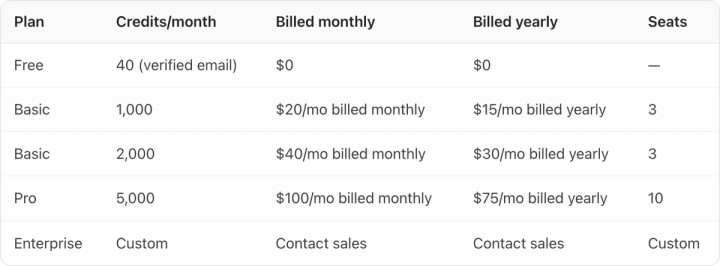
The yearly rate is exactly 25% below the monthly rate at every tier. Work it back to a unit price and Kive charges $0.02 per credit billed monthly, $0.015 billed yearly, at the same rate on Basic as on Pro.
Most tools taper the credit price as you scale. Kive does not. Moving from Basic to Pro buys you five times the credits for five times the money, plus seats and brand training. It does not buy cheaper images.
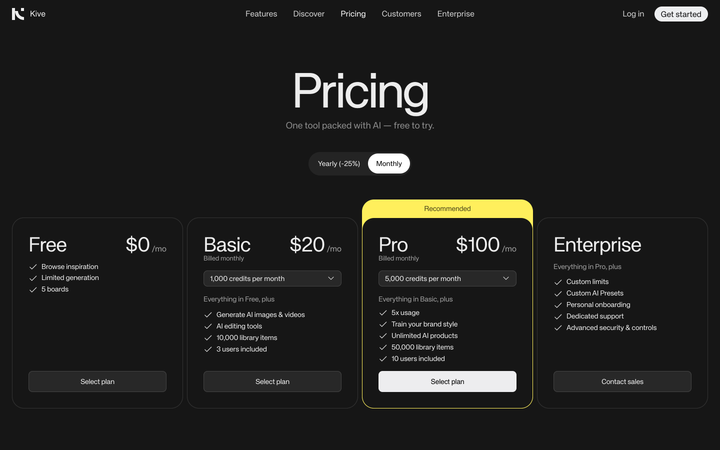
Why does Kive's pricing page show $15 when the plan costs $20?
Because the billing toggle at the top of the page is set to "Yearly (-25%)" before you touch it.
Switch it to Monthly and Basic becomes $20 and Pro becomes $100. Both cards then read "Billed monthly" instead of "Billed yearly."
Claid's pricing page does the same thing, and we cover that in our breakdown of Claid AI pricing. It matters when you are building a budget: compare Kive's advertised $15 against a competitor's monthly rate and you are comparing a twelve-month commitment against a cancel-anytime plan.
What do 1,000 credits actually get you?
Kive publishes approximate output counts per plan, which is more useful than the credit number on its own.
| What you're doing | Free (40 credits) | Basic (1,000) | Pro (5,000) |
|---|---|---|---|
| Image generations | ~6 | ~100 | ~500 |
| Video generations | — | ~40 | ~200 |
| Image edits | — | ~100 | ~500 |
| Image upscales | — | ~100 | ~500 |
| Video upscales | — | ~25 | ~125 |
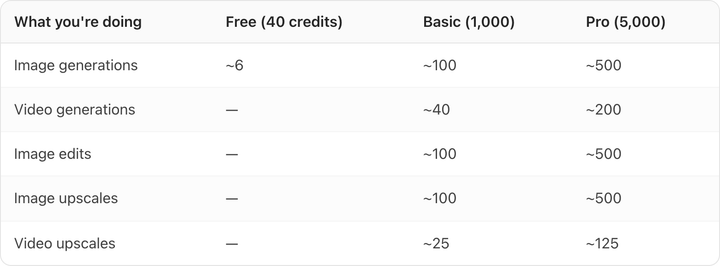
Individual edit operations have fixed costs in Kive's documentation: remove background is 1 credit, erase and extend are 2, replace object is 4, the edit tool and change background are 10 each, upscaling an image is 10 or 20 depending on resolution, and upscaling a video is 40. Generation costs vary with the model and quality settings you choose.
Run the arithmetic on the generation numbers and Basic works out to roughly 10 credits per generated image, or about $0.20 an image billed monthly and $0.15 billed yearly. Pro lands on the same figure. A video generation costs about 25 credits, so roughly $0.50 each on monthly billing.
For a brand shooting 30 SKUs with four images each, that is 120 generations before a single retry, already past what Basic's 1,000 credits cover once you count the versions you throw away. Budget by attempts rather than by finished shots. On packaged goods with fine label text we typically see three to five generations per usable image.
Do Kive credits roll over?
Yes, with a cap. Kive's documentation states unused credits carry over to the next month up to your monthly plan limit, so you can accumulate a maximum of twice your monthly allowance. On Basic that means the most you can ever bank is 2,000 credits.
One-time credit top-ups are available, but they are also capped at your plan's monthly credit limit per billing month. If you have a heavy month, you cannot buy your way through it on a small plan. You have to upgrade.
When you run out entirely, Kive gives you one free image every 30 minutes on Free and Basic, and one every 20 minutes on Pro. Treat that as a rate limiter rather than a way through a deadline.
What do you lose on the Free plan?
Enough that the free tier cannot answer the question you are asking it. You get 40 credits on a verified email, five boards, and browse access. Output carries a watermark, and AI Product Shots, the feature most e-commerce brands are evaluating Kive for, is not available until Basic.
Custom brand training sits higher still, on Pro only. If you are testing whether an AI tool can hold your packaging and label detail consistently across a catalog, the free plan cannot answer that question, because the feature that would answer it is two tiers up. Our full Kive AI review goes into what the output actually looks like on real product shots.
How does Kive's price compare to other AI product photography tools?
| Tool | Entry paid plan | Credits/month | What that buys | Effective cost per generated image |
|---|---|---|---|---|
| Kive Basic | $20/mo billed monthly ($15 billed yearly) | 1,000 | ~100 image generations | ~$0.20 (~$0.15 yearly) |
| Kive Pro | $100/mo billed monthly ($75 billed yearly) | 5,000 | ~500 image generations | ~$0.20 (~$0.15 yearly) |
| Claid Essentials | $9/mo, billed yearly | 500 | 125 AI Photoshoot generations at 4 credits each | ~$0.07 |
| Claid Pro | $35/mo, billed yearly | 2,000 | 500 AI Photoshoot generations | ~$0.07 |
| Pikes | Free to start, no credit card | — | — | Paid plans are not published publicly |
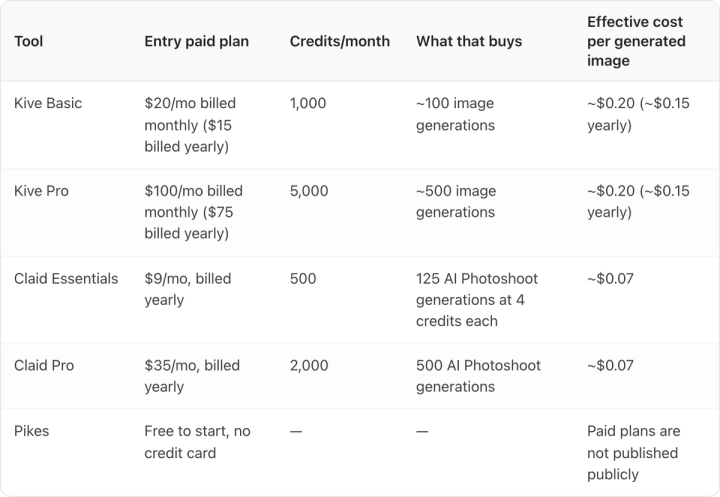
Claid is materially cheaper per generation. If your job is high-volume background swaps and enhancement, Claid's credit economics beat Kive's by roughly three to one. Claid's prices above are the rates displayed with its yearly toggle preselected, verified 29 July 2026.
Kive earns the difference on the surrounding platform: the boards, the 10,000-item library on Basic, three seats included, and brand style training on Pro. You are paying for a creative workspace as much as for generations. Whether that is worth $0.13 more per image depends on whether your team actually works inside it.
Where Kive's pricing gets awkward for a catalog brand
Two places, and both of them are about the gap between attempts and keepers.
The first is the retry tax. Credit pricing charges you for attempts, not results. On abstract or lifestyle imagery that is fine, because most attempts are usable. On packaged consumer goods, where the label has to stay legible and the brand colour has to stay exact, the ratio of attempts to keepers is much worse, and a flat per-credit rate means your real cost per usable asset is two to five times the sticker figure.
The second is that fidelity is the thing you cannot buy more of with credits. Brand training is a Pro feature, so a brand on Basic is asking a general-purpose model to hold packaging detail with no persistent reference. That is the failure mode we see most often when brands move off these tools.
This is the specific problem Pikes was built around: keeping label text, packaging detail, and brand colour correct across many SKUs and many outputs, with brand context that persists between generations rather than being re-prompted each time.
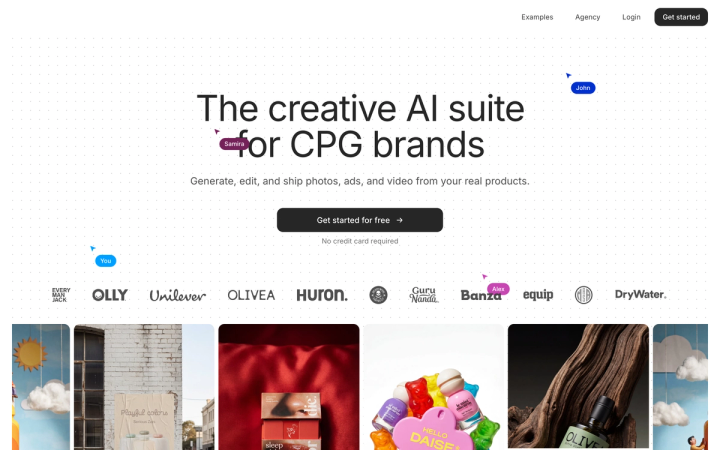
If you are running a catalog and product fidelity is what keeps failing, Pikes is free to start with no credit card, and worth testing on your hardest SKU rather than your easiest one.
For a direct feature-by-feature comparison, see Kive AI vs Pikes AI, or the three-way test of Higgsfield, Kive and Pikes on product detail preservation.
Frequently asked questions
Is Kive AI free?
There is a free plan with 40 credits for verified email accounts, worth about six image generations, plus five boards and browse access. Output is watermarked, and AI Product Shots are not included. It is enough to see the interface, not enough to evaluate output quality on your own products.
What is the real monthly price of Kive Basic?
$20 per month billed monthly, or $15 per month if you commit to a year. The $15 figure is what the pricing page shows by default because the yearly toggle is preselected.
How many images can you generate on Kive Basic?
About 100 image generations per month from the 1,000-credit allowance, or about 40 video generations, according to Kive's own plan comparison. Editing operations draw from the same pool.
Do unused Kive credits expire?
They carry over to the next month, but only up to your monthly plan limit, so you can bank a maximum of two months' worth. Top-up credit purchases are also capped at your plan's monthly limit per billing cycle.
Is Kive Pro worth five times the price of Basic?
Only if you need what Pro adds beyond volume: 10 seats instead of 3, a 50,000-item library, and custom brand style training. The credits themselves cost exactly the same per unit on both plans, so Pro is not a volume discount.
What is the cheapest way to try Kive properly?
One month of Basic billed monthly at $20, which unlocks AI Product Shots without a twelve-month commitment. Run your hardest SKU through it, the one with small label text or a difficult finish, rather than your simplest. That is where AI product photography tools separate.

Written by
Mike Lehman
Mike Lehman is a senior content strategist at Pikes. Before joining Pikes, Mike spent nearly a decade working with Glossier, Haus, and Athletic Brewing, leading campaigns that blended storytelling and data.