
Pontus Karlsson
Photoroom Pricing in 2026: What Each Plan Actually Costs
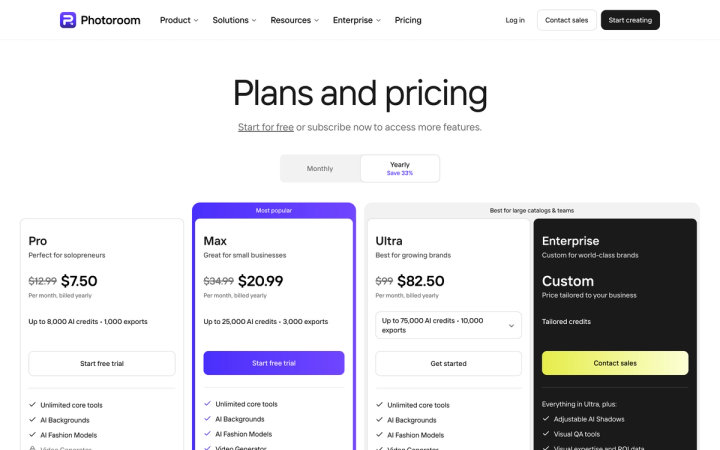
Photoroom costs $12.99, $34.99 or $99 per month on monthly billing for Pro, Max and Ultra. The $7.50, $20.99 and $82.50 you see first on its pricing page are annual rates, because the page loads with Yearly preselected. Enterprise is custom-quoted. All figures verified on photoroom.com/pricing on 2 August 2026.
How much does Photoroom cost in 2026?
Four tiers, three of them self-serve. Every paid plan includes up to 50 seats, which is unusual at this price point.
| Plan | Billed monthly | Billed yearly (per month) | AI credits/mo | Exports/mo | Video Generator |
|---|---|---|---|---|---|
| Pro | $12.99 | $7.50 | 8,000 | 1,000 | Not included |
| Max | $34.99 | $20.99 | 25,000 | 3,000 | Up to 50 |
| Ultra | $99 | $82.50 | 75,000 | 10,000 | Up to 150 |
| Enterprise | Custom | Custom | Custom | Custom | Custom |
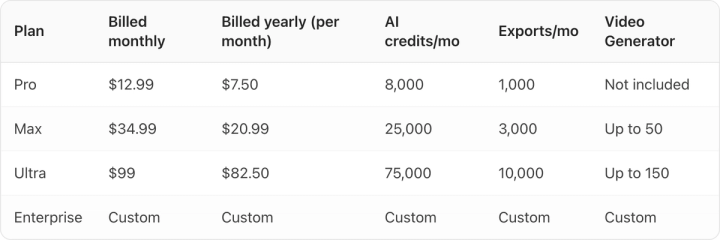
Shopify integration starts at Max. 4K output is Ultra only. Adjustable AI Shadows, as opposed to the preset shadows everyone gets, are Enterprise only.
Why is the price on the pricing page lower than what you'll pay?
Because the toggle defaults to Yearly. Land on photoroom.com/pricing and the first number your eye hits on the Pro card is $7.50, with $12.99 struck through beside it and "Per month, billed yearly" underneath.
That's not deceptive. The monthly price is on the card and the billing cycle is labelled. But it is easy to quote wrong, and most write-ups of Photoroom's pricing do.
The pattern is now standard across the category. Claid, Kive and Magnific all preselect annual too. We hit the same thing writing up Claid's pricing and Kive's pricing, and again on Magnific, formerly Freepik. If you're building a budget from a screenshot someone sent you, check which toggle was active.
Is the annual discount really 33%?
The badge on the toggle says "Save 33%". None of the three plans discounts by 33%.
| Plan | Monthly rate | Annual rate | Actual discount |
|---|---|---|---|
| Pro | $12.99 | $7.50 | 42% |
| Max | $34.99 | $20.99 | 40% |
| Ultra | $99 | $82.50 | 17% |
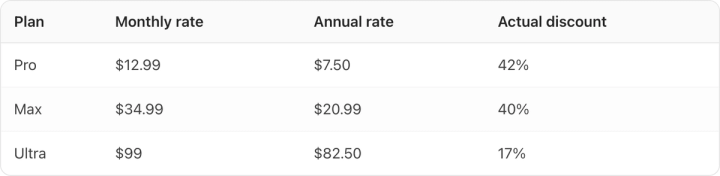
Pro and Max beat the advertised number. Ultra comes in at less than half of it, and Ultra is the plan a brand with a real catalogue would actually buy.
Committing to a year on Ultra saves $198 against $990 paid for the year. Committing to a year on Max saves $168 against $251.88. So the answer differs by tier. On Pro and Max the discount is large enough to justify the lock-in. On Ultra, $16.50 a month is thin compensation for losing the ability to drop the plan in a slow quarter.
What is a Photoroom AI credit, and how much does each tool cost?
Photoroom doesn't publish a per-tool credit price. It publishes the maximum number of generations each plan can produce if you spend the whole credit pool on one feature. Divide the pool by that number and you get the real rate, and it holds consistently across all three tiers.
| Tool | Credits per generation |
|---|---|
| AI Backgrounds (Basic) | 1 |
| AI Backgrounds (Advanced) | 5 |
| AI Images | 5 |
| AI Fashion Models 1K | 5 |
| Adjustable AI Shadows | 10 |
| Edit with AI | 20 |
| Product & Listing AI tools | 20 |
| AI Fashion Models 2K | 135 |
| AI Fashion Models 4K | ~240 |
| Video Generator | 500 |
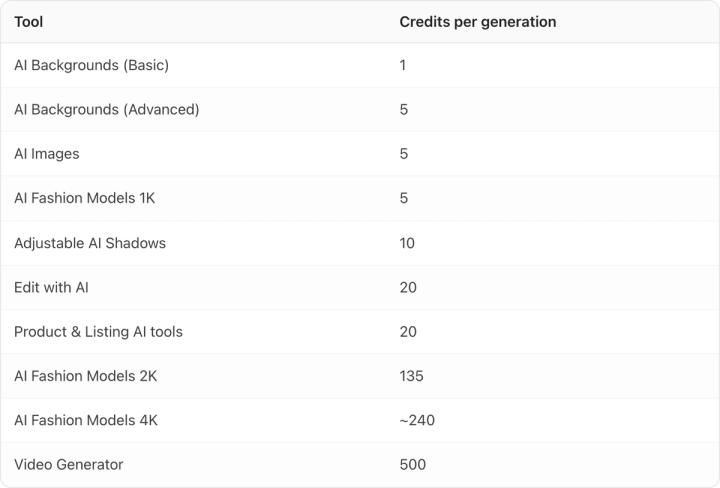
A 2K fashion model shot costs 27 times a 1K one, and a 4K shot costs roughly 48 times. One video generation costs 500 credits, the same as 500 basic backgrounds. On Max, video will eat your month faster than anything else on the list.
The core tools cost nothing. Background Remover, Retouch, AI Product Fixer, preset AI Shadows, AI Fill, AI Expand/Resize and Image Enhancer are unlimited on every paid plan, subject to fair use. That's a good deal, and it's the part of Photoroom most worth paying for.
Why the export cap matters more than the credit pool
Every plan has two meters, and they run out at different speeds.
Photoroom counts an export as "every image you save from Photoroom, whether from the editor, Batch, or a Shopify sync." One image, one export.
On Pro you get 8,000 credits and 1,000 exports. Doing basic AI backgrounds at 1 credit each, your credits could produce 8,000 images, but you can only save 1,000 of them. The export cap binds first, by a factor of eight.
Cost per exported image, which is the number that matters for catalogue work:
| Plan | Billed monthly | Billed yearly |
|---|---|---|
| Pro | $0.0130 | $0.0075 |
| Max | $0.0117 | $0.0070 |
| Ultra | $0.0099 | $0.0083 |
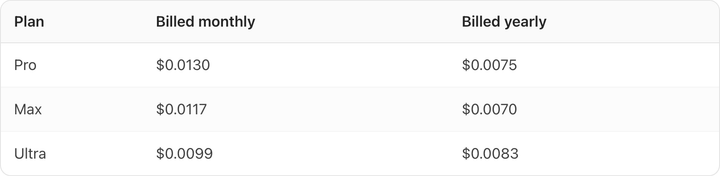
On annual billing, Max is the cheapest plan per exported image, cheaper than Ultra. Ultra buys you 4K, more video and a bigger credit pool. It does not buy you a better rate on exports. Pick Ultra for the capabilities, not the unit economics.
Exports pause when you hit the cap. You get warnings at 80% and 100%, and can upgrade mid-cycle. Credits and exports both reset each billing cycle and are shared across your Space. Photoroom also notes the credit allowance "may vary depending on your country or region."
What does Photoroom's free plan include?
The pricing page says "Start for free" and then doesn't say what free means. No free column in the comparison table, no credit figure, no export figure, no statement about watermarks. You have to create an account to find out.
We're not going to guess at it. If the free tier matters to your decision, sign up and check before you plan around it. Note also that "Start free trial" on the Pro and Max cards is a trial of a paid plan, which is a different thing.
How much does the Photoroom API cost?
Separate product, separate wallet, simpler pricing. There's no annual toggle at all.
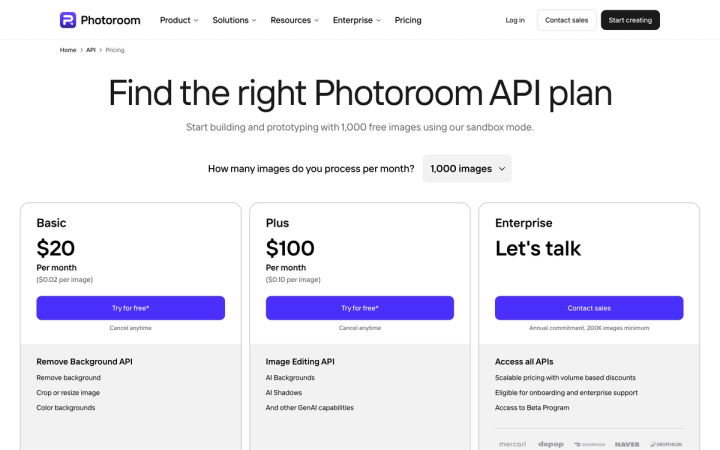
At 1,000 images a month, Basic is $20/month billed monthly and covers the Remove Background API only, working out to $0.02 per image. Plus is $100/month billed monthly and adds the Image Editing API, meaning AI Backgrounds, AI Shadows and other generative capabilities, at $0.10 per image. Enterprise requires an annual commitment and a 200,000-image minimum. Sandbox mode gives you 1,000 free images to prototype against.
App credits and API credits are not interchangeable. Photoroom's FAQ is explicit: "API and MCP usage are not included and use a separate allowance." Each paid app plan does include an API/MCP wallet "worth the plan's price, charged at API rates", so a $12.99 Pro plan gives you roughly $12.99 of API usage. At $0.02 an image that's about 650 background removals, which covers prototyping. At production volume you'll be paying API rates on top of the subscription.
Is Photoroom worth it for a consumer brand?
For what it's best at, yes. Photoroom's background removal is as good as anything on the market and it costs no credits on any paid plan. Fifty seats at $12.99 a month billed monthly is generous. The Shopify sync at Max saves real time if that's your storefront.
Where it gets expensive is generative work at catalogue scale. The export meter is the ceiling, and the tools that produce finished lifestyle imagery draw against a pool that resets monthly with no rollover. Edit with AI costs 20 credits a go; advanced backgrounds cost 5.
The other thing to test before you commit, on Photoroom or anywhere else, is fidelity. Run your five hardest SKUs through it: the one with small print on a curved surface, the one with a metallic finish, the one whose brand colour is nearly a competitor's. Look at the output at 100% zoom and read the label. Image models drift on exactly that detail, and a drifted label is a product misrepresentation before it's a styling problem.
That test is why we built Pikes AI to generate from a brand's actual SKUs rather than from a text description of them, holding brand colour and packaging detail constant across a run. If you're comparing options, put the same five SKUs through each one and judge on the labels.

Whichever tool you land on, price it per exported image on the billing cycle you'll actually pay, not per credit on the annual rate the page shows you first. For a wider view of the category we keep a running list of Photoroom alternatives, plus a head-to-head on Photoroom versus Pikes.
Frequently asked questions
Does Photoroom have a free plan?
Yes, there's a "Start for free" option, but the pricing page doesn't document what it includes. No credit allowance, no export allowance, no statement about watermarking. You have to create an account to see the limits. The "Start free trial" buttons on the Pro and Max cards are trials of those paid plans, which is a different thing.
What's the cheapest way to get Photoroom's video generator?
Max. Video Generator isn't included on Pro at all. Max is $34.99/month billed monthly, or $20.99/month billed yearly, and allows up to 50 video generations if you spend your whole credit pool on video. Each generation costs 500 credits.
Do Photoroom credits roll over?
No. Credits are a monthly pool "renewed each billing cycle" and shared across your Space. Exports work the same way. Unused allowance in one month doesn't carry into the next.
How many seats does Photoroom include?
Up to 50 on Pro, Max and Ultra alike. Enterprise is custom. Seat count is not how Photoroom segments its plans; credits, exports and feature access are.
Is Photoroom cheaper than Claid or Kive?
At the entry tier, yes. Photoroom Pro is $12.99/month billed monthly. Kive Basic is $15/month billed yearly, which works out to $20/month billed monthly at Kive's stated 25% annual discount. Claid Essentials shows $9/month billed yearly on Claid's page today; its monthly rate was $15 when we last toggled it, on 1 August 2026. But the plans meter differently, since Photoroom caps exports where the others cap credits. Compare on cost per finished image you can actually save rather than on headline price.
Can I cancel a Photoroom annual plan?
Photoroom's stated refund policy is up to one week after purchase, with the process depending on whether you subscribed on desktop or through the App Store or Google Play. Cancelling stops the subscription at the end of the current billing period. For API subscriptions specifically, remaining credits are preserved for six months.