

Mike Lehman
Pixelcut Review 2026: What Its Credits Actually Buy You
Pixelcut Pro costs $10 per month billed monthly, or $8 per month billed yearly, and includes 600 AI credits. That sounds cheap until you check what a credit buys. On the models most brands actually want, 600 credits is 20 images a month. On the cheapest model in the catalog the same 600 credits is 600 images.
We verified every number below on pixelcut.ai on 9 August 2026, with the billing toggle driven by hand. Disclosure: we make Pikes AI, which competes with Pixelcut. The pricing is Pixelcut's own; the arithmetic is ours, and you can redo it.
What is Pixelcut, and who is it actually for?
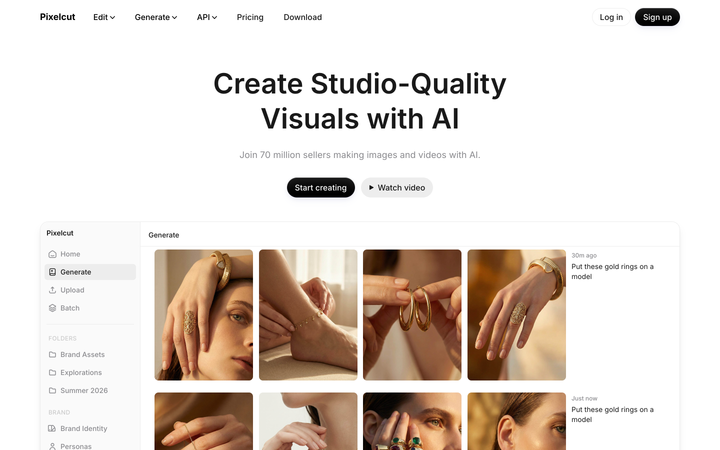
Pixelcut is an AI photo editor sold to people who sell things. Background removal, magic eraser, upscaling, generative fill, image expansion, AI backgrounds, batch editing, an ads builder, and a generation surface that resells a long list of third-party models. It ships on web, iOS and Android, and it has an API.
That mobile-first posture matters more than the feature list. Pixelcut's homepage claims "70 million sellers"; its pricing page says "over 200,000 creators, brands and small businesses" and "loved by over 2 million people." Whatever the real figure is, the shape of the product is aimed at a solo seller with a phone, not a brand team with a 400-SKU catalog and a shared asset library.
Knowing that before you evaluate it saves you a lot of time.
How much does Pixelcut cost in 2026?
Three plans. The billing toggle on the pricing page defaults to Monthly, which is worth saying out loud because most tools in this category default to annual and show you the discounted number first.
| Plan | Billed monthly | Billed yearly | AI credits / month | Team seats | Batch exports / month |
|---|---|---|---|---|---|
| Free | $0 | $0 | none listed | none listed | none listed |
| Pro | $10 | $8 | 600 | 3 | 1,000 |
| Business | $30 | $24 | 3,600 (adjustable to 180,000) | 10 | 2,000 |
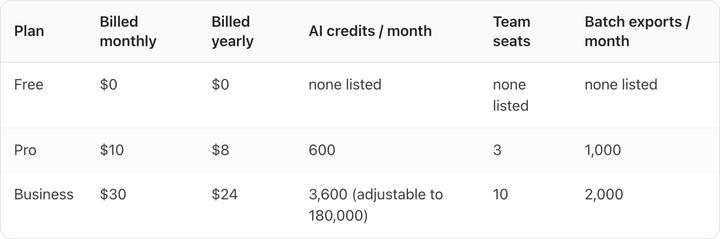
The yearly saving is a flat 20%. Free gives you limited background removal, limited upscale, and export without a watermark.
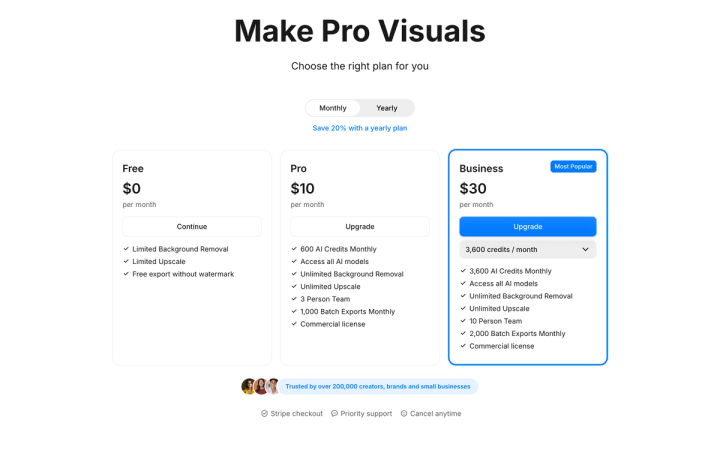
Background removal and upscaling are unmetered on both paid plans. Credits only bind on generative work. If your job is knocking out backgrounds on 300 packshots, the credit maths below is irrelevant to you, and Pro at $10 billed monthly is a cheap way to do it.
What does one Pixelcut credit actually buy?
Pixelcut does not publish a credit price per model. It publishes an image count per model, quoted against the top Business allowance of 180,000 credits a month. Dividing that allowance by each published count gives the per-image credit cost — and every result lands on a whole number, which is what tells you the reading is right.
That produces the following, with the Pro plan's 600 credits converted into images:
| Model | Credits per image | Images on Pro (600 credits) | Cost per image on Business at scale |
|---|---|---|---|
| Flux 2 Klein 4B | 1 | 600 | $0.007 |
| Z Image Turbo | 2 | 300 | $0.013 |
| Grok Imagine Image | 4 | 150 | $0.027 |
| Nano Banana Lite | 10 | 60 | $0.067 |
| Nano Banana, Flux 2 Pro, Imagen 4 | 12 | 50 | $0.080 |
| Flux Kontext Max, Imagen 4 Ultra | 18 | 33 | $0.120 |
| Nano Banana 2, Nano Banana Pro | 30 | 20 | $0.200 |
| ChatGPT Image | 40 | 15 | $0.267 |
| Recraft v4 Pro | 55 | 10 | $0.367 |
| ChatGPT Image 2 | 87 | 6 | $0.580 |
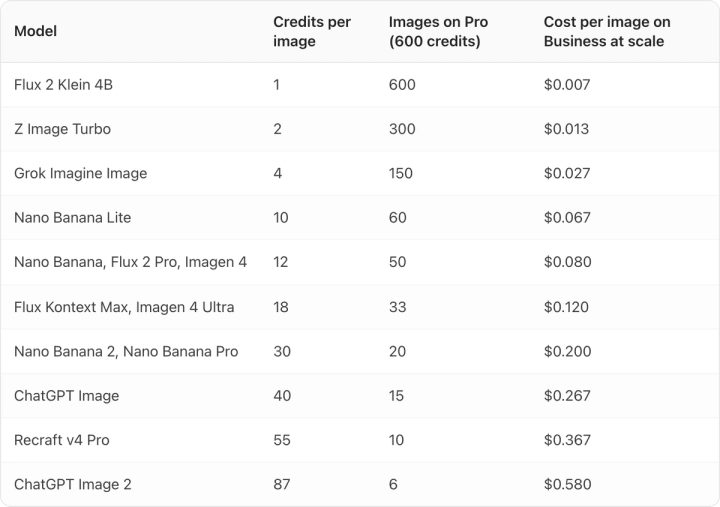
The spread is 87×. Your monthly bill is fixed; your output is not. A $10 Pro subscription is 600 throwaway drafts or six ChatGPT Image 2 renders, and nothing on the pricing page tells you which one you are about to buy.
For a brand shooting real packshots, the useful row is Nano Banana Pro at 30 credits. Pro gives you 20 of those a month, which is a trial rather than a catalog workflow.
Video is metered from the same pool and costs far more: Sora 2 at 100 credits a clip, Sora 2 Pro at 500, Hailuo v3.0 at 300. Pro's entire monthly allowance is one Sora 2 Pro clip with 100 credits left over.
Which Pixelcut plan is the best value?
The Business plan is not one price. It is a dropdown with eight steps, and the entry step is the worst deal on the ladder.
| Business credits / month | Billed monthly | Credits per $1 |
|---|---|---|
| 3,600 | $30 | 120 |
| 9,000 | $60 | 150 |
| 18,000 | $120 | 150 |
| 36,000 | $240 | 150 |
| 72,000 | $480 | 150 |
| 108,000 | $720 | 150 |
| 144,000 | $960 | 150 |
| 180,000 | $1,200 | 150 |
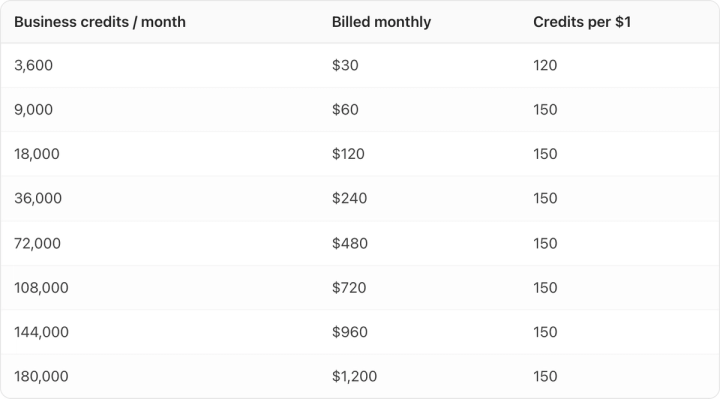
Every step from $60 up buys credits at exactly 150 per dollar. The $30 entry step buys them at 120. Doubling your spend from $30 to $60 gets you 2.5× the credits, not 2×.
Pro is worse again: 600 credits for $10 is 60 credits per dollar, half the rate of the $60 Business step. The pattern is the same one Midjourney's tiers show, and we cover it across vendors in our AI product photography cost per image breakdown. If you are past experimenting, the $30 step is the one to skip.
What is Pixelcut genuinely good at?
Three things.
Unmetered utility work. Unlimited background removal and upscaling on a $10 plan is hard to beat, and the batch export allowance (1,000 a month on Pro, 2,000 on Business) means you can actually run it at volume.
Model breadth. You get Nano Banana, Flux, Imagen, Recraft, Ideogram, Seedream, Qwen, Grok Imagine, Runway, Kling and Sora behind one subscription and one credit balance. If your workflow is "try six models on the same prompt and keep the best," that is a real convenience and cheaper than six subscriptions.
Low commitment. Free tier with watermark-free export, monthly billing preselected, Stripe checkout, cancel anytime. Nothing about the buying process is designed to trap you, which is more than can be said for several tools in this category.
Where does Pixelcut struggle for a brand with a real catalog?
Pixelcut is a workflow layer over other people's models. That is its strength on breadth and its weakness on consistency. A general-purpose image model has no idea what your label is supposed to say, and the failure mode is always the same: type on the pack drifts, a serif softens, a Pantone shifts half a step, and it looks fine at thumbnail size and wrong at 100%.
There is no persistent brand or SKU memory in the plan structure either. Every generation starts from the prompt you happen to write that day. Across 40 SKUs and three people, that is how a catalog stops looking like one catalog.
That gap is why we built Pikes AI to generate from a brand's actual product files and to carry brand context between generations, rather than resolving the product from a text description each time. Whatever tool you land on, run the same test before you commit: generate your worst SKU — the one with small type and a reflective surface — and open the output at 100% zoom. If the label is not readable and correct, the price per image does not matter.
If you want to compare on numbers rather than claims, our guides to running product photography at catalog scale and the best free AI product photography tools both go tool by tool.
Is Pixelcut worth it in 2026?
If you are a solo seller or a small team doing background removal, cleanup and occasional generation, Pro at $10 billed monthly is good value and the unmetered utilities alone justify it.
If you run a brand with a catalog and a fidelity standard, the honest read is that the $10 plan is a 20-image trial and the plan that actually supports volume starts at $60 billed monthly. Even then you are betting on general models to hold your label steady. Compare it against dedicated tools before you standardise on it; our Pebblely review and Photoroom alternatives cover the nearest ones.
Frequently asked questions
Is Pixelcut free?
Yes, there is a free plan at $0 with limited background removal, limited upscale and watermark-free export. It does not list a monthly AI credit allowance, so generative work is where the free tier runs out.
How much is Pixelcut per month?
Pro is $10 per month billed monthly and $8 per month billed yearly. Business starts at $30 per month billed monthly and $24 billed yearly, and scales in eight steps to $1,200 per month. Verified on pixelcut.ai/pricing, 9 August 2026.
How many images do you get with Pixelcut Pro?
600 credits a month, which is 20 images on Nano Banana Pro, 50 on Nano Banana or Imagen 4, and 600 on Flux 2 Klein 4B. Background removal and upscaling are unlimited and do not consume credits.
Do Pixelcut credits roll over?
Pixelcut's pricing page describes credits as a monthly allowance and does not state a rollover policy either way. Treat them as use-it-or-lose-it until Pixelcut says otherwise, and check the terms before buying a large step.
Does Pixelcut have a commercial licence?
Both Pro and Business list "Commercial license" as an included feature. The Free plan does not.
Which model should you use for product photos on Pixelcut?
For packshots where label accuracy matters, the higher-credit models (Nano Banana Pro at 30 credits, ChatGPT Image 2 at 87) will hold detail better than the 1–4 credit models, which are built for speed. Budget accordingly: on Pro that is 20 and 6 images a month respectively.

Written by
Mike Lehman
Mike Lehman is a senior content strategist at Pikes. Before joining Pikes, Mike spent nearly a decade working with Glossier, Haus, and Athletic Brewing, leading campaigns that blended storytelling and data.