
Pontus Karlsson
The Best Free AI Product Photography Tools in 2026
Five AI tools worth pointing at a product photo have a genuinely free tier in August 2026: Pomelli, Claid, Kive, Photoroom and Canva. Only one of them publishes what free is worth. Claid gives you 50 credits. Kive says "limited generation". Photoroom's pricing page documents nothing at all.
We checked every one of these on the vendor's own pricing page on 3 August 2026. Below is what each free tier gives you, what it costs when it runs out, and how far 50 credits goes on a real SKU.
Which AI product photography tools have a free plan in 2026?
| Tool | Free tier | What the pricing page says free includes | What it costs when free runs out |
|---|---|---|---|
| Pomelli (Google Labs) | Free to use | "Several hundred image and video generations" (verified 28 Jul 2026; the FAQ now sits behind a Google sign-in) | No paid tier published |
| Claid | Free trial | 50 credits on any operation, all Standard tools, 50 API credits | Essentials $15/mo billed monthly, or $9/mo billed yearly |
| Kive | Free plan, $0 | "Limited generation", 5 boards, browse inspiration; no credit figure on the card | Basic $20/mo billed monthly, or $15/mo billed yearly |
| Photoroom | "Start for free" button | Nothing documented: no credits, exports, watermark policy or resolution cap | Pro $12.99/mo billed monthly, or $7.50/mo billed yearly |
| Canva | Free plan, US$0/year | Design tools; AI features limited, and AI Pass is a paid add-on to Pro or Business | Pro US$180/year; Business US$250/year per person |
| Pikes AI | Free to start | "Get started for free", no credit card required | Not published on the site |
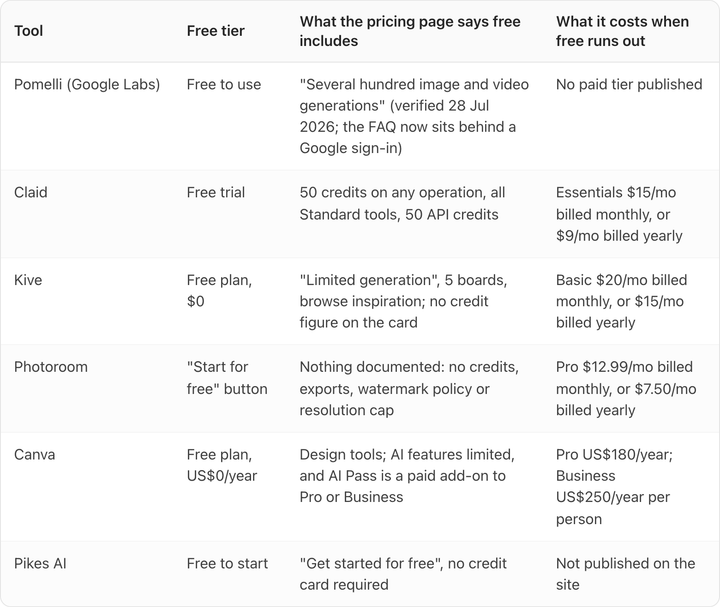
Carry one thing into every row of that table. Four of these five pricing pages load with the annual toggle already selected, so the number on the card is the discounted annual rate and the monthly rate is higher. In Claid's case it is $15 rather than $9. Read the toggle before you read the price.
Is Claid AI free?
Claid has a free trial, not a free plan. As of 3 August 2026 it gives you 50 credits to use on any operation, access to all Standard tools, and 50 API credits to test the API separately.
That 50 is the most useful number on this page, because Claid is the only one of the five that lets you convert free into money. Essentials is 500 credits for $15/month billed monthly, or $9/month billed yearly. At the monthly rate a credit is worth three cents, so the free trial is about $1.50 of product.
That is enough to run one SKU through a few operations and look hard at the result. It is not enough to ship anything. Our breakdown of Claid's pricing tiers goes through what each credit is spent on.

Is Kive AI free?
Kive has a permanent Free plan at zero cost, which is rarer than a trial and more useful. The card lists three things: browse inspiration, "Limited generation", and 5 boards.
It does not put a number on "limited". The Basic and Pro cards both carry a dropdown showing exactly how many credits you get, 1,000 and 5,000 a month. The Free card has no dropdown and no figure.
Paid, Kive is Basic at $20/month billed monthly or $15/month billed yearly, and Pro at $100/month billed monthly or $75/month billed yearly. The per-credit price does not improve as you go up: both tiers work out at two cents a credit on monthly billing. Pro buys you volume and seats, not a discount. We covered that in our Kive pricing analysis.

Does Photoroom have a free plan?
Photoroom's pricing page has a "Start for free" button and no free plan on it. As of 3 August 2026 there is no published credit count, no export count, no watermark policy and no resolution cap for whatever free turns out to be.
The paid tiers are documented in detail by comparison. Pro is $12.99/month billed monthly or $7.50/month billed yearly, with 8,000 credits and 1,000 exports. Max is $34.99/month billed monthly or $20.99/month billed yearly, with 25,000 credits and 3,000 exports.
Look at those two numbers on Pro: 8,000 credits against 1,000 exports. The export meter runs out roughly eight times faster than the credit meter, so exports are the real unit of cost. We worked the per-export maths out in our Photoroom pricing breakdown. If you cannot see how many exports a free account gets, you cannot size it.
Can you do product photography free in Canva?
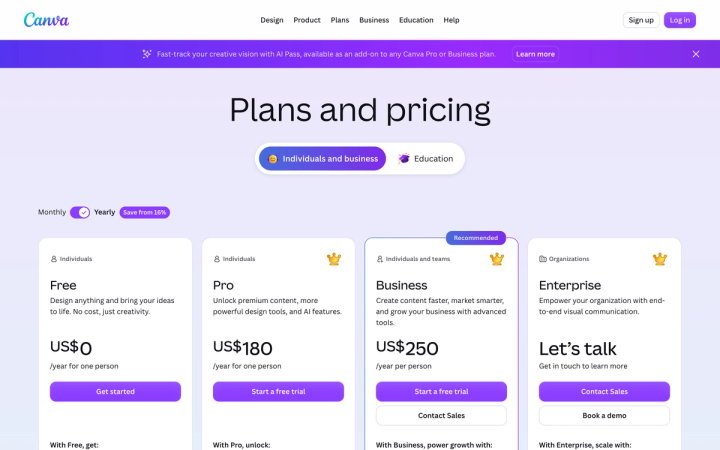
Canva Free is US$0/year, and Canva is the only tool here that quotes per year rather than per month. Pro is US$180/year for one person and Business is US$250/year per person, with the yearly toggle preselected and a "Save from 16%" badge.
The wrinkle is where Canva's AI now sits. A banner across the top of the pricing page on 3 August 2026 reads that AI Pass is "available as an add-on to any Canva Pro or Business plan". Some AI capacity is therefore a paid add-on on top of a paid plan, which makes the free tier's AI allowance the first thing to check.
Canva is the easiest of these five if you have no design resource, and that is worth something. It is also the weakest at holding fine packaging detail, which is the whole job in product photography. We wrote up where Canva stops being enough for product photos.
Is Google's Pomelli free?
Pomelli is a Google Labs experiment and the only tool on this list with no paid tier at all. When we last read Google Labs' own page on 28 July 2026, it said you could use Pomelli at no charge, with a cap in the region of several hundred image and video generations.
We could not re-verify that today. As of 3 August 2026 the Pomelli FAQ redirects to a Google sign-in, so the terms are no longer readable without an account. Treat the free status as accurate as of 28 July and check it yourself before you build anything on it.
The sign-in gate points at the real risk with Pomelli, which is not price. Labs experiments get retired. Free is a good reason to try it and a bad reason to make it the only place your brand's creative lives. Our Pomelli pricing write-up goes through what free from Google is really costing you.
What does a free tier actually cost you?
Three things, none of which appear on a pricing page.
Resolution and export caps. A generation you cannot export at listing resolution is a preview, not an asset. Amazon wants 500 to 10,000 pixels on the longest side. Check the ceiling before you count the credits.
Licence terms. Free tiers and paid tiers do not always carry the same commercial rights, and the platform rules are a separate question again from the vendor's. If you are putting AI output on a live listing, our guide to whether AI-generated product images are allowed covers what Amazon, Google Merchant Center and Meta each require.
Rework. Nobody prices this one and it costs the most. Generation is cheap on every tool here. Regenerating a shot because the label text came out wrong, then again because the cap colour drifted, is what eats the day. A free tier that produces near-misses fast is more expensive than a paid one that lands.
When is free enough, and when is it not?
Free is enough to find out whether a tool holds your product.
Every free tier on this list has the credits for the test. Take one SKU with real text on the packaging. Generate the same shot ten times. Open all ten at 100% zoom and read the label.
If the wording changes between generations, if the cap shifts colour, if the logo softens, that tool will not survive your catalogue. No price tier fixes it, because the drift is in the model rather than the plan. If the ten hold, you have learned something the pricing page cannot tell you.
That failure mode is why we built Pikes AI to generate from a brand's actual product images rather than from a text description of them, and you can run the same ten-shot test on us free at pikes.ai without a credit card. Run it on all five of the others too. The tool that keeps your label is the one worth paying for.
FAQ
Is there a completely free AI product photography tool with no limits? No. Pomelli comes closest, because it is a Google Labs experiment with no paid tier, but as of 28 July 2026 Google described a cap in the region of several hundred generations. Everything else on this list caps free usage by credits, exports, or an unstated "limited generation".
Which free tier gives you the most generations? Pomelli, by a wide margin, if the several-hundred figure still holds. Among the tools with published numbers, Claid's 50 credits is the only figure you can plan against.
Is a free trial the same as a free plan? No, and the difference matters. Claid's 50 credits are a one-off trial. Kive's free tier and Canva's US$0/year tier are standing plans you can keep using. A trial tells you whether to buy; a free plan can sit in a workflow permanently.
Do free tiers put a watermark on the output? None of the five pricing pages we read on 3 August 2026 states a watermark policy for its free tier. Photoroom's documents nothing about the free tier at all. Assume nothing and export one test file before you plan around it.
Can you use free-tier output on a live product listing? That is two separate questions. The vendor's licence decides whether you may use the image commercially, and the platform decides whether it may appear on a listing. Amazon, Google Merchant Center and Meta each set different rules on AI-generated imagery, and Amazon's disclosure requirement applies specifically to photorealistic AI-generated people.
How many free images do you need to evaluate a tool properly? Ten of the same SKU. One good result proves nothing, because every one of these tools can produce one good image. Consistency across ten is what predicts whether it works on a catalogue, and ten generations fits inside every free tier here except an unlucky Kive session.