
Pontus Karlsson
AI Product Photography Cost Per Image: What 5 Tools Actually Charge
A finished AI product image costs between $0.007 and $0.30 depending on which tool and which plan you buy. That is a 43x spread for output that looks broadly similar in a demo. We checked all five vendors' live pricing pages on 6 August 2026 and toggled both billing cycles on each one.
Most of that spread comes from how each tool counts an image, and from which tier you land on inside a single vendor's lineup. Quality has less to do with it than you would expect.
How much does one AI product image cost?
Here is every plan we could verify, normalised to cost per finished image. Where a vendor sells credits, we divided by that vendor's own published credits-per-generation figure.
| Tool | Plan | Price | Images included | Cost per image |
|---|---|---|---|---|
| Photoroom | Max | $20.99/mo billed yearly | 3,000 exports | $0.0070 |
| Photoroom | Pro | $7.50/mo billed yearly | 1,000 exports | $0.0075 |
| Photoroom | Ultra | $82.50/mo billed yearly | 10,000 exports | $0.0083 |
| Photoroom | Pro | $12.99/mo billed monthly | 1,000 exports | $0.0130 |
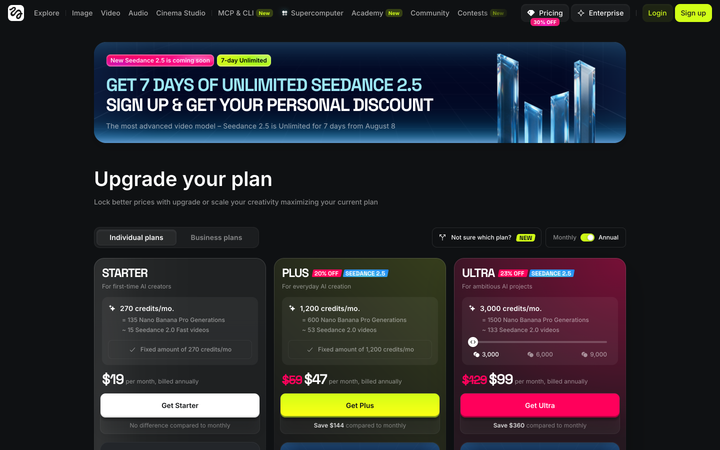
| Higgsfield | Ultra 9,000 | $270/mo billed yearly | 4,500 generations | $0.060 |
| Higgsfield | Ultra 3,000 | $99/mo billed yearly | 1,500 generations | $0.066 |
| Claid | Pro | $35/mo, annual preselected | 500 AI Photoshoots | $0.070 |
| Claid | Essentials | $9/mo, annual preselected | 125 AI Photoshoots | $0.072 |
| Pebblely | Pro | $39/mo billed monthly | 500 images | $0.078 |
| Higgsfield | Plus | $47/mo billed yearly | 600 generations | $0.078 |
| Higgsfield | Ultra 3,000 | $129/mo billed monthly | 1,500 generations | $0.086 |
| Pebblely | Basic | $19/mo billed monthly | 200 images | $0.095 |
| Higgsfield | Scale | $150/seat/mo billed yearly | 1,250 per seat | $0.120 |
| Higgsfield | Starter | $19/mo billed monthly or yearly | 135 generations | $0.141 |
| Kive | Basic or Pro | $15 or $75/mo billed yearly | ~100 or ~500 | $0.150 |
| Kive | Basic or Pro | $20 or $100/mo billed monthly | ~100 or ~500 | $0.200 |
| Pebblely | Lite | $9/mo billed monthly | 30 images | $0.300 |
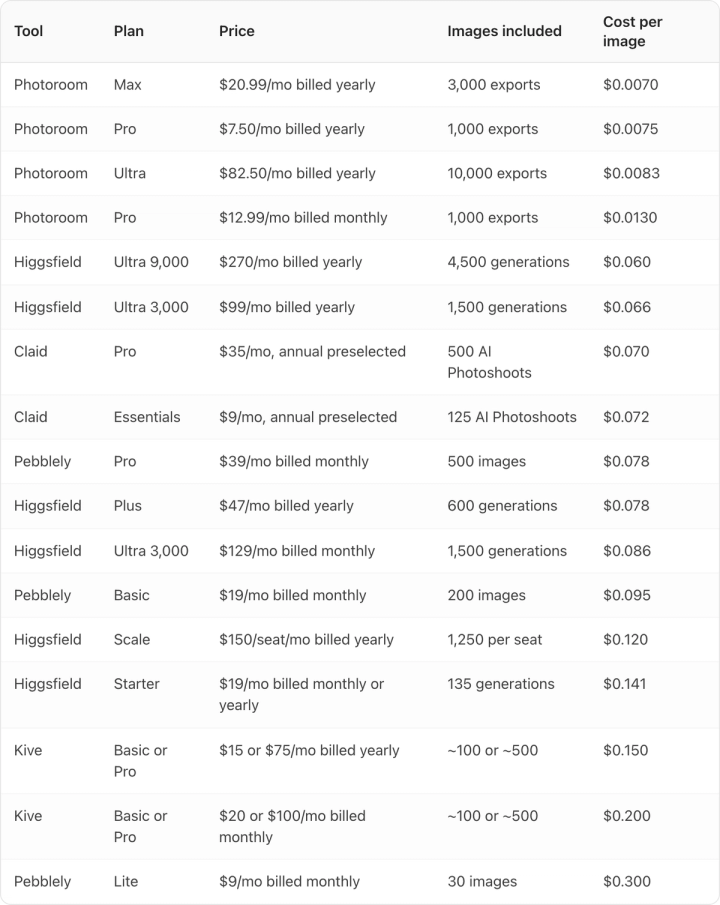
Photoroom is an order of magnitude cheaper than everything else here, and that gap is real rather than a rounding artefact. It is also the tool whose "image" involves the least work.
What counts as one image at each tool?
A single cost-per-image number stops being honest at exactly this point.
Photoroom's unit is an export. Its cheapest credit operations are background removals and basic background swaps, which are edits to a photo you already have. Higgsfield's unit is a Nano Banana Pro generation at 2 credits, a fresh image from a model. Claid's unit is an AI Photoshoot at 4 credits for standard quality or 10 for studio quality. Pebblely sells you a number of images and does not use credits at all.
Photoroom is cheap because it is mostly an editor, and the generation tools cost 8 to 40 times more because generating costs more than cutting out. Comparing $0.007 to $0.078 as though they buy the same thing will land you on the wrong plan.
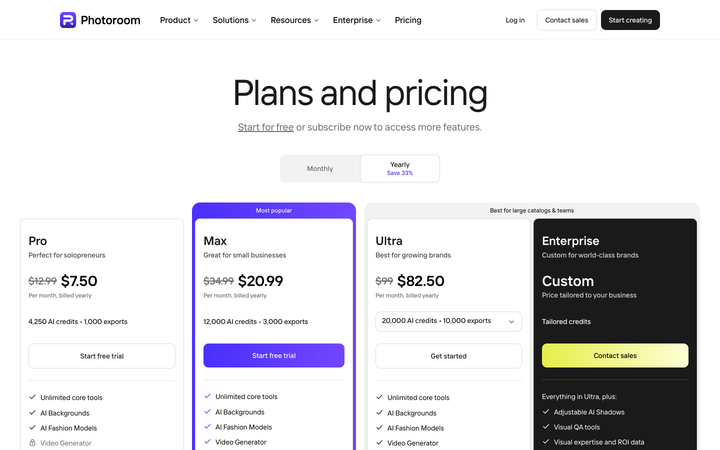
Photoroom Pro includes 4,250 AI credits but only 1,000 exports, and Photoroom's own feature table says Pro allows up to 1,600 AI Image generations. You can generate more images than you are allowed to export. The export meter is the real ceiling on every Photoroom tier, which is why we used exports rather than credits in the table above.
If you are working from older research, note that Photoroom's Pro credit allowance was 8,000 when we checked on 2 August 2026 and is 4,250 today. Credit allowances move, and a cost-per-image figure published a week ago may already be wrong.
Does the annual discount actually save money?
Usually, though one tool charges the same either way.
Four of the five pricing pages load with the annual option already selected: Photoroom ("Save 33%"), Kive ("Yearly (-25%)"), Claid ("Save $120") and Higgsfield. Pebblely is the only one that opens on Monthly. Glance at any of the other four and write down the number you see, and you have written down the annual rate.

Higgsfield Starter is the exception. Its card reads $19/mo billed yearly, and directly under the button it says "No difference compared to monthly." We toggled it both ways and confirmed it: $19/mo billed yearly and $19/mo billed monthly are the same price. It is the only entry tier in this set where committing to a year buys you nothing.
Higgsfield's larger tiers have a quirk running the other way. Switch to monthly and select the 6,000-credit step and it shows $220 with the note "Billed monthly, renews at $250." The 9,000-credit step shows $310/mo billed monthly, renewing at $375. The first month is discounted and the price then rises by 14 to 21 percent. The number on the card is not the number you will pay every month.
We could not verify Claid's monthly price. Its pricing page shows $9 and $35 with a "Billed monthly / Billed yearly" toggle that did not respond to three different click methods today, and has not responded on any of our last three checks. Every Claid figure here is the annual-preselected rate as of 6 August 2026, and we are not going to guess at the monthly one.
Why does the team plan cost more per image than the solo plan?
Higgsfield's Scale plan shows the pattern most clearly. It costs $150 per seat per month billed yearly, with a five-seat minimum and 2,500 credits per seat, which works out to 1,250 generations per seat and $0.120 per image.
The same vendor's Ultra plan at the 9,000-credit step costs $270 per month billed yearly for 4,500 generations, or $0.060 per image. The business plan costs exactly double per image.
Scale buys SSO, admin spend control, a shared credit pool, delegated top-ups, indemnification and priority support. Those are real things a 15-person team needs. But if you are a three-person brand team buying Scale because the card says "for growing creative teams", you are paying a 100 percent premium per image for governance features you will not use.
Kive has a flatter version of the same issue. Basic gives ~100 image generations on 1,000 credits and Pro gives ~500 on 5,000 credits, at $15 and $75 per month billed yearly. That is $0.150 per image on both. Kive Pro buys more capacity, brand style training and more seats, but not a volume discount.
Pebblely runs the opposite way and has the steepest curve here. Lite is $9 per month billed monthly for 30 images, or $0.300 each. Pro is $39 per month billed monthly for 500 images, or $0.078. The entry tier costs nearly four times per image what the top tier does, and Lite caps you at 30 images anyway, so it only works if your volume genuinely sits under that ceiling.
Which plan should you actually buy?
Work backwards from volume rather than from the monthly price.
If you mostly need backgrounds removed and swapped on photos you already have, Photoroom beats every generation tool by an order of magnitude and nothing else here competes with it on that job. Start at Pro and move to Max when you pass 1,000 exports a month.
If you need images generated rather than edited, ask how many finished images you need per month. Under 30, the entry tiers are fine despite bad unit economics, because the absolute numbers are small. Between 100 and 600, the middle tiers are where every vendor's per-image cost drops sharply. Above 1,500, the top individual tier almost always beats the team tier unless you specifically need SSO and shared billing.
Check your reroll rate before you trust any of these numbers. A tool at $0.07 an image that you run three times to get a usable label really costs $0.21. A tool at $0.15 that lands on the first attempt is cheaper. The vendors know this: Kive's own pricing FAQ says it cannot refund credits for a bad generation because "a few iterations may be needed to get the perfect result." Those iterations come out of your allowance.
Generate ten images of your worst SKU, the one with small type, a reflective surface or a busy label, and count how many you would actually put on a product page.
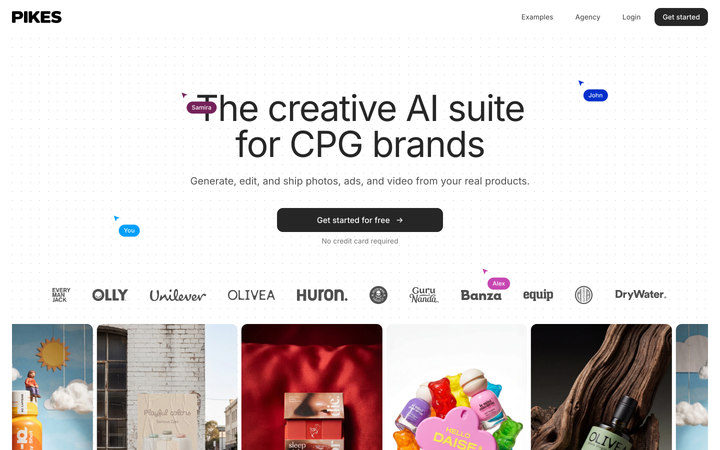
That reroll test is why we built Pikes AI to generate from a brand's real SKUs and hold brand context between generations, since label drift is the most common reason a cheap image turns expensive. Run the same test on whatever you are evaluating, including us. Your own catalogue is the only thing that will tell you which tool holds up.
For plan-by-plan detail on a single tool, we have verified breakdowns of Kive's pricing, Photoroom's pricing and Claid's pricing, plus a review of Pebblely and a guide to producing imagery at catalogue scale.
Frequently asked questions
What is the cheapest way to get AI product images?
Photoroom Pro at $7.50 per month billed yearly gives 1,000 exports, which is $0.0075 per image and the lowest verified figure in this set. That price buys editing operations such as background removal rather than full generations, so it is cheapest only if editing is the job you need done.
Which AI product photography tool has the lowest cost per generated image?
Among generation tools, Higgsfield Ultra at the 9,000-credit step is lowest at $0.060 per image on $270 per month billed yearly. Claid Pro is close at $0.070 on $35 per month with annual billing preselected, and it reaches that figure at a far lower monthly commitment.
Do AI image credits roll over?
The two vendors that answer the question answer it in opposite directions. Kive's pricing FAQ says unused credits roll over month to month, up to 2x your monthly credit limit. Pebblely's says "Unused image credits will not be rolled over to the following month." Claid, Photoroom and Higgsfield state no rollover policy on their pricing pages, so assume a monthly reset there.
Is there a free plan for AI product photography?
Kive, Photoroom and Higgsfield all have free tiers, and Claid offers a trial with 50 credits plus 50 API credits. Only Kive puts a number on what free buys: 40 credits for a verified email, about six image generations, plus one free image every 30 minutes once those run out. Higgsfield's comparison table lists its Free plan as "Limited use" with no figure attached, and Photoroom documents no credit or export count for its free tier. Pebblely's pricing FAQ says plainly: "We do not offer free trials."
Why do pricing pages show the annual price by default?
Because it is the lower number and it makes the plan look cheaper. Photoroom, Kive, Claid and Higgsfield all load with annual preselected as of 6 August 2026. Only Pebblely opens on monthly. Click the monthly toggle before comparing anything.
How many product images does a brand actually need per month?
It depends on catalogue size and channel mix, but a useful floor is six to eight images per SKU for a full listing, plus fresh ad creative. A 50-SKU brand refreshing a quarter of its catalogue each month and running paid social lands somewhere between 150 and 400 images, which puts it in the middle tiers of every vendor here.
Create your next product image set
Use your product photos and brand context to create studio-style and lifestyle variations in Pikes.
AI product photography with PikesCompare plans and generation credits