

Mike Lehman
How Many Product Photos Do You Need Per SKU?
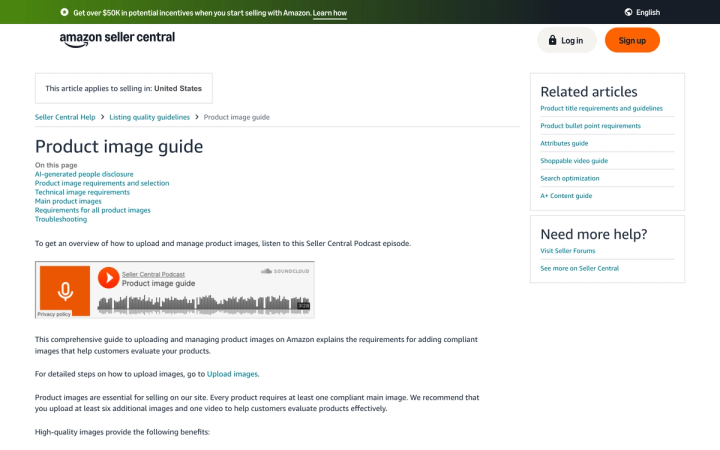
Most consumer brands need six to eight images per SKU: a hero on white, a scale shot, a label or detail macro, a back-of-pack shot, and two lifestyle frames. Amazon recommends a compliant main image plus at least six more, and a video, which is seven images in total. Shopify recommends 2048 × 2048 pixels per image. Below six, conversion suffers. Above ten, you are usually producing assets nobody looks at.
That is the short answer. The longer answer is that "per SKU" is the wrong unit for planning, and the brands that get this wrong blow their creative budget on the wrong half of the catalog.
How many product images does each platform actually require?
Start with the floor, because the platforms set it.
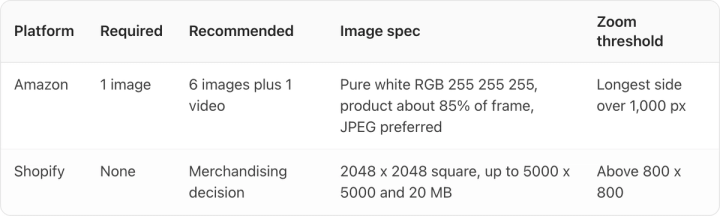
Amazon requires at least one image and recommends six plus one video. The main image has to be on a pure white background (RGB 255, 255, 255), with the product filling about 85% of the frame. Amazon prefers JPEG, and wants the longest side above 1,000 pixels for zoom to activate. Zoom is worth having, since it is the closest thing a shopper gets to picking the product up. We covered the full spec list in our guide to Amazon product image requirements.
Shopify is looser. It recommends square product images at 2048 × 2048 pixels, supports up to 5000 × 5000 and 20 MB, and needs images above 800 × 800 for its zoom to work. It sets no required count, which means the number is a merchandising decision rather than a compliance one.
So the platform floor is six on Amazon and zero on your own site. Neither number is the one you should plan against.
| Platform | Required | Recommended | Image spec | Zoom threshold |
|---|---|---|---|---|
| Amazon | 1 image | 6 images plus 1 video | Pure white RGB 255 255 255, product about 85% of frame, JPEG preferred | Longest side over 1,000 px |
| Shopify | None | Merchandising decision | 2048 x 2048 square, up to 5000 x 5000 and 20 MB | Above 800 x 800 |
What is the right number of images per SKU?
Six to eight for most consumer products. Here is what each slot is doing, in the order you should shoot them.
1. Hero on white
The catalog and search-results image. Pure white, product centered, filling the frame. This is the only shot that is non-negotiable, and it is the one people spend the least time on.
2. Scale reference
A hand holding it, or the product next to a familiar object. Returns driven by "smaller than I expected" are the most avoidable returns there are, and this shot is the whole fix. Skincare, supplements, and candles need it most.
3. Label or detail macro
Close enough to read the type. For supplements this is the supplement facts panel; for food it is the ingredients; for grooming it is the active ingredient callout. Regulated categories effectively require this shot because shoppers go looking for it.
4. Back of pack
The information a buyer checks before committing. Directions, warnings, net weight. Cheap to produce, and its absence reads as something being hidden.
5–6. Lifestyle in context
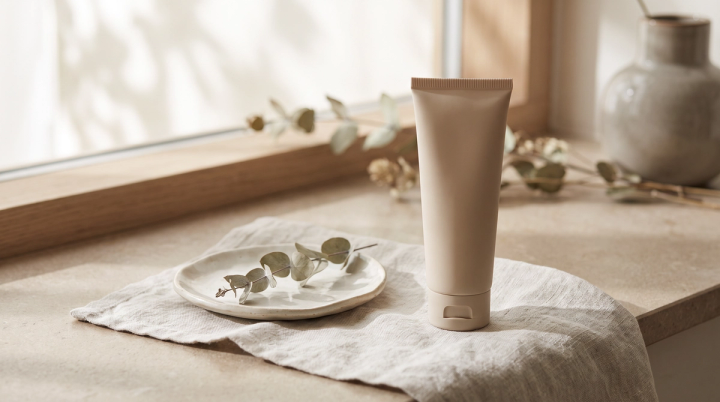
The product where it gets used: on a counter, in a gym bag, on a shelf. This is the shot that does the emotional work and the one most brands under-produce, because it is the most expensive to shoot conventionally. It is also the shot AI generation is genuinely best at, which is worth knowing when you are budgeting. More on that in our guide to AI lifestyle photos.
7–8. Optional: bundle, comparison, or UGC-style
Add these when they answer a real objection. A size-comparison across your own range, a bundle shot for a subscription offer, a creator-style frame for paid social. Skip them when they do not.
Should every SKU get the same number of photos?
No, and this is the decision that actually moves the budget.
Catalogs are not flat. A small number of SKUs drive most of the revenue, and the tail rarely justifies the same treatment. A workable split:
- Hero SKUs (top ~20% of revenue): the full eight, plus video. These carry the paid traffic and deserve the investment.
- Core SKUs: six. Hero, scale, detail, back of pack, two lifestyle.
- Tail and variants: three to four. Colorways and flavor variants of the same physical product mostly need the hero, the label, and one lifestyle frame. Reshooting a full set for every flavor of the same bottle is wasted budget.
Variants are worth a specific rule: if the packaging shape is identical and only the color or flavor name changes, you need a new hero and a new label shot. You do not need a new lifestyle set.
How much does this cost across a catalog?
Run the multiplication before you commit to a number, because it scales worse than people expect.
A 200-SKU brand at six images per SKU needs 1,200 images. At eight, it is 1,600. Conventional product photography is typically quoted per image or per shoot day, and at any realistic rate a four-figure image count becomes a five-figure project with a multi-week turnaround. We broke the rates down in product photography pricing in 2026.
The turnaround is usually the harder constraint. A catalog shoot booked in September lands in October, which means the SKU you launched in August spent its first six weeks on the site with one image.
AI generation closes that gap by breaking the scheduling dependency between "we have a product" and "we have images of it." It is also cheaper per image. The economics are in our writeup on the ROI of AI product photography.
When do more product photos stop helping?
Past about ten, on most products.
Extra images do not hurt. They cost real money and produce close to zero incremental conversion, while the same budget would have moved the number if you spent it on the tail SKUs sitting at one image each.
Check your own data before adding a ninth image. Most site analytics will tell you how deep into the gallery people scroll. If almost nobody reaches image six, spend the money on a better image two.
Two categories are real exceptions. Apparel needs more, because fit, drape, and color accuracy need multiple angles and ideally multiple body types. Furniture and larger home goods need more, because scale, material detail, and room context each require their own frame.
What matters more than the count?
Consistency across the set, and fidelity on the details.
Consistency means the same crop, the same lighting, the same background across every SKU in a category. A category page where the products sit at different sizes and color temperatures reads as amateur even when each individual image is fine. This is a bigger conversion factor than adding images.
Fidelity means the label is right. Small type stays legible, the logo lockup does not drift, and the brand color is the actual brand color rather than a shade near it. For supplements, food, and grooming, categories where the panel is the product, this is the thing to check on every asset before it ships. Our supplement photography guide goes deeper on the label-heavy categories.
For additional studio-style and lifestyle images, explore AI product photography with Pikes. Use your product photos and brand references to create variations, then compare each selected image with the actual SKU. Keep accurate label and back-of-pack photos in the set; generated packaging details still need review.
Frequently asked questions
How many photos does Amazon require per product?
At least one. Amazon recommends a compliant main image plus at least six more, and a video, which is seven images in total. The main image must be on a pure white background (RGB 255, 255, 255) with the product filling roughly 85% of the frame, and above 1,000 pixels on the longest side so zoom works.
How many product images should a Shopify store have per product?
Shopify does not set a required count, so plan on six to eight for most products. It recommends 2048 × 2048 pixel square images and needs at least 800 × 800 for zoom.
Do product variants need their own photos?
New hero and label shots, yes, because a shopper choosing a flavor or color needs to see the one they are buying. A full lifestyle set, no, as long as the packaging shape is unchanged.
What is the minimum number of images to launch a SKU?
Three: hero on white, a scale or in-use shot, and a readable label or detail shot. That is enough to list and sell. Fill in the rest once the SKU proves itself.
Does adding more product photos improve conversion?
Up to a point. Going from one or two images to six reliably helps. Going from eight to twelve usually does not, and the budget is better spent lifting the under-photographed SKUs in the tail.
How many images per SKU for apparel?
More than the general rule, typically eight to twelve. Fit and drape need front, back, and side angles, plus a fabric detail shot and ideally more than one body type.
Create your next product image set
Use your product photos and brand context to create studio-style and lifestyle variations in Pikes.
AI product photography with PikesCompare plans and generation credits

Written by
Mike Lehman
Mike Lehman is a senior content strategist at Pikes. Before joining Pikes, Mike spent nearly a decade working with Glossier, Haus, and Athletic Brewing, leading campaigns that blended storytelling and data.