
Pontus Karlsson
Topaz Labs Review 2026: Is It Worth It for Product Photography?
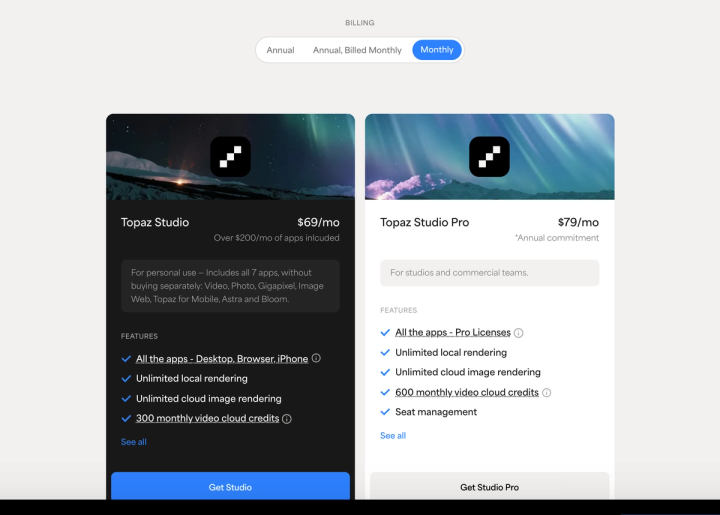
Topaz Labs is worth it if you already have product photos that need rescuing, and it is the wrong tool if you need photos you have not shot yet. It sharpens, denoises and upscales existing files; it does not build a scene. And the plan most brands click first, Topaz Studio at $69/mo billed monthly, is licensed for personal use only.
The licensing rule is covered in full below. Everything here was checked against topazlabs.com and Topaz's own End User License Agreement on 16 August 2026.
Disclosure: we make Pikes AI, which generates product imagery. Topaz solves a different problem from ours, and this review says where it beats us.
What does Topaz Labs actually do?
Topaz sells image and video enhancement, not image generation. You bring a file, it makes that file better.
The subscription covers seven apps. The three that matter for a product catalog are:
- Topaz Photo: denoise, sharpen, recover detail, adjust lighting, balance color, upscale. The general repair tool.
- Topaz Gigapixel: dedicated upscaling, marketed on the site as "6x Lossless Zoom." This is the one people buy Topaz for.
- Topaz Image Web: the browser version, which includes Topaz for Mobile.
The rest are Topaz Video, Astra (video upscaling) and Bloom (generative editing). Topaz says it is "trusted by over 1 million photographers and filmmakers." That is their number, not an independently audited one.
Rendering on your own machine is unlimited. There is no per-image credit meter on desktop work. If you are used to credit-based AI tools where every output costs something, that is a real difference, and it is in Topaz's favour.
What does Topaz Labs cost in 2026?
Topaz uses a three-way billing selector — Annual, "Annual, Billed Monthly," and Monthly. Most vendors offer two. Monthly is the preselected option, which is unusual; most tools we have priced this year open on annual.
All figures verified on topazlabs.com on 16 August 2026.
| Plan | Paid monthly | Annual, billed monthly | Paid annually up front | Licensed for |
|---|---|---|---|---|
| Topaz Studio (all 7 apps) | $69/mo billed monthly | $45/mo on an annual commitment | $399/yr up front | Personal use, plus commercial use only if your organisation is under $1M revenue |
| Topaz Studio Pro | $79/mo, annual commitment | Same $79/mo | $799/yr | Commercial use at any revenue, plus seat management |
| Topaz Photo alone | $39/mo billed monthly | $25/mo on an annual commitment | $199/yr up front | Same personal/pro split |
| Topaz Gigapixel alone | $29/mo billed monthly | $19/mo on an annual commitment | $149/yr up front | Same personal/pro split |
| Topaz Video alone | $59/mo billed monthly | $39/mo on an annual commitment | $299/yr up front | Same personal/pro split |
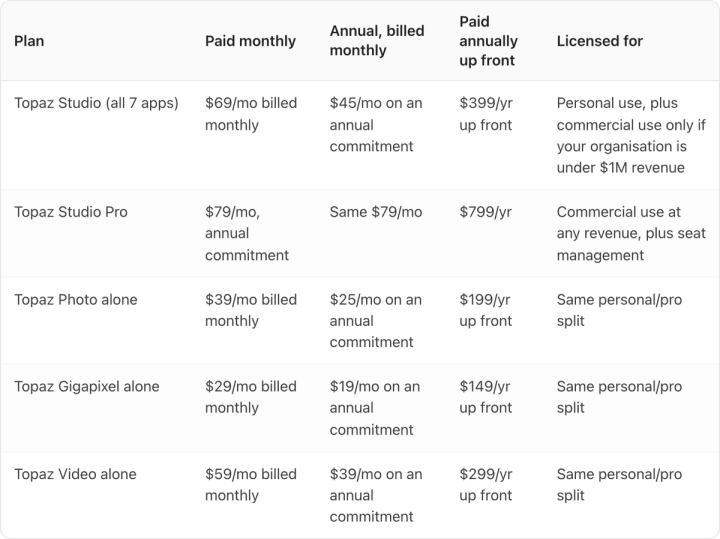
A few things worth pulling out of that table.
Paying annually up front is the biggest discount we have measured on any tool this year. Studio drops from $828/yr (at $69/mo) to $399/yr, a 51.8% discount. The typical range elsewhere is 10-40%. The single apps discount even harder: Topaz Photo goes from $468/yr to $199/yr, which is 57.5% off.
Studio Pro has no true month-to-month option. The card shows $79/mo under the Monthly selector, but it carries an asterisk reading "Annual commitment." Paying that monthly for twelve months costs $948/yr against $799/yr up front, so the monthly convenience costs $149.
The "over $200/mo of apps included" headline needs a caveat. At the single-app list prices, the six apps total $224/mo billed monthly. At the prices Topaz is actually charging today (Image Web is discounted from $19 to $12/mo, Astra from $39 to $19/mo) they total $197/mo. The claim holds at list price, not at checkout price.
One honest note on method: Topaz was serving two different versions of its pricing page on the day we checked. The prices were identical in both; only the layout and the wording around Studio Pro differed.
Why is the $69 plan a problem for a brand over $1M in revenue?
The Topaz Studio card says "For personal use," and Topaz's End User License Agreement.pdf) puts a revenue number on that phrase:
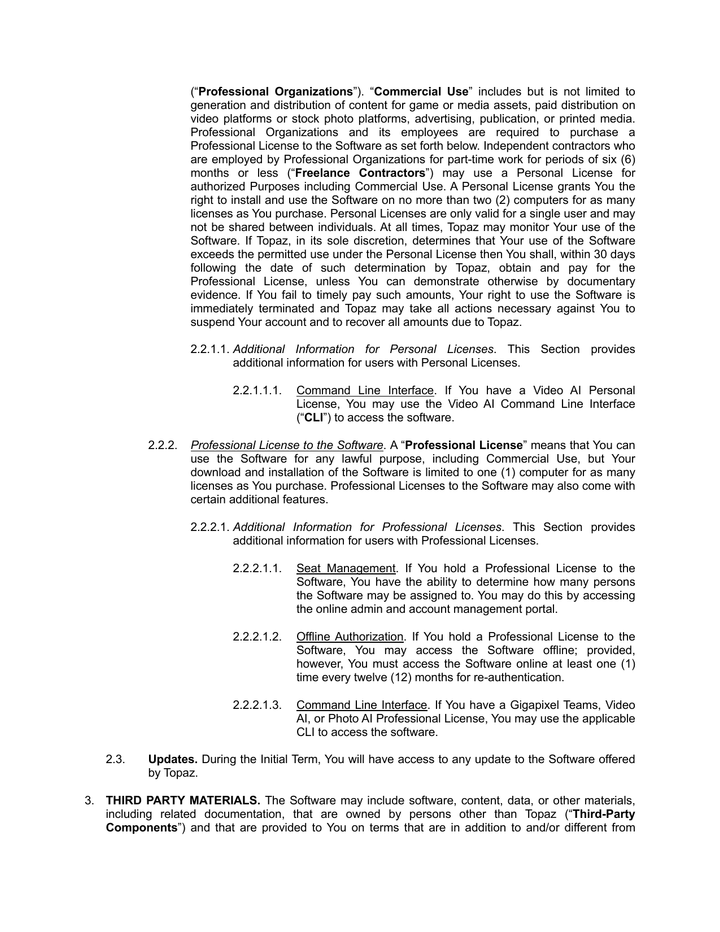
The Software may not be used under a Personal License for Commercial Use by full-time or part-time employees of organizations whose consolidated annual revenue exceeds $1 million (USD $1,000,000) ("Professional Organizations").
And it defines Commercial Use explicitly:
"Commercial Use" includes but is not limited to generation and distribution of content for game or media assets, paid distribution on video platforms or stock photo platforms, advertising, publication, or printed media.
Advertising is named. So if you run a consumer brand doing more than $1M a year and an employee uses a Personal License to clean up a product shot that ends up in a Meta ad or on a printed carton, that is outside the license.
Two further clauses matter operationally:
- A Personal License covers two computers and a single user, and "may not be shared between individuals." A three-person creative team needs three licenses.
- Topaz reserves the right to audit. If it decides your use exceeds the Personal License, you have 30 days to buy the Professional License or lose access.
Topaz is not hiding this, to be fair. A banner runs across the top of the pricing page reading "Buying Topaz for your business? You'll need Pro for full commercial rights." It is just far less prominent than the $69 number underneath it.
So the real entry price for most brands reading this is not $69/mo. It is Studio Pro at $799/yr paid up front, or $948/yr billed monthly. That is still defensible for what you get, but budget the right number.
Is Topaz Labs good for product photography?
For the job it does, genuinely yes. Three cases where it earns its place in a CPG workflow:
Rescuing a back catalog. If your 2019 shots are 1,200px and the site now wants 2,000px squares, Gigapixel is the best tool available for that. Amazon accepts a maximum of 10,000 pixels on the longest side and recommends far more resolution than most legacy catalogs carry, and upscaling is the cheapest route there.
Fixing shoots you cannot re-run. Sample sent back, product discontinued, photographer unavailable. Denoise and sharpen on an underlit file beats a reshoot you cannot book.
Detail on small type. Ingredient panels and dosage text photographed slightly soft are a real conversion problem on supplement and grooming SKUs. Topaz Photo recovers more of that than a Lightroom sharpen does.
Topaz's upscaling quality is also better than the upscalers bundled into general AI tools. If upscaling is the actual job, buy the specialist.
Where does Topaz fall short for a product catalog?
The limit is structural rather than a quality complaint.
It cannot produce a photo that does not exist. If you have 200 SKUs and shots for 40, Topaz improves 40 images. The gap stays a gap. That is the most common situation we see at consumer brands, and enhancement tools do not touch it.
There is no brand or product memory. No stored SKU library, no persistent brand colors, nothing that keeps output consistent across a catalog. Every file is handled on its own. For catalog-scale work that matters, and we wrote about the production problems large catalogs create separately.
No lifestyle or ad-creative output. Topaz will not put your bottle on a bathroom shelf or generate three ad variants for testing.
Desktop-first. Unlimited local rendering is a real benefit, but it means real hardware and someone sitting at it. A team without a workstation gets less from the subscription than the price implies.
Enhancement or generation: which problem do you actually have?
If your images exist and are not good enough, buy an enhancement tool. Topaz is the strongest one, and nothing in this article should be read as talking you out of it.
If the images do not exist, no amount of sharpening helps. That is the gap we built Pikes AI for: generating product photography and ad creative from a brand's actual SKUs, with brand colors and product details held constant across the catalog rather than re-specified each time. Product fidelity is the whole difficulty there: label text and packaging detail are exactly what general image models drift on.
Whichever way you go, run the same test before committing. Take your most detailed SKU, the one with the smallest legal type on the label, put it through the tool and open the output at 100% zoom. If the text is not still readable and correct, the tool has not solved your problem, whatever the marketing page says. That test takes ten minutes and settles most tool arguments.
If you want the arithmetic behind that decision, we broke down what AI product photography costs per image against studio rates.
Should you buy Topaz Studio or a single app?
Almost always Studio, and the maths is unusually blunt.
Topaz Photo at $39/mo plus Topaz Gigapixel at $29/mo is $68/mo, all billed monthly. Topaz Studio, which includes both plus five more apps, is $69/mo on the same billing. One dollar a month separates the two photo tools from everything Topaz makes.
Single apps only make sense if you need exactly one — a video team buying Topaz Video alone at $59/mo billed monthly, for instance. For any product-photography use case, the bundle wins immediately.
And if the budget is the real constraint, check the free tiers across AI product photography tools before subscribing to anything. Several will cover a small catalog.
FAQ
Is Topaz Labs a one-time purchase? No. Topaz moved to subscriptions. As of 16 August 2026 the options are $69/mo billed monthly, $45/mo on an annual commitment billed monthly, or $399/yr paid up front for Topaz Studio.
Can I use Topaz commercially on the $69 plan? Only if your organisation's consolidated annual revenue is under $1 million. Above that, the EULA requires a Professional License, which means Topaz Studio Pro at $799/yr paid annually or $948/yr billed monthly.
Does Topaz Labs generate product photos? No. It enhances files you already have. Bloom does generative editing on an existing image, but there is no path from a product with no photograph to a finished product shot.
How much does Topaz Gigapixel cost on its own? $29/mo billed monthly, $19/mo on an annual commitment billed monthly, or $149/yr paid up front, as of 16 August 2026. At the monthly rate it is only $40/mo less than the full Studio bundle.
Is Gigapixel better than the upscaler built into other AI tools? In our testing on product shots, yes, particularly on packaging text and fabric texture, where generic upscalers invent detail that was not there. If upscaling is the core job, the specialist is worth it.
Can I cancel a Topaz subscription? Topaz's pricing FAQ states you can cancel at any time from your account and keep access through the end of the billing period. Note that Studio Pro is sold on a twelve-month commitment, so cancelling does not end that term early.
What to buy
Buy Topaz if your problem is image quality. Budget Studio Pro at $799/yr paid annually rather than Studio at $69/mo, because above $1M in revenue that is what the license requires.
If your problem is image supply rather than image quality, that is a different purchase. See what Pikes AI generates from your existing SKUs and run the same 100% zoom test on the result.