
Pontus Karlsson
Adobe Firefly Review 2026: Is It Right for Product Photography?
Adobe Firefly is a capable general creative tool and a risky default for catalog product photography. The reason brands pick Adobe, IP indemnification, covers Adobe's own models only. It excludes the partner models Adobe now advertises first, and it excludes anything labelled beta. That includes the one feature you would use to train on your own SKUs.
Disclosure: we build Pikes AI, which competes with Firefly for part of this work. Every Adobe number below comes from Adobe's own pages, checked on 8 August 2026, and linked so you can re-check it.
What is Adobe Firefly in 2026?
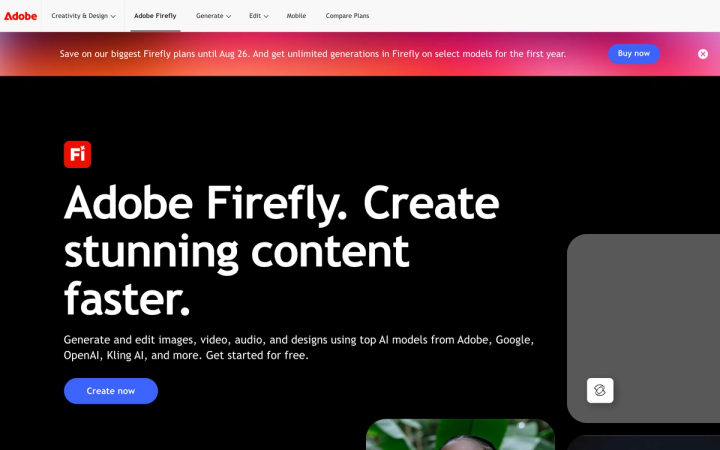
Firefly started as Adobe's own image model. It is broader now. Adobe's product page describes it as a way to "Generate and edit images, video, audio, and designs using top AI models from Adobe, Google, OpenAI, Kling AI, and more."
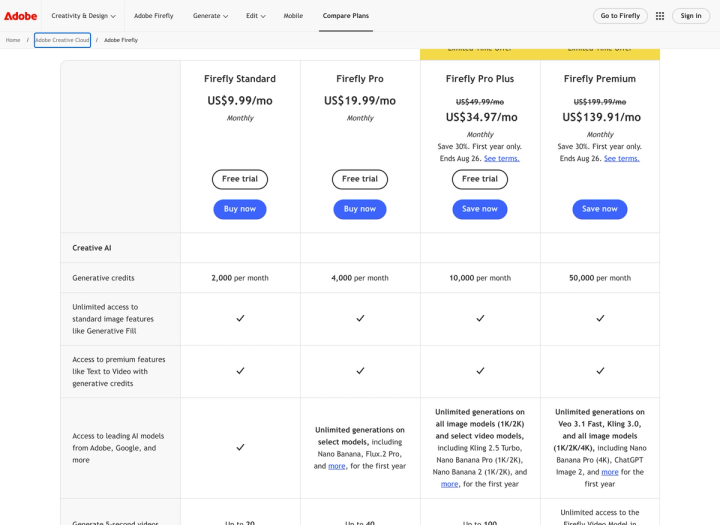
That last clause changed the product. Firefly is partly a storefront for other companies' models. The plan comparison page names Nano Banana, Nano Banana Pro, Nano Banana 2, Flux.2 Pro, Kling 2.5 Turbo, Kling 3.0, Veo 3.1 Fast and ChatGPT Image 2.
Adobe's own models sit alongside them: Firefly Image 5, Firefly Image 4 Ultra, the Firefly Video Model, and the Generative Fill and Generative Expand tools inside Photoshop, Illustrator and Lightroom.
Which model produced a given image decides what you are allowed to do with it.
How much does Adobe Firefly cost?
Four individual plans, all quoted monthly. Two are running a promotion that ends 26 August.
| Plan | Price (as shown) | Generative credits | Cost per Firefly Image 5 generation |
|---|---|---|---|
| Firefly Standard | US$9.99/mo, billed monthly | 2,000 per month | $0.050 |
| Firefly Pro | US$19.99/mo, billed monthly | 4,000 per month | $0.050 |
| Firefly Pro Plus | US$34.97/mo, billed monthly, first year only (regularly US$49.99/mo, billed monthly) | 10,000 per month | $0.035 promo, $0.050 at regular price |
| Firefly Premium | US$139.91/mo, billed monthly, first year only (regularly US$199.99/mo, billed monthly) | 50,000 per month | $0.028 promo, $0.040 at regular price |
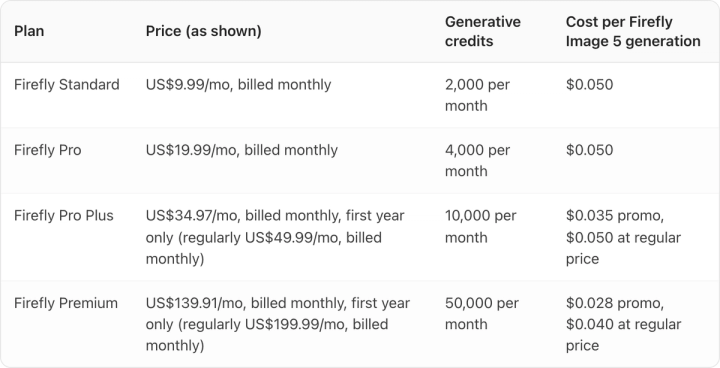
Adobe's plans page shows monthly prices only. There is no annual toggle and no annual discount on it. That makes Firefly unusual in this category, where most tools preselect annual billing and show the discounted figure first.
The struck-through prices on Pro Plus and Premium are real. Both cards read "Save 30%. First year only. Ends Aug 26." Budget on the regular price, because that is what year two costs.
What does a generative credit actually buy?
Credits are Firefly's real unit of cost, and they only bind on some features.
Every paid Firefly plan includes unlimited use of standard features. Adobe's credits FAQ puts it plainly: if you are on a Firefly plan, "Your credits are only spent on premium generative features, as you have unlimited access to standard features." Generative Fill with Adobe's models in Photoshop is a standard feature, so retouching an existing packshot does not draw down your balance.
Premium image generation does. The published rates:
- Firefly Image 5: 10 credits per generation
- Firefly Image 4 Ultra: 20 credits per generation, and Adobe notes this produces "1 image per generation"
- Firefly Custom Models (beta): 500 credits per training run
- Rotate Object in Photoshop: 20 credits per object, charged only on the first rotation of each
- Turntable: 20 credits per generation, 74 variations
Credits do not accumulate. Adobe: "No, generative credits do not roll over to the next month. Your generative credit balance will reset to your allocated amount on a monthly basis." If your shoot cycle is lumpy, an unused month is gone.
The arithmetic on Firefly Image 5 at 10 credits is flat. Standard gives 200 generations for $9.99. Pro gives 400 for $19.99. Pro Plus at its regular $49.99 gives 1,000. All three land on $0.050 per generation. Only Premium breaks the pattern, at $0.040 regular.
Moving up a Firefly tier buys more generations at the same rate. Most tools in this category price the other way, making the entry tier the worst value per unit. If 200 generations a month covers you, the cheapest Firefly plan is also the most efficient one.
One gap. Adobe does not publish a flat credit cost for the partner models. The credits FAQ lists them as "Varies" and points to a separate partner-models page. The maths above holds for Adobe's own models and cannot be extended to a Nano Banana or ChatGPT Image 2 generation. If those are the models you plan to use, ask Adobe for the rate before you commit a catalog to it. For how other vendors price the same work, we broke the unit costs down in our cost-per-image comparison.
Is Adobe Firefly commercially safe for a consumer brand?
Firefly is usually bought to answer this question. The answer carries two conditions that are easy to miss.
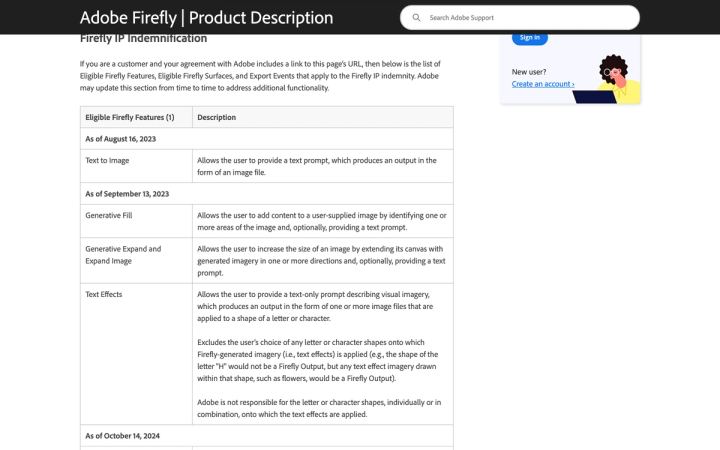
The first is that the indemnity is contractual. Adobe's Firefly product description opens with the qualifier: "If you are a customer and your agreement with Adobe includes a link to this page's URL, then below is the list of Eligible Firefly Features, Eligible Firefly Surfaces, and Export Events that apply to the Firefly IP indemnity." A Firefly plan bought with a card on the consumer site is not an agreement of that kind. The indemnity travels with enterprise and teams entitlements.
The second is that the eligible list is narrower than the product. The features Adobe names as eligible are Text to Image, Generative Fill, Generative Expand and Expand Image, Text Effects, Text to Vector Graphic, the Translate features, Generative Extend, Text to Video and Image to Video, Text to Avatar, sound effects, Generate Speech and Generate Music.
Then a footnote narrows it again. Coverage "Excludes any (A) capabilities that Adobe may develop that are denoted in the user interface as being powered or provided by non-Adobe trained models and (B) any features designated as 'beta' or 'trial' or accessed within a surface labeled as 'beta' or 'trial.'"
Put those two sentences together and you get this:
| What you generate | Eligible for the Firefly IP indemnity? |
|---|---|
| Text to Image or Generative Fill on an Adobe Firefly model, exported by a user on a qualifying enterprise or teams entitlement | Yes |
| Nano Banana, Flux.2 Pro, Kling or ChatGPT Image 2 inside Firefly | No, non-Adobe trained model |
| Firefly Custom Models trained on your own products | No, designated beta |
| Any eligible feature, on an individual plan bought with a card | No qualifying agreement |
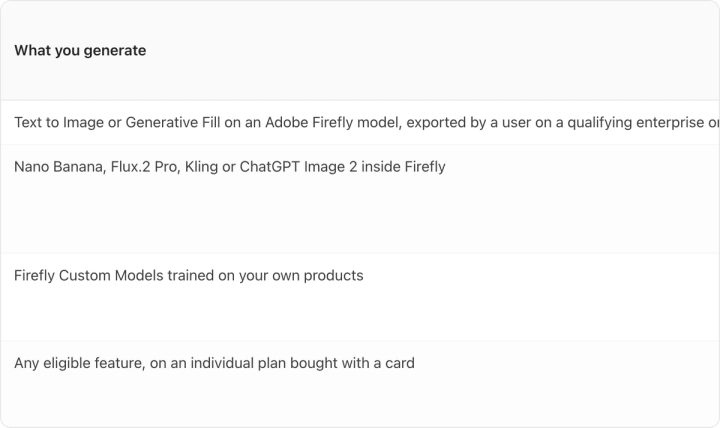
The partner models Adobe promotes hardest are the ones the indemnity excludes. Unlimited generations on them for the first year is the headline benefit on every plan card. Training a model on your actual SKUs is excluded too.
None of this makes Firefly unusable. It does mean "we use Adobe, so we're covered" needs checking against which model produced the file. If your reason for choosing Adobe is legal comfort, keep production on Adobe's own models and get your entitlement in writing.
Adobe also applies Content Credentials when content containing a Firefly-generated asset is downloaded or exported. That metadata travels with the file, which matters now that marketplaces have their own AI-disclosure rules. We covered where those stand in our guide to whether AI-generated product images are allowed.
How well does Firefly hold product fidelity?
General-purpose models struggle here, for a specific reason.
Label text has to be legible and correctly spelled. Brand colour has to match the pack rather than approximate it. General image models are trained to produce a plausible image, and a plausible label is not your label.
Firefly gives you two routes. Generative Fill on an image you supply keeps your real product in the frame and generates around it. That is the safer route, and it is uncapped on paid plans. Text to Image generates the product too, which is where drift shows up.
Run the same test on any tool before you commit a catalog to it. Generate one hero shot of a SKU with small type on the pack. Open it at 100% zoom. Read the label out loud. If a word is soft, a letter is invented, or the colour has shifted half a step, that tool cannot carry your alternate-image slots however good the lighting looks at thumbnail size.
That test is why we built Pikes AI to generate from a brand's real SKUs and hold brand context between generations, rather than describing a product in a prompt and hoping. If you want to see what that looks like on your own products, Pikes AI is free to start. The test above works on whatever you pick.
What is Firefly genuinely good at?
Plenty, and pretending otherwise would be silly.
If your team already works in Photoshop, Illustrator and Lightroom, Firefly is the lowest-friction generative tool available to you, because it is already in the menus. Generative Fill and Generative Expand are unmetered on paid plans, which for a retouching-heavy workflow is a real saving. And it publishes an explicit list of which features its IP indemnity covers, so there is something concrete to check against.
Adobe is transparent in ways its competitors are not. It publishes exact credit costs per feature, states plainly that credits do not roll over, and quotes monthly prices without hiding them behind an annual default. After a year of reading pricing pages in this category, that is unusual, and it counts.
If you need broad creative work across social, video, audio and type treatments, one Firefly bill covers more ground than a dedicated product tool will. Weighing it against staying in Photoshop with no generative tooling? We compared that path in our look at Photoshop alternatives for product images.
Who should buy Firefly, and who shouldn't?
Buy it if your team is already Adobe-native, your generative work is broad rather than catalog-deep, you can keep production on Adobe's own models, and you can get an entitlement that carries the indemnity.
Look elsewhere if your problem is volume of on-brand product images across many SKUs, you need label and packaging fidelity to hold across hundreds of outputs, or you were counting on training a model on your own products. That route is beta, costs 500 credits per training run, and sits outside the indemnity.
One consideration that has nothing to do with Adobe: models in this category get retired on short notice. OpenAI removed the DALL-E snapshots from its API in May 2026, which we wrote about in our comparison of Grok Imagine, Midjourney and DALL-E. Firefly's partner-model line-up will not look the same in a year, and Adobe's own models are the stable part of the offer.
Frequently asked questions
Is Adobe Firefly free? There is a free entry point. Adobe's product page invites you to "Get started for free," and its credits FAQ explains that free-plan credits are allocated on first use of a Firefly feature and "expire one month from allocation." On the paid side, Standard, Pro and Pro Plus all show a Free trial button as of 8 August 2026. Firefly Premium does not. If free tiers are what you are shopping for, we rounded up the options in our guide to free AI product photography tools.
Do unused Firefly credits roll over? No. Adobe states that credits "do not roll over to the next month" and that the balance resets to the plan allocation monthly, on the day you started the plan.
Are Nano Banana or ChatGPT Image 2 generations covered by Adobe's IP indemnity? No. Adobe's eligible-features footnote excludes capabilities "denoted in the user interface as being powered or provided by non-Adobe trained models." Those partner models are exactly that, even though they are the headline feature on the plan cards.
Is there an annual discount on Firefly? Not one Adobe shows on the Firefly plans page. As of 8 August 2026 that page displays monthly pricing only, with no annual toggle. The 30% reductions on Pro Plus and Premium are a first-year promotion ending 26 August, not an annual-billing discount.
What happens when I run out of generative credits? You wait for the monthly reset or buy more. Adobe's options are upgrading a tier, buying a credit add-on plan, or purchasing credits in Photoshop's Generative Credits Usage panel. Standard features stay unlimited regardless.
Is 2,000 credits a month enough for a product catalog? On Firefly Image 5 that is 200 premium generations, or 100 on Image 4 Ultra, which produces one image per generation. At seven images per SKU that is 28 SKUs a month if every generation is a keeper, which it will not be. Retouching an existing packshot with Generative Fill is unmetered, so the answer depends on whether you are editing real photography or generating from scratch.