AI Image Tool Pricing in 2026: What You Actually Pay
On 26 August 2026 we opened the pricing page of eleven AI image tools and wrote down what loaded before touching anything. Five presented annual billing by default. One priced a "monthly" plan as a 12-month commitment. One showed a first-year-only rate next to a struck-through regular one. Two published no price at all.
Every one of those is disclosed somewhere on the page, in type smaller than the price. All of it is easy to miss when you are comparing six tools in an afternoon and copying headline numbers into a spreadsheet.
A disclosure before the numbers: we make Pikes AI, which competes with most of the tools below. We have included ourselves in the table, and we come out of it badly on one measure.
Why is the number on an AI image tool's pricing page usually the annual rate?
Because the annual rate is lower, and a lower number on the page converts better.
The standard pattern is a two-position toggle marked Monthly and Yearly, with Yearly preselected and the per-month equivalent of the annual plan displayed underneath. Nothing about that is deceptive on its own. The page usually says "billed yearly" in small type directly beneath the figure, and that line does the disclosure work. The figure is still what ends up in your spreadsheet.
The practical consequence for a consumer brand is that a tool you budgeted at one rate arrives as a single charge for twelve months, and the month-to-month price you assumed you were testing on does not exist at that number.
Which AI image tools preselect annual billing?
Every row below records what loaded in a logged-out browser on 26 August 2026, before any click. Where we could confirm the default from the page's own markup rather than by eye, we have said so.
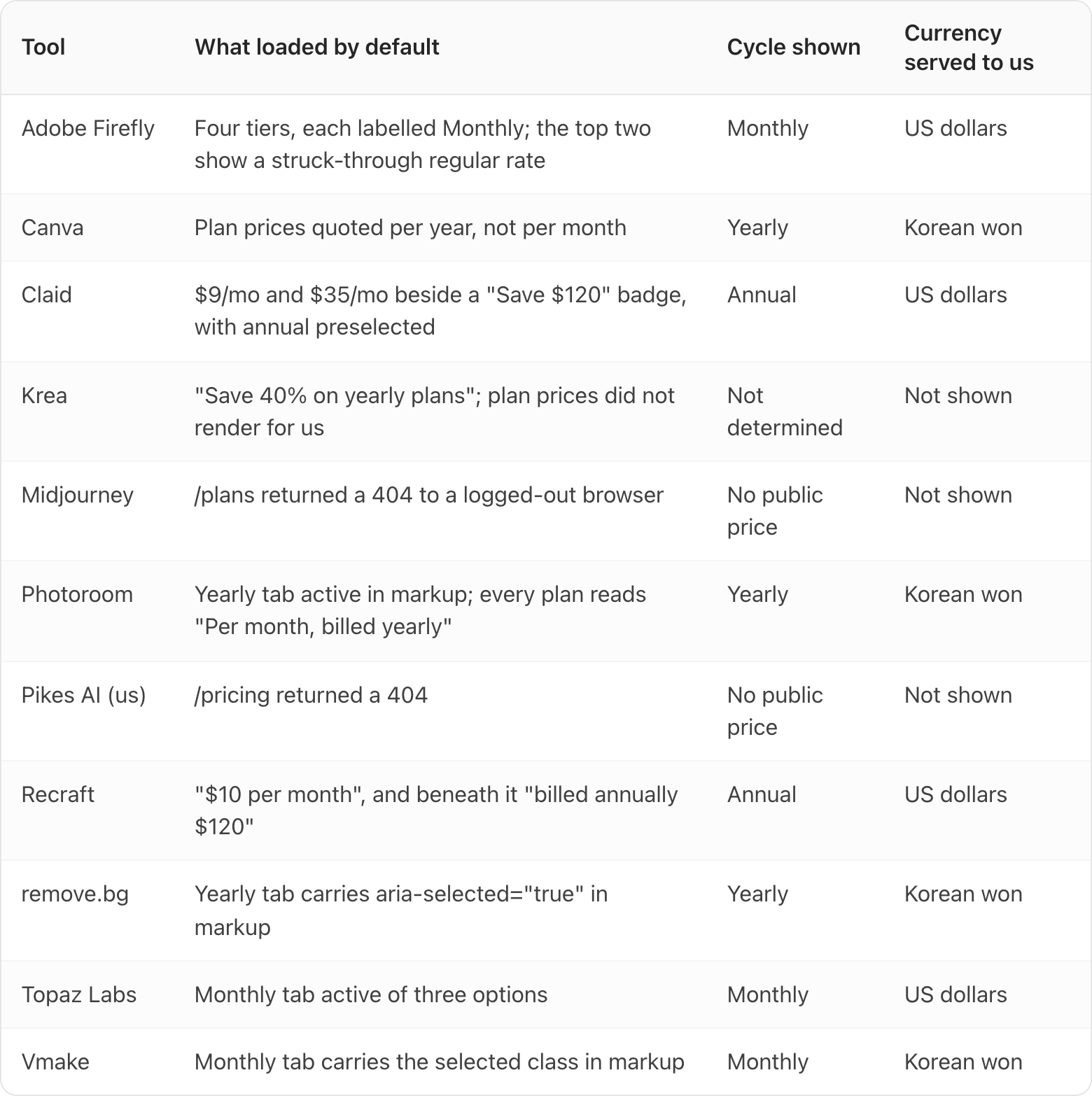
Five of the eleven presented annual billing first. Three presented monthly. One would not show us prices, and two publish none.
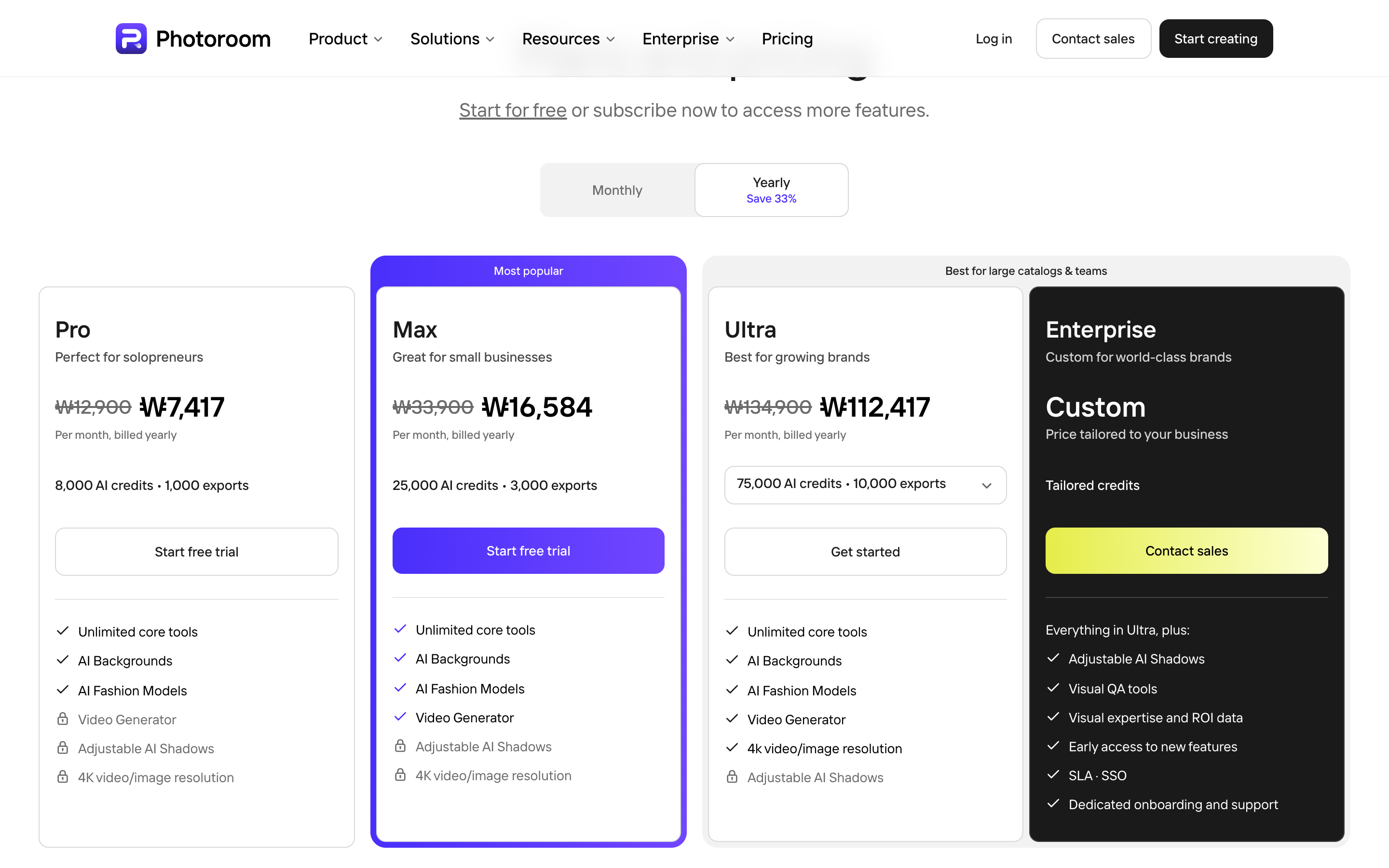
Photoroom is a clean example of the pattern working exactly as designed. The Yearly tab is selected, it carries a "Save 33%" label, each plan shows a struck-through original beside the discounted figure, and each one is captioned "Per month, billed yearly". Everything you need is on the page, arranged so the smallest number is the most prominent.
Claid deserves a specific note. Its page loaded showing $9/mo and $35/mo next to a "Save $120" badge, and the toggle would not switch to monthly when we clicked it. That matches an earlier check of the same page on 5 August 2026, which failed across three separate click methods. Because we cannot drive the control, we will not state Claid's monthly price. What we can say is that $9 is the figure the page shows with annual billing preselected, as of 26 August 2026.
What does "monthly" mean at Topaz Labs?
Topaz runs a three-position system, and it is the clearest one in the set.
Its billing control has three positions, not two: Annual, "Annual, billed monthly", and Monthly. The middle option is the interesting one, because its name is an accurate description of a thing most pricing pages do not label at all. You pay every month, and you are committed for twelve of them.
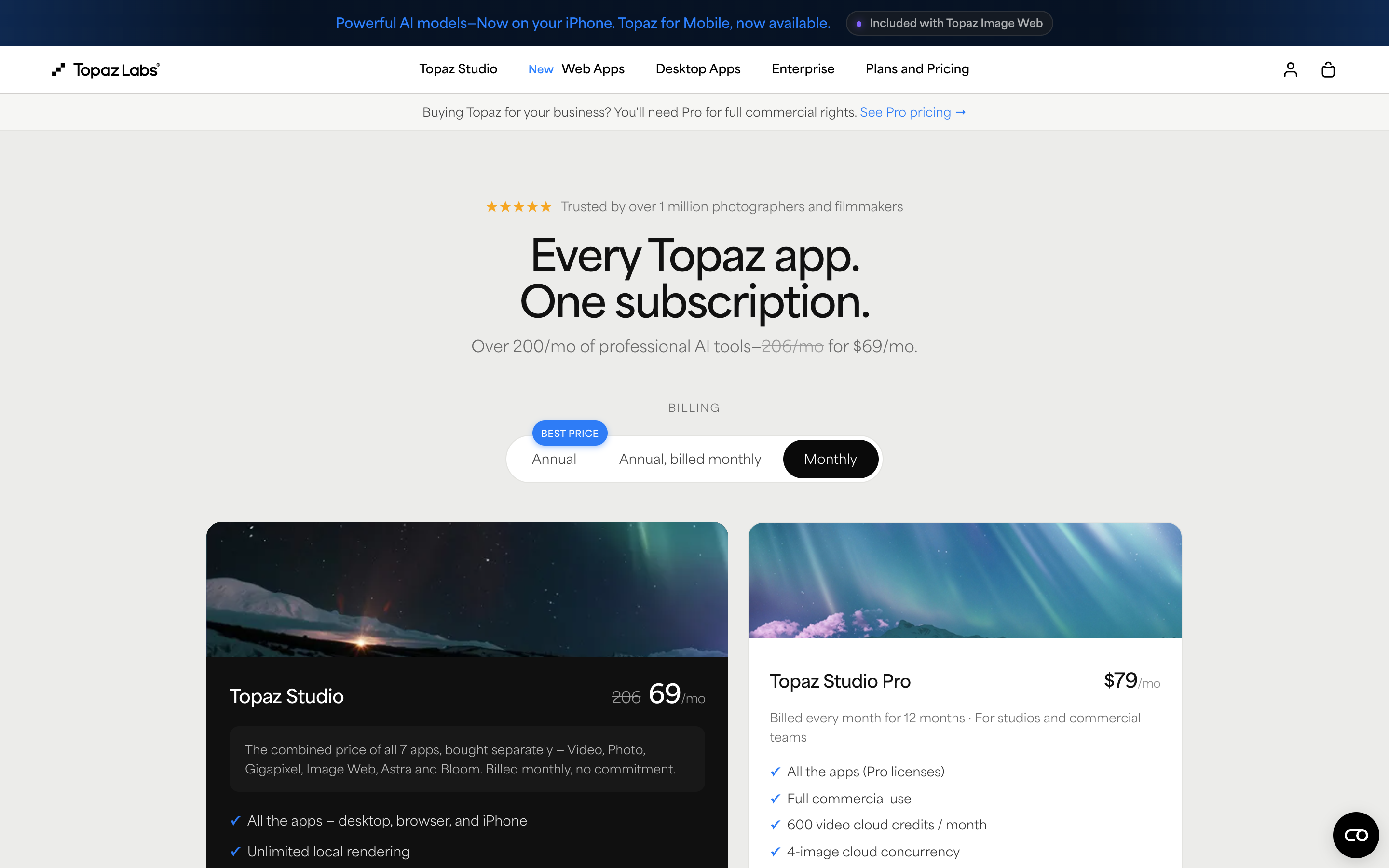
Topaz loads with Monthly selected, which is the more customer-friendly default and worth crediting. But with Monthly selected, its Studio Pro tier still reads $79/mo with the line "Billed every month for 12 months" underneath, which is an annual commitment paid in twelve instalments. So the Pro tier has no true month-to-month option even under the Monthly tab. If you need Pro, and Topaz's own site-wide banner says you do if you are buying for a business, the twelve-month commitment is not optional.
This is the distinction worth carrying into every vendor evaluation. "Monthly" can describe the payment frequency or the commitment length, and those are not the same thing.
Why did Adobe Firefly show a discount that expires?
This is the mechanic most likely to surprise you a year from now.
Firefly's plan page loaded with all four tiers labelled Monthly and prices in US dollars. Firefly Standard showed US$9.99/mo and Firefly Pro US$19.99/mo, both billed monthly at their plain rate. The top two tiers were different. Firefly Pro Plus showed a struck-through US$49.99/mo beside US$34.97/mo, and Firefly Premium a struck-through US$199.99/mo beside US$139.91/mo. Both carried the same line: "Save 30%. First year only. Ends Oct 21."
So the number in the largest type on those two cards is a rate you get for twelve months, after which the struck-through figure is what you pay. Adobe states this plainly on the card. It is still the kind of thing that turns a budget line into a surprise in month thirteen, particularly if the person who bought the seat has since changed jobs.
If you are comparing credit allowances alongside price, Firefly's four tiers came with 2,000, 4,000, 10,000 and 50,000 generative credits per month respectively.
Why did four of these pages quote us Korean won?
This one caught us out, and it matters as soon as you compare notes with a colleague in another country.
Our browser was geolocated to South Korea. Canva, Photoroom, remove.bg and Vmake all switched currency accordingly and served prices in Korean won. Claid, Recraft, Topaz and Adobe served US dollars regardless. Adobe instead put up a modal offering to send us to its Korean site, which is how we worked out what was happening.
Pricing pages localise by IP address, not by your account settings or your billing address. Two people at the same company can open the same URL and see different currencies, and the converted figures rarely line up neatly with the dollar ones. If you are building a tool budget from screenshots someone forwarded you, check which currency they were looking at.
It also means that any article quoting a single set of prices, including this one, is describing what one browser in one location saw on one day. We have dated every observation for that reason.
Which AI image tools publish no price at all?
Two of the eleven publish no price, and we are one of them.
Midjourney's /plans page returned a 404 to a logged-out browser. You cannot see what Midjourney costs without an account. Our own /pricing returned a 404 too, because we do not publish a pricing page.
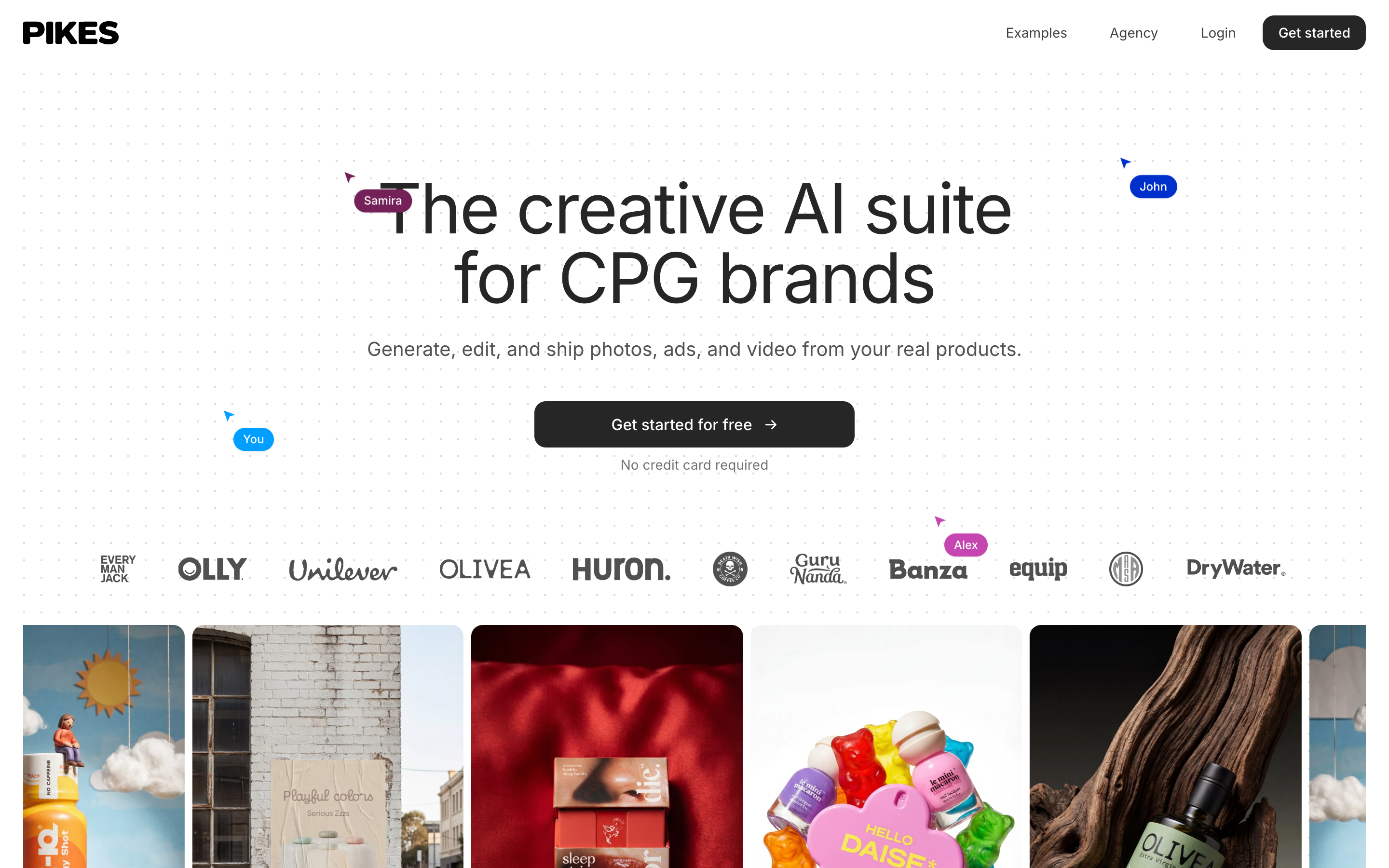
We are not going to pretend that is a feature. If you are assembling a shortlist on a Tuesday afternoon, a tool you cannot price is a tool that is harder to shortlist, and the honest reading of the table above is that we score worst on transparency of the eleven. It is a fair thing to hold against us, and if it matters to your evaluation you should say so when you talk to us.
What we would rather be judged on is whether the output holds up on your actual SKUs, which is why we built Pikes AI to generate from a brand's own product library rather than from a text prompt alone. You can try it on your own catalogue and see whether the label text survives before price enters the conversation at all.
How should you budget for an AI image tool?
Four checks will cover it, and none takes longer than a minute per vendor.
- Look at the toggle before you look at the price. Note which position is selected on load. If it says Yearly, the large number is one twelfth of an annual commitment.
- Read the line under the price. "Billed yearly", "billed annually", "billed every month for 12 months" and "first year only" are four different products.
- Check the currency symbol. If it is not the one you expected, the page has geolocated you.
- Work out cost per usable image, not cost per month. A plan's credit allowance matters more than its headline rate once you are producing at catalogue scale. We walk through that calculation in our guide to AI product photography cost per image.
Price is also not the only term worth reading before you commit twelve months to a vendor. Two others move more money than the monthly rate does: what you are licensed to do with the output, covered in our breakdown of AI image commercial use licences, and whether your uploads are used to train the vendor's models, which we measured across eight vendors in AI image tools and training data.
If your budget genuinely is zero for now, our roundup of free AI product photography tools covers what the free tiers actually allow. And if Topaz is on your shortlist specifically, our Topaz Labs review goes further into its licence tiers.
Frequently asked questions
Is the price shown on an AI image tool's pricing page the monthly price?
Often not. Of the eleven pages we checked on 26 August 2026, five loaded showing annual billing, with the annual rate divided by twelve displayed as a per-month figure. The monthly rate on those plans is higher and requires a click to see.
How do I tell which billing cycle a pricing page is showing me?
Read the small caption directly beneath the price rather than the price itself. "Per month, billed yearly" and "billed annually $120" both mean you are looking at an annual plan. If there is a toggle, note which side is highlighted before you touch it, because clicking it changes what you are comparing.
Does the annual discount actually save money?
Usually yes, if you stay. The advertised savings we saw ranged from 10 percent at remove.bg to 40 percent at Krea, with Photoroom at 33 percent and Recraft at 20 percent. The question is not whether the discount is real but whether you will still want the tool in month eight. For a first evaluation, paying monthly to find out is normally worth the premium.
What is an "annual, billed monthly" plan?
A twelve-month commitment that you pay for in twelve instalments. Topaz labels this explicitly as a third option alongside Annual and Monthly. Other vendors offer the same structure without naming it, which is why the line under the price matters more than the tab you clicked.
Why does the price change depending on where I am?
Most of these pages detect your country from your IP address and switch currency automatically. We saw Canva, Photoroom, remove.bg and Vmake all serve Korean won to a browser geolocated in South Korea, while Claid, Recraft, Topaz and Adobe served US dollars. Your account settings and billing address do not override this on the marketing page.
Which AI image tool is cheapest for a consumer brand?
There is no single answer, because the meaningful figure is cost per usable image rather than cost per month, and that depends on how many attempts it takes to get a shot you would actually put on a product page. A tool at half the monthly rate that needs three times the generations is more expensive. Run the same five SKUs through each shortlisted tool and count the keepers before you compare the subscription prices.
All pricing observations in this article were recorded from a logged-out browser on 26 August 2026. Pricing pages change frequently. Check the vendor's own page before you buy.