
Pontus Karlsson
Which AI Image Tools Train on Your Product Photos (and How to Opt Out)
Recraft, Photoroom, Canva and remove.bg all train their AI models on the images you upload, and all of them have it switched on unless you go and change it. Runway does the same and offers no way out in its terms. Adobe, Magnific and Pikes say they don't. Each of those positions is one sentence in a policy you can read today.
If you run creative at a consumer brand, the images you drop into these tools are not mood-board scraps. They are unreleased packaging, a reformulated label, a bottle that has not shipped yet. This is a checklist for finding out where yours are going, and what the opt-out actually covers when you find it.
We make a competing product, so read the table with that in mind. Every claim below links to the vendor's own page, and all of them were read on 22 August 2026.
Which AI image tools train on the photos you upload?
| Tool | Trains on your uploads? | Opt-out available? | Where it says so |
|---|---|---|---|
| Recraft | Yes, "enabled by default" | Yes, in account profile settings | Terms of Service, section 7.7 |
| Photoroom | Yes | Yes, in account settings (not retroactive) | Privacy Policy |
| Canva | Yes | Yes, in privacy settings | Privacy Policy |
| remove.bg | Yes | Not stated on its own privacy page | Privacy Policy, section 1.3 |
| Runway | Yes | None found in the Terms of Use | Terms of Use |
| Adobe Firefly | No, for generative training | Separate opt-out covers product-improvement analysis | Content Analysis FAQ |
| Magnific / Freepik | No | Not applicable | Terms of Use, section 9 |
| Pikes | No, unless you opt in | Sharing is opt-in, not opt-out | Privacy Policy |
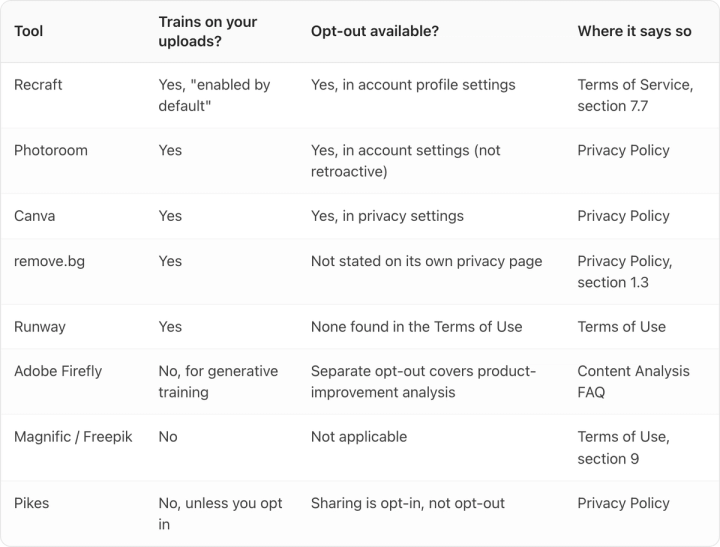
Two things stand out. The tools built specifically for product and e-commerce imagery (Photoroom, remove.bg and Recraft) are the ones most likely to be learning from your catalog. And the split is not free versus paid. It is vendor by vendor, and it does not track price.
What does "enabled by default" actually mean?
Recraft is the clearest-worded of the group, which is to its credit. Its Terms of Service say that Recraft "may use your Inputs you provide and the Assets produced by the Services to train, fine-tune, and otherwise improve Recraft's artificial intelligence models and systems," and then, unusually, states the default out loud: "This training use is enabled by default, but you may opt out at any time by adjusting your preferences in your account profile settings."
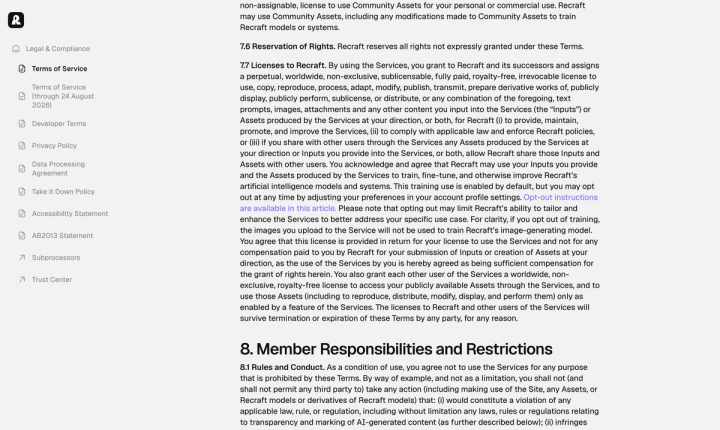
Most vendors do not say "by default." They write "we may use" and leave you to work out that "may" means "are, right now." Recraft naming the default is the exception, not the standard, and it is the single most useful sentence in any of these documents.
There is an asymmetry in the same terms worth noticing. Recraft trains on your inputs, but forbids you from using any asset "to train any artificial intelligence model, system or network." The licence you grant runs one direction. That is normal across the category, and Runway and Midjourney both prohibit using outputs to build a competing model. It is still worth seeing plainly. Our Recraft review covers what the tool is like to actually use.
If you opt out, does that cover images you already uploaded?
No. The switch is forward-only.
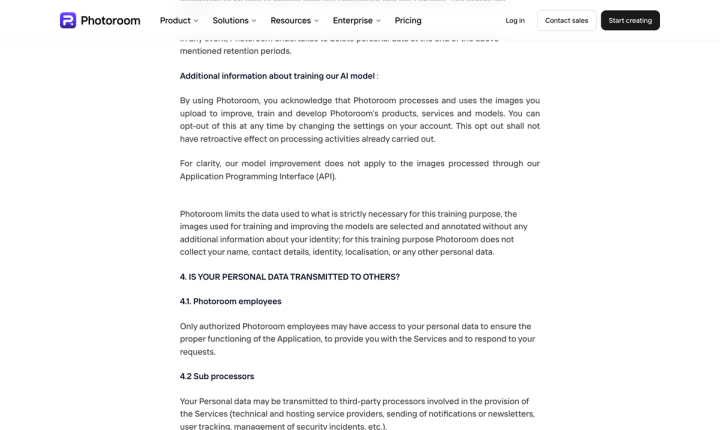
Photoroom is the only vendor in this set that spells it out. Its privacy policy says you can opt out "at any time by changing the settings on your account," then adds: "This opt out shall not have retroactive effect on processing activities already carried out."
It stops the next upload and leaves the last thousand where they are, which is worth sitting with if you have been uploading a catalog for two years.
Recraft's wording points the same way. Its clause reads "if you opt out of training, the images you upload to the Service will not be used," in the future tense, and the licence you granted explicitly survives termination of the agreement. Closing your account does not unwind it.
The practical consequence: the value of opting out is highest on the day you sign up and decays from there. If you are evaluating a tool this week, change the setting before you bulk-upload, not after.
Photoroom also carves out something genuinely useful that nobody else in this set does. "For clarity, our model improvement does not apply to the images processed through our Application Programming Interface (API)." If you are running catalog volume, routing it through the API rather than the app takes you out of the training pool entirely, at the same vendor running the same pipeline.
Which tools say they don't train on your uploads at all?
Three, and they say it in different ways.
Adobe draws a distinction the others blur. Its Content Analysis FAQ, last updated 4 June 2026, says: "We do not analyze your content to train generative AI models, unless you choose to submit content to the Adobe Stock marketplace." Firefly's models, it says, "were trained on licensed content, like Adobe Stock, and public domain content where copyright has expired."
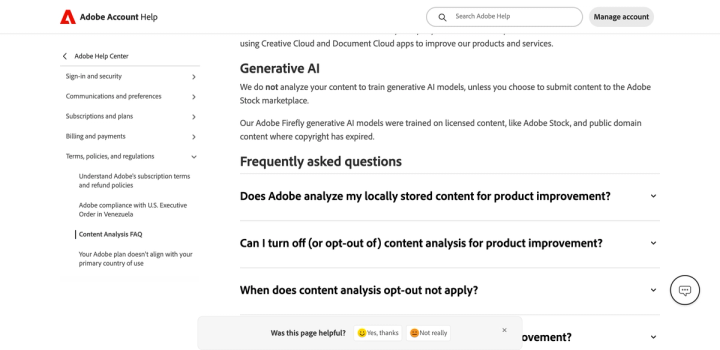
But Adobe does run content analysis for product improvement, which is a separate process with its own opt-out and its own FAQ entry titled "When does content analysis opt-out not apply?" So if someone tells you "Adobe doesn't train on your files," ask which of the two they mean. Our Firefly review goes into how it performs on product work.
Magnific, now part of Freepik, gives the flattest commitment of anyone here. Its terms state: "Magnific will not use Inputs (including the User's image captured when using certain AI Products) or Outputs to train its own AI models." The same document treats inputs and outputs as confidential unless you publish them to its community. On this specific question Magnific is at least as strong as we are, and it would be dishonest to write this article without saying so.
Runway sits at the other end, and it makes a useful contrast with its own reputation. Runway is the most permissive vendor we have measured on commercial rights, and it tells you plainly that content you make is yours to use commercially. On training, its Terms of Use say inputs and outputs "may be used by the Company to train and improve its AI models," under a licence described as "non-exclusive, irrevocable, perpetual, worldwide." We read the whole document looking for a way out: all nine mentions of opting out refer to the arbitration agreement, not to training. Permissive on ownership and permissive on training are not the same axis, and one does not predict the other. We cover the rest of the product in our Runway review.
Why does this matter more for a catalog than for a mood board?
The difference is what is in the frame.
A designer feeding in reference art is risking a style. A brand feeding in its SKU library is uploading unreleased packaging, pre-launch flavour names, claim copy that legal has not cleared, and sometimes a licensed character or a photographer's shot that came with a contract limiting how it may be used.
That last one is where this stops being philosophical. If a photography contract grants you usage for advertising, it almost certainly does not grant a third party a perpetual, irrevocable, sublicensable licence to train on the file. Two of the vendors above use exactly those words. If your shoot agreements have any teeth, the opt-out is not a preference. It is how you stay inside the deal you signed. The same reasoning applies to who owns the output, which we covered in our guide to commercial use rights on AI images.
How do you audit your stack in ten minutes?
Do this once, today, for every tool anyone on your team has uploaded a product photo into.
- Open the privacy policy, not the marketing page. Search it for "train". Most policies have exactly one relevant paragraph and it is findable in seconds.
- Look for the default. "We may use" means it is on. Only Recraft in this set says so outright.
- Find the toggle before you look for the promise. It lives in account settings, profile settings, or a privacy-controls page, never in the tool's main UI.
- Check whether the opt-out is retroactive. Assume it is not, because at every vendor that addresses it, it is not.
- Check whether the API is treated differently. At Photoroom it is exempt. That is a real lever if you have volume.
- Write down the date. These documents change. Recraft's own site currently shows a second version labelled "Terms of Service (through 24 August 2026)," which means the terms quoted here are days from being superseded.
If a tool cannot answer question two in writing, that is your answer. Our remove.bg alternatives guide lists the background-removal options if you decide to move.
Where we stand
Our own privacy policy reads: "We do not use your private assets to train public models unless you explicitly elect to share them for that purpose."
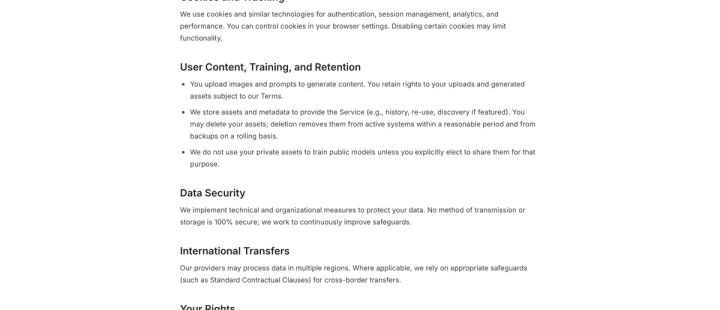
We built it that way because of who we sell to. A brand that hands us its whole SKU library is handing over the packaging refresh that has not been announced. Sharing is something you turn on, not something you discover you left on.
That is one sentence in one policy, though, and you should treat it exactly like the seven above it: go read it yourself, then go read your other tools'. If you want to test how a tool handles your actual products rather than its demo set, try it on your own SKUs, which is the only benchmark that tells you anything.
Whatever you land on, run the audit. At most of these vendors the default is that your uploads are training a model, and finding out whose takes about ten minutes.
FAQ
Does opting out of AI training delete images I already uploaded?
No. Opting out stops future use; it does not reach processing already carried out. Photoroom states this explicitly, and Recraft's licence survives termination of the agreement. If you want past uploads removed, that is a separate deletion request under your data-access rights, and it is not the same control.
Is my data safer on a paid plan?
Not reliably. Across the eight vendors here, the training position is set at the vendor level, not the plan level. Paid tiers do sometimes change other things, and Recraft's free tier carries ownership restrictions its paid tier does not. But paying is not itself an opt-out. Check the setting on the plan you are actually on.
Does using an API instead of the app make a difference?
At Photoroom, yes: its policy says model improvement "does not apply to the images processed through our Application Programming Interface (API)." Do not assume that generalises. Most vendors in this set say nothing about API traffic either way, and silence is not an exemption.
Which tools do not train on customer uploads?
As of 22 August 2026, Adobe (for generative training specifically), Magnific/Freepik, and Pikes all state that they do not. Adobe separately runs opt-out-able content analysis for product improvement, which is a different process from generative training.
Can I be contractually exposed by uploading a photographer's images?
Potentially. Commissioned photography usually comes with defined usage rights. Granting a tool a perpetual, irrevocable, sublicensable licence to train on those files may exceed what your contract allows you to grant. Ask your photographer or your counsel before bulk-uploading a commissioned shoot.
How often should I re-check these policies?
At least at renewal, and whenever you add a tool. These documents move quickly. Recraft's site currently displays a superseding version dated 24 August 2026, two days after this article was written. Screenshot what you rely on and date it.