
Pontus Karlsson
Recraft Review 2026: Pricing, Credits, and Product Photography Fit
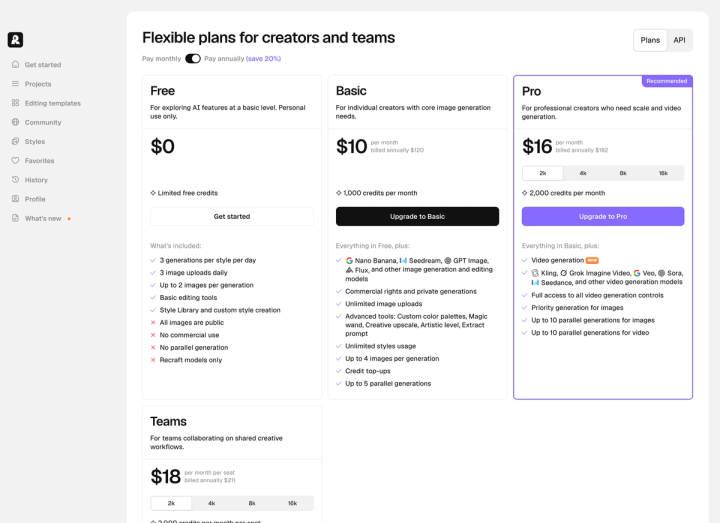
Recraft costs $12 a month billed monthly, or $10 a month billed annually. The pricing page loads with annual preselected, so the $10 on screen is not the monthly rate. For product work the number that matters more is credits: Basic's 1,000 credits buys 15 images or 1,000, depending entirely on which model you run.
Before we go further: we make Pikes AI, which competes with Recraft on part of this. Every figure below comes from Recraft's own live pages on 10 August 2026, and each one is checkable in a browser.
What does Recraft cost in 2026?
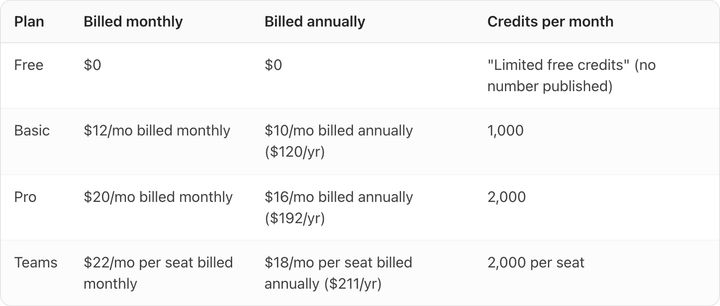
Four plans. Recraft advertises 20% off for paying annually, and that holds on Pro and Teams. On Basic it does not: $120 a year against $144 paid monthly is a saving of 16.7%.
| Plan | Billed monthly | Billed annually | Credits per month |
|---|---|---|---|
| Free | $0 | $0 | "Limited free credits" (no number published) |
| Basic | $12/mo billed monthly | $10/mo billed annually ($120/yr) | 1,000 |
| Pro | $20/mo billed monthly | $16/mo billed annually ($192/yr) | 2,000 |
| Teams | $22/mo per seat billed monthly | $18/mo per seat billed annually ($211/yr) | 2,000 per seat |
Recraft states these prices are exclusive of VAT, so the number on your invoice may be higher depending on where you are.
Why does Recraft's pricing page show $10 when the monthly price is $12?
Because the billing toggle arrives set to "Pay annually (save 20%)". The tell is the small grey line under each price. Under Basic it reads "billed annually $120". Switch the toggle to "Pay monthly" and Basic moves to $12, Pro to $20, Teams to $22 per seat.
There is no convention here, so check the toggle every time. We looked at two other vendors on the same day and got two different behaviours: Pixelcut preselects monthly, so its $10 really is a monthly price, and Adobe Firefly offers no annual plan at all, so its $9.99 needs no disambiguation.
If you are budgeting a year of tooling, assume the advertised number is the annual rate until the page says otherwise.
How many images do 1,000 credits actually buy?
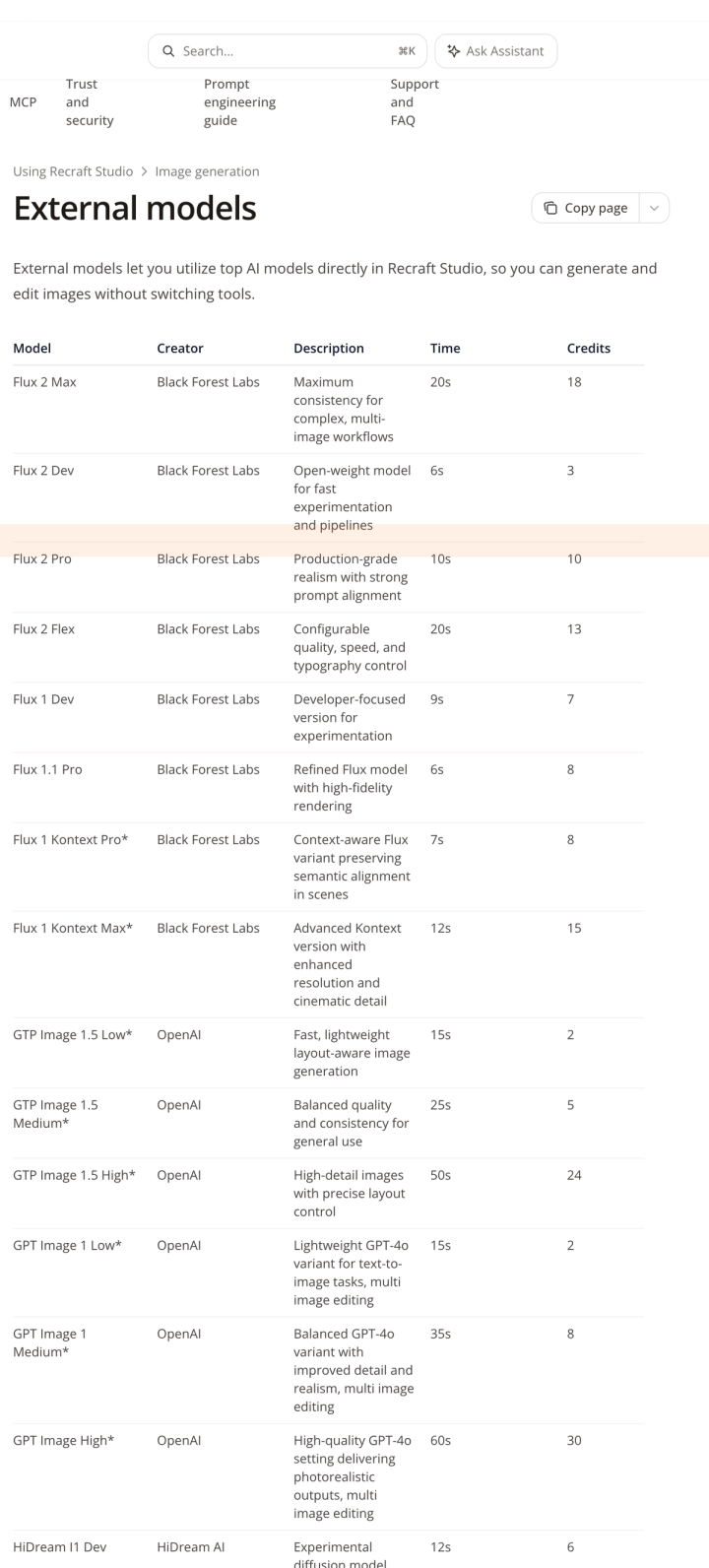
Recraft publishes a credit cost for every model it offers, and the range across them is what makes the plan price hard to read.
| Model | Credits per image | Images on Basic's 1,000 credits | Cost per image on Pro, billed monthly |
|---|---|---|---|
| Z-Image Turbo | 1 | 1,000 | $0.01 |
| Flux 2 Dev | 3 | 333 | $0.03 |
| Nano Banana | 7 | 142 | $0.07 |
| Seedream V4.5 | 8 | 125 | $0.08 |
| Flux 2 Pro | 10 | 100 | $0.10 |
| GPT Image High | 30 | 33 | $0.30 |
| Nano Banana Pro | 32 | 31 | $0.32 |
| Nano Banana Pro 4K | 63 | 15 | $0.63 |
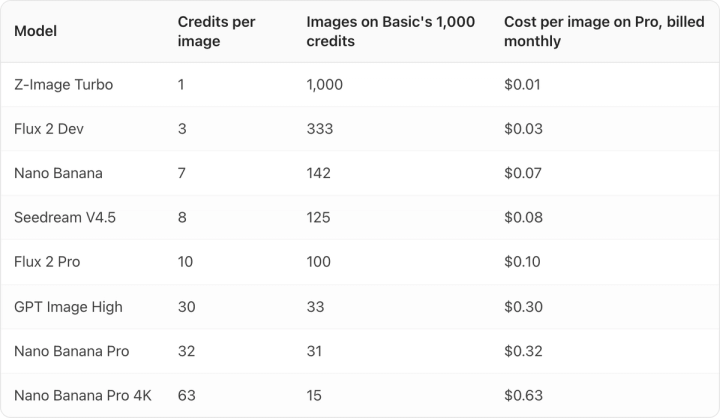
That is a 63x spread between the cheapest and the dearest model on the same subscription. Basic's 1,000 credits is either a thousand images or fifteen, and nothing on the pricing page tells you which one you are buying.
The cost-per-image column works because Pro prices credits at exactly one cent each, so credits multiply straight into dollars. If you are comparing this against other tools, our breakdown of AI product photography cost per image puts the same arithmetic next to several vendors.
Does Recraft get cheaper as you scale?
No, and that makes it unusual. Pro's credit allowance is adjustable in four steps, and at monthly billing the price moves in lockstep: 2,000 credits for $20, 4,000 for $40, 8,000 for $80, 16,000 for $160. One cent per credit at every step, with no volume discount for committing to more.
Basic is the plan to avoid on unit price. At $12 for 1,000 credits it works out to 1.2 cents per credit, 20% worse than Pro. Eight dollars more moves you to Pro and doubles the allowance. Teams sits at 1.1 cents per credit and buys shared workspaces, shared styles, centralised billing and SSO rather than extra generation.
Two billing details worth knowing before you commit. Subscription credits reset each cycle and do not roll over. Top-up credits are a separate purchase, never expire, and are only sold to Basic and Pro subscribers.
What can Recraft's free plan actually be used for?
Not commercial work. Recraft's FAQ says: "Images generated on the Free plan are owned by Recraft. They are publicly visible in the community gallery and are not licensed for commercial use."
For a consumer brand that is three separate problems stacked. Ownership sits with Recraft rather than you. Output is public, so unreleased packaging would be public too. And there is no commercial licence, so nothing generated there can run in an ad or sit on a product page.
The fourth limit matters most for product photography. The free plan is restricted to "Recraft models only", which puts every external model behind the paywall: Nano Banana, Seedream, GPT Image, Flux and the rest. Several of them carry an asterisk in Recraft's documentation, marking the models it uses for editing images with natural language.
For a brand with a catalogue already shot, editing an existing photo by describing the change is usually the operation that matters most. On Recraft it is not available free at any volume. If you want to trial the thing you would actually do daily, you are trialling it on a paid plan. Our roundup of genuinely free AI product photography tools covers which competitors do let you test commercially usable output at zero cost.
Is Recraft a good fit for product photography?
Recraft is a design tool that also generates images, and reading it as a product-photography tool sets the wrong expectation.
What it does better than most product-photo tools is real. Vector and SVG output, logo generation, a Style Library with custom style creation, custom colour palettes, and strong text rendering. If you need a consistent illustration system, an icon set, or on-brand vector assets across a brand, Recraft handles that and dedicated product-photography tools, including ours, do not.
The gap for a CPG catalogue is structural. There is no product library. Nothing in Recraft holds your actual SKU as a persistent reference across generations, so you are describing your product to a general-purpose model and hoping the label survives the round trip. That is fine for a concept board. It becomes a problem the moment the output has to be your product.
One test settles this on any tool, ours included. Generate your best-selling SKU, zoom to 100%, and read the label. If the type has softened, re-flowed, or invented a word, the image cannot be a product-page shot no matter how good the lighting looks.
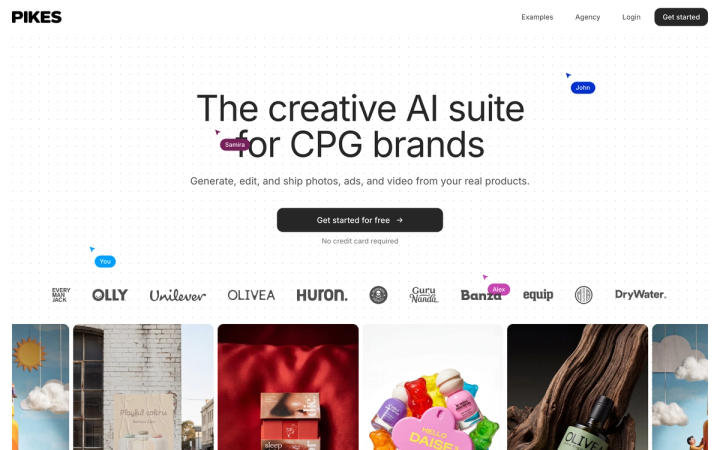
That test is why we built Pikes AI to generate from a brand's real product images rather than from a text description of them. If you want to try that approach on your own SKUs, Pikes AI is free to start. Whichever tool you land on, run the zoom test before you commit a catalogue to it.
How does Recraft compare to the other tools brands evaluate?
| Tool | Entry paid plan | Credits included | Billing shown by default |
|---|---|---|---|
| Recraft | $12/mo billed monthly ($10 billed annually) | 1,000 | Annual preselected |
| Pixelcut | $10/mo billed monthly | 600 | Monthly preselected |
| Adobe Firefly | US$9.99/mo billed monthly | 2,000 | No annual plan offered |
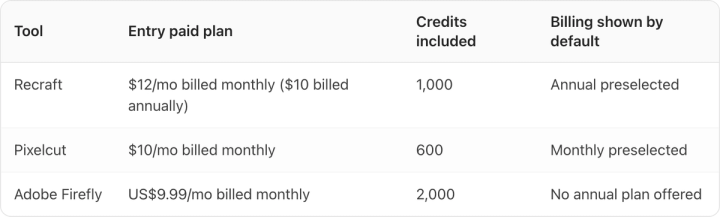
All three prices were checked on the vendors' own live pricing pages on 10 August 2026.
The credits column is the trap. A Recraft credit, a Pixelcut credit and an Adobe generative credit are not the same unit and do not buy the same models. Firefly's 2,000 credits look like twice Recraft's 1,000 and that comparison means nothing on its own. Cost per finished image, on the specific model you intend to use, is the only figure that transfers between vendors. We went through the same exercise for Pixelcut's credit structure and for Adobe Firefly's plans.
Frequently asked questions
Is Recraft's $10 price real?
Yes, with annual billing. That is $120 charged up front for twelve months. Paying month to month costs $12, and you can cancel at the end of any billing period.
Do Recraft credits roll over?
No. Subscription credits reset at the start of each billing cycle and unused ones are lost. Top-up credits behave differently: they are bought separately, never expire, and are used automatically once the monthly allowance runs out. Top-ups are only available on Basic and Pro.
Can I use free-plan images commercially?
No. Recraft owns Free plan output, it appears publicly in the community gallery, and it carries no commercial licence. Paid plans grant full ownership and commercial rights, and those rights survive cancellation for anything generated while subscribed.
Does Recraft give refunds?
Only in a narrow window. Recraft issues refunds if your account has used fewer than 30 credits in total and your most recent payment was within the past 30 days. Beyond either limit, cancelling stops future billing but does not return the current period.
What happens to my images if I cancel?
Images created during a paid subscription stay private and remain yours, with full commercial rights, after the subscription ends. They are not moved into the public gallery.
Is Recraft suitable for Amazon or Shopify product images?
It can produce images at the right dimensions, but nothing in the tool enforces marketplace rules on background colour, frame fill or AI metadata, and those rules differ by platform. Check the output against the specs themselves, starting with Google Shopping's image requirements.