
Pontus Karlsson
Google Shopping Product Image Requirements in 2026
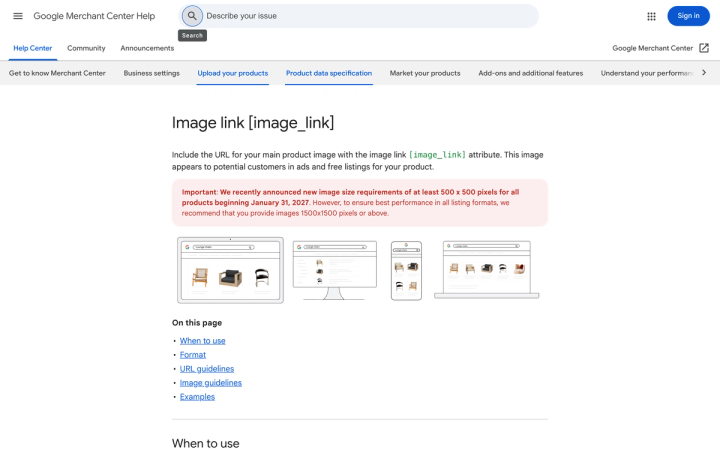
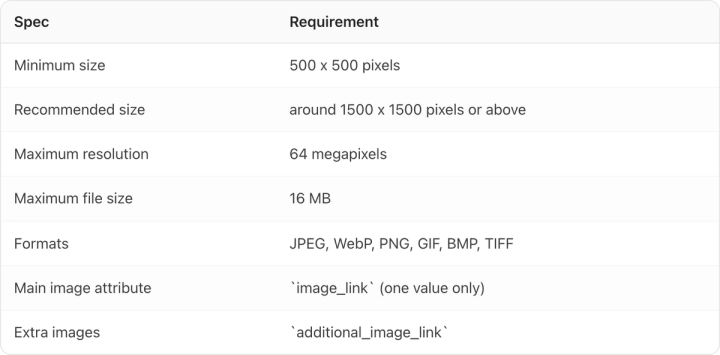
Google requires every product image to be at least 500 x 500 pixels, no larger than 64 megapixels, under 16 MB, and in JPEG, WebP, PNG, GIF, BMP or TIFF. No borders. No promotional overlays. No placeholders. Break one of those and the product is disapproved rather than demoted. It stops showing in Shopping ads and free listings entirely.
Everything below is quoted from Google's own [image link [image_link]](https://support.google.com/merchants/answer/6324350) documentation, checked on 9 August 2026.
What are Google's hard image requirements?
These are the rules that cause disapproval. Google is explicit about the consequence: "If you don't follow these requirements, your product will be disapproved and you will be notified in the Diagnostics section of your Merchant Center account."
| Spec | Requirement |
|---|---|
| Minimum size | 500 x 500 pixels |
| Recommended size | around 1500 x 1500 pixels or above |
| Maximum resolution | 64 megapixels |
| Maximum file size | 16 MB |
| Formats | JPEG, WebP, PNG, GIF, BMP, TIFF |
| Main image attribute | `image_link` (one value only) |
| Extra images | `additional_image_link` |
The file extension also has to match the actual format. Google warns that "using incorrect file extensions (for example .jpg for a .png file) can lead to 'Unsupported image type' errors", which is what a badly configured export pipeline produces at scale.
The other one is crawlability. Your images have to be reachable by both Googlebot and Googlebot-image in robots.txt. If your CDN blocks either, every image fails and nothing on the image itself is wrong.
What gets a product image disapproved?
Google's prohibited list is more specific than most brands expect. No image that contains "promotional elements or content that covers the product," including:
- Calls to action, for example "buy"
- Service information such as extended warranty or free shipping
- Price information
- Promotional adjectives, for example "best" or "cheap"
- Condition or compatibility, for example "new" or "2-piece"
- Any overlay: watermarks, brand names, logos, "unless it's an inherent part of the product itself"
- Barcodes
- Brand, manufacturer or retailer name and logo, with the same inherent-to-the-product exception
Plus: no borders. No placeholder image. No generic graphic or illustration standing in for the real product. No logo or icon instead of a product image. No single-colour swatch.
That "inherent part of the product itself" clause is the one to hold on to. Your branding printed on the pack is fine, because it is the product. The same logo added in post as a corner watermark is a disapproval.
What changes on 31 January 2027?
Google has announced that the 500 x 500 pixel minimum applies to all products from 31 January 2027. If any part of your catalog still ships legacy 250px or 400px thumbnails — old SKUs, discontinued lines, anything migrated from a previous platform — those listings stop serving on that date.
This is a cheap audit to run now and an expensive one to run in January. Sort your feed by image dimensions and fix the tail.
How big should the product be in the frame?
Google's guidance is a band: frame the product so it takes up "no less than 75%, but not more than 90%, of the full image." Background should be solid white or transparent, though "staged or lifestyle images that clearly show the product are also acceptable."
Google also says don't use a transparent background for light-coloured products, "because they might show with a black background." A white-on-transparent PNG of a white jar can render as a white jar on black.
Where do Google's rules conflict with Amazon's?
If you sell on both, you cannot assume one hero file passes both. Amazon's Product image guide, checked the same day, sets rules that overlap on some points and collide on others.
| Rule | Google Shopping | Amazon |
|---|---|---|
| Product size in frame | 75%–90% | "Show the product as 85% of the image" |
| Background | Solid white or transparent; lifestyle acceptable | "Pure white background (RGB color values: 255, 255, 255)" on the main image |
| Packaging | If shown, must display "multidimensional product packaging and not just the front" | "Don't include packaging, unless it's an important product feature" |
| Multiple faces | Not restricted | "Only show the product once in the image, for example, front only, and not both the front and the back" |
| Footwear | Show alone in main image, on a model in additional images | "Show a single shoe, facing left, at a 45-degree angle" |
| Apparel | "Provide images of products worn by people" | "Show on a model if the product is clothing in adult sizes," and no mannequin of any kind |
| Max size | 64 MP / 16 MB | 500–10,000 pixels on the longest side |
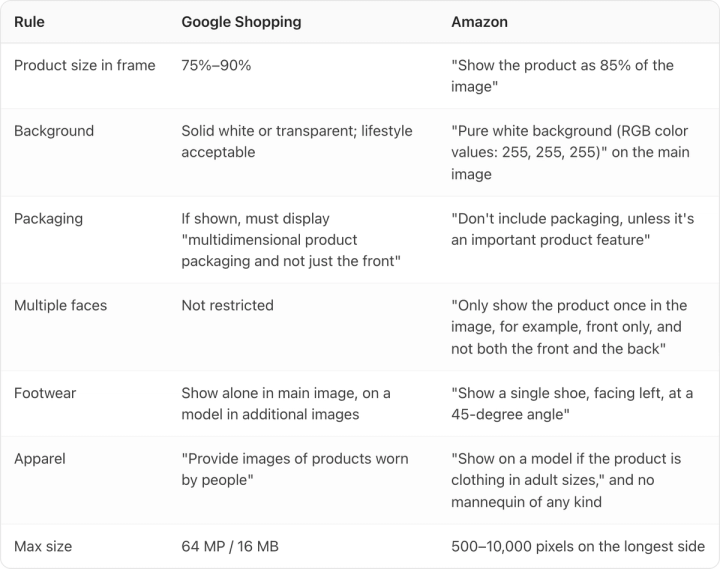
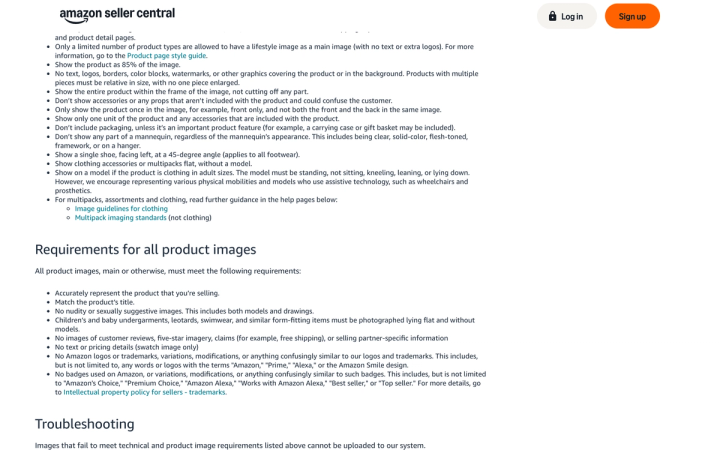
The frame-fill numbers actually resolve cleanly: 85% sits inside Google's 75–90% band, so shoot at 85% and you satisfy both with one file. Size resolves too: a 3000 x 3000 JPEG under 16 MB clears every limit on both platforms.
The genuine collision is packaging, and it lands hardest on CPG brands, where the pack is the product. Google wants multidimensional packaging rather than a flat front-of-pack. Amazon wants one unit, one instance, and explicitly rules out front-and-back in the same frame.
How do you shoot one pack photo that passes both?
Shoot the pack at a three-quarter angle showing the front face and one side, on pure white, filling 85% of the frame, at 3000 x 3000.
That single setup satisfies Google's multidimensional requirement (more than just the front) without breaking Amazon's rule against showing front and back together, because a front-and-side view is still one instance of one unit. It also survives Google's warning that it "may automatically crop your image," because an 85% fill leaves enough margin that a crop toward the product does not clip it.
Then split the alternates. Amazon's guide recommends one main image plus "at least six additional images and one video," and Google takes extras through additional_image_link. Anything that fails one platform's main-image rule — props, lifestyle, back-of-pack directions, size comparisons — belongs in those slots, not the hero. We go deeper on how many you actually need in how many product photos per SKU, and on Amazon's full spec in our Amazon product images guide.
Apparel is the one place you may need two files. Both platforms want the garment on a person, but Amazon bans any visible mannequin (clear, solid-colour, flesh-toned, framework or hanger), which rules out a hollow-man shot that Google would accept. Our ghost mannequin guide covers where that line falls.
What does Google require for AI-generated product images?
Google lists this under minimum requirements, so it is a disapproval risk rather than a suggestion:
All images created using generative AI must contain meta data indicating that the image was AI-generated (for example, the IPTC DigitalSourceTypeTrainedAlgorithmicMedia metadata tag). Don't remove embedded metadata tags such as the IPTC DigitalSourceType property from images created using generative AI tools.
Google names three IPTC NewsCodes that must be preserved: TrainedAlgorithmicMedia, CompositeSynthetic and AlgorithmicMedia.
Note the direction. Google's rule is don't strip what your generator embedded, which means your risk is not the AI tool, it is the retouching, resizing or CDN step downstream that quietly discards metadata. Amazon's equivalent rule points the other way, asking you to add a keyword for photorealistic AI-generated people. Your export pipeline has to satisfy both. We cover the compliance picture in are AI-generated product images allowed.
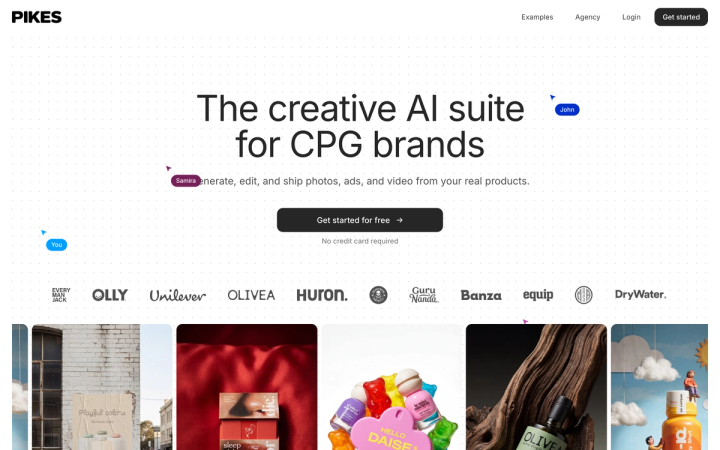
Both rules assume the image still accurately represents the product. Google's first requirement is to "accurately display the entire product." A generated image with a drifted label is a misrepresentation before it is a metadata problem — which is why we built Pikes AI to generate from a brand's real product files rather than from a text description of them. Whatever tool you use, check the output at 100% zoom and check the metadata survived export.
Why does updating an image take up to six weeks?
Because Google keys the recrawl to the URL, not the file.
Change the image content but keep the same URL and Google says it "can take significantly longer (up to 6 weeks) for the system to detect and recrawl the new image." Submit a new, unique URL and the recrawl typically happens within 3 days (24 to 72 hours), with the product marked "Under Review" and the old image still serving until the new one processes.
So version your image filenames, and never overwrite in place. It costs nothing at export time and it is the difference between a seasonal refresh landing in three days or after the season. And keep URLs otherwise stable — no timestamps or session parameters, which force needless recrawls.
Frequently asked questions
What size should Google Shopping images be?
At least 500 x 500 pixels, and Google recommends around 1500 x 1500 or above. The hard ceilings are 64 megapixels and 16 MB. From 31 January 2027 the 500 x 500 minimum applies to all products.
Does Google Shopping require a white background?
No. Google recommends solid white or transparent, but states that "staged or lifestyle images that clearly show the product are also acceptable." Amazon does require pure white (255, 255, 255) on the main image, so if you sell on both, white is the safer default.
Can you use AI-generated images in Google Shopping?
Yes, provided the image accurately displays the product and retains the IPTC metadata indicating it was AI-generated. Google explicitly says not to remove tags such as DigitalSourceType that generative tools embed.
Why was my product disapproved for its image?
The most common causes are promotional overlays (price, "free shipping", calls to action), watermarks or added logos, borders, placeholder or generic images, images under 500 x 500, a file extension that doesn't match the format, or a robots.txt that blocks Googlebot-image.
How many images can you submit per product?
One in image_link, since Google accepts only one value and ignores subsequent entries, plus additional views through additional_image_link.
Can the same photo be used for Amazon and Google Shopping?
For most products, yes: pure white background, 85% frame fill, 3000 x 3000 under 16 MB. Packaging and apparel are the exceptions, where Amazon's restrictions on packaging, mannequins and footwear angle are tighter than Google's.
Create your next product image set
Use your product photos and brand context to create studio-style and lifestyle variations in Pikes.
AI product photography with PikesCompare plans and generation credits