

Mike Lehman
Best remove.bg Alternatives for Product Photography in 2026
The best remove.bg alternatives in 2026 are Photoroom, Canva, Clipdrop and Pikes AI. remove.bg still cuts out a product cleanly, but it charges one credit per image and stops there. If you need a finished scene rather than a transparent PNG, you pay for background removal once and everything after it again.
Prices below were checked on remove.bg's, Photoroom's and Canva's live pricing pages on 15 August 2026, with the billing cycle stated for every number. Two of the three preselect annual billing, so the price you see first is not the price you pay monthly.
Disclosure: we make Pikes AI, which competes with several tools on this list.
What does remove.bg actually cost in 2026?
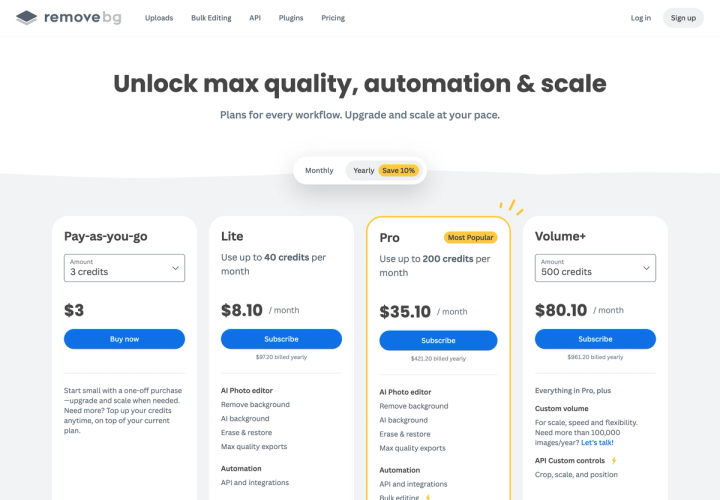
remove.bg sells credits. One credit removes one background. There are three subscriptions and a one-off top-up.
Landing on the pricing page, you see Yearly already selected and a "Save 10%" badge. Those are annual prices. Switching the toggle to Monthly raises every one of them.
| Plan | Billed monthly | Billed yearly | Yearly total | Credits |
|---|---|---|---|---|
| Pay-as-you-go | $3 one-off | — | — | 3 credits |
| Lite | $9/mo billed monthly | $8.10/mo billed yearly | $97.20 | Up to 40/mo |
| Pro | $39/mo billed monthly | $35.10/mo billed yearly | $421.20 | Up to 200/mo |
| Volume+ | $89/mo billed monthly | $80.10/mo billed yearly | $961.20 | 500/mo |
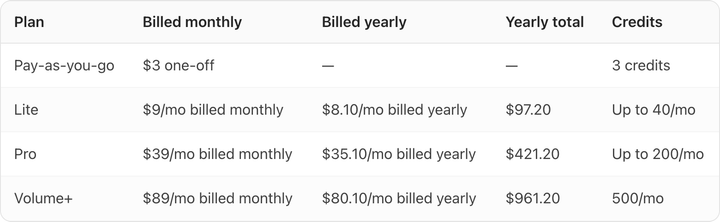
The 10% discount is real and it is exactly 10% on all three plans. That is rarer than it sounds. Photoroom advertises "Save 33%" and delivers between 16.7% and 42.3% depending on which plan you pick.
The number that matters more is cost per image:
- Lite: $0.225 per image
- Pro: $0.195 per image
- Volume+: $0.178 per image
- Pay-as-you-go: $1.00 per image
The top-up is 4.4 times the Lite rate and 5.6 times the Volume+ rate. If you buy credits in threes because you only needed a few, you are paying the worst price on the board.
Why do brands look for a remove.bg alternative?
Three reasons come up repeatedly, and only one of them is price.
The output is a transparent PNG. remove.bg returns your product on transparency. For a marketplace listing that needs a pure white background, that is most of the job done. For an ad, an email header or a lifestyle grid, it is the first ten percent. You still need a background, a shadow that matches it, and a crop per placement.
Credits run out at catalog scale. A 200-SKU catalog shot at five angles is 1,000 images. On Lite that is 25 months of allowance. On Volume+ it is two months. Brands that shoot seasonally hit the ceiling in a burst and then buy top-ups at $1.00 each.
Edge quality on hard materials. Automatic matting is very good on solid packaging and still struggles on the things CPG brands actually sell: clear glass, mesh, foil with specular highlights, loose hair on a brush. You get a usable mask and then spend time in Erase & restore fixing the rim.
None of that makes remove.bg a bad tool. It is the most reliable single-purpose cutout engine available, and its API is the reason it sits inside so many other products. Whether that is enough depends on what you do after the cutout.
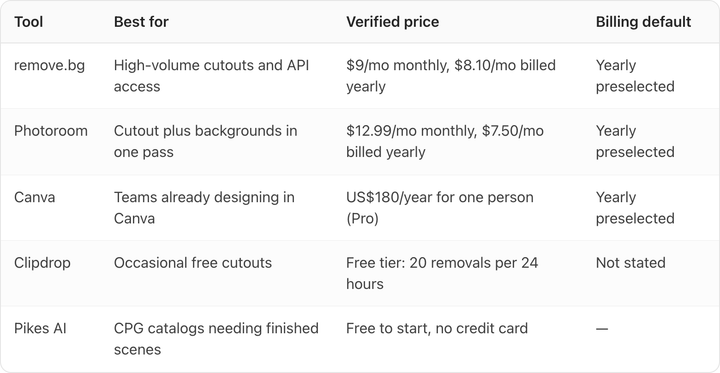
What are the best remove.bg alternatives?
| Tool | Best for | Verified price | Billing default |
|---|---|---|---|
| remove.bg | High-volume cutouts and API access | $9/mo monthly, $8.10/mo billed yearly | Yearly preselected |
| Photoroom | Cutout plus backgrounds in one pass | $12.99/mo monthly, $7.50/mo billed yearly | Yearly preselected |
| Canva | Teams already designing in Canva | US$180/year for one person (Pro) | Yearly preselected |
| Clipdrop | Occasional free cutouts | Free tier: 20 removals per 24 hours | Not stated |
| Pikes AI | CPG catalogs needing finished scenes | Free to start, no credit card | — |
Photoroom
Photoroom is the closest like-for-like swap, and it does more per credit. Verified on 15 August 2026: Pro is $12.99/month billed monthly or $7.50/month billed yearly, and includes 8,000 AI credits and 1,000 exports. Max is $34.99 monthly or $20.99 billed yearly with 25,000 credits and 3,000 exports. Ultra is $99 monthly or $82.50 billed yearly.
Watch the annual discount. The toggle advertises "Save 33%", but Pro is really 42.3% off, Max is 40.0%, and Ultra is 16.7%. That is a 25.6 point spread behind one headline number. Compute it from the two prices on the plan you want.
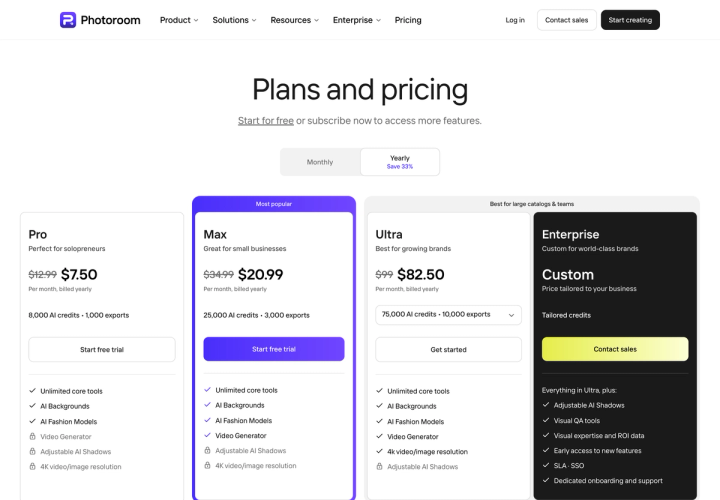
Photoroom gives you AI Backgrounds and AI Fashion Models on every paid tier, so the cutout arrives already placed. 4K resolution and Adjustable AI Shadows are held back for Ultra and Enterprise, which matters if you are producing print or need the shadow to sit correctly on a new surface. Our Photoroom pricing breakdown goes through the credit ladder in more detail.
Canva
Canva has owned remove.bg since February 2021, when it acquired the Austrian company Kaleido that built it, as TechCrunch reported at the time. So one of the main remove.bg alternatives is its own parent company.
Background removal sits behind Canva Pro. The pricing page lists it under "Premium tools (resize, translate, remove background)", verified 15 August 2026. Pro is US$180/year for one person and Business is US$250/year per person, with Yearly preselected and a "Save 16%" badge. We did not verify Canva's monthly rate, so we are not quoting one.
Canva is the right answer if your team already lays out packaging, decks and social posts there. It is the wrong answer if you need a repeatable API step in a catalog pipeline. See our Canva alternatives for product photos for where it runs out.
Clipdrop
Clipdrop's Free tier allows 20 background removals per 24 hours, verified on its pricing page on 15 August 2026. That is a genuinely useful allowance for occasional work and more generous than most free tiers.
We could not get the paid plans to render fully on 15 August 2026, so we are not quoting Clipdrop's subscription prices. Check the card you are buying.
Pikes AI
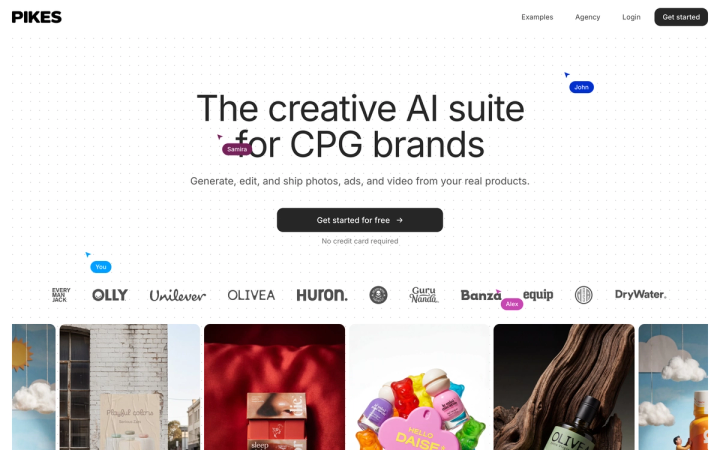
The reason we built Pikes is the gap in the first section of this article: a cutout is not a photo. We generate from your actual SKUs, so the output is a finished scene with the product still looking like the product, rather than a transparent PNG you then have to compose. Background removal is one step inside that, alongside scene generation, ad creative and image-to-video.
Whichever tool you pick, run the same test before you commit a catalog to it: cut out your hardest SKU, the clear bottle or the foil sachet, then zoom to 100% and look at the rim. Most tools pass on a matte box and separate on the rim.
If that test matters to you, Pikes AI is free to start with no credit card.
How should you choose between them?
Match the tool to the shape of your work rather than the lowest sticker price.
You need cutouts and nothing else, at volume, through an API. Stay on remove.bg. Nothing here beats it at the one job, and Volume+ at $0.178 per image on monthly billing is a fair rate. Just avoid the $3 top-up.
You need the cutout and a background. Photoroom. You are buying two steps for roughly one price, and the credits stretch further.
Your team lives in Canva. Use what you are already paying for before adding a subscription.
You are producing hundreds of finished scenes per season. Per-image cutout pricing is the wrong unit. Price the finished asset instead. Our guide to AI product photography cost per image compares tools on that basis, and product photography for large catalogs covers the pipeline around it.
Frequently asked questions
Is remove.bg free?
There is no free subscription tier on the pricing page. The cheapest entry is the $3 pay-as-you-go pack, which buys 3 credits at $1.00 each. Verified 15 August 2026.
How much does remove.bg cost per image?
Between $0.178 and $1.00 depending on how you buy. Volume+ on monthly billing is $89 for 500 credits, or $0.178 per image. Pay-as-you-go is $1.00 per image. Lite sits in between at $0.225.
Is Photoroom cheaper than remove.bg?
On the entry plan, no on the monthly sticker and yes on what you get. Photoroom Pro is $12.99/month billed monthly against remove.bg Lite at $9/month billed monthly, but Pro includes 8,000 AI credits and 1,000 exports against 40 credits. Photoroom is also doing background generation, not only removal.
Does Canva own remove.bg?
Yes. Canva acquired Kaleido, the Austrian company behind remove.bg and Unscreen, in February 2021. remove.bg still runs as its own product with its own pricing.
Which background remover handles glass and transparent packaging best?
Test it yourself rather than trusting a comparison, including this one. Automatic matting is trained on opaque objects and every tool degrades on transparency. Run your hardest SKU through the free tier of two or three tools and inspect the rim at 100% zoom.
Do I need background removal if I am generating images with AI?
Often not. Removal exists because you started with a photo that had the wrong background. If the scene is generated around your product from the start, there is no background to remove. You still need removal for supplied assets, retailer requests and marketplace listings that demand a pure white field.

Written by
Mike Lehman
Mike Lehman is a senior content strategist at Pikes. Before joining Pikes, Mike spent nearly a decade working with Glossier, Haus, and Athletic Brewing, leading campaigns that blended storytelling and data.