

Mike Lehman
Amazon vs DTC Product Photography: What Changes and What Doesn't
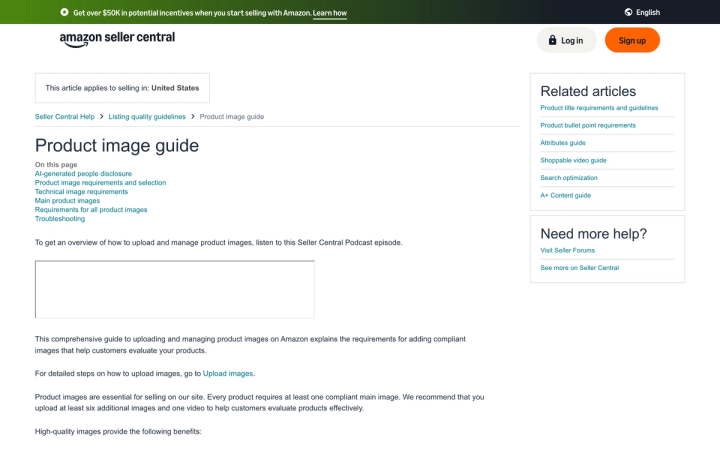
Amazon and your own site need different photos of the same product. Amazon's main image must sit on pure white (RGB 255,255,255) with the product filling 85% of the frame and no text, logos or graphics. Your Shopify product page has none of those rules and rewards the opposite: lifestyle, scale, texture and video. Shoot once for both and you get a listing that converts on neither.
What is the actual difference between Amazon and DTC product photography?
The difference is who the photo has to satisfy.
On Amazon, the first image is a compliance document. It runs against a fixed specification, and a main image that fails it can get the listing suppressed from search until you replace it. Amazon also arranges images from multiple selling partners on a shared product page, so consistency with a standard matters more than your art direction.
On your own site, the photo is a storefront. Nobody rejects it. The constraint is the customer's uncertainty. How big is it, what is it made of, what does it look like in a real room? Your job is to answer that before they leave.
What does Amazon require that your own site does not?
These are Amazon's published requirements for US listings, taken from Seller Central's Product image guide on 29 July 2026.
The main image must:
- Sit on a pure white background (RGB color values 255, 255, 255)
- Show the product filling 85% of the image
- Carry no text, logos, borders, color blocks, watermarks or other graphics, either over the product or in the background
- Be a real representation of the product, not a placeholder. The first image you upload defines the product identity, and a placeholder can block your intended image from uploading later
Only a limited number of product types are allowed a lifestyle image as the main image, and even then with no text or extra logos.
Technical specs for all images:
- Minimum 500 pixels and maximum 10,000 pixels on the longest side
- JPEG (.jpg or .jpeg) recommended; TIFF, PNG and GIF accepted, GIF non-animated only
- Clear and non-pixelated, with no jagged edges
- Files named with the product identifier plus variant code
Your DTC site imposes none of this. Amazon's rules are narrow and enforced. Your site's are wide and unenforced.
What can you do on your own site that Amazon will not allow?
Shopify's product media specifications are permissive by comparison, and they are worth reading as a list of things you are leaving on the table if you only ever shoot for Amazon.
- Images: up to 5000 × 5000 px or 25 megapixels, under 20 MB. Shopify recommends 2048 × 2048 px for square product images. Supported formats include PNG, JPEG, PSD, TIFF, BMP, GIF, SVG, HEIC and WebP, including animated GIF and WebP.
- Video: up to 10 minutes, up to 1 GB, up to 4K (4096 × 2160), as .mp4, .mov or .webm. You can also embed YouTube and Vimeo URLs.
- 3D models: up to 500 MB in GLB or USDZ. Files over 15 MB are optimized automatically to keep load times down.
- Quantity: Shopify does not document a cap on media items per product.
Verified on help.shopify.com, 29 July 2026.
Text on images, animated formats, an unlimited gallery, a 10-minute video and a rotatable 3D model are all fine on your site, and all outside what Amazon's main image permits.
How many images does each destination need?
Amazon is explicit. Every product requires at least one compliant main image, and Amazon recommends you upload at least six additional images and one video, which is seven images minimum plus video.
That "six additional" number is worth checking against whatever shot list you are working from. It is a common error to plan for six images total when Amazon's guidance is six beyond the main.
For a DTC page there is no published number, because the constraint is different. Work backwards from the questions that drive returns for your category: scale, material, what is inside the box, and what it looks like in use.
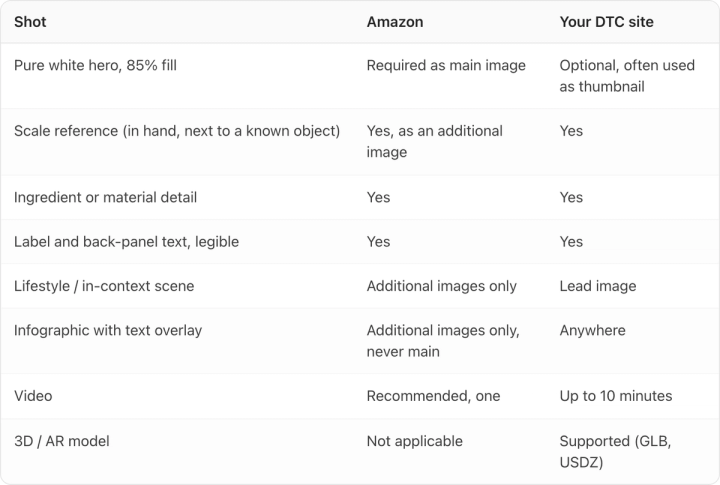
A practical split for one SKU:
| Shot | Amazon | Your DTC site |
|---|---|---|
| Pure white hero, 85% fill | Required as main image | Optional, often used as thumbnail |
| Scale reference (in hand, next to a known object) | Yes, as an additional image | Yes |
| Ingredient or material detail | Yes | Yes |
| Label and back-panel text, legible | Yes | Yes |
| Lifestyle / in-context scene | Additional images only | Lead image |
| Infographic with text overlay | Additional images only, never main | Anywhere |
| Video | Recommended, one | Up to 10 minutes |
| 3D / AR model | Not applicable | Supported (GLB, USDZ) |
Our guide to how many product photos you need per SKU works through the arithmetic for a full catalog.
Can you shoot once and use both?
Partly, and the order matters.
Shoot the Amazon-compliant set first. Its constraints are the tightest, and a pure-white 85%-fill hero at high resolution can be cropped, placed on a colored background or composited into a scene for your own site afterwards. Going the other direction does not work — you cannot recover a compliant white-background main image from a lifestyle shot with props in it.
Two things do not transfer:
- Text overlays. Anything with copy baked in is fine on your site and disqualifying as an Amazon main image.
- Aspect ratio. Amazon's grid favors square. Your product page, ads and email each want something different.
The practical approach is one shoot, one master file per angle at the highest resolution you can, and destination-specific crops and treatments derived from it. Our complete e-commerce photography guide covers the capture side; the Amazon product images requirements guide covers the specs in depth.
Where do AI-generated images fit?
AI works best as a production method for the derivative shots, once you have a master file to work from. It suits the multiplication problem: one compliant hero becomes a dozen lifestyle scenes, seasonal variants and ad crops without rebooking a studio.
Two rules keep this out of trouble.
First, the generated image still has to be an accurate representation of the product. Amazon's requirement that the main image truthfully represent what you sell does not relax because the pixels came from a model. Label text that drifts makes the listing inaccurate.
Second, Amazon has a disclosure requirement for AI-generated people. If an image contains photorealistic people who were entirely generated by AI, you must tag the file with the keyword contains-synthetic-performer in the dc:subject (XMP) field using an IPTC-compatible metadata editor before upload. Amazon then adds a disclosure where applicable. You do not need the tag if the image features real people (even ones altered with AI tools), characters from movies or games, no people at all, or people who are not photorealistic.
If you are generating lifestyle scenes with models in them for Amazon, that tag is now part of your workflow.
Tools that keep a persistent product library and brand guidelines, Pikes among them, exist to hold label text and packaging color steady while the background, scene and crop change. If you want to test that on your own catalog, Pikes is free to start and takes your real product photos as the reference.
Frequently asked questions
Can I use the same main image on Amazon and my Shopify store?
Yes. An Amazon-compliant main image (pure white, 85% fill, no text) is a perfectly good thumbnail on your own site. The reverse usually fails, because DTC lead images tend to include props, scenes or text that Amazon does not permit on a main image.
How many product photos does Amazon actually require?
One compliant main image is required. Amazon recommends at least six additional images and one video on top of that, so seven images total is the practical target.
What background does Amazon require?
Pure white, specified as RGB 255, 255, 255, for the main image. Additional images have more freedom and can include lifestyle scenes and infographics with text.
What image size does Amazon accept?
Between 500 and 10,000 pixels on the longest side. JPEG is the recommended format; TIFF, PNG and non-animated GIF are also accepted.
Do I have to disclose AI-generated product images to Amazon?
Only when the image contains photorealistic people generated entirely by AI. In that case you add the contains-synthetic-performer keyword to the dc:subject XMP field before uploading. Product-only images with no people require no tag.
Is video worth producing for both?
Amazon recommends one video per listing, and Shopify supports up to 10 minutes and 4K. A single 20-to-30-second clip covering unboxing, scale and use satisfies Amazon and can be cut down for your product page and ads.
Create your next product image set
Use your product photos and brand context to create studio-style and lifestyle variations in Pikes.
AI product photography with PikesCompare plans and generation credits

Written by
Mike Lehman
Mike Lehman is a senior content strategist at Pikes. Before joining Pikes, Mike spent nearly a decade working with Glossier, Haus, and Athletic Brewing, leading campaigns that blended storytelling and data.