

Mike Lehman
How to Build your Entire E-commerce brand Ad Creative with Claude
Every profitable ad campaign uses the same process: test multiple variants, find what resonates, then scale hard on the best performers. It sounds simple, but the cost of briefing designers, waiting on revisions, paying for shoots, and rebuilding everything for a new product costs more than most ecommerce brands can conveniently scale on.
It's exactly why brands that crack the production side win. For example, Clear Within increased its add-to-cart rate by 80% by scaling on the better-performing variant of its product page.
This article shows you how to do the same thing using Claude paired with Pikes AI's product image generation. While you can generate images in Claude, you can build a repeatable, automated pipeline that takes your product details and brand guidelines as inputs, and outputs ready-to-test ad creatives into a single folder.
By the end of this guide, you'll have a working pipeline that generates complete ad creative packages for Meta, TikTok, and YouTube that you can use right away.
What You Need Before You Start
Let’s start with the tools and resources you need to set up and get ready.
- A Claude Pro or Max Subscription plan: You need a paid Claude account to access all of its features without any limit. The free tier works for occasional prompting, but if you’re generating multiple ad creative batches regularly, you need a pro or max plan to keep your workflow uninterrupted.
- An AI Content Creation or Product Photography Tool: Claude can write ad copy, generate creative concepts, campaign ideas, strategies, and automate processes. But it cannot create ad images. To do this, you need to connect it to a tool that can:
- Generate actual ad images from text prompts
- Edit and refine product visuals
- Remove backgrounds from product photos
- Animate images into short videos
- Pull and analyse your Meta ad performance data
Pikes AI is a better option for this use case as it is purpose-built for e-commerce brands that need high-realism, post-ready creatives for ad campaigns.
- Your Brand File: What separates wacky AI-generated creatives from realistic, on-brand types is how much information and context you feed into the system. A guaranteed way to get brand creatives that feel and sound exactly like your brand is to connect a file containing your brand logo, colours, style, and creative guidelines.
To create one, just imagine that you’re briefing a creative director you just met on what you want. You’d tell them what the Ad should achieve, your target personas' details, how you want them to feel when they see it, and angles you’d like to explore.
Another secret ingredient for generating high-converting ads is to feed Claude with your customers’ comments, reviews, complaints, and conversations so it can reach them at a more emotional level, which is what AI lacks.
Your brand document should cover:
- Brand name
- Tagline
- Who you are
- Voice and tone
- Things you never say
- Our proof points
- Visual style
This file is everything. The more honest and specific you are here, the better every single creative will be.
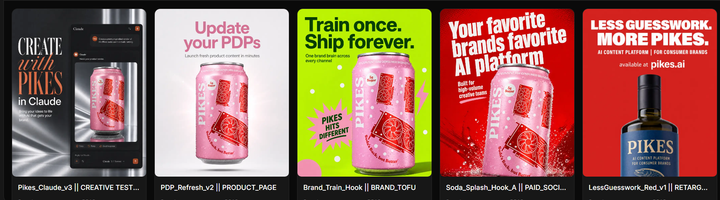
Setting Up Your Accounts
Step 1: Connect Pikes AI to Claude
Claude cannot generate ad images or creatives. But when paired with an AI product photography tool like Pikes, it becomes your powerful partner for producing all your ad creatives.
Once connected, Claude calls Pikes on your behalf and delivers the result directly into your conversation, so you never have to leave the app to generate an image.
Here’s how to connect them:
- After you’ve created an account on Pikes, log in to your dashboard.
- Click on “Pikes for Claude”
- In the Claude connection section, copy the “Remote MCP URL.”
- Log in to your Claude account and make sure you’re in Claude code mode
- Go to Settings → Connectors → Customize.
- Select the (+) icon at the top right corner of the menu and click “Add Custom Connector.”
- Paste the URL you copied and click “Add”
After you do this once, whenever you ask Claude to generate an image, it will use Pikes AI automatically.
Step 2: Upload your Brand File
Open a new conversation in Claude Code and paste your brand file at the start. Then input this instruction:
“Here are my brand guidelines. Keep everything in this document in mind for everything we work on in this conversation.”
Claude will confirm that it has absorbed your guidelines.
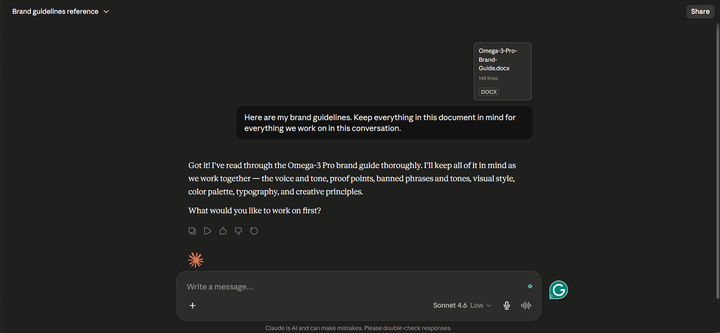
Every piece of copy and every image brief generated from this point will automatically be filtered through your brand.
Getting Ready
Step 3: Find Reference Ads in Pikes Before Generating Your Image
This is the step most people skip, and it’s the one that makes the biggest difference in image quality. Before generating anything, use Pikes AI’s Ad Search feature to find high-performing ads in your category that Claude can use as visual references.
To do this,
- Log in to your Pikes.ai account.
- Go to Meta Suite > Ad Search > Select the category of your product.
- Scroll down to select the ad visual that resonates the most with you.
- Click on it and download.
Look for ads that:
• Use a visual structure similar to what you have in mind
• Have strong product-to-background contrast
• Handle text overlays cleanly without cluttering the image
• Match the tone you’re going for (clinical and clean vs warm and lifestyle)
Once you’ve identified a reference ad that resonates, upload it to Claude and tell it: “Use this as a visual reference for the image we’re about to generate.”
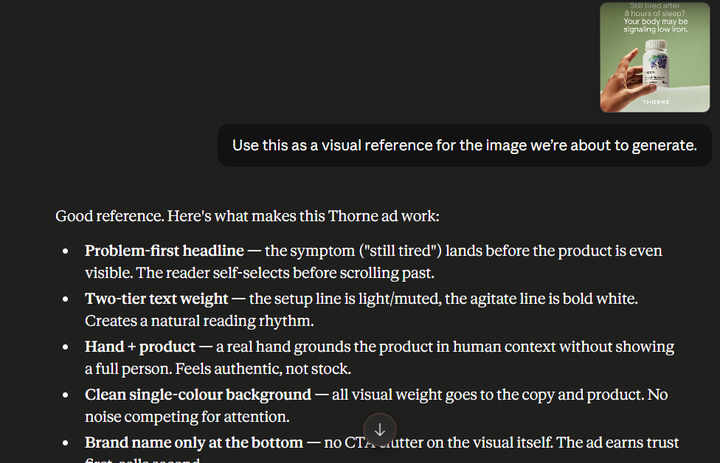
This gives Pikes AI a concrete creative direction rather than building from a blank brief, and the difference in output quality is significant.
Step 4: Brief Claude on Your Campaign
Tell Claude exactly what you’re working on using this structure:
“I want to create ad creatives for [PLATFORM] promoting [PRODUCT NAME]. The target audience is [AUDIENCE DESCRIPTION]. The key benefit is [BENEFIT]. The offer is [OFFER]. The creative angle is [ANGLE].”
For example:
“I want to create ad creatives for Meta promoting Omega-3 Pro. The target audience is men aged 40–55 with brain fog who work desk jobs. The key benefit is 3x better absorption than standard fish oil. The offer is buy 2, get 1 free this week only. The creative angle is Problem/Agitate.”
Claude now has the full picture to build your creative package.
Generating Your Ad Creatives
Step 6: Generate The Ad Image With The Right Specs
Now you’re ready to generate. This is where most brands leave quality on the table by treating image generation as an afterthought. A strong image prompt needs three things: the right model, the right dimensions, and a precise visual brief.
Choose the Right Pikes AI Model
Pikes AI offers two models that serve different creative needs, and choosing the right one before you generate saves you multiple rounds of revisions.
Consistency Pro is built for ads where text legibility and layout precision are critical. If your creative needs clean text overlays, a product label that reads clearly, or a structured layout that has to stay consistent across multiple ad formats, use Consistency Pro. It holds fine details together and keeps the quality intact as in the original.
Creativity Pro is built for lifestyle imagery and high-visual-impact creatives. If you’re generating an aspirational scene, a human model using your product, or an environment-based image where mood and realism matter more than text precision, use Creativity Pro. It produces the kind of visually rich output that performs well on TikTok and Instagram, which requires compelling aesthetics to drive engagement.
Tell Claude which model to use when you give the image brief:
“Generate this image using Pikes AI on Creativity Pro.”
Specify Your Ad Dimensions
Different platforms require different image dimensions, and generating at the wrong size means your creative will either be cropped, distorted, or rejected at upload. Tell Claude exactly what you need:
• Meta Feed (image ad): 1080 x 1080px (1:1) or 1080 x 1350px (4:5)
• Meta Stories / Reels: 1080 x 1920px (9:16)
• TikTok: 1080 x 1920px (9:16)
• YouTube display ad: 1200 x 628px (1.91:1)
Include the dimension in your image request so Pikes generates at the correct size from the start.
Write a Precise Visual Brief
Vague prompts produce vague images. The more specific your brief, the closer the first output is to what you actually want. Here’s an example of what to ask Claude to generate:
“Generate an ad image for this campaign using Pikes AI on Consistency Pro, sized 1024 x 1024px for Meta feed. Use the reference ad we pulled earlier as a style guide. Place the product ad in a portrait 1:1 format. Deep navy blue background (#1A3C5E). A realistic male hand, skin tone of a man in his 40s, holding the product. The bottle is centred in the lower half of the frame, hand entering from the left side, similar to the Thorne ad composition. No clutter.”
Claude will pass this brief to Pikes AI and return the generated image directly in your conversation.
Here is the result below:
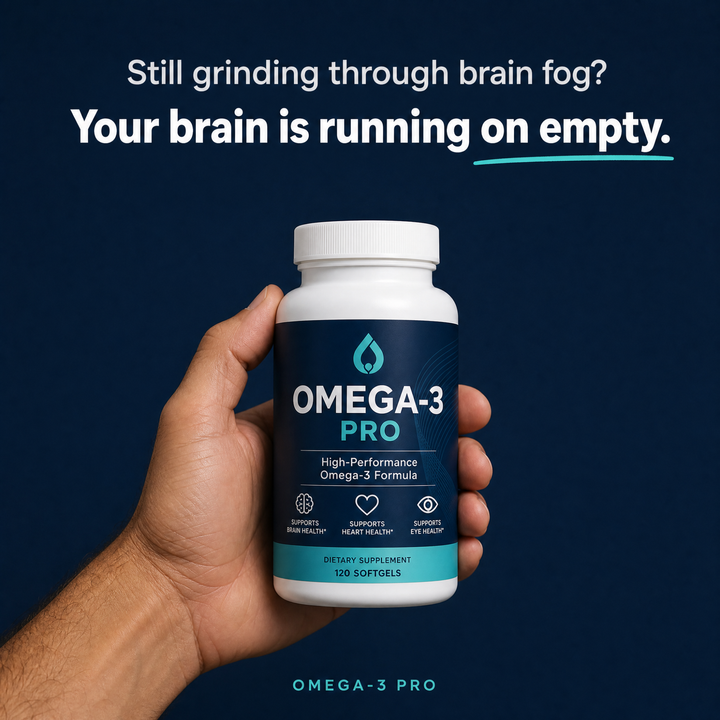
If the result needs refinement, describe the change in plain language, e.g. “make the lighting warmer”, “move the product more central” etc., and Claude will send the revision brief back to Pikes without you needing to re-enter the full prompt.
Remove the Background If Needed
If you want to place your product on different backgrounds across multiple ad formats, ask Claude to strip it:
“Remove the background from the image Pikes just generated and return the transparent PNG.”
Claude will call Pikes AI again and return the cutout version in the same thread.
Step 7: Package and Save Your Creative
Once you have your copy and image finalised, ask Claude to compile everything:
“Summarise everything from this session into one clean creative brief: the campaign inputs, all 5 copy variants, the image description, which model was used, the dimensions, and which variant was used for the final creative.”
This gives you a shareable document your media buyer or team can use to upload, test, and replicate the creative process for the next product.
How to Scale to Multiple Creatives in One Session
Once the single-product workflow is running, scaling is straightforward. Paste your brand guidelines once at the start of a new session, then send Claude a batch brief:
“I’m going to give you three campaign briefs. For each one: write 5 copy variants, pull a reference ad from Pikes ad search, then generate an ad image on the appropriate model and platform dimensions. Here are the three briefs:”
Brief 1: Meta feed, Omega-3 Pro, women aged 35–50 with joint pain, benefit: reduces inflammation in 2 weeks, offer: free shipping on first order, angle: Before/After. Use Creativity Pro, 1080x1350px
Brief 2: TikTok, Vitamin D3+K2, office workers with low sunlight, benefit: clinically dosed 5000 IU + MK-7, offer: subscribe and save 20%, angle: Ingredient authority. Use Consistency Pro, 1080x1920px
Brief 3: Meta Stories, Omega-3 Pro, men 40–55 switching from their current supplement, benefit: 3x absorption backed by third-party testing, offer: free sample with first purchase, angle: Social proof. Use Creativity Pro, 1080x1920px
Claude will work through each in sequence, pulling references, generating copy, and producing images via Pikes AI inside one thread. An afternoon of this produces a full week of ad testing material.
What You've Built
At this point, you have a working ad creative pipeline that most e-commerce brands are still paying agencies to do manually.
You built a system that reads your brand guidelines, generates platform-specific copy variants, sends a detailed visual brief to Pikes AI, downloads the generated image, and organises everything into one clean output folder automatically.
The real value of this pipeline is the fact that it gets faster and smarter every time you use it. The more you refine your brand file, sharpen your input variables, and study which angles are converting, the better your outputs become.
Once your pipeline is running smoothly, three natural next steps will extend its value significantly:
- Connect it to your Meta Ads Manager via API so that generated creatives upload directly to your ad account without manual intervention.
- Add a performance feedback loop by feeding your ROAS and CTR data back into the pipeline so Claude can use what's already working to inform the next batch of copy angles.
- Expand your brand file over time. Every customer review, winning hook, and failed angle you add makes every future creative sharper.
Your pipeline is ready. Try Pikes AI for free and generate your first ad creative in under a minute.
FAQs
How much does it cost to run this pipeline?
You'll need a Claude Pro or Max subscription and a Pikes plan as well. Costs vary depending on how many creatives you generate, but a single run generating five copy variants and one image typically costs a fraction of what a freelance designer charges per asset. Pikes AI has its own pricing plans for API access costs.
Can I use this pipeline with ad platforms other than Meta?
Yes. You can switch between Meta, TikTok, and YouTube by simply changing one line in your brief.
What happens if the generated creatives don't match my brand?
This almost always comes down to the brand.txt file being too thin. The more specific you are about voice, tone, visual style, and what you never say, the tighter the outputs become. Feed it real examples of winning ad copy, customer reviews, past hooks that converted, and the quality gap will close significantly.
What Types of Products Work Best With AI Product Photography?
AI product photography works best for products that rely on visual presentation to compel buying decisions and when the appearance needs to remain consistent across images. Examples are consumer goods, health and wellness products, fashion accessories, beauty and skincare products, and food and beverage packaging.
Turn your product photos into ad concepts
Create image and video variations from your product references in Pikes, then review the assets for your campaign.
AI ad creatives with PikesCompare plans and generation credits

Written by
Mike Lehman
Mike Lehman is a senior content strategist at Pikes. Before joining Pikes, Mike spent nearly a decade working with Glossier, Haus, and Athletic Brewing, leading campaigns that blended storytelling and data.