
Pontus Karlsson
How to Turn Product Photos Into Video Ads: 2026 Specs and Workflow
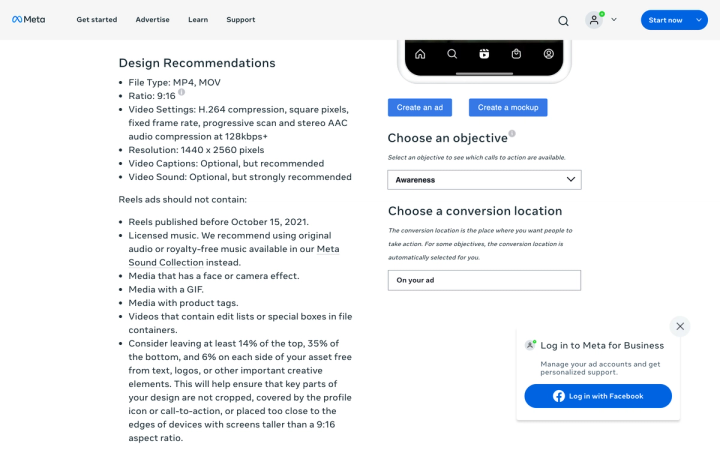
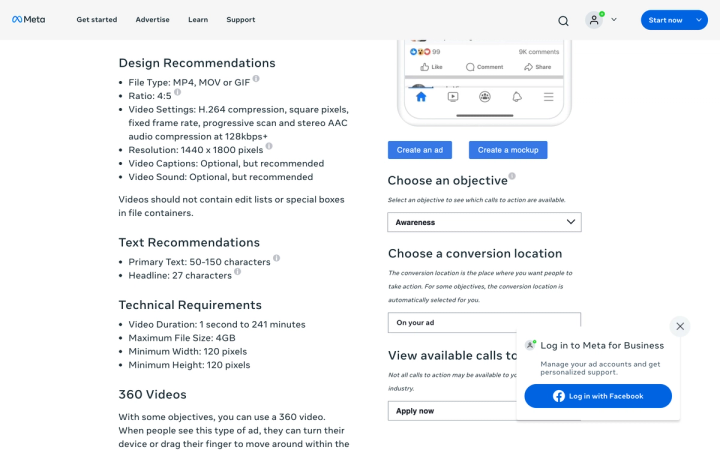
Yes, you can build a Meta video ad from a single product still, and for most consumer brands it is the fastest route to a testable ad. The constraint is not the image. It is the frame: Instagram Reels wants 9:16 at 1440 x 2560, Facebook Feed wants 4:5 at 1440 x 1800, and Meta asks you to keep 14% of the top and 35% of the bottom clear of anything important.
That bottom 35% is the number that catches people out. A packshot centred in a square photo ends up with its label sitting exactly where the caption and call-to-action button land.
What are the specs for Meta video ads in 2026?
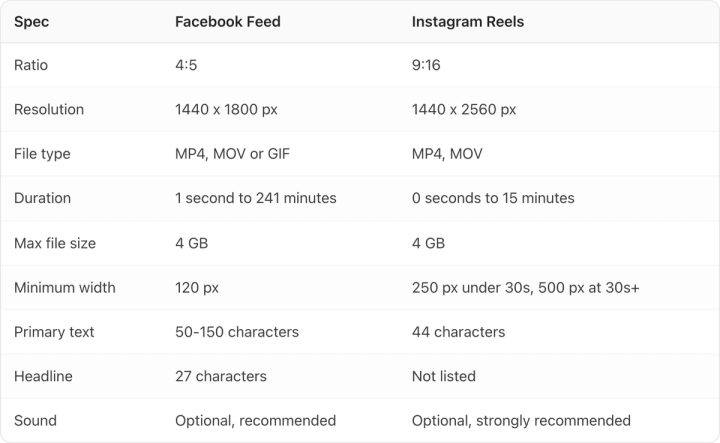
These come from Meta's own Ads Guide, checked on 1 August 2026. Feed and Reels are different enough that one export will not serve both well.
| Spec | Facebook Feed | Instagram Reels |
|---|---|---|
| Ratio | 4:5 | 9:16 |
| Resolution | 1440 x 1800 px | 1440 x 2560 px |
| File type | MP4, MOV or GIF | MP4, MOV |
| Duration | 1 second to 241 minutes | 0 seconds to 15 minutes |
| Max file size | 4 GB | 4 GB |
| Minimum width | 120 px | 250 px under 30s, 500 px at 30s+ |
| Primary text | 50-150 characters | 44 characters |
| Headline | 27 characters | Not listed |
| Sound | Optional, recommended | Optional, strongly recommended |
Both placements want H.264 compression, square pixels, a fixed frame rate, progressive scan and stereo AAC audio at 128 kbps or better. Variable frame rate is the most common reason a file that plays fine locally gets rejected on upload.
Note the text limits. Reels gives you 44 characters of primary text against Feed's 50-150. If you write one caption for both, it will be truncated in one of them.
What does the safe zone mean for a product shot?
Meta recommends leaving at least 14% of the top, 35% of the bottom and 6% of each side free from text, logos and other important creative elements. On a 1440 x 2560 Reel that is 358 px of clearance at the top and 896 px at the bottom.
Work it backwards and your usable area is roughly 1,270 x 1,306 px in the middle of the frame. That is close to square, sitting slightly above centre. Anything you actually need a shopper to read, the product name, the flavour, the claim, has to live inside it.
This is the biggest change when you move a photo into video. Product photography for a listing centres the product and fills the frame, because Amazon wants the product at around 85% of the image. A vertical ad wants the opposite: the product held high and small enough that the bottom third can be given away.
So do not crop a listing image to 9:16 and call it done. Regenerate or reframe with the safe zone in mind, or you will ship an ad whose label is behind a button.
What kind of motion actually works from a still?
A single photo gives a model one viewpoint, so the honest range of motion is narrower than the demos suggest. What holds up:
- Slow push in or pull out. Reliable, reads as intentional, and never asks the model to invent geometry it cannot see.
- Parallax on the background while the product stays locked. Sells depth without touching the packaging.
- Environmental motion. Steam, liquid, fabric, dust, light sweeping across a surface. The product is still; the world moves.
- A held product turn of 15-20 degrees. Fine on simple cylindrical packaging. Risky the moment there is a label wrapping the curve.
What does not hold up: full 360 turns from one still, anything that requires the back of the pack, hands picking the product up, and pouring shots where liquid has to behave physically. Models will attempt all of these and the failure is usually the label, which smears or re-renders as nonsense text halfway through the rotation.
The practical test is to scrub to the last frame. If the packaging still reads correctly there, the clip is usable. Most rejects are obvious by second three.
How long should a product video ad be?
Meta permits up to 15 minutes on Reels and 241 minutes on Feed, which tells you nothing useful. The operational answer for a product ad is shorter than both by two orders of magnitude.
The cost structure pushes you the same way. AI video is priced per second of output, so a 6-second concept costs twice a 3-second one and rarely earns it. Build 3-6 seconds, and if a concept needs longer, cut two clips and join them rather than generating one long take, since quality degrades over duration on every model I have used.
Add captions. Meta calls them optional for both placements and strongly recommends sound on Reels, but a product ad that only works with audio on is an ad that only works for a minority of impressions.
What does AI video generation actually cost?
All figures below were checked on each vendor's own pricing page on 1 August 2026, at the monthly-billed rate. Every one of these pricing pages opens on annual billing by default, so the numbers you see first on their sites are lower than these.
| Tool | Entry plan, billed monthly | Video allowance | Notes |
|---|---|---|---|
| Magnific (formerly Freepik) | $20/mo billed monthly, 20,000 credits | Kling 3.0 Turbo 1080p at 780 credits per 3s | Veo 3.1 4K with audio costs 2,080 credits per 4s |
| Kive | $20/mo billed monthly, 1,000 credits | ~40 video generations | ~200 on the $100/mo Pro plan, billed monthly |
| Claid | $15/mo billed monthly, 500 credits | 35 credits per 5s, so ~14 clips | ~57 on the $49/mo Pro plan, billed monthly |
| Photoroom | $12.99/mo billed monthly, Pro | None | Video Generator starts on Max at $34.99/mo billed monthly |
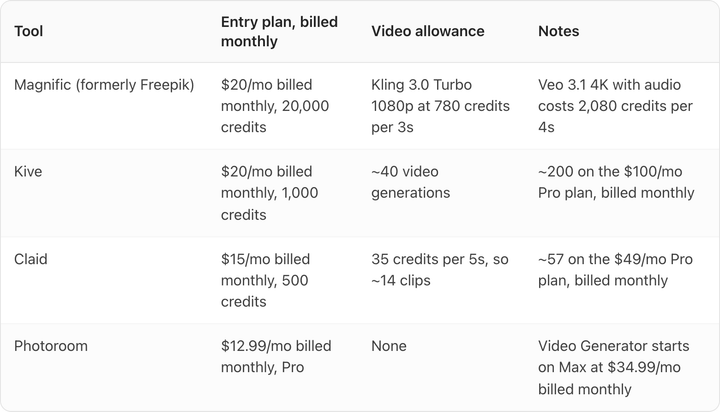
Check the Photoroom row if you are price-shopping. Its cheapest plan lists the Video Generator as not included, so the real entry point for video is $34.99 a month billed monthly, not $12.99. We have a fuller breakdown of what Magnific charges after the Freepik rebrand and of Kive's credit system.
Budget on the assumption that you will discard most generations. A 25% keep rate is normal, which means a $20 plan yielding 40 clips is really yielding about 10 usable ones.
What will get a Reels ad rejected?
Meta lists specific exclusions for Reels ads. They must not contain licensed music, media with a face or camera effect, media with a GIF, media with product tags, Reels published before 15 October 2021, or videos containing edit lists or special boxes in the file container.
The music rule catches teams out most often. Use original audio or Meta's own Sound Collection rather than a track lifted from a trending organic post.
Separately, if your video contains a photorealistic AI-generated person, disclosure rules now apply on several platforms and they differ from each other. We covered which platforms require AI disclosure and which do not in detail, including the parts of that guidance the wider web currently gets wrong.
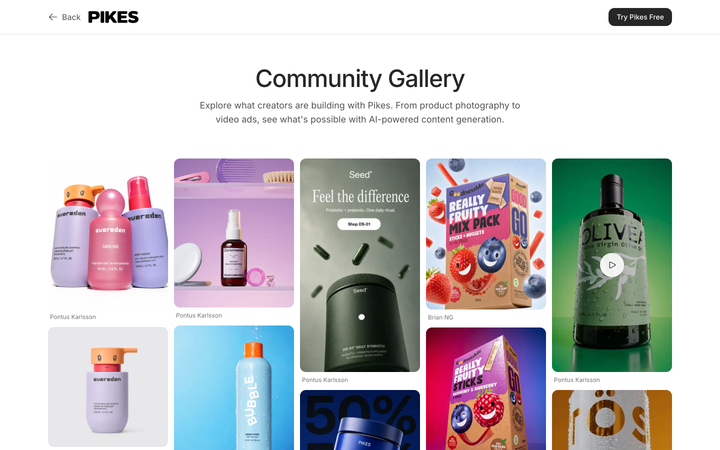
To explore this workflow with your own product references, see creating Meta ad variations with Pikes. Begin with a clear product photo and one motion brief, then review the label, logo and shape throughout each generated clip. Count the usable results and revisions rather than assuming every generation is ready to publish. For bottles and cans, our beverage video ad guide includes a shot list and illustrative storyboard to help plan the sequence.
Frequently asked questions
Can you make a video ad from one product photo? Yes. A single still supports push-ins, background parallax, environmental motion like steam or liquid, and a small product turn. It does not support full rotations or anything requiring an unseen side of the pack.
What size should a product video ad be? 1440 x 2560 at 9:16 for Instagram Reels, 1440 x 1800 at 4:5 for Facebook Feed. Both cap at 4 GB and want MP4 with H.264 and a fixed frame rate.
How long should a product video ad be? Three to six seconds for a testable ad unit. Meta's limits are far higher, but per-second generation pricing and quality degradation over duration both argue for short.
Do I need sound? Meta calls sound optional on both placements and strongly recommends it for Reels. Add captions regardless, since a large share of impressions play muted.
Why does the label go blurry halfway through my clip? The model is re-rendering the packaging each frame rather than tracking it. Shorter clips and less rotation both reduce it. Check the final frame of every generation before using it.
Can I use the same video for Feed and Reels? Technically yes, but the ratios differ, 4:5 against 9:16, and the primary text limits differ, 50-150 characters against 44. One export will be letterboxed or truncated in the other placement.
Turn your product photos into ad concepts
Create image and video variations from your product references in Pikes, then review the assets for your campaign.
AI ad creatives with PikesCompare plans and generation credits