

Mike Lehman
Krea AI Review 2026: Pricing, Units and Product Photography
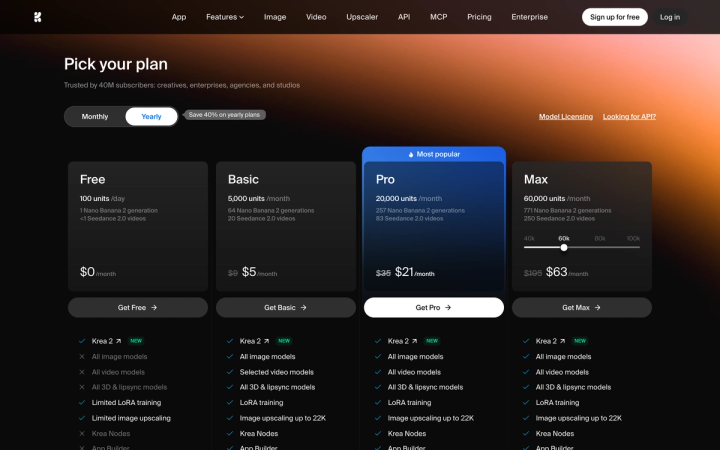
Krea AI costs $9/month for Basic, $35/month for Pro and $105/month for Max when you pay monthly, or $5, $21 and $63 per month on annual billing. It is a broad creative suite covering image, video, 3D, upscaling and LoRA training, and it does market itself for e-commerce. For a CPG brand shipping catalog and ad creative, that breadth is the trade-off.
Everything below was checked on krea.ai on 11 August 2026. A disclosure you should factor in: we build Pikes AI, which competes with Krea. That is exactly why every number here comes from Krea's own live pages rather than from a summary.
What is Krea AI, and is it built for product photography?
Krea is a multi-model creative platform. One subscription gives you Krea's own models (Krea 2, Krea 1) plus third-party models (the pricing page names Nano Banana 2, Seedance 2.0, Veo3, Sora and Kling), along with an upscaler, LoRA finetuning, a node-based workflow editor, and image-to-3D.
It is a generalist with a product-photography landing page. Krea's /ecommerce page is headlined "AI Product Photography for Ecommerce" and describes the job as "Enhance product photos, create video assets, and generate ad creatives without expensive photoshoots."

A generalist gives you range. You can go from a pack shot to a 3D asset to a video in one tool. None of it knows what your SKU is supposed to look like.
How much does Krea cost in 2026?
Four plans, verified on the pricing page today.
| Plan | Billed monthly | Billed annually (per month) | Units per month | Nano Banana 2 images | Commercial license |
|---|---|---|---|---|---|
| Free | $0 | $0 | 100 units/day | ~1 per day | No |
| Basic | $9 | $5 | 5,000 | 64 | Yes |
| Pro | $35 | $21 | 20,000 | 257 | Yes |
| Max | $105 | $63 | 60,000 | 771 | Yes |
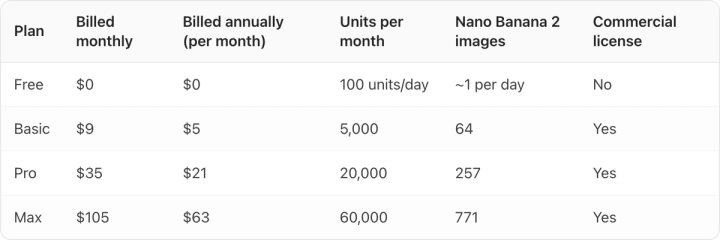
Pro is flagged "Most popular". Max carries a slider offering 40k, 60k, 80k and 100k units; the $105 figure is the 60k step, which is where the slider sits by default. The slider labels were not clickable in our testing, so we are not quoting the other three steps.
Why is the price you see not the price you pay?
Krea's pricing page loads with the Yearly side of the toggle already selected. The four prices on screen at first load, $0, $5, $21 and $63, are annual rates. Three of them sit next to a struck-through number ($9, $35 and $105) that is the real monthly price.
Click Monthly and the strike-throughs resolve into the actual month-to-month cost. So if you budget from the first screen you see, you will under-budget Pro by $14 a month, or $168 a year.
Krea is not unusual here. Of the vendors we measured in early August 2026, Recraft also preselects annual, Pixelcut preselects monthly, and Adobe Firefly offers no annual option at all. So read the toggle state before you read the price, on every vendor.
There is a second, smaller trap. The banner reads "Save 40% on yearly plans", and on Pro and Max it is exactly 40%. On Basic it is 44.4% ($9 to $5), better than advertised. Headline discount percentages are rounded marketing copy. Compute the discount per plan from the two prices.
What is a "unit", and what does one image actually cost?
Krea prices in units rather than images, then translates for you on each card. Basic's 5,000 units are labeled "64 Nano Banana 2 generations", Pro's 20,000 are "257" and Max's 60,000 are "771".
Divide those out and one Nano Banana 2 image costs about 78 units on every plan. The pricing page never prints that number, and it is the one that lets you compare Krea to anything else.
| Plan | Cost per image, billed monthly | Cost per image, billed annually | Actual annual saving |
|---|---|---|---|
| Basic | $0.141 | $0.078 | 44.4% |
| Pro | $0.136 | $0.082 | 40.0% |
| Max | $0.136 | $0.082 | 40.0% |
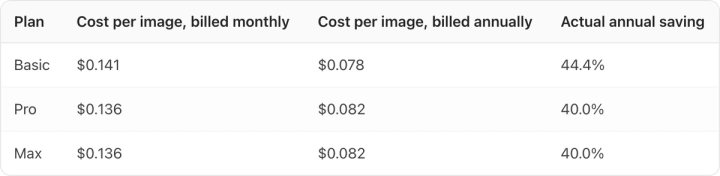
Two things fall out of that table.
First, the bigger plans barely improve the rate. Pro to Max is 3× the units for 3× the price, exactly flat. Basic to Pro is 4× the units for 3.9× the price, worth about 3%. Paying for a bigger plan buys you headroom and concurrency, not a better rate. That is unusual. At most vendors we have priced, the entry tier is noticeably worse per unit than the tiers above it.
Second, on annual billing Basic is the cheapest per image of the three, because its annual discount is deeper. If your volume genuinely fits inside 64 images a month, the entry plan is not the penalty tier here.
One caveat on all of it: 78 units is the cost of a Nano Banana 2 generation specifically. Krea runs many models at different rates, and a video model burns through units far faster. Pro's same 20,000 units are only 83 Seedance 2.0 videos. If you are comparing tools purely on image cost, our breakdown of AI product photography cost per image puts these numbers next to the rest of the market.
What can't you do on Krea's free plan?
The free plan gives you 100 units a day, which at 78 units per image is roughly one image per day. Krea's own card says so: "1 Nano Banana 2 generation".
Volume is the smaller problem. Free is the only plan with a cross next to Commercial license on Krea's own feature grid. Free also shows crosses against "All image models" and "All video models"; you get Krea's in-house models, not the third-party ones.
For a brand, that combination means the free tier is not a trial of the thing you would actually buy. Krea marks the commercial license as not included, so the output is not cleared for use in an ad, and you cannot test the models most people are signing up for. If free-tier evaluation is what you are doing, our roundup of genuinely free AI product photography tools is a better place to start than any single vendor's free plan.
Where does Krea fall short for a consumer brand?
Krea is good at what generalists are good at. Range is real. The model roster is current, the upscaler goes to 22K on paid plans, and the node editor is a workflow tool most competitors do not have. If your job is exploring visual directions, it is a strong pick.
The gap shows up at catalog scale. Krea has no product library, nowhere to register your actual SKUs as references, and no persistent brand context that carries color, style and voice between generations. Every session starts from prompt text. That is fine for one hero image and painful across forty.
And it is the failure mode our buyers care about most: label text drifting, a pantone shifting half a shade, a cap molding changing between shots. A general-purpose model has no reason to hold those constant because it does not know they are constraints.
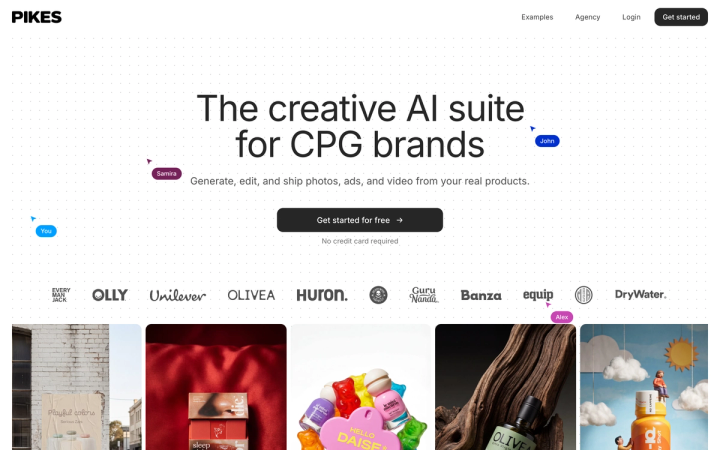
That specific problem is why we built Pikes AI to generate from a brand's real SKUs and to keep brand context between generations, rather than from a text prompt each time. Whatever you choose, run the same test before you commit. Generate the same SKU eight times, open all eight at 100% zoom, and read the label. If the text is soft or the color moved, the tool is not ready for your catalog.
Who should actually use Krea?
Buy Krea if you want one subscription covering image, video and 3D, you are model-curious and want new releases early, and your work is closer to campaign concepting than to catalog production. Pro at $35 per month billed monthly is a reasonable price for that spread.
Skip it if your main job is producing consistent, on-brand imagery for many SKUs. You will spend the saving on re-rolls. Purpose-built alternatives are worth a look first. We have written up Recraft and Pixelcut with the same pricing scrutiny, plus Pebblely if background generation is the whole of your need.
Frequently asked questions
Is Krea AI free?
There is a free plan at $0 with 100 units a day, which is about one Nano Banana 2 image daily. It excludes the commercial license and the third-party image and video models, so it is not usable for brand work.
How much is Krea Pro?
$35 per month billed monthly, or $21 per month billed annually, as of 11 August 2026. The pricing page shows the $21 figure by default because Yearly is preselected.
How many images do you get on Krea Pro?
20,000 units per month, which Krea equates to 257 Nano Banana 2 generations or 83 Seedance 2.0 videos. At roughly 78 units per image, that works out to about $0.14 per image on monthly billing.
Does Krea offer commercial rights?
Yes, on Basic, Pro and Max. Krea's pricing grid marks Commercial license as included on all three paid plans. The Free plan does not include it.
Is Krea good for e-commerce product photography?
It is capable, and Krea markets an e-commerce use case directly. It is strongest for lifestyle and campaign imagery and weakest for high-fidelity, high-volume catalog work, because it has no SKU library or persistent brand context to hold product details steady across many generations.
Does Krea have a bigger plan than Max?
Max includes a unit slider running from 40,000 to 100,000 units per month, and Krea lists an Enterprise option and a separate API in its top navigation. We verified the $105 price at the 60,000-unit step only.
Prices and plan features verified on krea.ai on 11 August 2026. Vendor pricing changes often, so check the live page before you buy.

Written by
Mike Lehman
Mike Lehman is a senior content strategist at Pikes. Before joining Pikes, Mike spent nearly a decade working with Glossier, Haus, and Athletic Brewing, leading campaigns that blended storytelling and data.