
Pontus Karlsson
Vmake AI Review 2026: Strong on Social Video, Thin on Catalog Stills
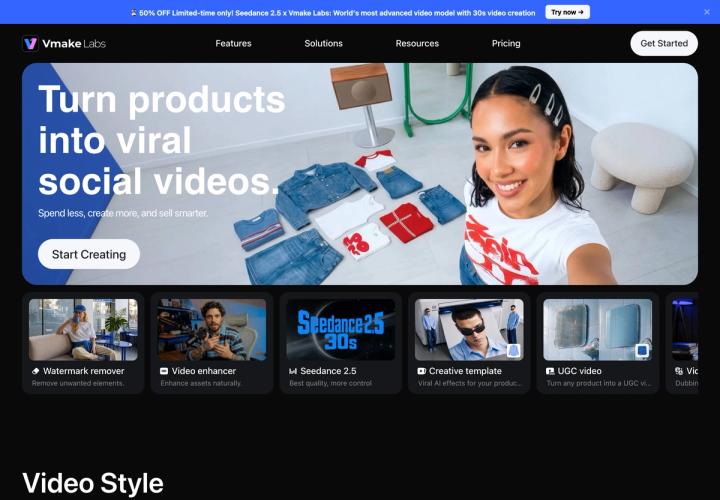
Vmake Labs is a video-first tool. Its own homepage headline is "Turn products into viral social videos", not photograph them. Paid plans start at $9.99 per month billed monthly, and monthly is the cycle the pricing page preselects, which is unusual in this category. If your problem is a catalog of product stills, this is the wrong shape of tool.
We make a competing product, so treat the recommendation accordingly. Everything below is checked against Vmake's live pricing page on 14 August 2026, and the numbers are the ones the page shows a logged-out visitor.
What is Vmake AI, and what is it actually for?
Vmake Labs sells short-form video creation built around a product image. The homepage groups its tools as watermark remover, video enhancer, creative templates, UGC video, video translator, recreate video, AI avatar video, product showcase and AI video generator. The named audiences are local business owners, e-commerce sellers, affiliate marketers and social media managers.
The creative templates are the clearest signal of intent. They are named things like "Fruit drama", "Product battle", "Unboxing", "Before & after", "360 spin" and "Fashion lookbook". These are social video formats, not photography setups. The pitch is one image in, one platform-native video out.
Still images are in there, but as a supporting act. The plans include image generation models and an image quality enhancer, and the credit allowance is quoted in images as well as videos. What Vmake does not offer is the catalog-side machinery: no persistent product library, no brand context that carries between generations, no marketplace-spec output presets.
How much does Vmake cost in 2026?
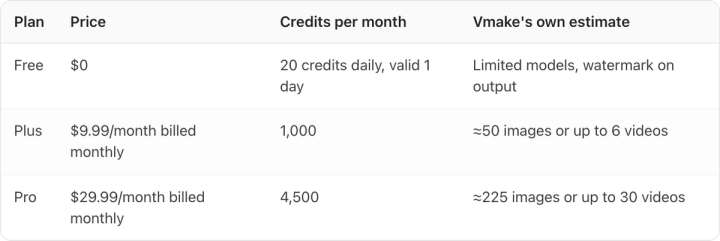
Three tiers. Verified 14 August 2026, with the pricing page's default billing cycle selected:
| Plan | Price | Credits per month | Vmake's own estimate |
|---|---|---|---|
| Free | $0 | 20 credits daily, valid 1 day | Limited models, watermark on output |
| Plus | $9.99/month billed monthly | 1,000 | ≈50 images or up to 6 videos |
| Pro | $29.99/month billed monthly | 4,500 | ≈225 images or up to 30 videos |
Both paid cards carry the line "Automatically renews at $9.99/month" and "$29.99/month" respectively, so the displayed figure is the figure that recurs. That is worth checking rather than assuming. Several tools in this category display an annual-billing price by default and only reveal the true monthly rate once you flip a toggle.
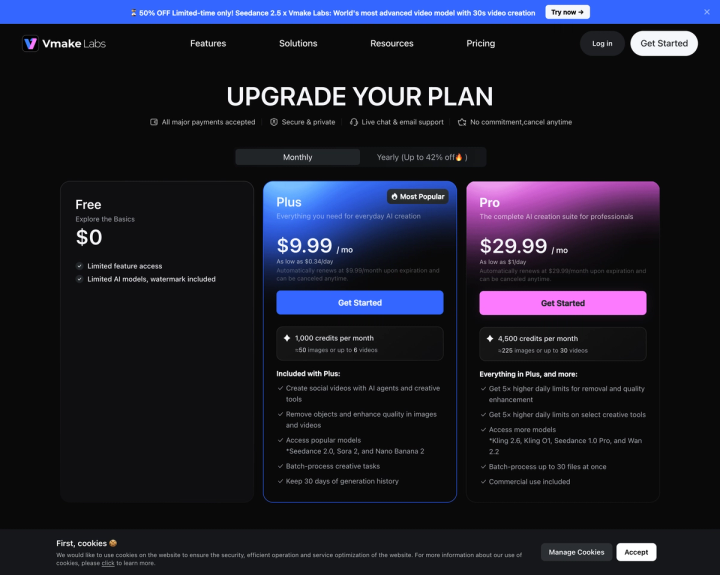
Vmake is one of the few we have measured that preselects monthly. Of the eight vendor pricing pages we have driven the billing toggle on this month, five open on annual billing, two open on monthly, and one offers no annual option at all. Opening on monthly means the number you first see is the number you actually pay, which is worth something on its own.
One caveat. During testing the same URL served two different versions of the plan cards within a few minutes, with different plan subtitles and a different feature list on Plus. The prices were identical in both. Read the feature list on the card you are actually buying rather than a version you saw earlier.
Is Vmake's yearly plan really 42% cheaper?
The toggle is labelled "Yearly (Up to 42% off)". Switching it shows Plus at $69.99 per year and Pro at $209.99 per year, both with a matching "renews at ... /year" line.
Work it out per plan rather than trusting the banner:
- Plus: $9.99/month billed monthly × 12 = $119.88. Billed yearly it is $69.99, a saving of $49.89, or 41.6%, an effective $5.83 a month.
- Pro: $29.99/month billed monthly × 12 = $359.88. Billed yearly it is $209.99, a saving of $149.89, or 41.7%, an effective $17.50 a month.
So "up to 42%" is honest, and it holds on both plans rather than only the top one. Advertised discounts in this category are usually rounded marketing copy that misses by several points on at least one tier. Vmake's is accurate to within half a percentage point.
What does one image or video actually cost?
Vmake publishes credits, not unit prices, so you have to divide. Its own estimates give 1,000 credits ≈ 50 images and 4,500 ≈ 225 images: 20 credits per image on both tiers.
| Plan and cycle | Effective monthly | Images included | Cost per image |
|---|---|---|---|
| Plus, billed monthly | $9.99 | ≈50 | $0.20 |
| Pro, billed monthly | $29.99 | ≈225 | $0.13 |
| Plus, billed yearly | $5.83 | ≈50 | $0.12 |
| Pro, billed yearly | $17.50 | ≈225 | $0.08 |
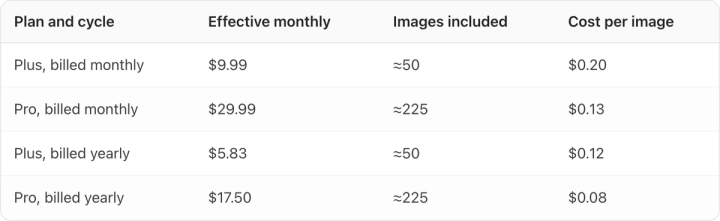
The entry tier is the worst unit price. Plus costs 50% more per image than Pro on the same billing cycle. That pattern holds across most credit-based tools we have measured, and it is the single most common way a small brand overpays: buying the cheap plan, running out, and topping up at the worst rate on the board.
Video is where the credits actually go. Plus gives 1,000 credits for "up to 6 videos", about 167 credits each, roughly eight images' worth of budget per clip. If you plan to use Vmake for what it is best at, model your spend on videos and treat the image count as a rounding error. For a broader picture of what a finished AI image costs across tools, we have the numbers in AI product photography cost per image.
What do you give up on the free plan?
The free tier grants 20 credits daily, valid for one day, and they do not roll over. Vmake describes it as "Limited feature access" and "Limited AI models, watermark included", with exports capped at 720p.
A watermark makes free output unusable for paid social, which is the honest read: the free tier is a demo, not a working allowance. That is a fair design, and Vmake is clearer about it than most. If a genuinely usable free allowance is what you need, the comparison is in the best free AI product photography tools.
Commercial use is listed as a Pro feature on the plan card. Given the two page variants we saw, confirm commercial rights on the plan you are buying before you put output into a paid campaign. This is the kind of term that decides whether an asset can run at all.
How does Vmake compare with the alternatives?
| Tool | Best at | Output it is built for | Catalog features |
|---|---|---|---|
| Vmake Labs | One image to short social video | Vertical social video | None: no product library or brand context |
| Runway | Model choice and generation control | Video, many models | None |
| Mokker | Still product scenes | Product stills | Limited |
| Soona | Real photography with real crews | Real photographs | Managed service |
| Pikes AI | Product fidelity across many SKUs | Stills, ads and video | Product library and persistent brand context |
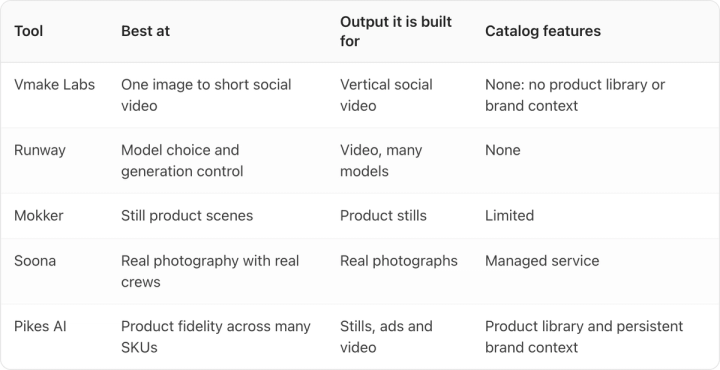
Be fair about where each wins. If you want breadth of video models and fine control over generation, Runway publishes a per-model credit cost and gives you more levers. If you want real photographs of a real product, no AI tool replaces a studio. And if what you need is a stack of platform-legal stills for 200 SKUs, none of the video-led tools, Vmake included, is built for that job.
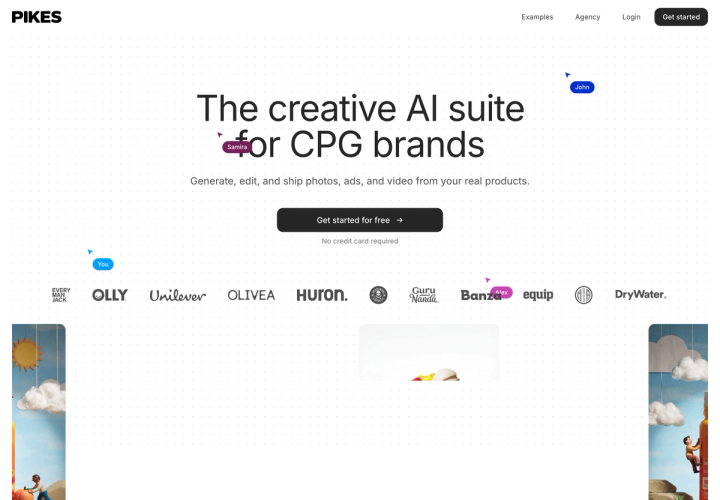
That catalog problem is why we built Pikes AI around a brand's own SKUs and a brand context that persists between generations: the failure mode we kept hitting with general-purpose models was label text drifting between outputs, which is invisible at thumbnail size and obvious at 100% zoom. Whatever tool you pick, run that test. Generate the same SKU three times, zoom to 100%, and read the label in each. If the text changes, the tool is not ready for your catalog, and that is true of ours as much as anyone's. If you want the video route specifically, we covered how the image-to-video step works in turning product photos into video ads.
Who should use Vmake, and who shouldn't?
Use it if you sell a handful of SKUs, you post to TikTok, Reels or Shorts continuously, and your bottleneck is video volume rather than photographic accuracy. At $9.99/month billed monthly with no annual lock-in, the cost of finding out is small.
Skip it if your job is a catalog. There is no product library, no persistent brand context, and no marketplace-spec presets, so every asset is a one-off. At 50 images a month on Plus, a 200-SKU catalog would take four months of allowance to photograph once. The batch limit on Pro is 30 files at a time, which helps but does not change the shape of the problem. Our guide to product photography for large catalogs covers what that workflow actually needs.
The verdict: a good, honestly priced social video tool with a clear point of view, and a poor fit for product photography at catalog scale. Judge it as a social video tool and it holds up well.
Frequently asked questions
Is Vmake AI free?
There is a free tier: 20 credits daily, valid for one day, with limited models, 720p exports and a watermark on output. It is enough to evaluate the tool and not enough to ship from.
How much is Vmake per month?
Plus is $9.99 per month and Pro is $29.99 per month, both billed monthly, verified 14 August 2026. Billed yearly, Plus is $69.99 per year ($5.83/month) and Pro is $209.99 per year ($17.50/month).
How many images do you get with Vmake?
Plus includes 1,000 credits a month, which Vmake estimates at about 50 images or up to 6 videos. Pro includes 4,500 credits, about 225 images or up to 30 videos. Both work out to roughly 20 credits per image.
Does Vmake include commercial use rights?
Commercial use is listed on the Pro plan card. Because the pricing page served more than one version of its feature list during our checks on 14 August 2026, confirm the terms on the plan you are buying before running output in paid media.
Is Vmake good for Amazon product photos?
Not really. Amazon's main-image rules require a pure white background with the product at 85% of the frame, and Vmake has no marketplace-spec output presets. You would be checking and cropping every file by hand.
What models does Vmake run?
The Plus card lists Seedance 2.0, Sora 2 and Nano Banana 2. Pro adds Kling 2.6, Kling O1, Seedance 1.0 Pro and Wan 2.2, and raises exports from 1080p to 1080p plus 2K.