

Mike Lehman
Amazon A+ Content Image Requirements: Sizes, Specs and Rejections
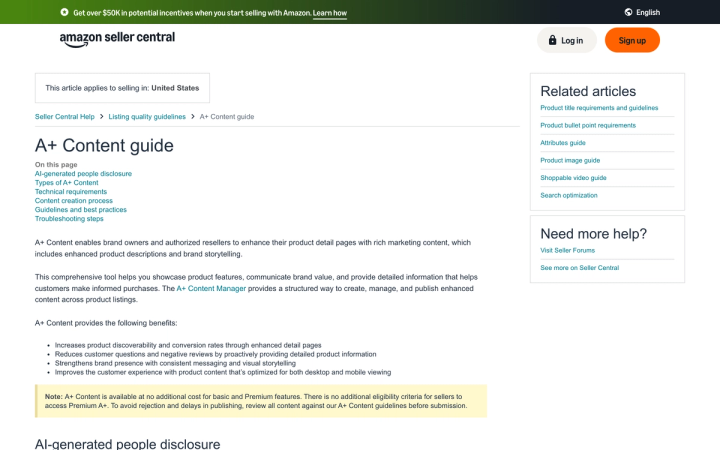
Basic A+ Content images max out at 970 x 300 pixels. Premium A+ goes to 1464 x 600. Every file must be under 2 MB, in RGB, saved as .jpg, .bmp or .png, at a minimum of 72 dpi. Animated GIFs, watermarks, QR codes and hyperlinks are all rejected. Verified on Amazon's A+ Content guide on 12 August 2026.
Those two pixel figures are the ones most brands get wrong, because they are nothing like the square masters sitting in your gallery. Here is what the rest of the spec sheet says, and what it costs you in production.
What are Amazon's A+ Content image size limits?
Amazon publishes three A+ Content types, and the image ceiling changes with each.
| A+ Content type | Max image size | Modules on the detail page | Modules to choose from | Video and hotspot | Navigation carousel |
|---|---|---|---|---|---|
| Basic A+ | 970 x 300 | 5 | 14 | No | No |
| Premium A+ | 1464 x 600 | 7 | 19 | Yes | Yes |
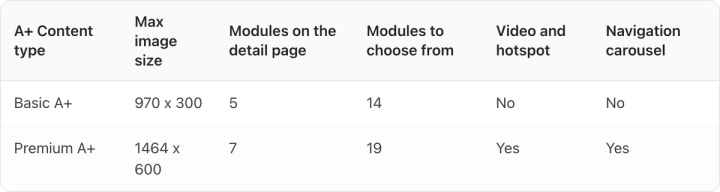
There is a third type. A+ brand story is a single module of up to 19 pre-formatted cards that renders in the "From the brand" section, and it runs alongside either Basic or Premium.
Both A+ tiers are free. Amazon's note on the page reads: "A+ Content is available at no additional cost for basic and Premium features. There is no additional eligibility criteria for sellers to access Premium A+."
That matters more than it sounds. Premium A+ used to be the thing you got after negotiating with your account team. If your A+ art was built for Basic, you can move to the larger canvas today at no extra charge, provided you re-export the images.
Why you have to re-export, not just re-upload
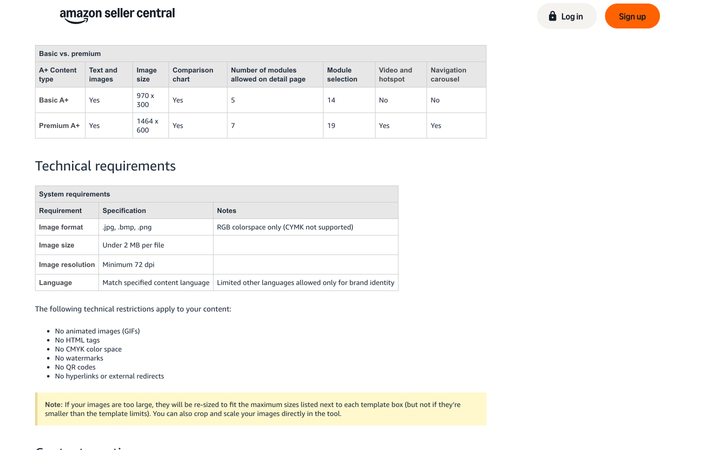
Amazon resizes images down but never up. The note beneath the technical requirements says: "If your images are too large, they will be re-sized to fit the maximum sizes listed next to each template box (but not if they're smaller than the template limits)."
Drop a 970-wide Basic asset into a Premium module built for 1464 and it stays 970 wide inside a bigger box. Nothing errors, nothing gets rejected, and the module renders soft on a retina screen. The free upgrade to Premium costs you an export pass across the catalog, and that is the whole cost of it.
Two more consequences of the resize rule. Uploading oversized art is safe, so exporting at the ceiling rather than under it is the right default. And because the ceiling is expressed in pixels, the "minimum 72 dpi" line in the spec table decides nothing. A 1464 x 600 file is 1464 x 600 whether its header says 72 or 300.
What file formats and sizes does A+ Content accept?
| Requirement | Specification |
|---|---|
| Image format | .jpg, .bmp, .png |
| Color space | RGB only, CMYK not supported |
| File size | Under 2 MB per file |
| Resolution | Minimum 72 dpi |
| Language | Must match the specified content language |
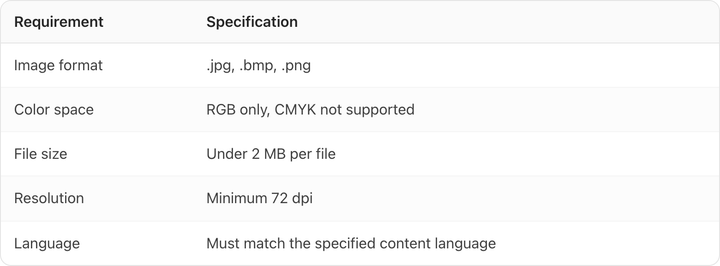
At 1464 x 600, the largest A+ canvas is 0.88 megapixels. A JPEG that size will rarely approach 2 MB. A PNG carrying photographic content can, especially if your design team exports 24-bit PNG by habit for the transparency they are not using. Check the exported size per module rather than assuming the cap is unreachable.
The CMYK rule catches print-led teams. If your packaging art comes back from a print supplier, it is likely CMYK, and it needs converting before it goes anywhere near A+ Content Manager.
Amazon also lists six flat technical restrictions: no animated images (GIFs), no HTML tags, no CMYK color space, no watermarks, no QR codes, and no hyperlinks or external redirects.
Can you reuse your gallery photos in A+ Content?
No, and Amazon blocks it twice over.
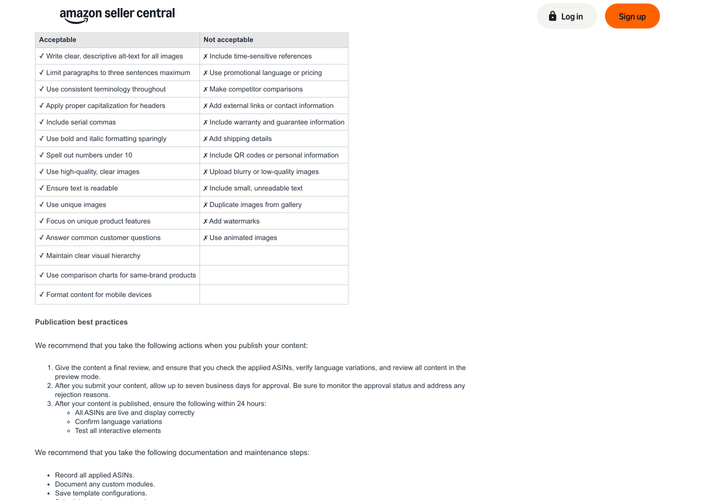
The guidelines table lists "Use unique images" as acceptable and "Duplicate images from gallery" as not acceptable. Separately, the best-practice list opens with "Include unique content that doesn't duplicate the image gallery."
The geometry says the same thing from the other direction. Your gallery masters are cropped roughly square, with the product filling 85% of the frame per Amazon's main image guidance. A+ modules are wide banners at 3.2:1 and 2.4:1. Center a square pack shot in a 970 x 300 box and you get a small product with two large empty margins.
So A+ is a second shot list, not a second crop of the first one. For a brand with 40 SKUs and five Basic modules per listing, that is 200 pieces of art that cannot come from the gallery shoot. Budget it as its own production job.
What gets A+ Content rejected?
The banned list is mostly about copy, which matters because on A+ the copy is usually inside the artwork. Amazon's not-acceptable column covers time-sensitive references, promotional language or pricing, competitor comparisons, external links or contact information, warranty and guarantee information, shipping details, QR codes or personal information, blurry or low-quality images, small unreadable text, duplicate gallery images, watermarks, and animated images.
Read that list against a typical CPG banner. "Save 20%", "Free shipping", "New for 2026", "vs. the leading brand", "100% money-back guarantee" are all standard e-commerce banner copy and all of them are disallowed. Baked into a JPEG, any one of them takes the whole module down.
The cost of getting it wrong is time. Amazon allows up to seven business days for approval and publishes within 24 hours after that. A rejection, a re-export and a resubmission is most of a fortnight, and you can only hold 20 pending submissions at once.
On the acceptable side, the guidance is unusually prescriptive for a spec page: alt text on every image, paragraphs of three sentences maximum, consistent terminology, serial commas, sparing bold and italic, numbers under 10 spelled out, comparison charts restricted to same-brand products, and a layout that works on mobile.
How do you disclose AI-generated people in A+ Content?
Amazon handles this differently for video and for images, and the image path is the easier of the two.
For video containing photorealistic AI-generated people, you add the keyword contains-synthetic-performer to the dc:subject (XMP) field using an IPTC-compatible metadata editor before upload. For images, Amazon gives you a checkbox: tick "AI-generated people" when you upload to Creative Assets in A+ Content Manager and Amazon applies the metadata for you.
The tag applies narrowly. Amazon tells you not to provide it if your media features real people even when altered with AI tools, features characters from movies or games, contains no people at all, or the people in it are not photorealistic. An AI-generated pack shot with nobody in it needs no tag.
That is a much smaller obligation than the AI rules on other retail surfaces. If you also list on Walmart, Google Shopping or Instacart, each of them handles AI imagery through a different mechanism, and one of them bans a whole category of generated image outright.
What this means for a CPG catalog
Work backwards from the module count. Five Basic modules is up to five images per ASIN, seven on Premium, and the brand story module carries up to 19 cards on top. Multiply by your live ASIN count and A+ is usually a bigger asset job than the gallery it sits beneath. Amazon's product image guide separately recommends "at least six additional images and one video" on top of the compliant main image, which puts the gallery at eight assets before A+ starts.
Three rules keep that job manageable:
- Design at the ceiling. Export at 1464 x 600 even if you are publishing Basic today. Oversized files get resized down cleanly; undersized files stay small forever.
- Keep every claim out of the artwork. Put pricing, shipping, guarantees and comparisons in text fields or nowhere. Text baked into a banner cannot be edited after a rejection without a full re-export.
- Build one master per module type, not per SKU. Backgrounds, ingredient callouts and how-it-works diagrams are reusable across a range. Only the pack shot changes, which is the same templating logic that makes large catalogs tractable anywhere else.
That last point is where we spend most of our own effort. Generating the pack shot in a wide banner crop, at the right scale, with the label still readable across a whole range, is the part that does not scale with a photographer's day rate, and it is why we built Pikes AI to work from a brand's real SKUs rather than a text description of them. Whatever you use to produce the art, apply Amazon's own test before you submit: open the module at 100% and check that the smallest text on the pack is still legible, because "small, unreadable text" is on the rejection list by name.
Frequently asked questions
What size should Amazon A+ Content images be? 970 x 300 pixels for Basic A+ and 1464 x 600 for Premium A+, both under 2 MB, in RGB, as .jpg, .bmp or .png. Individual modules have their own maximums, which A+ Content Manager displays next to each template box.
Is Premium A+ Content free? Yes. Amazon states that A+ Content is available at no additional cost for both basic and Premium features, and that there is no additional eligibility criteria to access Premium A+. Verified 12 August 2026.
Can you use the same photos in A+ Content and the main image gallery? No. Amazon lists duplicating gallery images as not acceptable and asks for unique content in A+. The aspect ratios differ enough that reusing them would look wrong anyway.
How long does A+ Content take to be approved? Allow up to seven business days for approval, then up to 24 hours for the content to appear. You can have a maximum of 20 pending submissions at any time.
Do you have to disclose AI-generated images in A+ Content? Only when the media contains photorealistic AI-generated people. For images you tick "AI-generated people" during upload and Amazon adds the metadata; for video you add contains-synthetic-performer to the dc:subject XMP field yourself. Generated images with no people in them need no disclosure.
How many A+ modules can one product have? Five on Basic A+ and seven on Premium A+, chosen from 14 and 19 module types respectively, plus one brand story module of up to 19 cards. A+ Content is not supported for products sold through Seller Central in the Books, Music, Video or DVD categories.
Create your next product image set
Use your product photos and brand context to create studio-style and lifestyle variations in Pikes.
AI product photography with PikesCompare plans and generation credits

Written by
Mike Lehman
Mike Lehman is a senior content strategist at Pikes. Before joining Pikes, Mike spent nearly a decade working with Glossier, Haus, and Athletic Brewing, leading campaigns that blended storytelling and data.