
Pontus Karlsson
Drop Shadows in Product Photos: How to Make Cut-Outs Look Real

A believable product shadow needs three things: it must start where the product touches the surface, it must match the direction and softness of the light already in the frame, and it must be grey or a darker version of the surface colour rather than pure black. Get the contact point wrong and the product looks pasted on, which is the single most common tell in a cut-out product photo.
None of the major marketplaces publishes a shadow rule. We grepped Amazon's Product image guide, Google's image link specification and Shopify's product media documentation on 17 August 2026, and the word "shadow" appears zero times in all three. What they do publish is a background requirement, and that is what your shadow has to survive.
Why do cut-out product photos look fake?
Because the shadow is missing, or it is the wrong shadow.
Photographers separate two things that most editing tutorials collapse into one:
- Contact shadow (also called occlusion shadow). The small, dark, tight band right where the object meets the surface. It is the darkest part of any shadow and it has almost no blur. It sells the illusion, and its absence is why a cut-out looks like a sticker.
- Cast shadow. The larger, softer shape thrown away from the object by the light source. It gets lighter and blurrier the further it travels from the contact point.
A cut-out with a cast shadow and no contact shadow looks like the product is hovering. A cut-out with a contact shadow and no cast shadow looks flat but plausible. If you only have time to do one, do the contact shadow.
The third case is a reflection, which is a mirrored copy of the product fading downward, not a shadow at all. It reads as glossy acrylic or glass surface. It suits fragrance and spirits and looks wrong on a cardboard carton. We go deeper on that in photographing glass and reflective packaging.
What do Amazon, Google and Shopify actually require?
Nothing about shadows specifically. Here is what they do require, checked today.
| Platform | Background requirement | Mentions shadows? | Source |
|---|---|---|---|
| Amazon (main image) | Pure white, RGB 255, 255, 255; product at 85% of frame | No | Product image guide (G1881) |
| Google Shopping | Solid white or transparent; staged and lifestyle images also acceptable | No | Image link [image_link] spec |
| Shopify | No background requirement published | No | Product media types |
![Table. Columns: Platform, Background requirement, Mentions shadows?, Source. Platform: Amazon (main image); Background requirement: Pure white, RGB 255, 255, 255; product at 85% of frame; Mentions shadows?: No; Source: Product image guide (G1881). Platform: Google Shopping; Background requirement: Solid white or transparent; staged and lifestyle images also acceptable; Mentions shadows?: No; Source: Image link [image_link] spec. Platform: Shopify; Background requirement: No background requirement published; Mentions shadows?: No; Source: Product media types](https://cdn.sanity.io/images/r2emo59v/production/fc80d59000688d718e33bab3dfbe965c888735c4-1560x564.png?auto=format&fit=max&w=720)
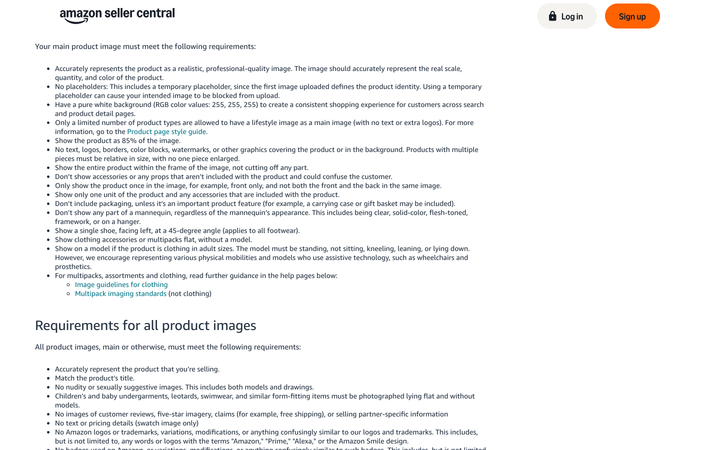
The clause people worry about is Amazon's "No text, logos, borders, color blocks, watermarks, or other graphics covering the product or in the background." A soft grey shadow is not a graphic, a border or a colour block in any ordinary reading, and shadows are routine on compliant Amazon main images. But Amazon does require the background to be pure white, and that is a real constraint on how far your shadow can travel.
The practical rule that follows: keep the shadow tight and light enough that the corners of the frame stay at 255, 255, 255. A shadow that gradients across the whole canvas turns your background off-white and gives a rejection reviewer something to point at.
Google is looser. It accepts "solid white or transparent" and explicitly allows staged or lifestyle images, so a full cast shadow on a surface is fine there. It also carries a warning that catches people exporting cut-outs:
Don't use a transparent background for images with light colors because they might show with a black background.
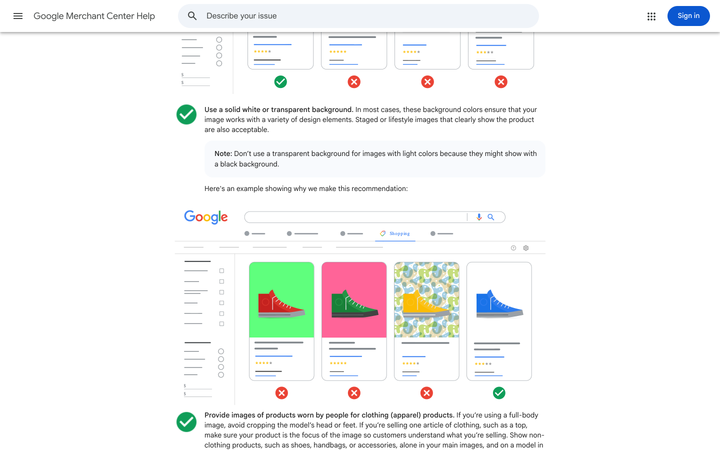
If you are shipping a transparent PNG of a white jar with a soft shadow, that shadow is the only thing separating your product from whatever background Google renders behind it. Flatten to white instead. The full cross-platform image spec comparison has the file-size and dimension limits that go with this.
How do you build a shadow that reads as real?
Five settings, in the order they matter.
1. Anchor the contact point. Find every place the product touches the surface and darken exactly that line. On a cylindrical bottle it is a narrow ellipse, not a full oval. On a carton it is the front bottom edge plus a sliver of each side. Blur it 2 to 6 pixels on a 2000px image, no more.
2. Match the direction to the light. Look at the product's own highlight. If the specular highlight sits on the upper left, the light is upper left and the shadow falls lower right. Getting this backwards is the second most common tell, and it is instantly visible even to people who cannot say why the image looks wrong.
3. Match the softness to the source. A hard-edged shadow implies a small, direct light: sun, bare bulb, on-camera flash. A soft, wide, low-contrast shadow implies a large diffused source, which is what a softbox in a studio produces and what most CPG product photography uses. A hard shadow under a product that is otherwise lit like a softbox shot is a contradiction the eye catches.
4. Never use pure black. Real shadows are the surface colour with less light on it, and they pick up bounced colour from the surroundings. On white seamless, a shadow around 8 to 20% opacity in a neutral grey reads correctly. On a coloured surface, sample the surface and darken it rather than reaching for black. Pure black at high opacity is what makes an image look like clip art. This is the same discipline as getting the product's own colour right, which we cover in product photo colour accuracy.
5. Let it fall off. Shadow density should decrease and blur should increase with distance from the contact point. A cast shadow that is uniformly dark along its whole length has no light source that could have made it.
A quick self-check before you export: cover the product with your hand and look at the shadow alone. Can you tell where the light is and what shape sat there? If not, the shadow is decoration rather than information.
When should a product photo have no shadow at all?
For most catalogue main images.
Shadowless white-background images are the standard for the main image slot in most catalogues, because the shadow varies between shots and a grid of products with inconsistent shadow directions looks unprofessional at thumbnail size. If you are producing a hundred SKUs, a consistent no-shadow treatment beats a hundred inconsistent shadows.
Drop the shadow when:
- The image is a swatch, a size chart, or any flat diagram.
- The product will be composited onto multiple backgrounds later. A baked-in shadow will fight the new surface.
- Your catalogue already uses shadowless mains and this is one more SKU. Consistency wins.
Keep the shadow when the image has to communicate physical presence: hero shots, lifestyle scenes, ad creative, anything where the product is sitting on a real surface. Our guide to how many product photos you need per SKU covers which slots those are.
Can AI generate a usable product shadow?
Reasonably well now, with one thing to check every time.
Generative tools handle contact and cast shadows better than they handle labels, because a shadow is a soft, low-detail shape and models are good at those. What breaks is the shadow's agreement with everything else in the frame. Ask for a scene and you can get a product lit from the left with a shadow falling left, or a shadow whose softness implies a window while the product's highlight implies a strip light.

The check that catches it takes five seconds: zoom to 100%, find the specular highlight on the product, and confirm the shadow runs the opposite way. Then look at the contact point and confirm the shadow actually touches the product rather than starting a few pixels away. Both errors are obvious once you know to look and invisible if you do not.
That second failure, the shadow that does not quite touch, is why we built Pikes AI to generate from a brand's real product files rather than from a text description of them. When the model is working from the actual SKU, the contact point has something true to attach to. Any tool you use should pass the same two checks before the image ships.
Frequently asked questions
Does Amazon allow shadows on the main product image?
Amazon's Product image guide does not mention shadows at all. It requires a pure white background at RGB 255, 255, 255 and prohibits "text, logos, borders, color blocks, watermarks, or other graphics." Shadows are common on compliant listings. Keep them tight enough that the background reads as pure white at the frame edges.
What opacity should a product drop shadow be?
On a white background, roughly 8 to 20% for the cast shadow and darker for the contact shadow directly beneath the product. Use neutral grey rather than black. On a coloured surface, sample the surface colour and darken it instead of overlaying black.
What is the difference between a drop shadow and a contact shadow?
The contact shadow is the tight dark band where the product meets the surface, with almost no blur. The drop or cast shadow is the larger soft shape thrown away from the product by the light. Photos that look pasted on usually have the cast shadow and are missing the contact shadow.
Should I export product cut-outs as transparent PNGs?
Only if you control every background they will appear on. Google's image specification warns not to use a transparent background for light-coloured images "because they might show with a black background." For marketplace listings, flatten onto white.
Which direction should the shadow fall?
Away from the light source, which you can identify from the product's own specular highlight. Highlight upper left means shadow lower right. Pick one direction and use it across the whole catalogue so the grid looks consistent.
Do shadows hurt background removal?
They complicate it. Most background-removal tools cut on the product edge and discard the shadow, so you get a clean cut-out with no shadow at all and have to rebuild one. If you plan to remove the background later, shoot on a surface where the shadow is easy to isolate, or plan to add the shadow after the cut. We compared the tools in the best remove.bg alternatives.
Platform requirements in this article were read from Amazon Seller Central, Google Merchant Center Help and Shopify's documentation on 17 August 2026.
Create your next product image set
Use your product photos and brand context to create studio-style and lifestyle variations in Pikes.
AI product photography with PikesCompare plans and generation credits